www.it-connect.fr

WhatsApp Video Call Bug Lets Attackers Browse Photos on Locked Android Phones
WhatsApp is an easy gateway to the full photo gallery of an Android smartphone, even when it is locked and fully up to date with the latest patches installed. A single incoming WhatsApp video call is enough to bypass the entire security stack. Here is what we know.
Security researcher Jose Rodriguez, who uncovered the issue, posted a video on X: "Be aware that your photos can be viewed without unlocking your phone when you receive a WhatsApp video call on Android. It is in plain sight. It is not hidden, it is not a secret feature. It is not a hack.", he wrote.
The issue has been reported to Meta and Google. However, at the time of writing, no fix is available. That said, to exploit this technique, you need to:
- Have the phone in hand,
- A WhatsApp video call must arrive on the phone at that moment (so you need a second phone).
This WhatsApp-related vulnerability is not something a cybercriminal on the other side of the world can exploit remotely. Still, it is unsettling, especially if the device is lost or stolen, because lock-screen security becomes ineffective.
A Simple Walk Through WhatsApp Menus
So, how does this attack work and provide full access to the photo gallery? In practice, all you have to do is navigate WhatsApp's menus on Android while a video call is in progress.
- Answer the call. On a locked device, you can answer a WhatsApp video call with a simple swipe, without authentication. This is expected behavior, just like for a regular call.
- Open effects. Once the call is underway, the effects icon opens a panel with three tabs: effects, filters, and backgrounds. Here, the backgrounds tab is the one that matters.
- Go through Meta AI. The "Create with Meta AI" button offers to generate a new image or edit an existing photo.
- Edit a photo. This is where everything happens: the editing option opens the system media picker, and therefore the entire Android gallery. Even if the device was locked at the start, it does not matter.
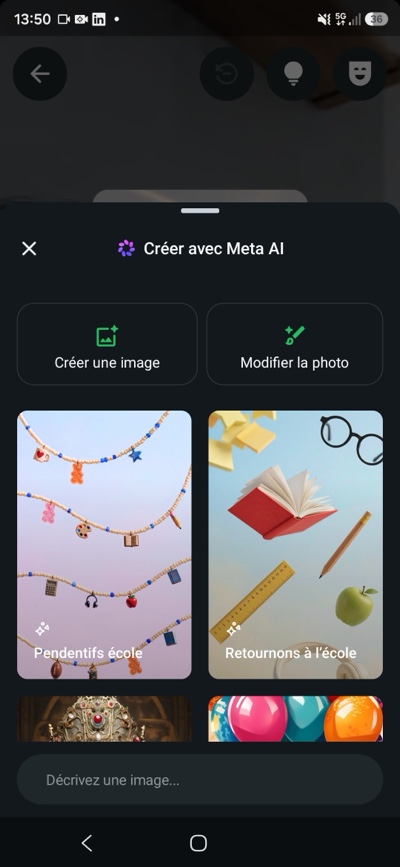
It remains to be seen whether all devices are affected in the same way. Depending on manufacturers' custom Android skins and any additional security features they may include, different behavior may occur. Personally, I tested this on my Samsung Galaxy S24 running Android 16, and I can confirm that the technique works...! It has also been confirmed on Android 17.
On the iPhone side, nothing to report. With the CallKit framework, an incoming WhatsApp call on a locked iOS device goes through Apple's native calling interface, not WhatsApp's call screen. The effects panel is simply never accessible before unlocking. All because of an AI feature that is completely useless!