www.it-connect.fr

Proton Pass Adds Folders, Auto-Fill Controls, and Compromised Password Alerts
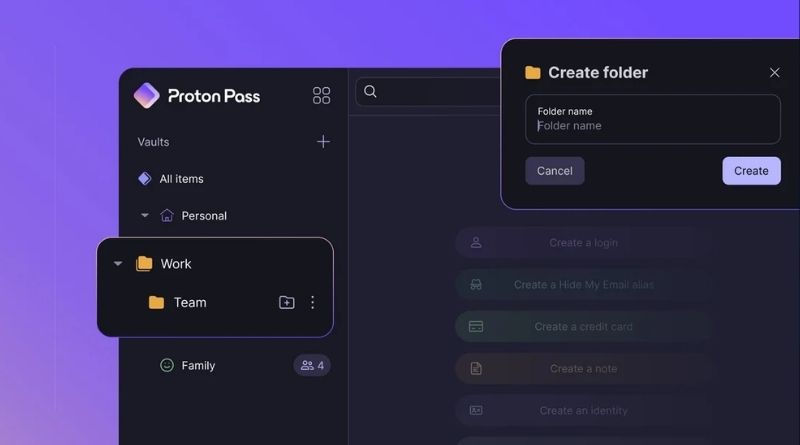
If you store hundreds of credentials in Proton Pass, this new feature should make your life easier: folders. On top of this user-requested feature, Proton Pass now includes finer auto-fill controls and a compromised password detection mechanism. Here’s what you need to know.
In a blog post, Proton announced three new features for its password manager: folders, auto-fill URL matching, and compromised password alerts. Until now, to organize content in Proton Pass, users mostly had to rely on vaults, and an account can have more than one. That works well to separate personal and work items, but much less so when you want to sort access by type, project, and so on.
Folders, but not on every subscription
With folders, there is now a bit more flexibility:
- Folders and subfolders: items in a vault can be arranged in a user-defined tree structure, with as many nesting levels as needed.
- Drag and drop: an item can be moved from one folder to another, and even from one vault to another.
- Targeted search: it is possible to filter and search within a folder and its subfolders.
There is one limitation to keep in mind. "For now, folders follow their vault’s sharing settings," Proton notes. In other words, you cannot share a single folder with a colleague: it is the entire vault or nothing.
It is also worth noting that folder creation is reserved for paying users: Proton Pass Plus, Pass Family, Proton Unlimited, and business plans. On the free version or Pass Essentials, you can only use folders within a vault shared by a paying subscriber.
Auto-fill: you decide where and when
Auto-fill is now configurable for each credential, with several matching modes: parent domain and subdomains, exact host matching, or blocking on a given URL. Advanced modes support wildcard patterns and regular expressions. You can also choose which fields are filled automatically.
This is a real security plus, especially because auto-fill can be risky. Indeed, a credential associated with a domain can be suggested on its subdomains, including a subdomain that is not under your control. Exact host matching closes that loophole. Here, Proton Pass is mainly catching up with the competition, since this feature is hardly innovative.
Finally, Proton Pass adds compromised password detection to its existing checks (weak or reused passwords, email addresses exposed in a breach). According to Proton, the check is performed locally on the device: each password hash is compared against a list of hashes from known breaches.
What Proton is planning for this winter
At the same time, Andy Yen, Proton’s CEO, published the 2026 autumn-winter roadmap for all of the company’s services. For Proton Pass, several announcements will be of interest to businesses:
- Sharing without revealing the password: the recipient can sign in to the service without ever seeing the credential. Ideal for a contractor.
- Share expiration: access to a shared item or vault ends automatically after a defined period.
- Folder sharing: folders and subfolders will be shareable, just like vaults and items today.
- Pass Monitor v2: a redesigned interface and proactive alerts for weak, reused, or compromised passwords.
- Administration: policies that can be applied to specific users or groups, vault transfer when an employee leaves the company, and a redesigned admin console.
What do you think?