www.it-connect.fr


DuckDuckGo Browser Now Blocks YouTube Ads by Default
On July 8, 2026, DuckDuckGo announced a major new feature for its web browser: blocking most video ads, including on YouTube. Called YouTube Ad Blocking, the feature is enabled by default on iPhone, Windows, and macOS. Here's what this changes for users.
A feature enabled by default, except on Android
DuckDuckGo made the announcement through its Spread Privacy blog. From now on, the DuckDuckGo browser is able to block ads shown before a video starts and those that interrupt playback.
As for availability, DuckDuckGo distinguishes two cases:
- On iOS, Windows, and macOS, the feature is enabled by default for most users, provided the app is up to date.
- On Android, it must be enabled manually via Settings > Ad Blocking. DuckDuckGo says it will be enabled by default soon, but has not provided a date.
On all platforms, the option can be enabled or disabled from the browser settings, so you stay in control. On desktop, you need to click the video icon next to the green shield in the address bar. If you choose to disable ad blocking while a video is playing, the browser will offer to send an anonymous error report.
The new feature is already available in DuckDuckGo 0.164.1.
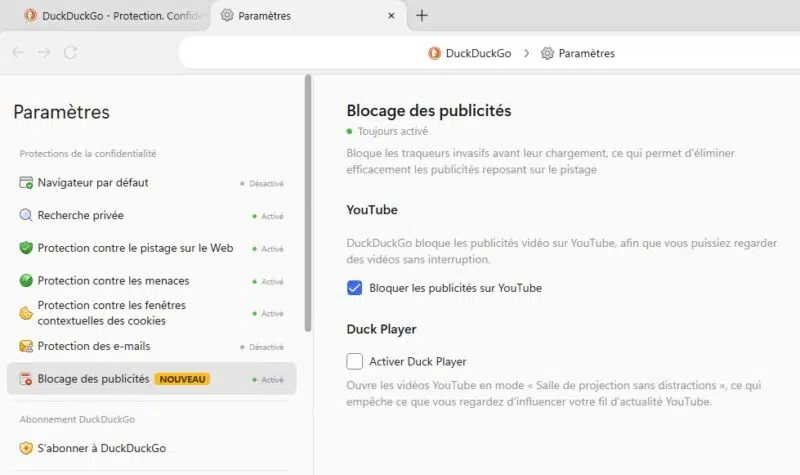
On desktop, YouTube ad blocking should work well as long as you stay within the DuckDuckGo browser window. On mobile, however, YouTube links often open in the YouTube app rather than in the browser. In that case, the workaround breaks the feature: it only works when the YouTube website is opened in the DuckDuckGo browser.
Finally, DuckDuckGo takes care to distinguish this new feature from Duck Player, its built-in player launched several years ago and already mentioned when the DuckDuckGo browser for Windows was released. Duck Player offers a distraction-free theater mode and applies YouTube's strictest privacy settings, at the cost of a few trade-offs (watch history and playlist resume). YouTube Ad Blocking, on the other hand, keeps the classic YouTube experience, including history and recommendations, but without the ads. Both can be enabled at the same time.
Under the hood: uBlock Origin filter lists
To block YouTube ads, DuckDuckGo did not reinvent the wheel. This feature relies on community filter lists from the uAssets repository used by uBlock Origin, maintained by an active open source community and updated regularly to keep pace with changes in ad delivery. DuckDuckGo also says it applies its own rules to improve compatibility and reduce breakage on pages.
The battle between Google and publishers (not to mention users) continues. For years, YouTube has been fighting an attrition war against ad blockers. YouTube's support pages clearly state that using an ad blocker violates its terms of service, and affected users may be asked to allow ads, subscribe to Premium, or have playback blocked.
Overall, DuckDuckGo's direction is consistent. After trackers, cookie banners, and web ads, DuckDuckGo is now going after video, even as Google prepares to use IP addresses for ad targeting starting August 3, 2026. If you're interested in network-wide ad blocking, you should read our tutorial on AdGuard Home or Technitium.