www.it-connect.fr

Active Directory Security: Auditing LAPS Delegations and Detecting ACL Flaws
A single forgotten delegation on a computer object can be enough to expose the local administrator password managed by LAPS, and open the door to silent privilege escalation. These drifts trigger no alert, do not appear at the organizational unit (OU) level, and often escape standard auditing tools. Yet in an Active Directory domain, a single read permission granted to the wrong account is enough to turn protection into an entry point.
This issue was raised to me following several exchanges with Alain Cuisenier, an Active Directory security engineer. Those discussions highlighted a practical need: better auditing of Microsoft LAPS-related delegations in order to identify invisible exposures. In this article, we will look at how these flaws appear, why they are difficult to spot, how to detect them with a dedicated open source PowerShell module (LegacyLapsAudit), and how to fix them.
The essentials at a glance
Auditing LAPS delegations means checking which accounts really have read access to the ms-Mcs-AdmPwd attribute (the local administrator password, stored in clear text by Legacy LAPS). The main risk comes from rights applied directly to a computer object rather than inherited from an OU: they do not show up in the OU delegation view and are missed by LAPS PowerShell modules.
An account with Full Control, All Extended Rights, or Read on this attribute can read the local password and gain administrative access on the machine. To detect these cases, you need to compare the real ACLs of each computer object with the legitimate delegations defined at the OU level, then migrate to Windows LAPS (LAPS2), which encrypts passwords and no longer relies solely on ACLs.
Understanding the risk
Even with security controls in place, regular audits, or pentest campaigns, a simple delegation mistake can be enough to weaken an Active Directory infrastructure, or even compromise it. This type of drift remains silent and difficult to detect with standard auditing tools because it does not change either the GPO configuration or the delegations visible at the OU level.
Reminder: what is Microsoft LAPS (Legacy)?
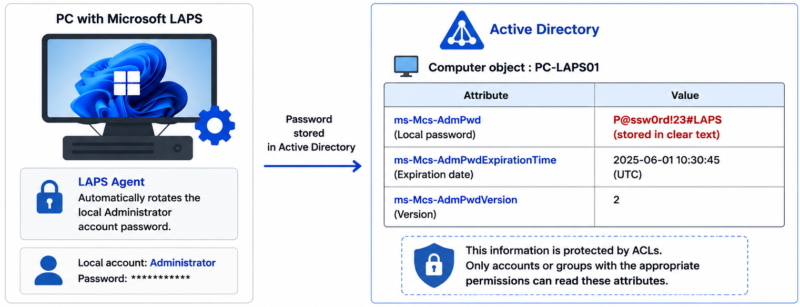
Microsoft LAPS, also known as LAPS Legacy or LAPS1, automatically rotates the local administrator account password on machines joined to an Active Directory domain. Each machine therefore has a unique password that is regularly changed, which greatly limits lateral movement through password reuse.
When the solution is deployed, Active Directory adds and replicates two main attributes in the directory: ms-Mcs-AdmPwd, which stores the local password in clear text, and ms-Mcs-AdmPwdExpirationTime, which contains the expiration date. This behavior may seem surprising, but access to these attributes is protected by ACLs (access control lists) in principle: only accounts with the required permissions can read them.
If you're new to the solution, the full setup (installation, schema preparation, GPO) is covered in our free Microsoft LAPS course.
Why ACLs are the weak link
The main risk lies in poor ACL management on computer objects. A user with excessive rights can access sensitive information without this being visible at the OU level, because the permission is set on the object itself. These dangerous delegations can be mapped to several recognized vulnerability categories:
- CWE-284: improper access control.
- CWE-732: incorrect permission assignment on a critical resource.
- CWE-269: improper privilege management.
Such exposure can lead to privilege escalation and then lateral movement within the information system.
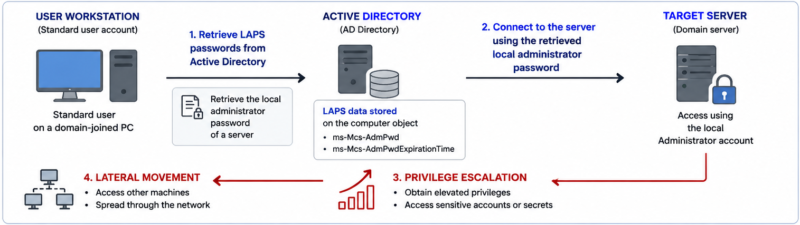
Demonstration: from a forgotten delegation to compromise
In our lab, we will illustrate several concrete cases of delegation mistakes that can lead to exposure of LAPS passwords. The goal is not to provide offensive instructions, but to show how common and easy to exploit these exposures are, so that they can be tracked down more effectively.
Scenario 1: a Full Control right that remains after a move
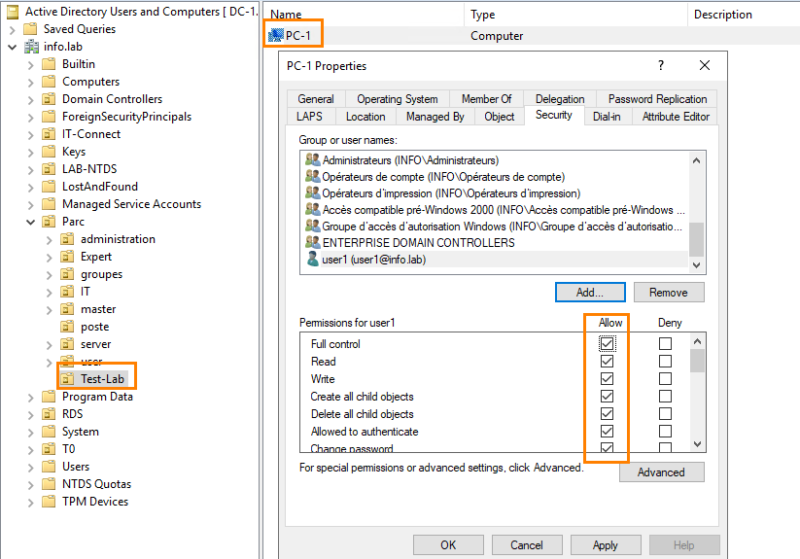
First, we mistakenly grant user1 a Full Control (FC) right on a machine. This bad configuration may come from a simple technician error or a one-off request in a test OU. The problem is that this right persists, which can create a real backdoor. Here, the PC-1 machine has Full Control rights granted to user1.
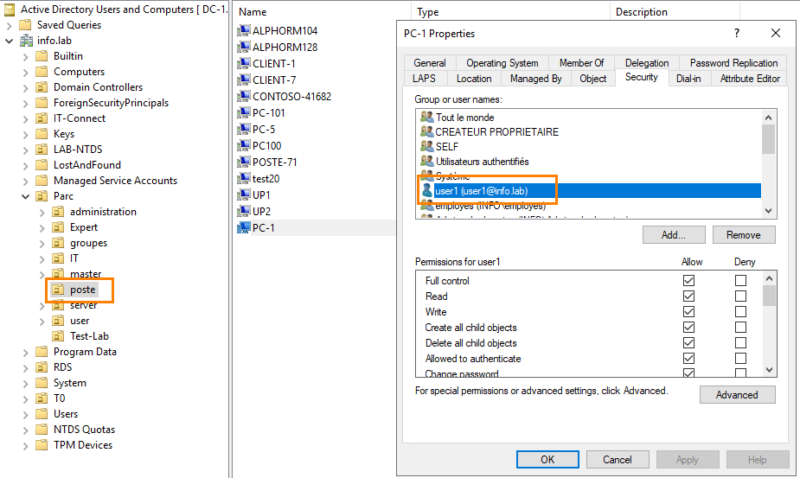
Once the machine is moved to another OU, we can see that the ACL rights were preserved. Moving the object does not reset permissions set directly on the object.
Scenario 2: a read right directly on the attribute
In a second scenario, we directly grant user1 read access to the LAPS password attribute on srv-2 and PC-Lab-2. We then clear the value of the LAPS password expiration date field on the latter, which disrupts rotation tracking.
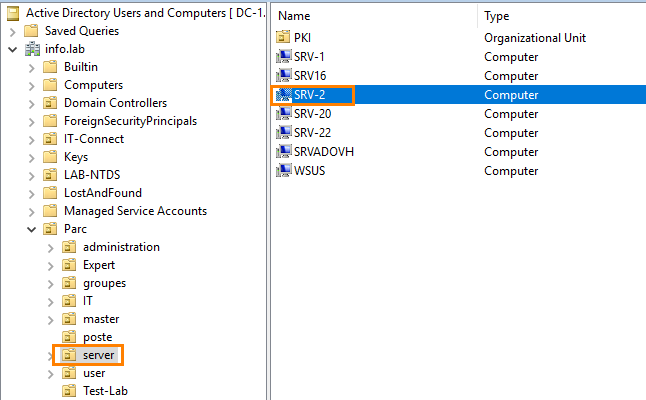
Here are the permissions in question:
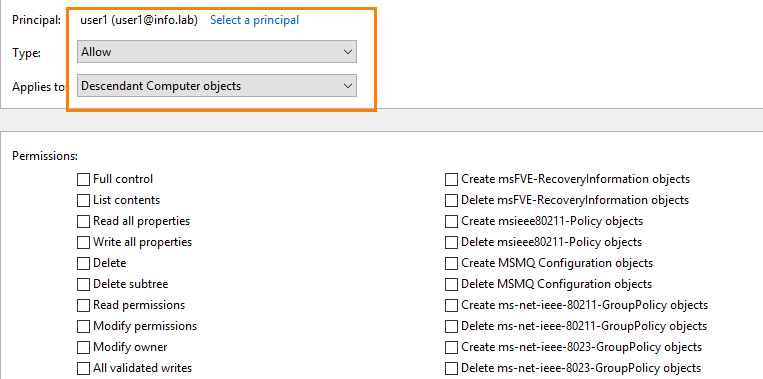
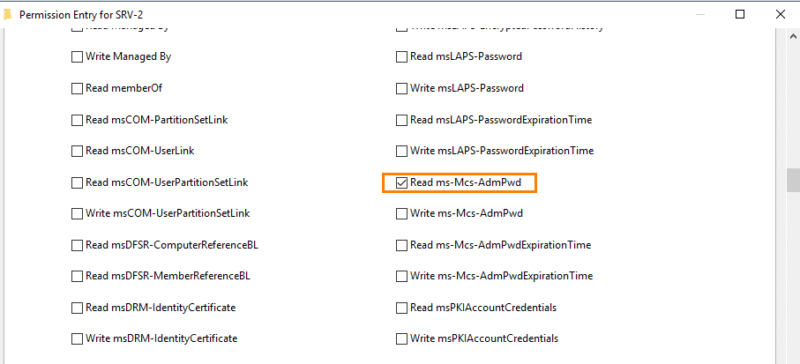
These rights do not appear at the OU level because they are applied directly to the computer object. This makes them much harder to detect: running the commands from the LAPS PowerShell module does not identify the anomaly.
Exploitation: read the password and pivot
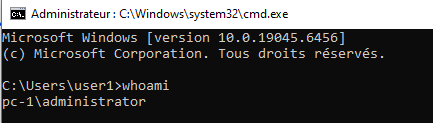
From PC-1, the user with Full Control on the object can exploit this configuration and read the LAPS password. In just a few commands, without RSAT or any special tool, the password is retrieved, allowing the user to become local administrator on the machine.
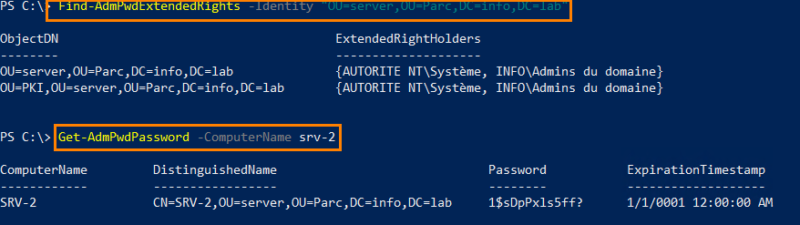
Privilege escalation has therefore been achieved easily.
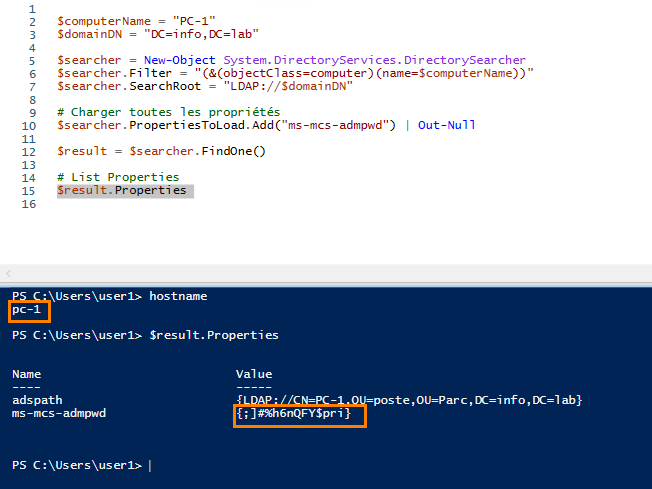
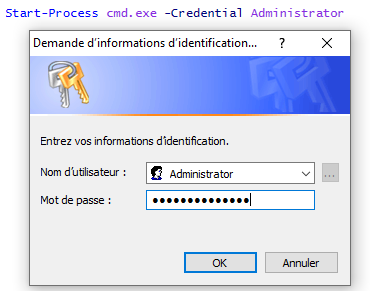
Likewise, we retrieve the password for srv-2.
We then open a Remote Desktop connection to the server.
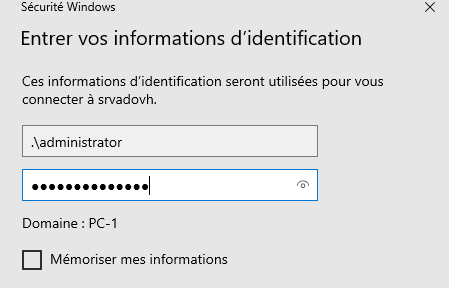
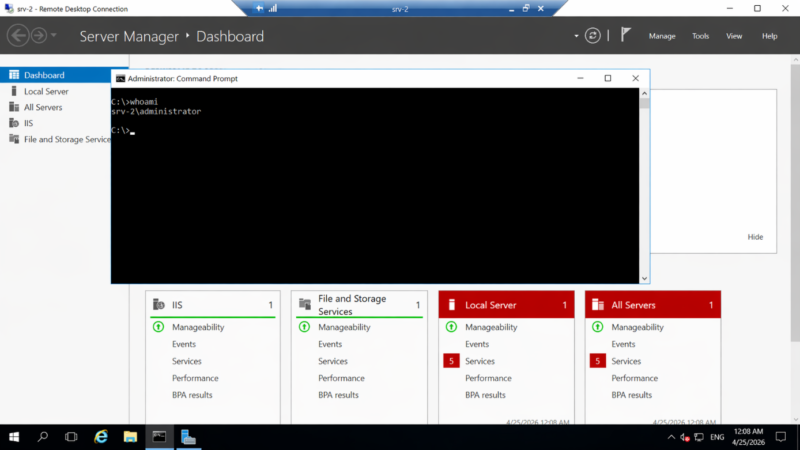
The logon works without difficulty, which makes lateral movement to the server easy. As we can see, we did not need any advanced skills or any specific tool (Linux, Kali) to exploit this bad configuration and take control.
Why standard auditing tools miss it
To verify the scope of the problem, we tested the main Active Directory auditing tools against the same scenario. In our lab, we used the free versions of PingCastle and Purple Knight, then ADACLScan and BloodHound. None of them were able to properly correlate the abnormal ACLs with the presence of LAPS on the machines, especially when an inappropriate right is set directly on the object.
PingCastle and Purple Knight
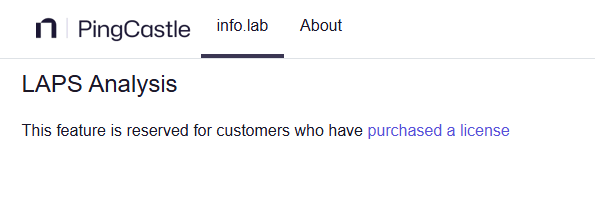
PingCastle was quickly ruled out: the free version does not offer any specific LAPS audit.
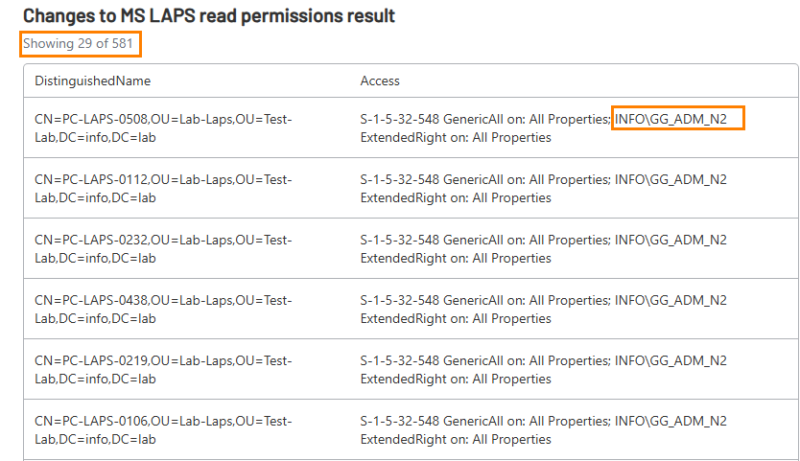
Purple Knight, for its part, analyzes and lists ACL rights on each machine for non-standard users who can read the password. However, in the case of a legitimate delegation performed at the OU level (for example for the GG_ADM_N2 or Tech_N2 groups), those rights are interpreted as non-legitimate. This generates large outputs, with tables that can contain several thousand machines, which makes the analysis difficult and not very actionable.
ADACLScan
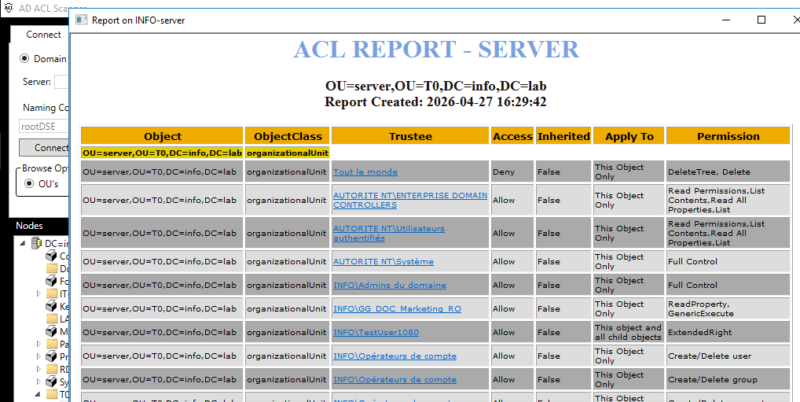
The ADACLScan module does not provide any specific analysis related to LAPS or dangerous rights. It simply lists all default ACLs. You therefore need to add your own filters and combinations to identify risky cases. In a large environment, the tool can therefore miss some exposures, especially for users without deep expertise.
BloodHound
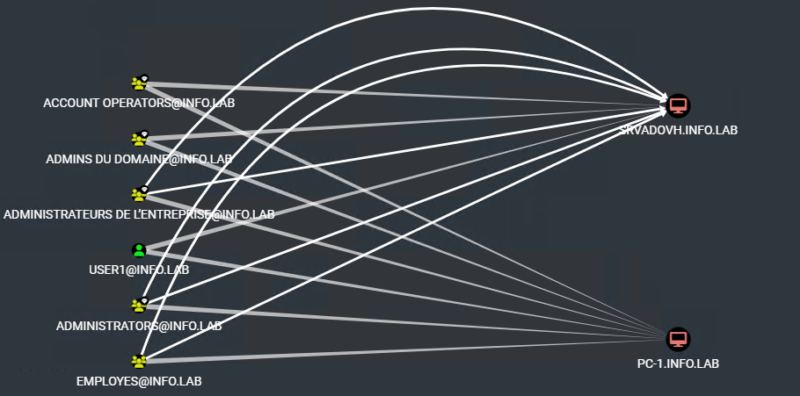
With BloodHound, the result is similar to Purple Knight. We used the following Cypher query to list accounts with extended rights on LAPS-managed machines:
MATCH p = (b:Base)-[:AllExtendedRights|ReadLAPSPassword|GenericAll]->(:Computer {haslaps:true})

RETURN p

LIMIT 1000
We can then visualize the accounts with extended rights on the machines. However, it is impossible to determine whether those rights were actually delegated through a parent OU or directly on the objects, which makes the analysis ambiguous, especially in large environments with a high number of machines.
4
LegacyLapsAudit: a PowerShell module dedicated to delegation auditing
In response to this, we decided to create an open source French tool to remove this ambiguity. It is a PowerShell module available on the PowerShell Gallery.
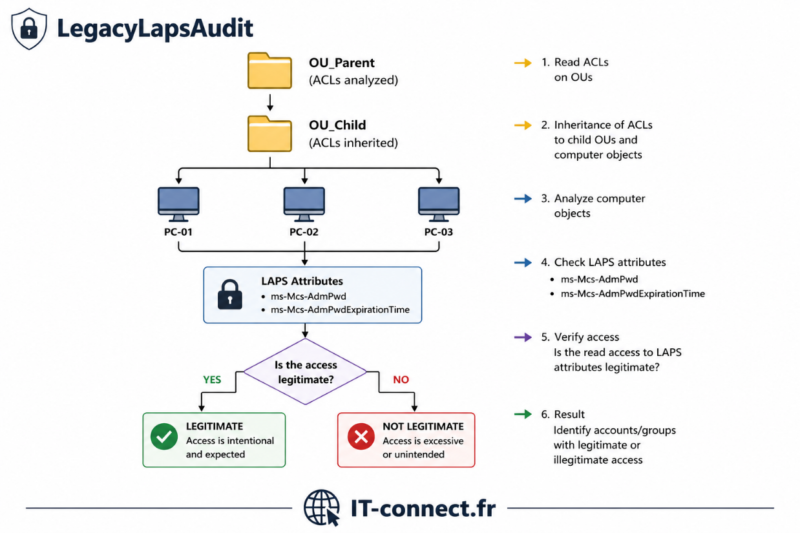
Its goal is to analyze machines, compare rights to determine whether they are legitimate or not, identify suspicious access to LAPS passwords, and provide a clear overview of delegations and LAPS usage.
Below is the operating mechanism:
Prerequisites
The module does not require elevated rights and can be run from any machine in the domain. However, having an account with read access to the LAPS attributes is a plus for refining the analysis and getting a complete report.
Installation
Installation is done directly from the PowerShell Gallery, under the current user context:
Install-Module LegacyLapsAudit –Scope CurrentUser –Force
Launch an analysis
Once the module is installed, a full domain analysis is launched with the following command:
Invoke-LegacyLapsReports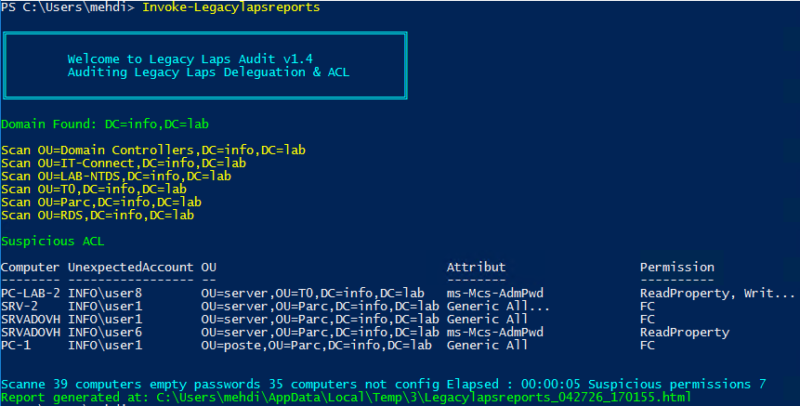
In a large environment, I recommend targeting a specific OU first using the OUPath parameter, specifying the LDAP path of the OU in question. This helps limit the scope and speeds up the first analysis pass. At the end of the run, a report automatically opens in the browser.
You can review an online report example to get an idea of the output.
Reading the report
Several sections and pieces of information are available, starting with the number of machines analyzed and those with LAPS enabled.
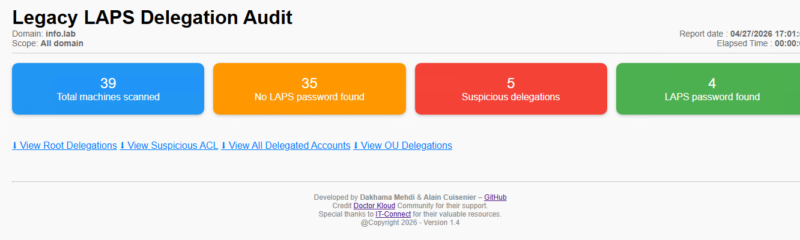
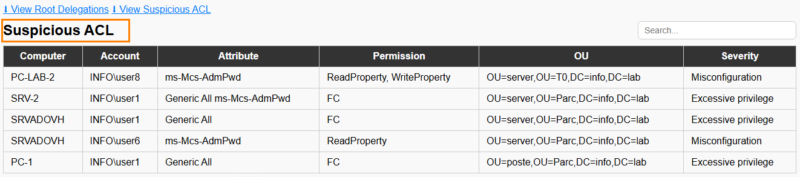
The first interesting section is Suspicious ACL. It highlights accounts that have read access to passwords without that right being defined through a parent OU. This is exactly the situation in our two scenarios: this section can reveal a forgotten right, an object move, or a bad configuration.
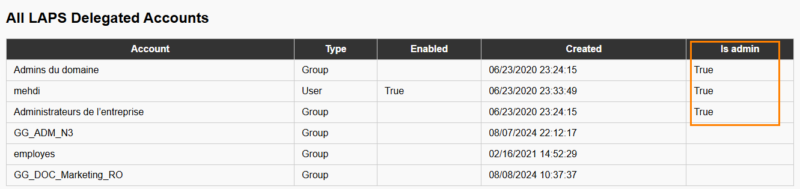
The All Laps Delegated section lists all accounts or groups that can read LAPS passwords across the environment, with additional information such as the account creation date, status, or privilege level.
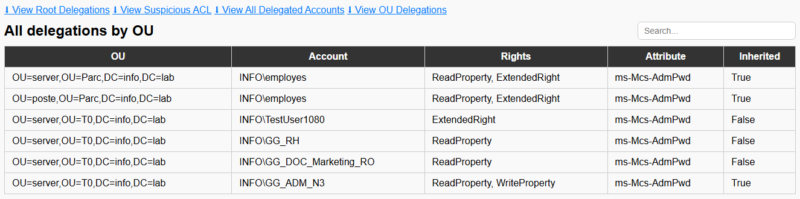
Finally, a third section presents delegations by OU.
Using this information, the tool helps maintain a consistent security posture, while keeping in mind that this type of analysis must be performed regularly.
Remediation: migrate to Windows LAPS
Given today's threats, adopting Windows LAPS (the new version, known as LAPS2) is strongly recommended. Unlike the old LAPS (Legacy LAPS), which relies solely on ACLs to protect the ms-Mcs-AdmPwd attribute, the new version introduces much stronger security mechanisms:
- The password is stored in a secure attribute (for example
msLAPS-EncryptedPassword). - It is encrypted using modern cryptographic mechanisms.
- Access no longer relies only on traditional ACLs, but also on a separate decryption authorization.
- An unauthorized user will only see an unusable encrypted value, even if they manage to read the attribute.
However, keep in mind that Windows LAPS encryption requires a domain functional level (DFL) of 2016 or later. On an older domain or for incompatible machines, Windows LAPS can operate in clear-text mode, protected only by ACLs: in that case, close attention to delegations remains just as important.
To prepare for this migration, two IT-Connect tutorials explain how to deploy Windows LAPS depending on your environment:
- For an on-premises deployment, follow our tutorial Configure Windows LAPS with Active Directory.
- For a cloud-managed environment, see our tutorial Configure Windows LAPS with Intune (password storage in Microsoft Entra ID).
Microsoft's official documentation, Getting started with Windows LAPS and Active Directory, complements these resources.
Conclusion
We have seen that a single bad delegation can expose LAPS passwords and enable privilege escalation and lateral movement, without any advanced tool. The security of an Active Directory directory does not depend on a tool or a script, but on a set of best practices combining technical controls and strategy.
A poorly controlled delegation is enough to compromise an environment, which is why regular auditing and precise access control are so important. A module like LegacyLapsAudit does not replace that discipline, but it does fill a real blind spot in market tools: correlating ACLs on computer objects with LAPS usage.
FAQ
How do you audit LAPS delegations in Active Directory?
Auditing LAPS delegations means comparing the real ACL rights of each computer object with the legitimate delegations defined at the OU level, in order to spot read rights applied directly to an object. The open source PowerShell module LegacyLapsAudit automates this analysis and highlights, through its Suspicious ACL section, accounts that can read a LAPS password without inheriting delegation from a parent OU.
Why is a misconfigured LAPS delegation dangerous?
An account with an unintended read right on the LAPS password attribute can retrieve the local administrator password of a machine. This opens the door to local privilege escalation and then lateral movement, without requiring sophisticated tools. The risk is even greater when the right is applied directly to the computer object, because it becomes invisible at the OU level.
Where are LAPS passwords stored in Active Directory?
With Legacy LAPS, the password is stored in clear text in the ms-Mcs-AdmPwd attribute of the computer object, and the expiration date in ms-Mcs-AdmPwdExpirationTime. With Windows LAPS, the encrypted password is stored in a dedicated attribute such as msLAPS-EncryptedPassword.
How do you fix a risky LAPS delegation?
You need to remove non-legitimate ACL rights applied directly to computer objects, centralize delegations at the OU level using documented security groups, and review moved objects. The long-term fix is to migrate to Windows LAPS with encryption, which no longer relies solely on ACLs.