www.it-connect.fr

Forensic Windows – Part 4: Exploiting SuperFetch Artifacts
On a Windows machine, every launched application leaves a footprint, and SuperFetch keeps a valuable record for the analyst. After studying Prefetch in the previous parts of this series, we now turn to SuperFetch, often presented as its natural counterpart. In this article, we will see how this mechanism works, where its data is stored, and how to analyze and leverage it in a forensic context.
About SuperFetch
We have seen that Prefetch speeds up application launches by preloading the required files as soon as they are run for the first time. However, this mechanism remains limited because it does not take into account the user's overall habits or the system's evolving usage over time.
Introduced with Windows Vista, SuperFetch technology complements this behavior. It continuously analyzes application usage to identify the ones that are launched most often, as well as the moments when they are started (for example at logon, or after resuming from hibernation). Based on this information, it anticipates needs and reloads useful data into memory before the programs are even executed.
SuperFetch therefore takes a predictive and dynamic approach. It optimizes memory usage by prioritizing the most relevant applications while ensuring that RAM is not saturated.
One terminology point should be clarified, as it is often a source of confusion. On modern Windows versions (Windows 10 and Windows 11), the service is no longer called SuperFetch but SysMain. In reality, SysMain is the name of the full service, which includes several components such as the Prefetcher and SuperFetch itself. The term SuperFetch now refers more to a building block of SysMain than to the service as a whole. In the rest of this article, we will use both terms depending on the context, keeping that nuance in mind.
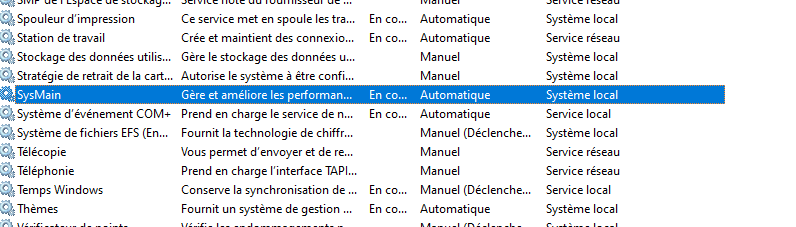
Note: the SysMain service is implemented in %SystemRoot%\System32\sysmain.dll, hosted by a svchost.exe process. You can check its status in the Services console (services.msc) or with the Get-Service SysMain command.
Why SuperFetch matters in forensic analysis
Beyond its optimization role, SuperFetch records a significant amount of information, making it a standalone execution artifact. Analyzing its files makes it possible to identify executed programs and files loaded into memory, along with data such as paths and usage frequency.
Several characteristics make this artifact interesting during an investigation:
- Broad coverage. Unlike Prefetch, which focuses on executables, SuperFetch also tracks other file types such as
.inifiles,.dllfiles, and their paths. This enriches activity reconstruction. - A record of historical applications.
Ag*Historyfiles retain traces of applications used in the past, even if they are no longer executed or have been uninstalled. This is valuable when an attacker has tried to erase their tools. - A multi-user view. These databases contain information for all users on the system, not just the current session.
AgAppLaunch.db is one of the most interesting files: it contains information about the most frequently launched applications across all contexts, whereas Prefetch focuses more specifically on executable launches.
However, one structural limitation must be kept in mind, and we will come back to it: SuperFetch does not provide a precise, reliable timestamp for each execution. These traces are therefore mainly used to establish or corroborate usage, and rarely to date an action down to the second.
Where SuperFetch files are stored
SuperFetch files are stored in the same location as Prefetch files, in the C:\Windows\Prefetch folder.
Their names generally start with the Ag prefix and use the .db extension. There are also compressed variants, recognizable by the .trx suffix appended at the end (for example AgGlGlobalHistory.db.trx).
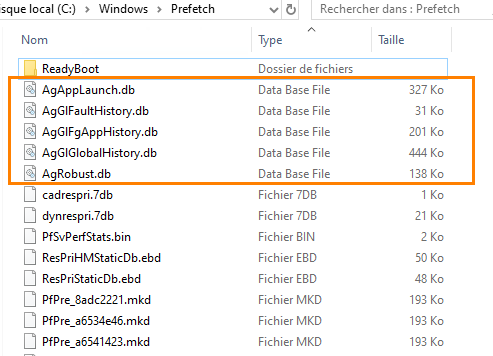
One service behavior is worth knowing because it affects collection. Most SuperFetch databases are written to disk when the service stops, while AgAppLaunch.db is also updated when it starts. Since SysMain runs continuously, some files may therefore not appear immediately, or may not reflect the most recent activity. In a live-system test environment, it may then be necessary to stop the SysMain service, launch the desired applications to generate activity, and then restart the service to force the files to be written.
Warning: stopping the SysMain service and generating activity changes the system state. In a real investigation, these actions do not belong on the original evidence. They should be reserved for a lab environment or a working copy, in order to preserve the integrity of the collected evidence.
The following diagram summarizes how SuperFetch works.
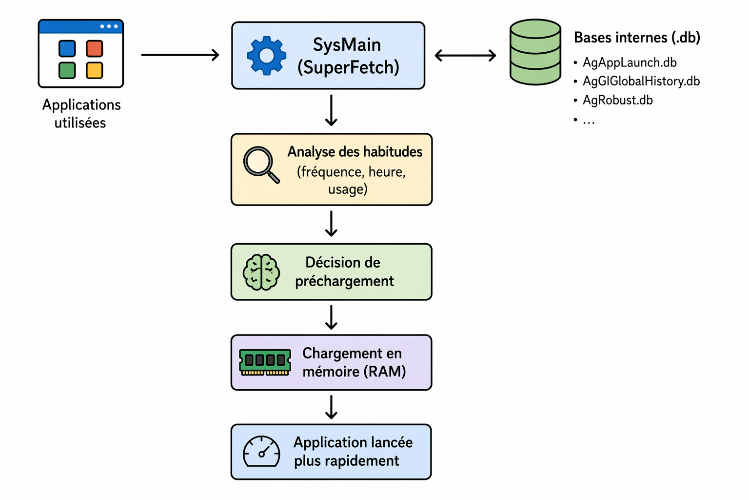
To go further into the internal format and data structure, the documentation on Forensics Wiki on the SuperFetch format is a useful reference.
Analyzing SuperFetch files
Analyzing SuperFetch files remains complex because of their proprietary format and the lack of reliable, maintained tools. Several approaches coexist, with uneven results. Let’s take a look.
The rewolf-superfetch-dumper tool
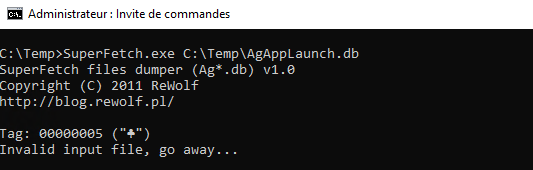
A first approach is to use the open source tool (GPL license) developed by rewolf, rewolf-superfetch-dumper.
However, during my tests, I found that this tool did not support recent systems such as Windows 10 and Windows 11, notably because of the evolution of the compression mechanism based on the Xpress Huffman algorithm introduced by Microsoft.
Hex editor analysis
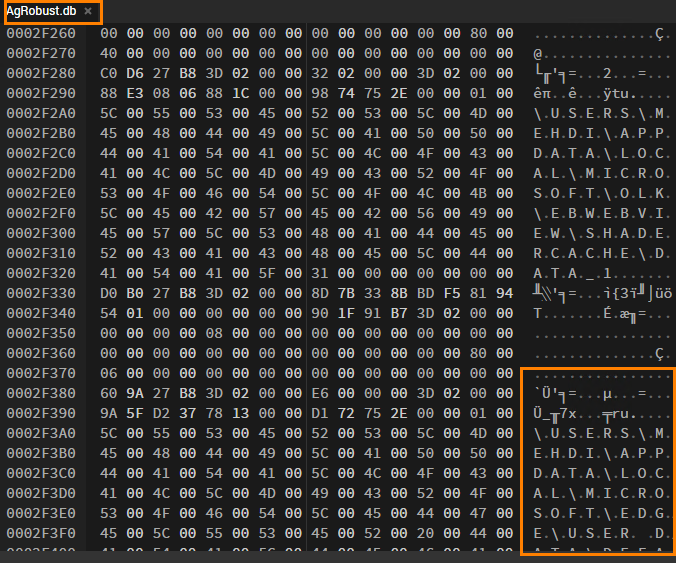
Another approach is to open the files in a hex editor. This method makes it possible to identify certain strings, especially file names or paths, but it remains tedious and difficult to scale.
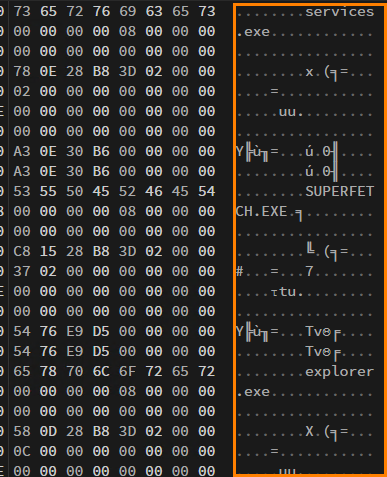
We can observe an action on the SuperFetch service, followed by the launch of the Explorer process. However, a complete analysis would require converting all of the binary data, which is especially tedious. I therefore chose to abandon this approach.
To learn more about the file architecture, the blog by rewolf provides a detailed description of the format.
Reference research work
More advanced work was presented at Black Hat USA 2020 in a talk titled “Fooling Windows through Superfetch,” by Mathilde Venault and Baptiste David. It provides a much better understanding of the internal operation of SysMain and the format of its files. The conference slides are publicly available.
This research led to a reference scientific paper, “Superfetch: the famous unknown spy ,” published in the Journal of Computer Virology and Hacking Techniques. It details the architecture of the service and the format of the entire prefetch file set, which had previously been poorly documented.
SysMainView, the tool suited to recent systems
These works led to the creation of SysMainView, a tool provided by Mathilde Venault and compatible with recent systems. Once compiled, it makes SuperFetch files much easier to read and interpret than the previous methods. This is now the approach I recommend. The project is available in its SysMainView GitHub repository.
Using SysMainView
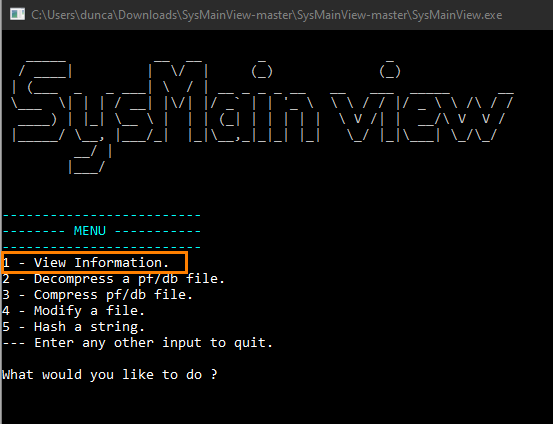
Once the tool has been downloaded and compiled, its menu is straightforward. You only need to enter a number to trigger the corresponding action. Here, we choose option 1 to list the contents of a SuperFetch file.
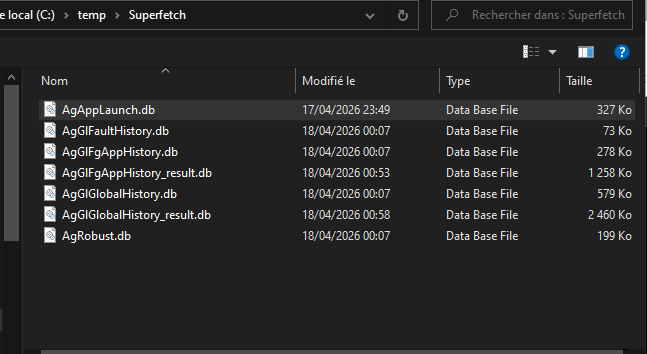
We then select the file to analyze.
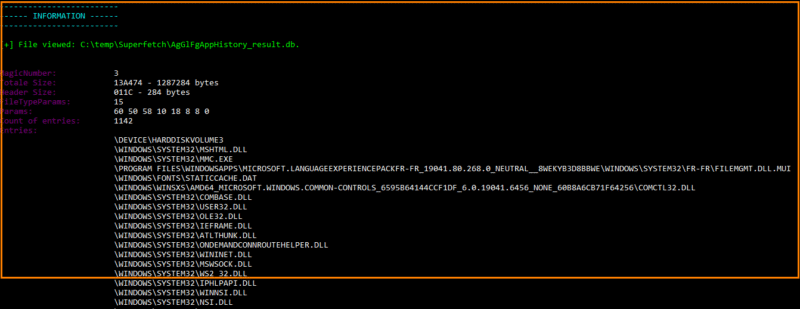
Select the file. The content (parsing) is then displayed.
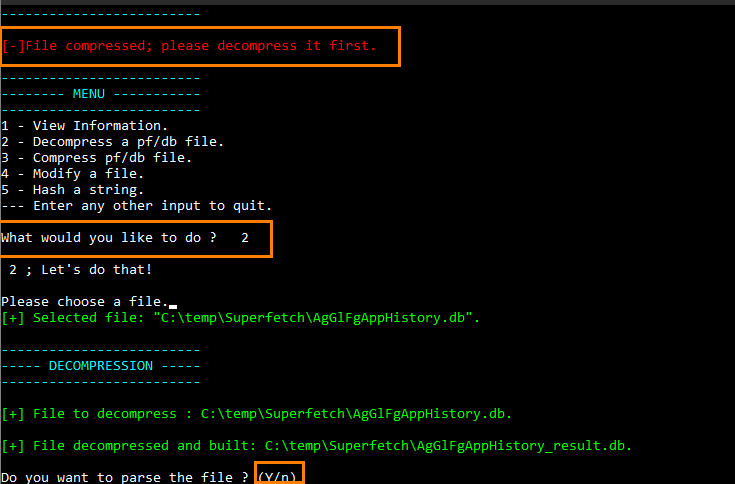
If the file is compressed, a message prompts us to decompress it. Simply choose option 2, then confirm.
The different databases simultaneously contain information about the paths and files used.
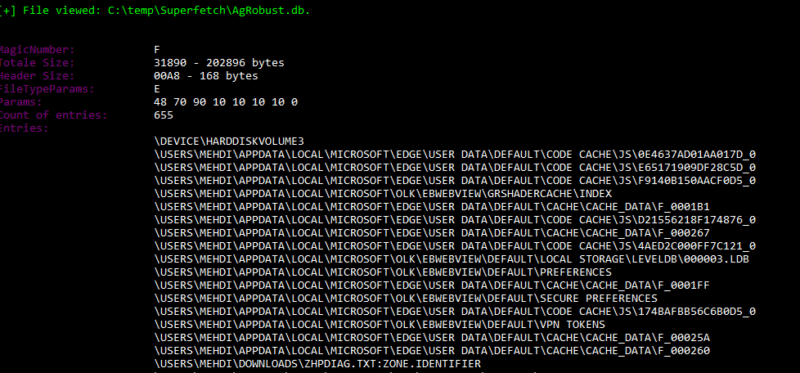
This lets you view all the items launched by users and the system, with many extensions.
Exploring these files reveals particularly interesting information. I encourage you to analyze them carefully; the goal here is not to detail every field, but rather to illustrate the method in a forensic-oriented approach.
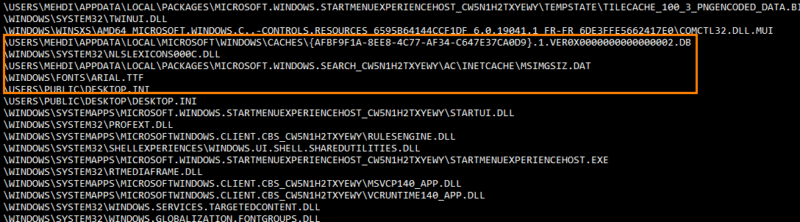
That concludes this part. The tool does not provide formatted output, but since the source code is available, it is entirely possible to add a .csv export to make your analyses easier.
Conclusion
SuperFetch databases are a useful supplemental solution and represent an interesting complement to what we saw with Prefetch. They are not limited to executables or applications, but also cover other file types such as .ini and .dll files, as well as their paths, which makes the analysis richer and more relevant.
However, the lack of precise timestamps can be a limitation in a forensic investigation. Even so, demonstrating usage can, in some cases, help corroborate an action.
We will soon complete this approach with an analysis of the BAM and DAM mechanisms.
FAQ
What is SuperFetch in Windows?
SuperFetch is a memory optimization mechanism introduced with Windows Vista. It analyzes application usage patterns to preload useful data into memory and speed up launches. On Windows 10 and Windows 11, it is integrated into the SysMain service.
What is the difference between SuperFetch and SysMain?
SysMain is the name of the full service on recent versions of Windows. It includes several components, including the Prefetcher and SuperFetch. SuperFetch was the former name of the service and now refers to a component of SysMain rather than the whole service.
Why is SuperFetch useful in forensic analysis?
SuperFetch retains traces of executed programs, loaded files, and their paths. It also covers uninstalled applications and the activity of all users, making it a complementary source of execution evidence alongside Prefetch.
How do you analyze a SuperFetch file?
Several methods exist: the rewolf-superfetch-dumper tool (limited to older systems), hex editor analysis (tedious), or the SysMainView tool, which parses files on Windows 10 and Windows 11 in an accessible way.
Where are SuperFetch files located?
SuperFetch files are stored in the C:\Windows\Prefetch folder, in the same place as Prefetch files. They use the Ag prefix and the .db extension, with compressed variants in .db.trx.