www.it-connect.fr


What Accounts Do You Really Have Online? Three OSINT Tools to Find Out
You may think you only have a handful of online accounts, but the real number is often in the dozens, if not the hundreds. From a simple username, email address, or phone number, it is possible to reconstruct a large part of someone’s digital footprint in just a few minutes, without any special skills and with free tools.
In this article, I’ll introduce three complementary OSINT tools, each specialized in a different type of identifier: Maigret for usernames, user-scanner for email addresses, and Ignorant for phone numbers. For each one, we’ll look at what it does, how to install it properly with Docker, and how to use it through an example. The goal is not to learn how to track other people down (no doxing here), but to give you the means to audit your own digital footprint so you can better control it.
If the term OSINT is still unfamiliar to you, start by reading What Is OSINT? before continuing.
Account Enumeration by Identifier
To find accounts associated with an identity, these tools rely on a technique called account enumeration. The principle is simple. Starting from an identifier (username, email, or phone number), the tool automatically queries hundreds or thousands of sites to determine whether an account exists there, then returns the list of matches.
Two major mechanisms coexist. The first consists of testing whether a public profile page exists at a predictable address, for example a profile whose URL contains the searched username. That is Maigret’s approach for username-based searches. The second relies on a site’s password reset or registration functions, which behave differently depending on whether an account is already associated with the tested email address or phone number. That is the approach used by user-scanner and Ignorant.
These three tools do not compete with each other; they complement one another because they cover three different entry points. You do not necessarily use the same identifier everywhere; very often it will be a username or an email address, depending on how the service works. Sometimes it is the phone number, especially with certain mobile apps. By cross-referencing the results from several tools, you get a much more complete overview than by using each one alone. It can also help you pivot.
Prerequisites
To follow this tutorial, you need a Linux machine (here I’m using Debian) with Docker and Docker Compose installed. If that is not yet the case, refer to my Docker installation guide before getting started.
Each application has its own directory under /opt/docker-compose/. Let’s create the working tree.
sudo mkdir -p /opt/docker-compose/{user-scanner,ignorant,maigret}We will use one docker-compose.yml file per application, but you are free to group them into a single project.
Note: command-line services are declared with profiles: ["cli"]. These are tools that run once and then stop, so they are not meant to run continuously. The profile prevents them from starting automatically with docker compose up, and you launch them on demand with docker compose run.
Warning - These tools rely on publicly accessible information, but using them on a third party without a legitimate reason raises legal and ethical issues. Here, I am running the demonstrations only on my own identity. You should do the same.
Finding an Account from a Username with Maigret
What Maigret Does
Maigret (a nod to Inspector Maigret) is an OSINT tool that searches for accounts associated with a username across a very large database of sites. Developed by Soxoj, it is open source under the MIT license. Its database covers more than 3,000 sites, far beyond social networks alone: forums, gaming platforms, development sites, image hosts, country-specific sites, music platforms, and more. It casts a wide net.
Maigret does more than just detect whether an account exists. When a profile is found, it analyzes the page to extract public information (bio, avatar, links to other profiles, identifiers). It is also capable of recursive searches, which makes it an investigation tool as well.
To refine the search, Maigret also offers a tagging system to target categories (gaming, crypto, dating, forum, etc.) or countries. Once the analysis is complete, it generates graphs and can create reports in HTML or PDF format.
The official project resources are as follows:
- GitHub repository: github.com/soxoj/maigret
Installing Maigret with Docker
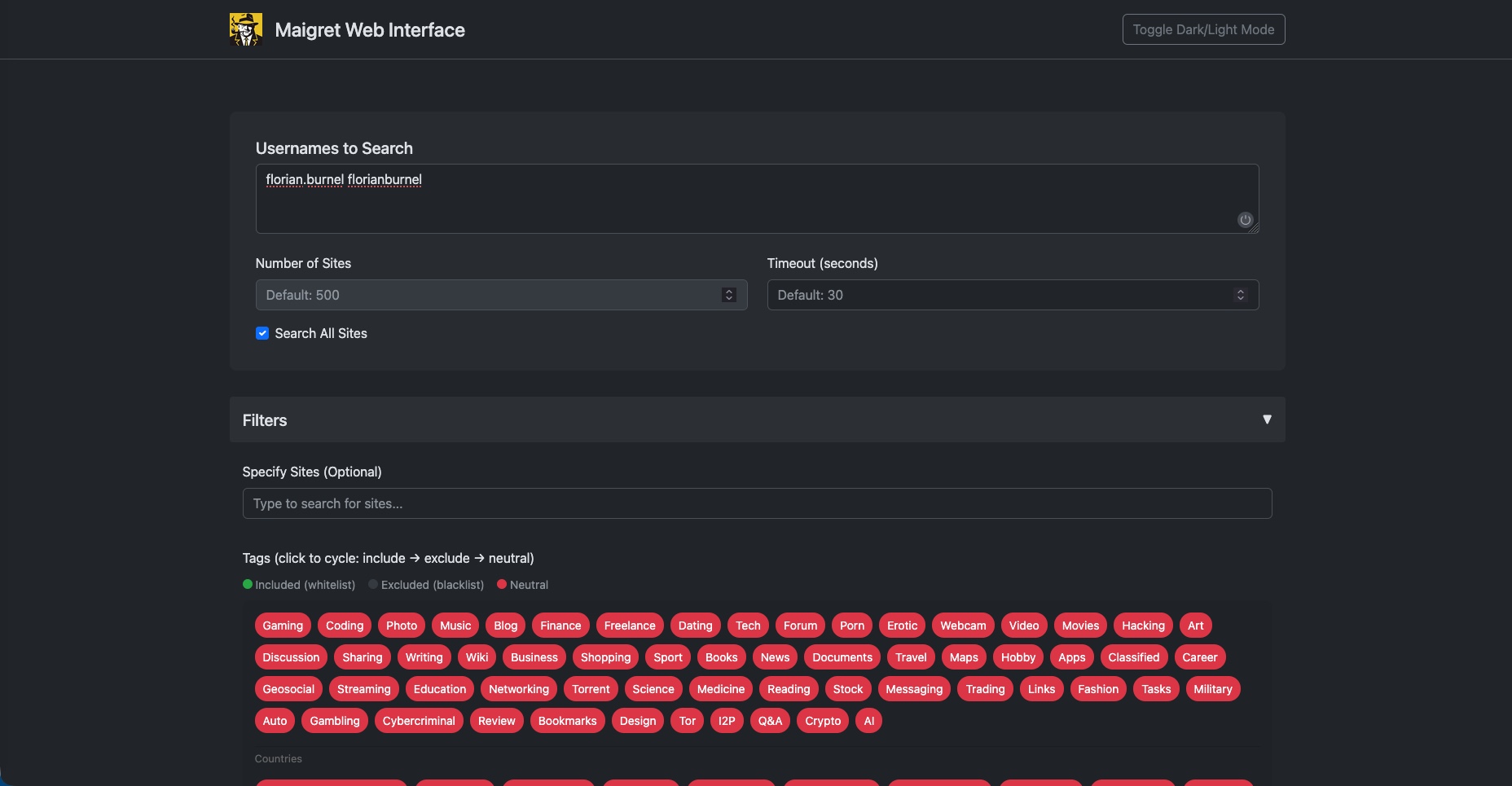
Maigret is distributed in two separate images: soxoj/maigret:web for the web interface and soxoj/maigret:latest for the command line. We will declare both in the same file, since they are part of the same tool. Create the file /opt/docker-compose/maigret/docker-compose.yml.
services:
  # Web interface, accessible at http://localhost:5000
  maigret-web:
    image: soxoj/maigret:web
    container_name: maigret-web
    ports:
      - "5000:5000"
    volumes:
      - ./reports:/app/reports
    restart: unless-stopped

  # Command-line version, launched on demand
  maigret-cli:
    image: soxoj/maigret:latest
    volumes:
      - ./reports:/app/reports
    profiles: ["cli"]
The web interface starts like a standard service.
cd /opt/docker-compose/maigret
docker compose up -d
The interface is then available at http://localhost:5000. The ./reports volume gives you direct access to the generated reports from the host. You can also publish the web application behind a reverse proxy such as Traefik.
This is the only one of the three tools with a service running continuously. The maigret-cli service, meanwhile, is tied to a profiles: ["cli"] entry: this profile excludes it from docker compose up (it would stop as soon as it starts), and we only invoke it on demand.
Using Maigret
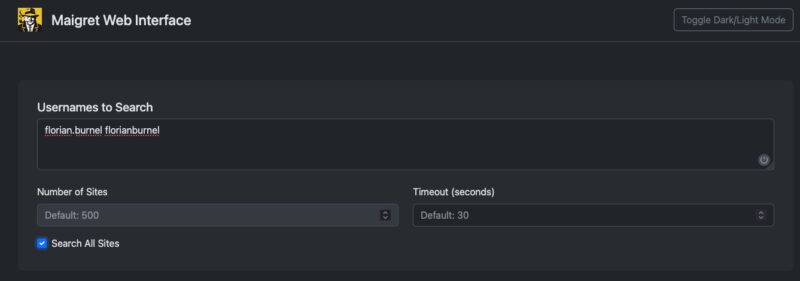
From the web interface, just enter a username and launch the search. You can specify multiple usernames in a row by separating each value with a space. If you check the Search All Sites option, Maigret will scan its database of more than 3,000 websites; otherwise, it is limited to the Top 500 websites. You can also target entire categories (gaming, social, forum) to narrow down your search.
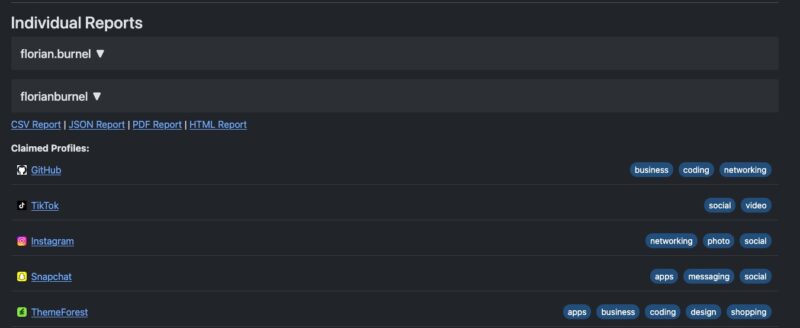
A few minutes later, the results appear. On one side, there is a graph that links the accounts identified on websites with the username(s). On the other, there is the list of found accounts, each with a link to the relevant page. Buttons let you generate a summary PDF or HTML report for each analyzed username.
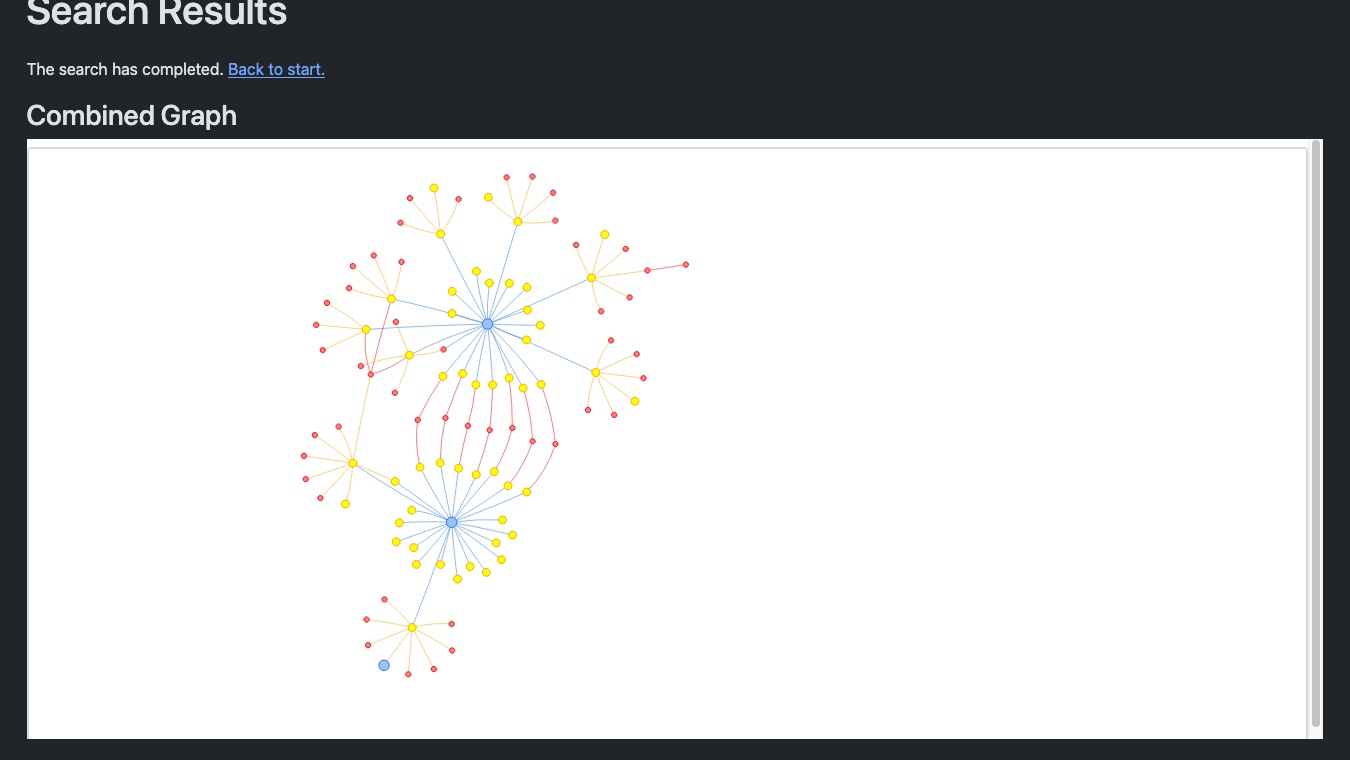
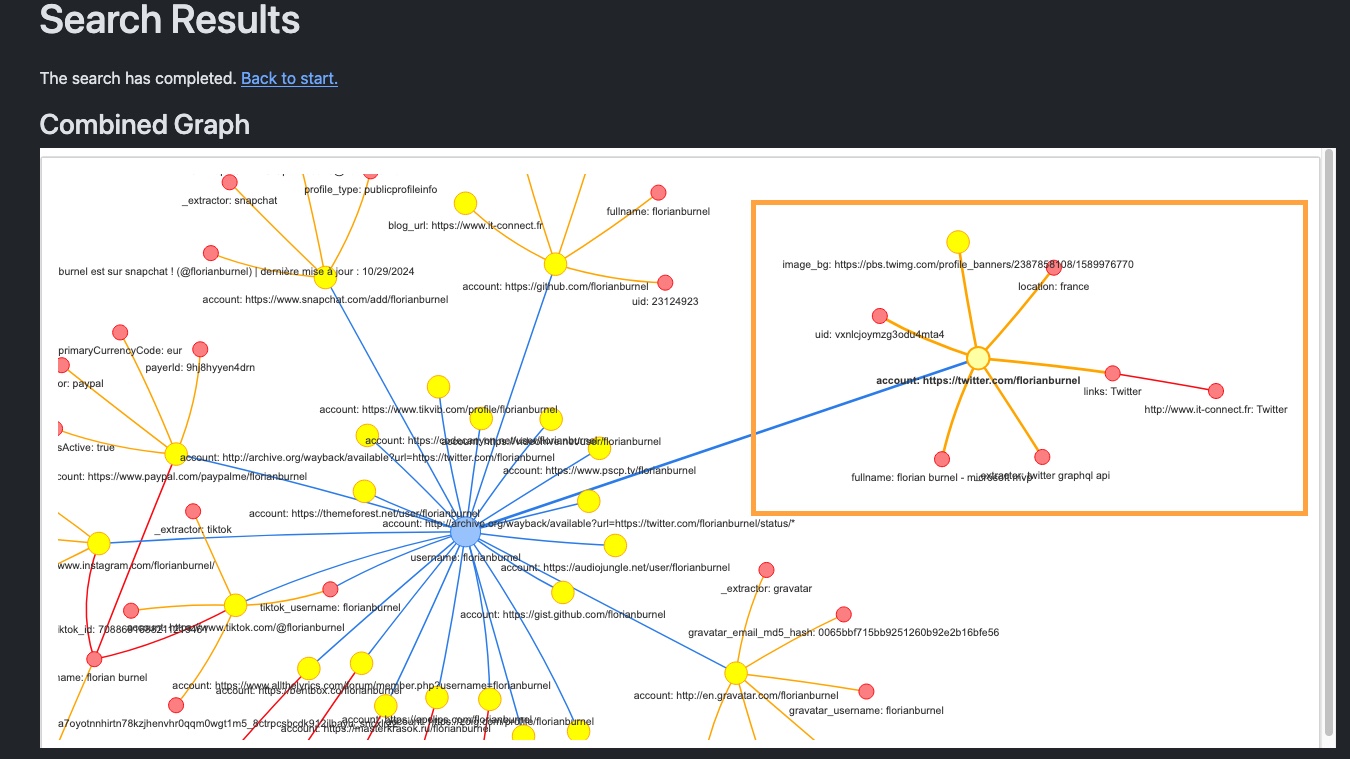
In the list of accounts, you may find your own accounts and possibly those of another person as well. This is especially true if you search using your first and last name, since someone else may share the same name. That is something I noticed when reviewing some of the results returned by Maigret. Sometimes it is obvious, especially when the profile photo clearly shows a different person.
For the command line, pass the username and options directly to the maigret-cli service from the project directory. Here are a few command-line examples:
cd /opt/docker-compose/maigret

# Standard search (top 500 sites)
docker compose run --rm maigret-cli <pseudo>

# Exhaustive search across the full database (more than 3000 sites)
docker compose run --rm maigret-cli <pseudo> -a

# Target only French sites using tags
docker compose run --rm maigret-cli <pseudo> --tags fr

# Generate an HTML report in ./reports
docker compose run --rm maigret-cli <pseudo> --html

# Display the full database and its tags
docker compose run --rm maigret-cli --list
For more advanced use, Maigret offers an AI analysis option (--ai) that sends the list of found sites to the OpenAI API to build a profile from them. This function requires an OpenAI API key (environment variable OPENAI_API_KEY) and, more importantly, it sends your results to a third party. If you’re interested, here is an example:
docker compose run --rm -e OPENAI_API_KEY=sk-api-key maigret-cli <pseudo> --aiFinding an Account from an Email Address with user-scanner
What user-scanner Does
For email-based searches, there is the Holehe tool. It is fairly well known, but it did not give me good results. I do not know whether it is still maintained. That is why I preferred to use user-scanner.
The user-scanner tool uses the same method as Holehe (enumeration through password reset flows), but with actively maintained modules. Here are its characteristics:
- Coverage of around 140 email modules and 210 username modules, making it a two-in-one tool capable of handling both identifier types (so it complements Maigret in a way).
- Proxy support with rotation and validation, which is valuable for limiting IP-based blocking during scans.
- Clear output (Registered / Not Registered) and exports in JSON and CSV formats.
The official resource is the GitHub repository: github.com/kaifcodec/user-scanner.
Installing user-scanner with Docker
The tool is available on PyPI and does not come with an official Docker image. We will therefore build a lightweight image from a minimal Dockerfile. Create the file /opt/docker-compose/user-scanner/Dockerfile.
Put this content into the file:
FROM python:3.12-slim
RUN pip install --no-cache-dir user-scanner
ENTRYPOINT ["user-scanner"]
Then, in the same directory, create the docker-compose.yml file.
services:
  user-scanner:
    build:
      context: .
    image: user-scanner:local
    volumes:
      - ./results:/data
    working_dir: /data
All that remains is to build the image.
cd /opt/docker-compose/user-scanner
docker compose build
The ./results volume retrieves JSON or CSV exports generated by the tool on the host.
Using user-scanner
Basic usage is a single command, with the -e option for an email address and -u for a username. Let’s give it a try.
cd /opt/docker-compose/user-scanner

# Search for accounts linked to an email address
docker compose run --rm user-scanner -e <e-mail>

# Search by username
docker compose run --rm user-scanner -u <pseudo>
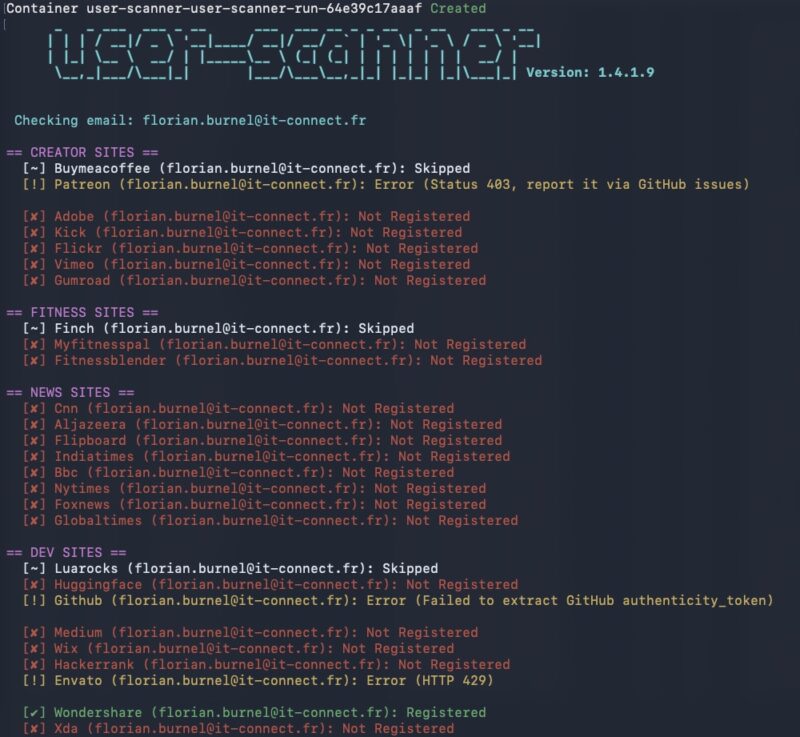
When it runs, user-scanner groups results by category and shows one of the following statuses for each site: account found, account not found, error, or skipped test. The last status deserves an explanation, because it illustrates an important OSINT concept.
By default, the tool sets aside certain modules that it considers noisy. On most sites, checking whether an account exists is done silently on the server side. But on some, triggering the forgot password function actually sends a password reset email to the person if an account exists. In other words, testing these sites would alert the target. In our case, that is not too much of an issue because we are analyzing ourselves, but in another context it is problematic. user-scanner excludes them by default to stay discreet, and you can include them explicitly with the --allow-loud option.
# Include noisy modules (only for your own identity)
docker compose run --rm user-scanner -e test@demo.fr --allow-loud
This behavior also provides a useful defensive lesson: receiving a password reset email you did not request can be a sign that someone is probing your accounts.
Finding an Account from a Phone Number with Ignorant
What Ignorant Does
Ignorant applies the same logic as the previous tools, but starting from a phone number. Developed by megadose (also the author of Holehe) and released under the GPLv3 license, it uses the forgotten-password technique to determine whether a number is associated with an account, without alerting the person concerned.
To be honest, one point needs to be said clearly: Ignorant’s coverage is intentionally limited, because few sites expose phone numbers in a queryable way. In practice, it tests only a handful of platforms, including Amazon, Instagram, and Snapchat. To my knowledge, there is no Maigret equivalent for phone numbers. That is also because platforms protect this identifier better and it is less widely used.
The official resource is the GitHub repository: github.com/megadose/ignorant.
Installing Ignorant with Docker
Like user-scanner, Ignorant is available on PyPI but has no official image. Create the file /opt/docker-compose/ignorant/Dockerfile.
FROM python:3.12-slim
RUN pip install --no-cache-dir ignorant
ENTRYPOINT ["ignorant"]
Then, in the same directory, create the docker-compose.yml file with this content:
services:
  ignorant:
    build:
      context: .
    image: ignorant:local
Then build the image.
cd /opt/docker-compose/ignorant
docker compose build
Ignorant does not write any report file; its results are displayed only in the terminal.
Using Ignorant
The syntax requires first the country code, then the number, both without the plus sign. For a French number such as 06 12 34 56 78, the country code is 33 and the number is written without the leading zero. That would give:
cd /opt/docker-compose/ignorant

# Search for accounts linked to a phone number
docker compose run --rm ignorant 33 612345678

# Show only the sites where the number is used
docker compose run --rm ignorant 33 612345678 --only-used
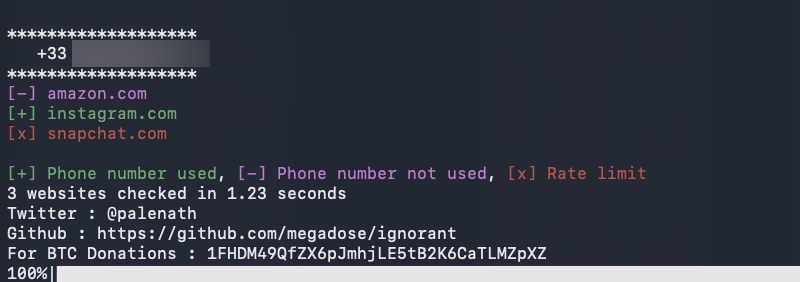
Here, we can see that only three sites are tested: Amazon, Instagram, and Snapchat.
Recommendations
Stay Within a Legal and Ethical Framework
These tools use public information, but that does not mean anything goes. In France and the European Union, the collection and processing of personal data are governed by the GDPR, including when that data is publicly accessible. Using these tools to monitor or track a person without a legitimate reason can expose you to legal action.
A few simple principles will keep you on the right side of the line. Work on your own identity or on test accounts you control. Never use noisy options (such as --allow-loud) on a third party, since they generate notifications for the targeted person. And if you are carrying out an investigation in a professional context (audit, threat research, investigation), make sure you have a legal basis and a clearly defined scope. And above all, authorization.
Adopt Good Usage Practices
Space out your searches, because these tools send a lot of requests to real authentication services, and a single IP address gets rate-limited quickly. user-scanner’s proxy support helps work around that issue. Also keep in mind that an error or rate-limit status does not mean there is no account, only that the site could not be tested properly. There can also be false positives. The tool does most of the heavy lifting, but you still need to analyze the results.
Reduce Your Own Digital Footprint
The defensive value of this approach is that it turns an attack surface into an action plan. Once you have seen what a third party can reconstruct about you, you can take action. Here are a few useful ideas in that direction:
- Do not reuse the same username everywhere, because it is the common thread that links all your accounts together.
- Use multiple email addresses or aliases per service to compartmentalize your registrations and break cross-correlation (a feature offered by many services, including Proton Mail).
- Delete accounts you no longer use, especially those that these tools surface and that you had forgotten about.
- Check the recovery options for your important accounts.
- Pay attention to unsolicited password reset emails, which may indicate that an enumeration is underway against your accounts.
Conclusion
Maigret, user-scanner, and Ignorant form a coherent trio for mapping an identity’s online presence from three entry points: username, email, and phone number. Deployed with Docker, they provide a solid starting point for running a search, especially with usernames and email addresses, where the results are often rich.
Here are the links to the official repositories for the three tools: Maigret, user-scanner, and Ignorant. I’ll also mention Social-Analyzer, which is an alternative — less complete — to Maigret (but for cross-checking information, it can be useful).
And you: did you have an accurate idea of how many accounts are tied to your username or email address? What do you think?
FAQ
What is account enumeration in OSINT?
Account enumeration consists of automatically testing an identifier (username, email, or phone number) across many sites to determine where an account exists. The tools rely either on detecting public profile pages or on the behavior of password reset functions, which react differently depending on whether an account is associated with the tested identifier.
What is Maigret used for?
Maigret searches for accounts associated with a username across more than 3,000 sites. It detects the existence of profiles, extracts public information from found pages (bio, avatar, links), and launches a recursive search on newly discovered identifiers. It offers both a web interface and a command-line version.
Is user-scanner a good replacement for Holehe?
Yes. user-scanner uses the same technique as Holehe (enumeration through password reset flows), but with actively maintained modules. Holehe is still widely known, but many of its modules are now broken, which is why I chose to present user-scanner.
Is it legal to use these OSINT tools?
These tools use public information, but the GDPR regulates the collection and processing of personal data, even when public. Using them on your own identity is not a problem. Using them on a third party without a legitimate reason may expose you to legal action. In a professional context, a legal basis and a defined scope are required.
What is the difference between Maigret and Sherlock?
Maigret is a derivative of Sherlock that goes further. Where Sherlock only lists accounts found on around 400 sites, Maigret covers more than 3,000 sites, extracts profile information, and relaunches a recursive search on discovered identifiers. Maigret also offers a web interface, which Sherlock does not. But nothing stops you from cross-checking the information.
How can I reduce my digital footprint after this kind of analysis?
Avoid reusing the same username everywhere, use email aliases per service to compartmentalize your registrations, delete accounts you no longer use, and check the recovery options for your important accounts.