www.it-connect.fr

97% of Ransomware Victims Had MFA: Where Are the Blind Spots?
In 97% of ransomware attacks linked to compromised credentials, the victim had MFA enabled. This figure, taken from Sophos' annual report published in July 2026, might lead one to believe that multifactor authentication is useless. That is the wrong conclusion. MFA was indeed in place, but not everywhere: on Microsoft 365 and SaaS apps, yes; on VPNs, Remote Desktop sessions, or admin consoles, not necessarily.
This number highlights a scenario found in many companies: MFA has been rolled out broadly in the cloud because it was easy to enable, and because vendors often force the issue. The best example is probably Microsoft 365. Meanwhile, your service provider and even your own users are still accessing the VPN with nothing more than a password. And this observation can be taken even further: Windows logon is generally still done with a simple password.
In this article, I will look at what the 2026 figures actually say, then map the authentication paths that most often escape MFA. We will then examine what the ANSSI reference framework for NIS 2 implies on this topic, and how to close the Active Directory blind spots with Specops Secure Access, including what this solution does not cover.
This article includes a sponsored message for Specops Software.
MFA Was There, but Not in the Right Places
What the 2026 numbers say
Sophos' State of Ransomware 2026 report is based on a survey of 2,158 IT and cybersecurity leaders across 17 countries whose organizations suffered a ransomware attack over the previous year. I will begin by highlighting three figures:
- 79% of ransomware attacks started with an identity-based approach.
- Compromised credentials remain the third technical cause of attack (23%), behind malicious emails (26%) and phishing (24%), two vectors that are also very often used to steal credentials.
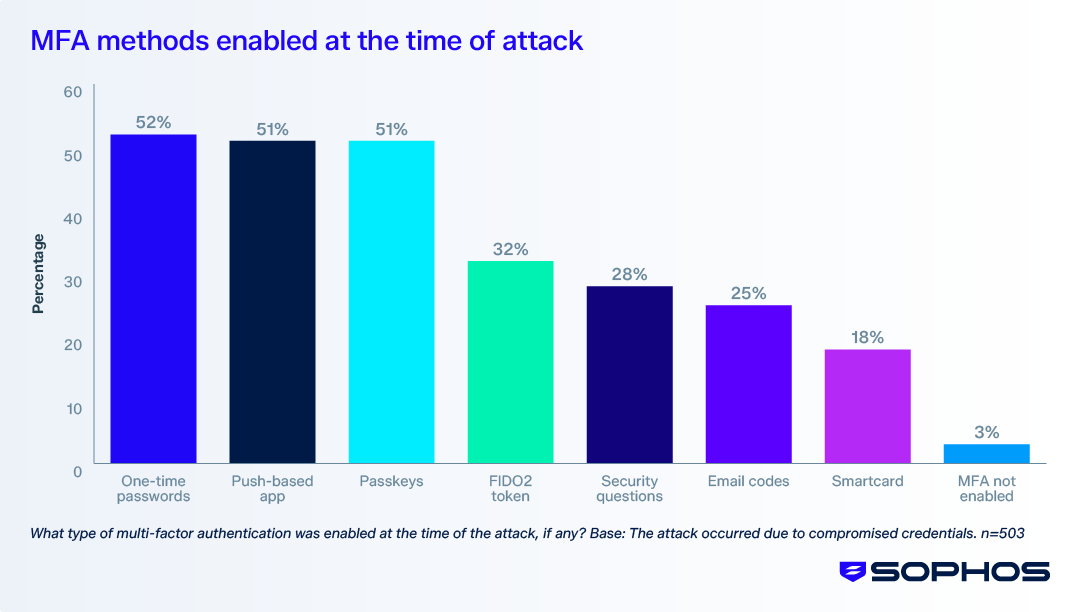
- 97% of victims whose attack originated with compromised credentials had MFA enabled in some form at the time of the attack.
Sophos' 2026 Active Adversary Report, this time based on 661 real incident response and MDR engagements, points in the same direction. Root causes are identity-related in 67% of cases, and MFA was missing where it would have been useful in 59% of cases. Most importantly, it describes the typical pattern: SaaS accounts often had MFA, but VPNs, firewall admin consoles, and legacy applications did not.
Two different failures not to confuse
When people say "the attacker bypassed MFA," this actually refers to two situations that can easily be mixed up:
- MFA bypassed: the attacker gets through despite the second factor. This is the case with AiTM (adversary-in-the-middle) phishing, which intercepts the session token, as recently shown by the BigBear 2.0 campaign that bypassed MFA for 258 companies. It is also the case with MFA fatigue, cookie theft by an infostealer, or social engineering against the help desk.
- MFA absent: the attacker never encountered a second factor because they used an authentication path that does not require one. A poorly protected RDP access, VPN access, and so on...
The first case comes down to the choice of authentication methods (phishing-resistant methods, binding the session to the device). It is also worth noting that you should be careful when mixing and allowing multiple methods: the attacker may choose the weakest one, even if a passkey is allowed. The second case is about MFA coverage, meaning the answer to the following question: which accesses are actually protected?. This article focuses on that second point.
Mapping Your Authentication Paths
Why Entra ID MFA is not enough
Enabling MFA in Microsoft Entra ID protects authentications that go through Entra ID: Microsoft 365 and federated applications. It does not protect Kerberos or NTLM authentications handled by your domain controllers. An attacker who has a valid Active Directory password will never go through the Microsoft login page if they can open a VPN tunnel backed by RADIUS or an RDP session. I detailed this separation between the two authentication planes in the article NIS 2: Why Windows Logon Remains the Blind Spot in Your Access Strategy.
The right approach is therefore to look at access points, not tools. For each entry point, ask yourself three questions:
- Which authentication source is being used?
- Is a second factor required?
- What does a successful authentication grant access to?
Entry points to review
Here is a starting grid for a typical hybrid Active Directory environment. It reflects the most common situation: Active Directory accounts are synchronized to Entra ID with Entra Connect, and MFA has been enabled on Microsoft 365 (via Conditional Access or security defaults), with no other MFA solution in place. The third column therefore answers a simple question: does this already deployed MFA also protect this entry point?
| Entry point | Authentication source | Covered by Entra ID MFA? | Exposure |
|---|---|---|---|
| Microsoft 365, federated SaaS apps | Entra ID | Yes, depending on Conditional Access | Internet |
| VPN (RADIUS / NPS) | Active Directory | No, unless using the NPS extension for Microsoft Entra MFA | Internet |
| Remote Desktop Gateway | Active Directory | No, unless using the NPS extension for Microsoft Entra MFA | Internet |
| Direct RDP to a server | Active Directory | No | Internal network |
| Windows logon and unlock | Active Directory | No | Physical workstation, internal network |
| Logon to a domain controller | Active Directory | No | Admin workstation |
| Admin consoles (firewall, hypervisor, NAS) | Local or LDAP database | No | Variable, sometimes Internet |
| Contractor and managed service accounts | Active Directory or local accounts | Rarely | Internet (VPN, remote support tools) |
| Local accounts (local administrator) | Local SAM database | No | Workstation, internal network |
The "Exposure" column is used to prioritize actions. For example, a VPN or Remote Desktop Gateway exposed to the Internet and accessible with nothing more than a password should be handled first, because it is directly reachable and exploitable with compromised credentials.
For protecting RDP access through a gateway, Microsoft provides the NPS extension for Entra MFA, which we presented in the tutorial Securing RDP Access to Your Servers with Azure MFA (and NPS). This extension covers RADIUS flows (VPN, gateway), not Windows logon.
The contractor case
Contractor access deserves a separate line in your inventory. It often combines every weakness: shared accounts, elevated privileges, remote access, and lifecycle management handled by no one. The ReCyF, the framework published by ANSSI to support NIS 2, explicitly includes contractors in its definition of remote access. To frame these accesses with your managed service provider, ANSSI's outsourcing guide, summarized by Mickael in the article Security Brief: Outsourcing Information Systems, is a good starting point.
The Gaps We Create Ourselves
Once MFA has been deployed, the coverage of that same MFA across access to your information system can deteriorate over time. It is rarely attackers who create these gaps: it is admins through the exceptions granted along the way. They accumulate over time and become entry points, or rather, weaknesses in your information system.
- Exclusion groups that are never reviewed
Any MFA solution offers a way to exclude accounts. There are good reasons to manage exclusions, but also a thousand and one bad ones. For example, it is necessary for a service account or an emergency break-glass account. That is not the issue. The problem lies elsewhere, especially with "temporary" exclusions: a user who lost their phone, a VIP who finds the process inconvenient, a time-sensitive project involving a contractor, and so on....
Without regular review, the exclusion group becomes the list of accounts an attacker has every interest in targeting.
- Weak authentication factors
Not all methods are equal. SMS remains vulnerable to SIM swapping and interception, to the point that Microsoft has started ending MFA authentication by SMS and call in favor of passkeys in Entra ID. A simple push notification can be approved by mistake.
The main problem is this: if you keep a weak method as a fallback, you are effectively lowering the security of the entire chain to the level of that backup factor. What I mean is that if you allow both passkeys and SMS codes as a fallback option, the attacker will go straight for SMS access. If you look closely at the Sophos chart presented earlier, you will notice that passkeys are almost at the same level as codes: that says a lot.
- Trusted networks
Exempting logons coming from corporate IP addresses from MFA is a common option. Often, this choice is made so as not to inconvenience users too much. And above all, this decision assumes that logons from the internal network are safe. That is true, except once an attacker manages to get inside. Not only do they move forward, but they also eliminate MFA and may remove other security controls.
- Local accounts
If the local administrator account on a workstation can be accessed through an interactive session without a second factor, it also becomes an entry point. Here, the context is different, since it implies the attacker is already on your internal network. However, the risk is even greater when the password is the same across all workstations. Managing the password with Windows LAPS reduces the lateral movement risk.
- Password reset and re-enrollment
One last path is often forgotten: the help desk. If an attacker can call the service desk, impersonate a user, and obtain a password reset followed by MFA re-enrollment on their own phone, the second factor no longer helps. Identity verification before any action on an account is therefore part of MFA coverage in its procedural dimension, as I explained in this article: How Can You Verify a User's Identity with Confidence Before Acting on Their Account?.
What NIS 2 and the ReCyF Mean for This
I will not repeat here the detailed analysis of NIS 2 authentication requirements, which I already covered in the dedicated article on Windows logon. In short, the ReCyF includes:
- Measure 8.3-EE: for essential entities, remote access authentication must be multifactor.
- Measure 10.B.1-EI/EE: for all access, an authentication mechanism involving at least one secret element. Password-only access therefore remains compliant outside remote access scenarios.
One point, however, is directly related to our topic. The ReCyF requires both essential and important entities to perform an annual review of accounts at minimum (measure 10.A.6-EI/EE) and an annual review of access rights at minimum (measure 10.C.4-EI/EE). An MFA exclusion is a special right granted to an account. It therefore belongs in this review, with a justification for each affected account.
In other words, the mapping shown above is not just a security exercise meant to show where you stand today. I see it as a deliverable you can present during an audit, provided you keep it up to date. As a reminder, the French law transposing NIS 2 has still not been enacted at the time of writing (it seems to be on this week's agenda), but the technical reference framework has been published.
Closing Active Directory Blind Spots with Specops Secure Access
What the solution covers
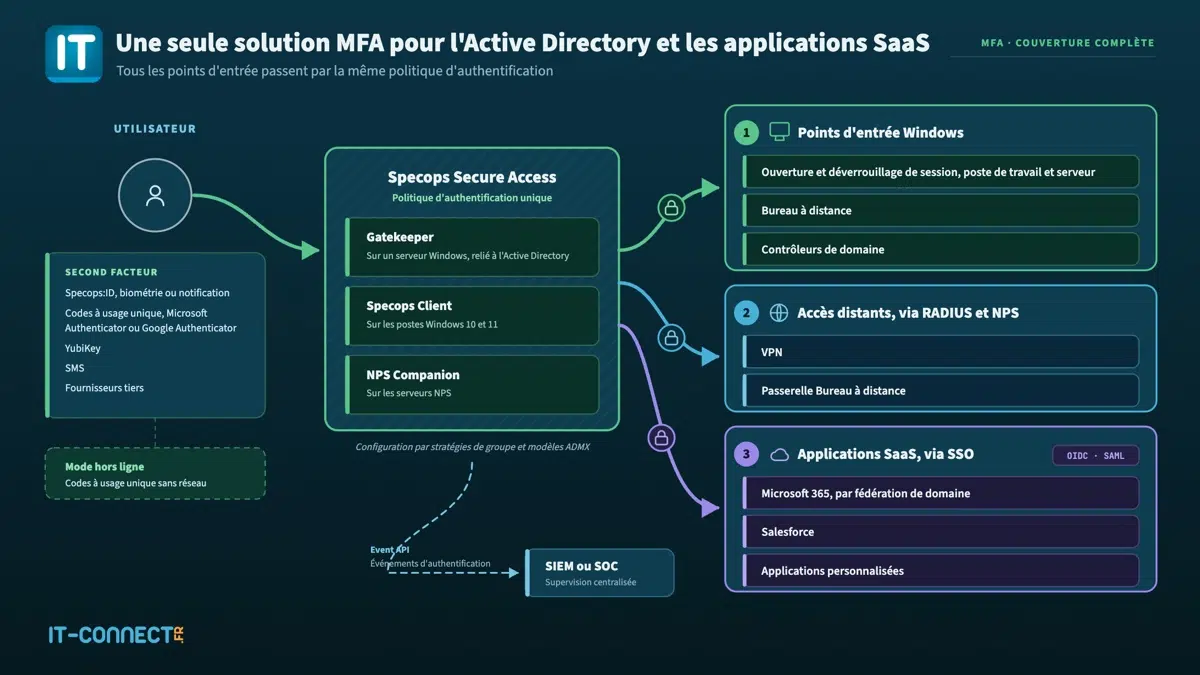
Specops Secure Access adds a second authentication factor directly at the level of Active Directory-based access that escapes Entra ID MFA. In other words, this solution should be able to address several gaps highlighted by the previous table. I am not going back over the installation of this solution in this article, as I covered it in the one dedicated to getting started with Specops Secure Access.
With the current version, the following scenarios are supported:
- Windows workstation logon on Windows 10 and Windows 11 (64-bit), as well as session unlock.
- Windows server logon
- Domain controller logon
- Direct Remote Desktop Protocol (RDP) connections
- Connections through a Remote Desktop Gateway
- RADIUS-compatible VPN connections, via NPS, regardless of the VPN appliance.
- SAML or OpenID Connect SaaS applications, via Specops SSO.
Let us now go back through the gaps identified earlier, one by one.
Domain controllers and the trust core
This Windows MFA solution is supported on Active Directory domain controllers. So, an interactive logon on a DC, whether local or over RDP, can now require a second factor.
This is consistent with the logic of the Tiering Model: domain controllers belong to Tier 0, and an interactive session on one of them gives control over the entire directory. Just make sure that, before enabling this setting, you have a documented and tested break-glass account.
Blocking local accounts
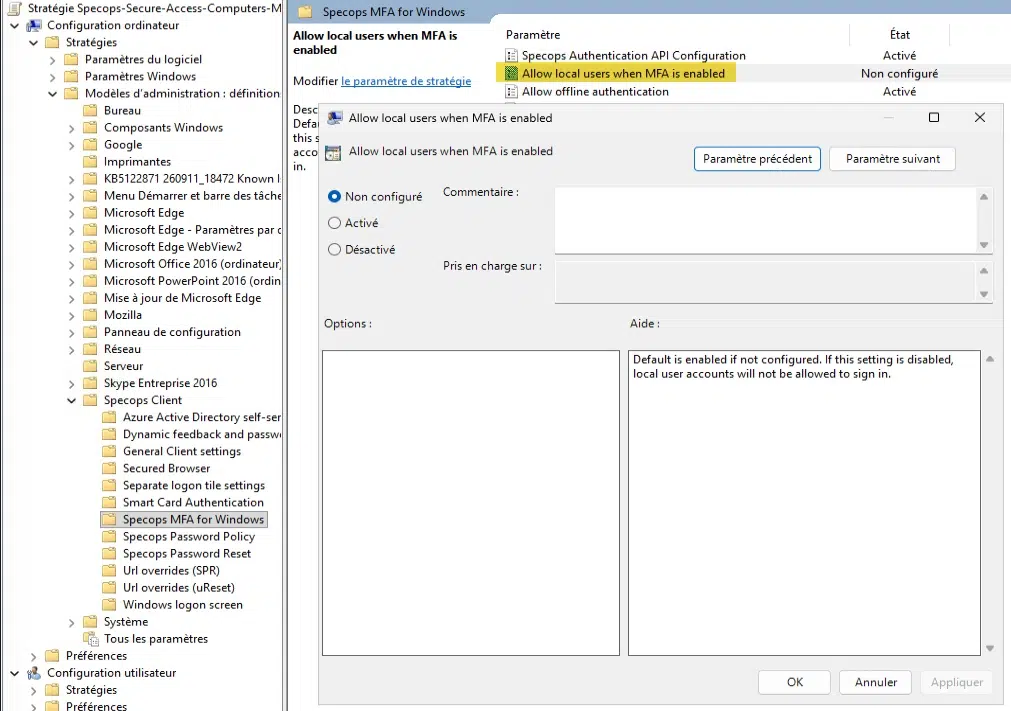
If you want to eliminate local logon (which is not a neutral change) on your Windows machines, the Specops Secure Access solution provides a ready-to-use setting for that purpose. Its name is Allow local users when MFA is enabled; it controls logon with a local account on a machine where MFA is enabled. By default, if it is not configured, local accounts remain allowed.
Warning: before disabling local accounts, verify your troubleshooting process for a workstation that has lost its trust relationship with the domain. That is precisely the case where you fall back to the local administrator account.
Managing the exclusion group
Secure Access allows you to exclude a security group from MFA, including via a GPO targeting the group. The feature is useful, provided it is treated as a governed exception: a group owner, a justification for each member, and regular content reviews.
As a reminder, a simple PowerShell command can be used to extract the list of group members:
$MFAExclusion = "GS_MFA_Exclusion"
Get-ADGroupMember -Identity $MFAExclusion -Recursive |
    Get-ADUser -Properties Description, LastLogonDate |
    Select-Object SamAccountName, Description, LastLogonDate
Trusted networks and request frequency
The Trusted Network Locations feature allows only the password to be requested from certain IP ranges, meaning MFA is not required. As mentioned earlier, this kind of functionality should be used with caution.
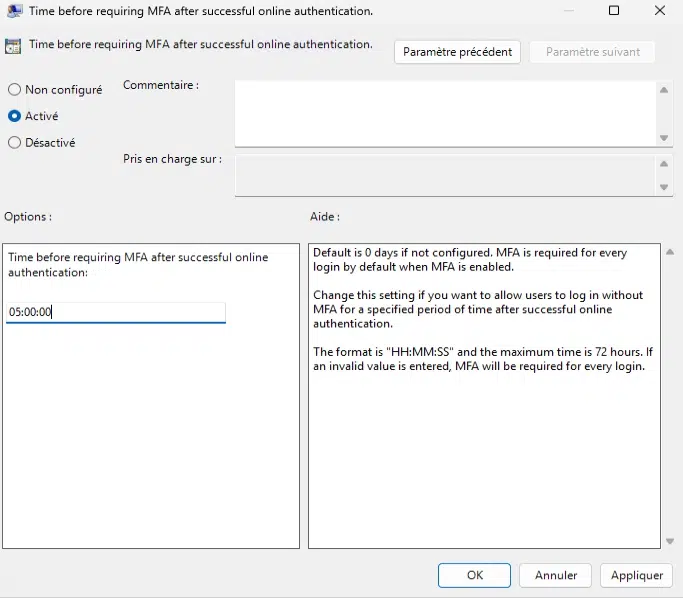
However, there is one setting that provides a better balance between security and user comfort: Time before requiring MFA after successful online authentication. By default, Secure Access requests the second factor at every logon. This setting lets you space out prompts (up to 72 hours maximum), for example to 5 hours to cover half a workday.
Offline mode, a compromise to tune
By default, offline authentication is disabled: if the Specops API cannot be reached, the user cannot sign in. Once enabled, it relies on offline codes generated in the Specops:ID app, or on a YubiKey used as a smart card. The Number of days before requiring online authentication setting limits how long a user can go without an online authentication (30 days by default).
Reducing this value for mobile devices limits the window during which a stolen workstation could be unlocked using the password and a compromised offline code.
Proving MFA coverage with logs
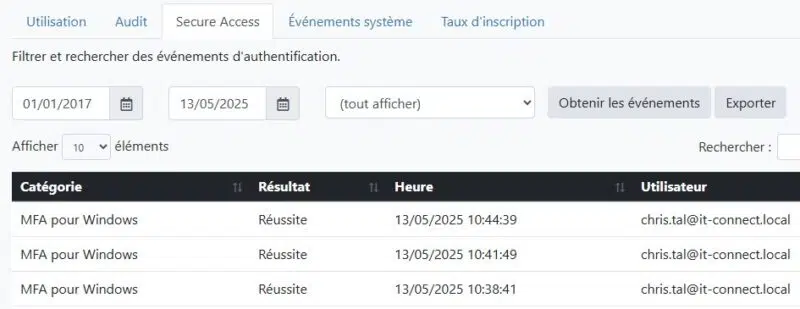
MFA coverage must be demonstrable. To address this need, the Specops API exposes authentication-related events for ingestion into a SIEM. At this time, there is no webhook, but you can query it to collect information. These events can also be reviewed through the Specops platform logs.
What Secure Access Does Not Cover
In the interest of honesty, here are the blind spots that remain even with Specops Secure Access deployed:
- Admin consoles for infrastructure devices (firewalls, hypervisors, NAS) that have their own account database. They are included in the Sophos findings. However, a Hyper-V hypervisor could be covered, and a NAS usually has a native MFA function, as do firewalls.
- Non-interactive network authentications (SMB access, WinRM, LDAP queries). The credential provider approach acts on interactive logon. An attacker with an NTLM hash or a Kerberos ticket is not stopped by this mechanism. Hardening the directory and Tiering remain necessary.
- Session theft on cloud applications (AiTM phishing, cookie theft). Once authentication has been validated, a stolen token remains usable. This is the limitation that device trust validation approaches are trying to address.
- Non-Windows endpoints: the Specops client is supported on Windows 10 and Windows 11.
Conclusion
The Sophos figure does not mean MFA is ineffective. It means most organizations deployed MFA where it was easy, then considered the job done. The useful question is no longer "Do we have MFA?", but "Which access paths still give something useful to an attacker armed with nothing more than a password?".
The approach I recommend comes in three steps: inventory authentication paths, prioritize according to exposure, then govern exceptions over time. Specops Secure Access provides a concrete answer for the Active Directory side (Windows logon, RDP, VPN, and domain controllers), with useful settings to avoid creating your own holes in MFA coverage. It does not cover everything, and that is precisely why the mapping must come before the tool selection.