www.it-connect.fr

Microsoft Licensing Explained: Contracts, Product Families, and Buying Channels
Microsoft licensing is a complex world: contracts (EA, MCA, CSP…), license families, multi-component bundles, and purchasing channels overlap in ways that can even confuse seasoned administrators. This complexity can have a direct impact on costs: oversized licenses, purchases made through the wrong channel, or contract migrations triggered by the disappearance of legacy programs. This article provides the key reference points to help you make sense of it all: first, the contracts and their link to Cloud billing accounts; then the M365 families and their bundle logic; and finally, the purchasing channels and the different types of partners. The goal here is not to identify the “right” contract, but to help everyone better navigate this jungle.
Microsoft licensing programs
To begin, we will look at the licensing programs available from Microsoft. Each program provides a legal and commercial framework with the customer organization or an individual, in the case of consumer offerings. These contracts define several criteria:
- What can be purchased : some products are only available under certain contracts (for example, Azure pay-as-you-go exists only under an MCA, not under an Open Licence).
- Commercial terms : commitment length, billing terms (monthly, annual, usage-based), possible volume discounts, and termination rights.
- Usage rights granted by the vendor : the contract itself does not directly grant a product license, but it sets the general rules (intellectual property, compliance, service levels, data confidentiality) that apply to all licenses purchased under it.
- Billing structure: the contract determines how billing accounts are created, and therefore how invoices are issued.
In short: signing a Microsoft contract (EA, MCA, CSP...) does not yet give you a usable license. It does, however, open the door to purchasing licenses (Microsoft 365, Azure, Dynamics 365, etc.) according to the rules defined by that contract. This is the distinction to keep in mind: the contract is the legal/commercial container, while the license is the right to use a specific product within that container.
There are several licensing programs; here is the list of the main ones:
| Program / contract name | Description | Target organization |
| EA (Enterprise Agreement) | Multi-year contract (3 years) with volume commitment, discounts tied to the total committed amount, and access to Software Assurance. Gradually being replaced by MCA-E in Microsoft’s commercial strategy. | Large enterprises (generally 500+ seats) |
| MCA (Microsoft Customer Agreement) | Open-ended framework agreement, with no fixed term, signed once and then valid for all subsequent purchases (Azure, M365 via CSP, etc.). Serves as the contractual foundation for self-service and partner purchases. | Organizations of all sizes |
| MCA-E (Microsoft Customer Agreement for Enterprise) | MCA variant designed to replace EA for large accounts: modernized commitment and negotiation mechanisms, with a commercial logic close to what was historically available in EA. | Large enterprises, an alternative to EA |
| CSP (Cloud Solution Provider) | Purchase of cloud and on-premises licenses through a reseller partner, with no mandatory commitment. Billing and commitment can be monthly, annual, or multi-year. Became the default channel for SMBs and mid-market organizations after the closure of Open Licence. | SMBs, mid-market, and large enterprises |
| SPLA (Services Provider License Agreement) | Monthly rental licenses used by a hoster/service provider to host Microsoft solutions for its customers. | Hosters, managed service providers |
| OEM | Licenses preinstalled by the manufacturer, permanently tied to the hardware. | Small businesses, consumers, new hardware |
Microsoft’s contractual landscape has not always been this streamlined. Historical programs such as Open Licence, closed in January 2022, or MPSA, now approaching end of life, previously structured a large share of SMB and mid-market purchasing. Microsoft is now actively pushing customers toward two models:
- CSP, now the default channel for purchases with or without commitment for organizations of all sizes.
- MCA / MCA-E: gradually replacing EA as the framework contract for large accounts.
This shift is not neutral for organizations still under a legacy program: it eventually implies a contractual and pricing migration that is better anticipated rather than endured at renewal time.
Cloud contracts and billing accounts
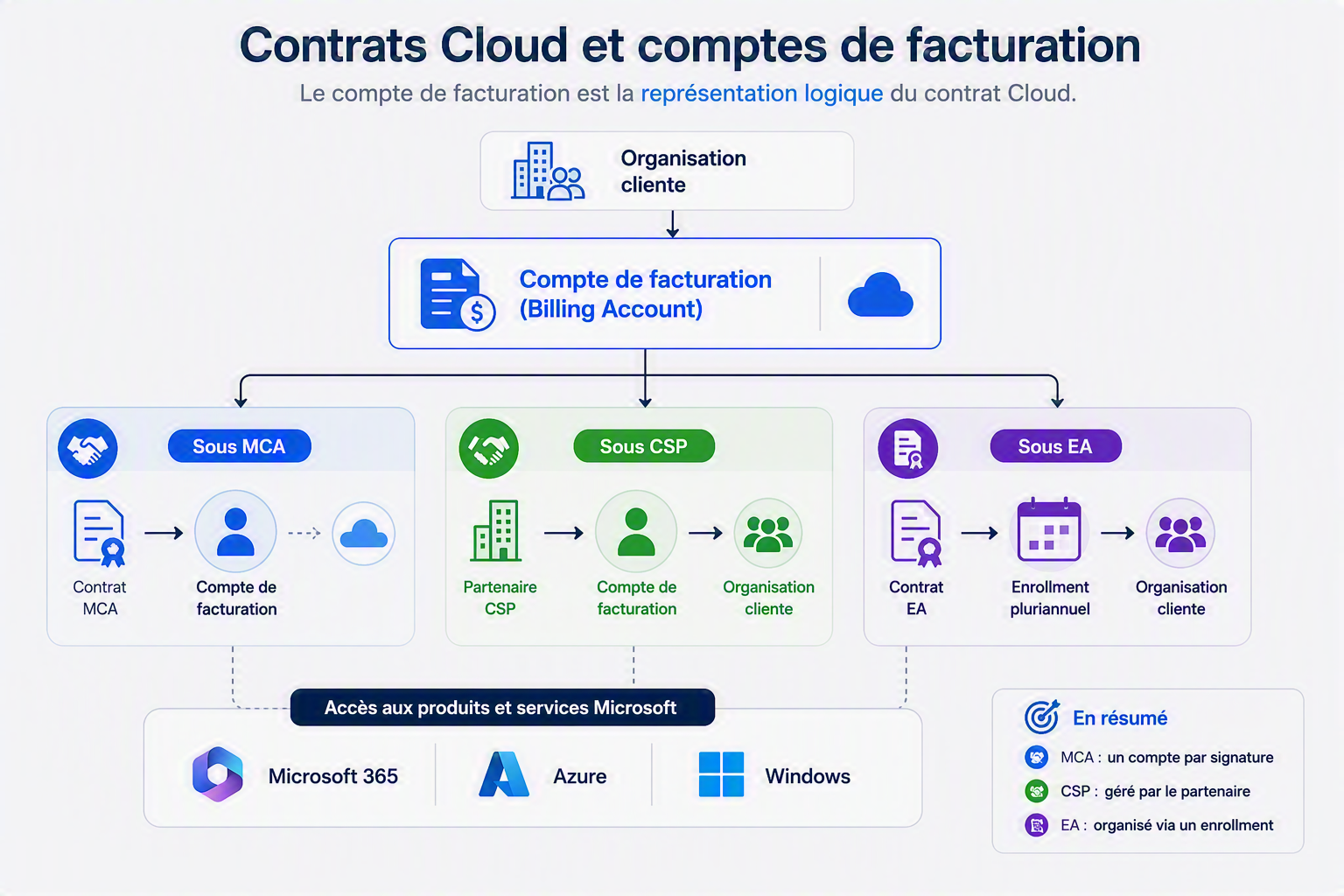
Purchases of Windows, Microsoft 365, or Azure licenses are not tied to a single “physical” contract in the same way as a paper EA: they are tied to a billing account, which itself is linked to an underlying contract. How this works depends on the contract in place:
- Under MCA : each contract signature creates a billing account visible in the Azure portal and/or the M365 admin center. A customer can have multiple billing accounts if they have signed multiple times (for example, an individual MCA and an MCA entered into via a CSP).
- Under CSP : the billing account is tied to the partner-customer relationship. This channel is based on a contractual relationship between Microsoft, the CSP partner, and the end customer. It is the partner that manages the customer’s consolidated billing and support.
- Under EA : the logic is different, organized around a multi-year “enrollment” rather than a Cloud billing account in the MCA sense.
In practical terms, the billing account is a logical representation of the contract held by the customer organization. It then makes it possible to subscribe to products and services, according to the terms of the licensing contract.
Key takeaway: a licensing program and a purchasing channel are two different things. An MCA or an EA is primarily a contractual framework. CSP, on the other hand, is mainly a distribution channel that allows you to buy Microsoft licenses through a partner. This is a common source of confusion in Microsoft licensing.
Microsoft 365 license families
Once the contract is in place, M365 licenses themselves are divided into major families, each with its own set of plans and eligibility rules:
| Family | Plans | Target / Eligibility |
| Consumer | Microsoft 365 Personal & Family | Individuals, up to 6 people for the Family subscription. |
| Business | Microsoft 365 Basic / Standard / Premium | Organizations with up to 300 users |
| Enterprise | Microsoft 365 E3 / E5 and E7 available since 2026 Office 365 E1 / E3 / E5 | Organizations with no size limit. |
| Education | Microsoft 365 A1 / A3 / A5 Office 365 A1 / A3 / A5 | Accredited schools and universities, students, and staff |
| Non-profit | Microsoft 365 Business Basic / Standard / Premium for Nonprofit Microsoft 365 E3 / E5 for Nonprofit | Approved non-profit organizations (often via TechSoup), discounted pricing or license grants |
All families offer a range of license plans with an upward progression: each tier adds advanced security, compliance, or collaboration capabilities compared with the previous one, without necessarily starting from scratch.
Bundles and standalone plans
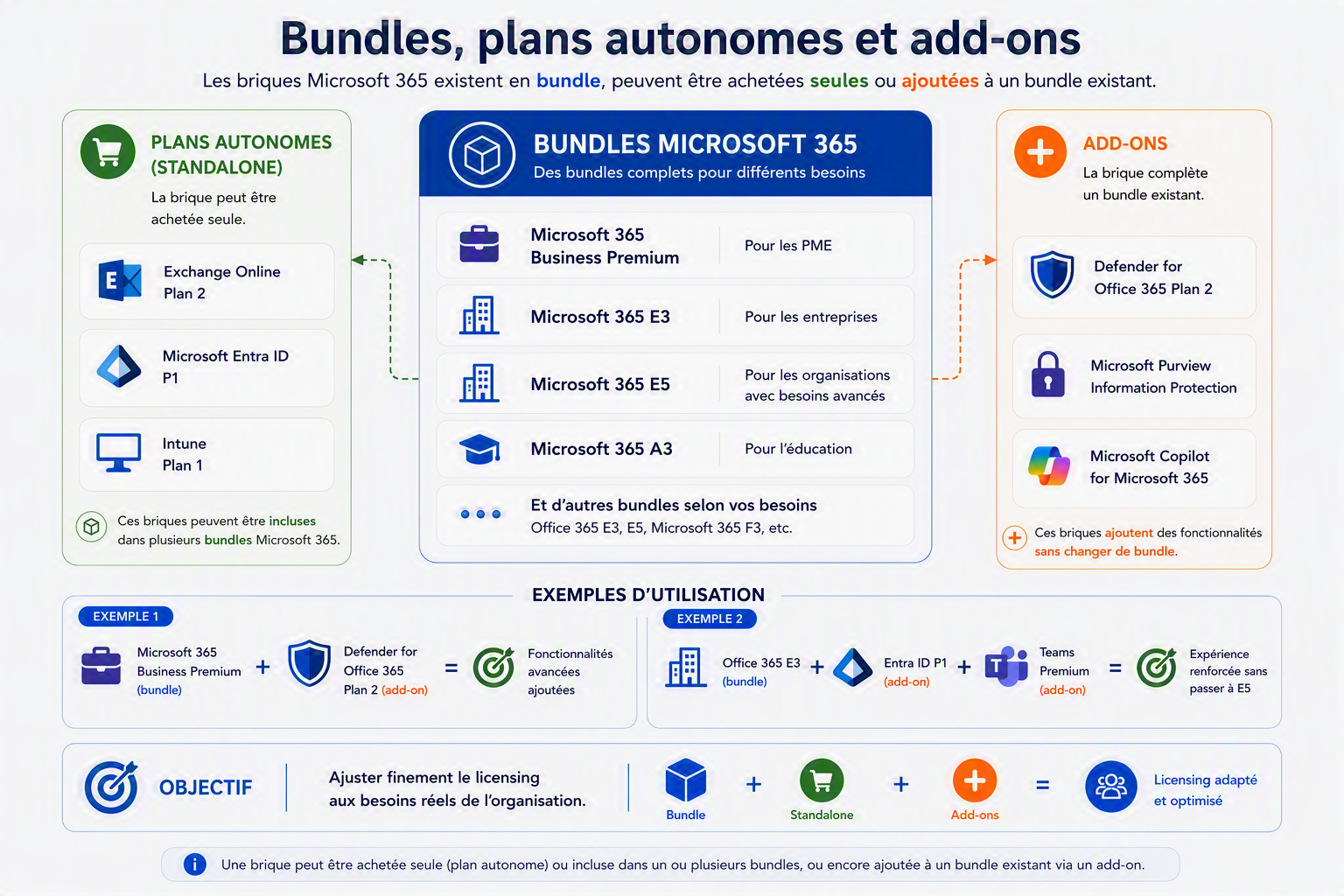
A Microsoft 365 plan (Business Premium, E3, E5...) is not a single product: it is a bundle, grouping several software components sold together at a more favorable price than if they were purchased separately. A Microsoft 365 E5 plan, for example, combines the Office suite, Exchange Online, SharePoint, Teams, Intune, Entra ID P2, Defender for Office 365, and other security and compliance components.
What is less well known is that many of these components also exist outside the bundle, in two forms:
- As a standalone plan : the component can be purchased on its own, without the rest of the bundle. This is the case, for example, with Exchange Online Plan 1/2, Entra ID P1/P2, Intune Plan 1, or Power BI Pro.
- As an add-on : the component complements an already owned bundle to add a specific feature without moving to the next tier. For example, adding Defender for Office 365 Plan 2 on top of Microsoft 365 Business Premium, rather than migrating all users to E5.
This approach makes it possible to fine-tune a licensing plan to the real needs of an organization, rather than paying for a full bundle when only one specific feature is required. The same applies in the opposite case, to avoid stacking add-ons whose combined cost would exceed that of a higher tier.
Purchasing channels
Once the contract and licenses have been identified, the remaining question is how to buy them. Two main channels coexist:
- Direct purchase : the customer buys directly from Microsoft, without an intermediary. This is the historical model for EA and for MCA signed directly, as well as self-service purchases for certain products.
- Purchase via CSP : the customer buys through a reseller partner, who manages all or part of the commercial, technical, and support relationship. As noted earlier, this channel is based on a three-way relationship (customer, reseller, and Microsoft), and comes in two partner profiles:
- Direct-bill partner (formerly called Tier 1) : billed directly by Microsoft, manages the entire customer relationship (billing, support, provisioning).
- Indirect reseller (formerly called Tier 2) : not billed directly by Microsoft, but relies on a Distributor (formerly Indirect Provider) that buys in bulk and handles billing on its behalf.
For an SMB or mid-market organization, going through a CSP partner, whether a Direct-bill partner or an Indirect reseller, generally offers the advantage of technical guidance and a single point of contact. By contrast, direct purchasing leaves the organization alone with Microsoft for day-to-day license and service management. In addition, a CSP partner can easily offer negotiated pricing based on your needs, commitment model, and billing terms.
Conclusion
These five steps cover the key milestones an organization must go through to access Microsoft 365:
- Choose the program that defines the contract
- Have the billing account that results from it
- Identify and subscribe to the license family suited to the organization’s type, needs, and size
- Optimize licensing and cost across bundles, standalone components, and add-ons
- Finally, choose the purchasing channel used to formalize the agreement: through a CSP or directly with Microsoft
To conclude this article, here are a few scenarios illustrating how all the steps discussed above work together:
- SMB with 50 employees, with no particular compliance constraints : Microsoft 365 Business Premium, purchased through a CSP partner as a Direct Bill Partner. The CSP partner provides local support and billing.
- Non-profit organization with 15 employees eligible for the non-profit program : Microsoft 365 Business Basic as a free grant for most accounts, supplemented by a few discounted Business Premium licenses for workstations that require desktop applications, all managed by a CSP partner familiar with the vendor’s Non-profit program specifics.
- Mid-market company with 800 employees and stronger compliance requirements : Microsoft 365 E3 as the foundation, with a Defender for Office 365 Plan 2 add-on for teams exposed to targeted phishing risks, rather than a broad move to E5. This illustrates the typical bundle/add-on tradeoff discussed in section 4.
- Large enterprise with 3,000 employees at the end of its EA cycle : migration to MCA-E at renewal time, planned several months in advance to avoid an imposed transition, as mentioned in section 1.
In all four cases, the same logic applies: start from the organization’s real need, then work back to the contract, license family, and purchasing channel that meet it, rather than the other way around. This is the “from need to contract” perspective that this article aims to make accessible.
As a freelance consultant specializing in the Microsoft Infra Cloud & Modern Work ecosystem, I can help you manage and optimize your licenses and services. Feel free to contact me if needed.