www.it-connect.fr


KB5124008: Microsoft Confirms the Trust Relationship Bug and Points to Machine Identity Isolation
Users who can no longer sign in, and devices that no longer trust the Active Directory domain: Microsoft has finally acknowledged that the KB5124008 update for Windows 11 is to blame. Microsoft also confirms that there is a link with the Machine Identity Isolation feature. Here are the latest details.
Two days ago, I published an article about the KB5124008 update breaking the trust relationship between Windows 11 devices and Active Directory. At that time, the issue had been reported by admins on the Web, including on Microsoft Q&A. But from Microsoft, there was complete silence. Still, one lead kept coming up repeatedly: Machine Identity Isolation, a feature related to Credential Guard.
That lead was the right one, and Microsoft has now officially confirmed it. Indeed, on Wednesday, September 16, 2026, in the evening (in France), Microsoft added this malfunction to the Windows 11 known issues list. And the reason I am mentioning it in this new article is that Microsoft has provided a temporary workaround, even though there is still no fix yet.
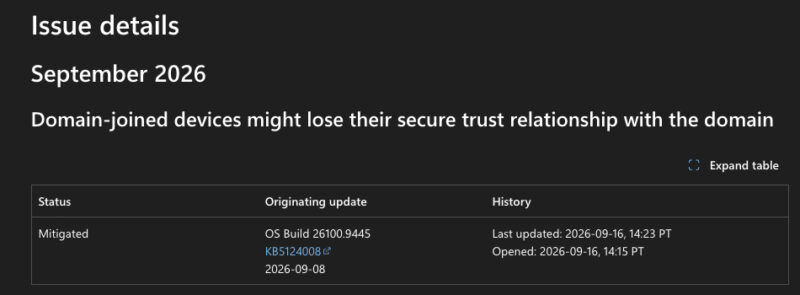
Microsoft explains that after installing the September 8, 2026 update (KB5124008) or a later update, some machine accounts protected by Credential Guard may lose their secure channel with the AD domain. The direct consequence is that users can no longer sign in, even when using valid credentials. On the other hand, sign-in with cached credentials may continue to work.
Why KB5124008 Wakes Up Machine Identity Isolation
What Microsoft confirms is that there is indeed a link between KB5124008 and the activation of Machine Identity Isolation. And above all, Microsoft could have, and I would even say should have, anticipated this problem... Here's why.
This update does not directly enable Machine Identity Isolation application mode. However, it forces Windows to honor existing settings, or settings deployed through policy, that enabled this mode. In other words, a configuration that previously had no effect suddenly becomes active overnight.
The catch, and this is the root cause of the issue, is that this feature is only supported with Active Directory domain controllers where the domain functional level is set to Windows Server 2025. "The feature must be disabled in other environments," Microsoft warns. Any device configured for Machine Identity Isolation but connected to DCs that do not meet this condition is therefore affected. This matches the reports, which mentioned domain controllers running Windows Server 2019 and 2022.
In practical terms, if you have configured a Group Policy to set up Credential Guard and your domain does not have a sufficiently high functional level, you will be impacted by this bug. In terms of versions, Windows 11 24H2, 25H2, and 26H1 are affected. No version of Windows Server is affected, because the bug is on the workstation side.
How to Fix the Problem
Here we come back to what was suggested in my previous article, but I am giving you a summary again, taking into account the method officially presented by the Redmond firm. In short, Microsoft recommends disabling Machine Identity Isolation using the same method that was used to enable it. Microsoft therefore suggests:
- Intune: disable the feature in the corresponding Intune policy.
- Group Policy: set the Machine Identity Isolation setting to Disabled in the GPO.
- Registry: check the
MachineIdentityIsolationvalue underHKLM\SYSTEM\CurrentControlSet\Control\Lsaand underHKLM\SOFTWARE\Policies\Microsoft\Windows\DeviceGuard. If it is set to 2, change it to 0.
Then restart the device, and repair the secure channel with this PowerShell command:
Test-ComputerSecureChannel -Repair -Credential (Get-Credential)Warning: on a device whose trust relationship is already broken, the GPO will not be able to refresh, since the machine can no longer authenticate to the domain. Make sure you update the GPO to protect the rest of the fleet and prevent the value from being reapplied after the repair. But on already affected devices, a local Registry intervention seems almost unavoidable. For machines managed by Intune, synchronization does not depend on the AD secure channel, so that should work.
I do not think Microsoft will release an out-of-band update to help you out, because the damage is already done... But we will see. The Redmond firm does mention a future update, though: "We expect to address this issue in a future Windows update by temporarily disabling Machine Identity Isolation while improvements are made to this feature."
What do you think?