www.it-connect.fr

Windows Update Gets New Controls to Finally Put Users Back in Charge
Microsoft has announced several changes to Windows Update, with a clear goal: give users back control and put an end to unexpected restarts. Currently being tested with Windows Insiders, these new features should improve update management on Windows. Let’s take a closer look at what Microsoft has planned.
Microsoft has also added a new policy setting to Windows to make it easier to uninstall Copilot (see this post).
What’s new in Windows Update
Windows Update has often been criticized for its lack of flexibility, especially because of unexpected restarts. Microsoft seems to have listened to its community, at least according to Aria Hanson: "We continuously read the feedback submitted about the Windows update experience. Personally, I’ve had the opportunity to review more than 7,621 direct comments over the past few months".
Two main issues stand out:
- Disruptions caused by untimely updates,
- Lack of control over when updates occur.
Microsoft has decided to provide a concrete answer with new options that will arrive in Windows 11 after a testing phase with Windows Insiders. Specifically, the Redmond company is planning the following features:
- Skip updates during OOBE
During the initial setup phase (called OOBE - Out-Of-Box Experience), it is now possible to skip the update installation step and reach the desktop more quickly.
"Note: this does not apply to managed commercial devices, or in certain edge cases where updates are required for the device to function.", Microsoft specifies. This means enterprise policies will still take precedence.
- A schedule to pause installations
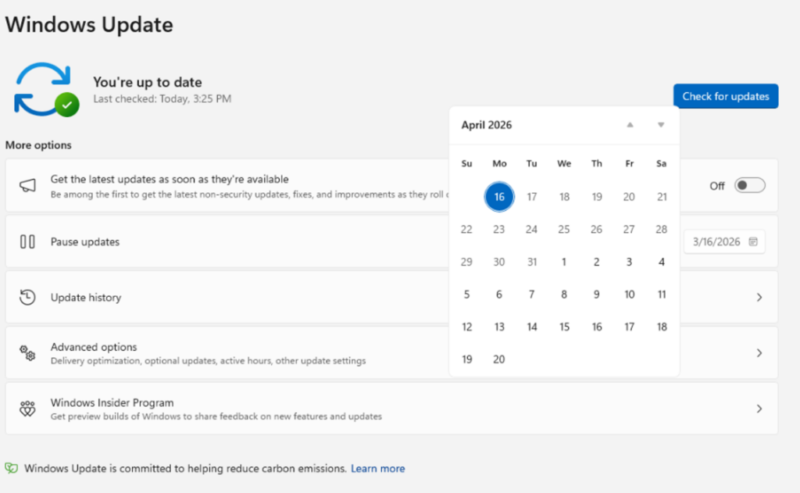
Through a UI enhancement in Windows Update and the addition of a calendar, you can choose a specific date to pause updates until that date. The delay can be up to 35 days, but you can postpone it as many times as needed.
"This means you can now extend the pause for up to 35 days at a time, with no limit to how many times you can reset the pause end date.", Microsoft explains.
- A clearer power menu
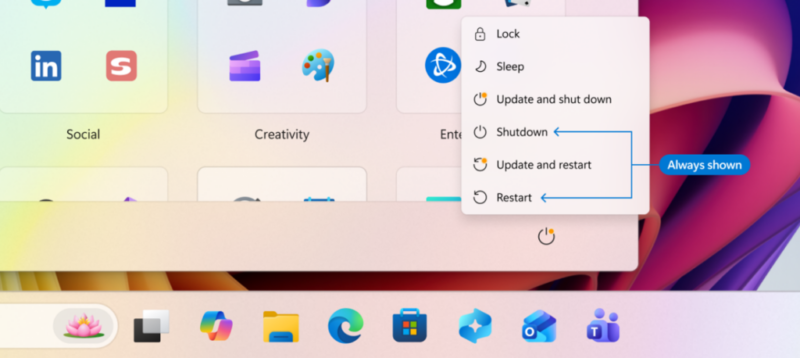
The Redmond company also says the power menu now separates standard actions from update actions. You will find the simple "Restart" and "Shut down" options, which will not trigger any installation, alongside "Update and restart" or "Update and shut down" options when patches are ready. This does not seem like a new feature to me, because there is already a similar distinction today.
What changes, I think, is mainly Windows’ behavior, which will no longer do its own thing if you ask it to restart without installing updates. Microsoft’s wording points in that direction: "If you choose ‘Restart’ or ‘Shut down’, Windows will perform exactly that action, without unexpectedly launching an update."
Finally, Microsoft says driver update labels will be improved. The idea is to indicate the type of device targeted by the update (audio, battery, display, etc.) to avoid confusion.
One reboot per month for Windows 11
Multiple restarts per month for updates: Microsoft does not want to hear about that anymore. One last important point: the Redmond company will release all updates at the same time. As a result, the mandatory monthly cumulative update will be accompanied by all the other updates your device needs to receive.
The goal: enforce a single restart per month to install updates. "We are starting by coordinating driver, .NET, and firmware updates so they align with the monthly quality update, reducing the update experience to a single restart per month.", Microsoft explains in this article.
What do you think?