www.it-connect.fr

Samsung Galaxy Connect Finally Lands on Intel and AMD Windows 11 PCs
The Samsung Galaxy Connect app is no longer limited to Galaxy Book owners: the new version is now compatible with Intel and AMD machines running Windows 11. Here’s what changes.
The end of a Samsung exclusive
As a reminder, the Galaxy Connect app acts as a bridge between your smartphone and your computer. Historically, Samsung restricted Galaxy Connect to users with its own laptops. A kind of vendor lock-in policy that has now been lifted with the rollout of app version 2.1.6.0.
From now on, if you own a computer from another brand, whether it’s Dell, HP or Lenovo, you can install this app and use it on your Windows 11 PC. There are still two conditions to meet:
- Use a Samsung Galaxy smartphone or tablet,
- Use a machine with an Intel or AMD processor (x64 architecture).
Machines with an ARM chip are left out! For example, if you have a computer equipped with a Snapdragon X processor from Snapdragon, this will not be possible (with the current version).
Galaxy Connect features
The goal of Galaxy Connect is to create a bridge between your mobile device (or tablet) and your Windows 11 workstation. It offers features similar to Microsoft’s built-in "Phone Link" experience in Windows, but not only that:
- A clipboard: you can copy and paste items seamlessly between your PC and your smartphone.
- Direct storage access: files on your phone are directly accessible from the computer.
- Browsing sync: you can find your open web pages and continue reading as you move from one device to another (something some web browsers can offer natively).
- An extra screen: Galaxy Connect lets you use your smartphone as a secondary display for your Windows PC. The other option is screen mirroring.
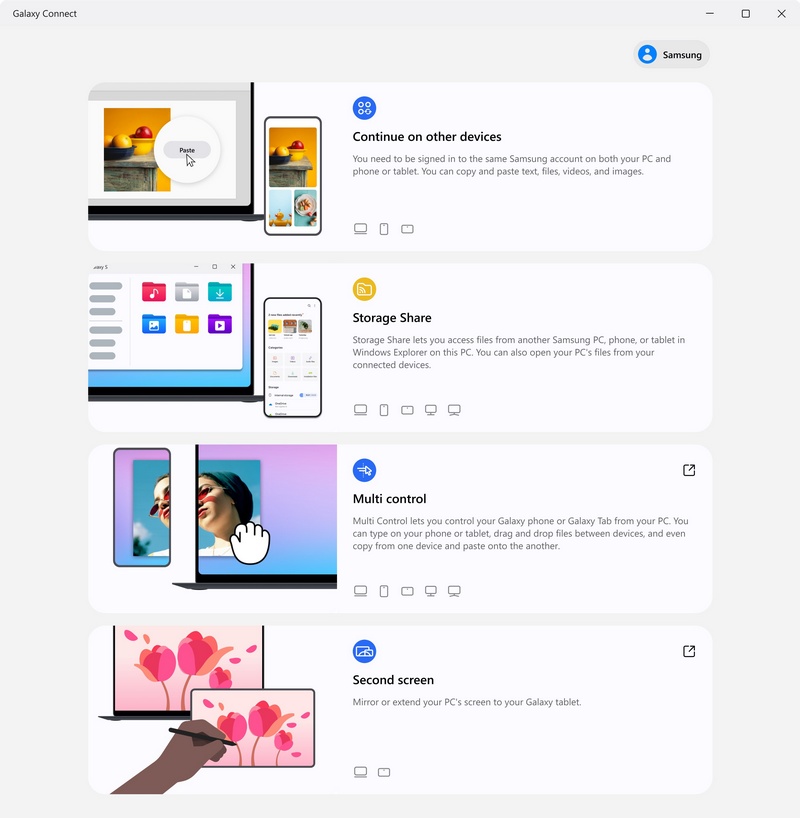
Want to try it? All you need to do is download the Galacy Connect app from the Microsoft Store. To set up the app, you must sign in with the same Samsung account on both the PC and the smartphone.