www.it-connect.fr


After MDT, Microsoft Is Phasing Out WDS in the Next Windows Server Release
WDS, the Windows Deployment Services role, will be deprecated starting with the next major version of Windows Server. Microsoft officially announced this in a support document. Here’s what you need to know.
Microsoft has published a new information note (KB5129631) dedicated to Windows Deployment Services (WDS). And it is not here to announce any new features. On the contrary, this role, well known to administrators for deploying Windows images over the network using PXE boot, will be deprecated starting with the next version of Windows Server. We do not yet know exactly when this future version will be available, but the decision has been made.
The wording matters: deprecation is not removal. We have a good example of this with WSUS: it is deprecated on Windows Server 2025, but it is still usable and available. For WDS, it will be the same: the component remains available, but it is no longer being improved and is no longer the recommended solution. Removal will surely come one day, but we are not there yet.
This announcement is not really a surprise, as WDS has been on the decline for several years:
- 2021 : Windows 11 deployments based on the
boot.wimfile from the installation media, in WDS mode, were deprecated. Deploying custom images via PXE remained possible, including for Windows 11 by adjusting the configuration. - January 2026 : Microsoft began hardening deployment to fix CVE-2026-0386, related to the transmission of the unattend.xml file through an unauthenticated RPC channel. At the time, I published an article about this CVE-2026-0386 flaw and its impact on WDS answer files.
- April 2026 : since the updates released on April 14, 2026, this automated deployment mode has been disabled by default and is no longer supported.
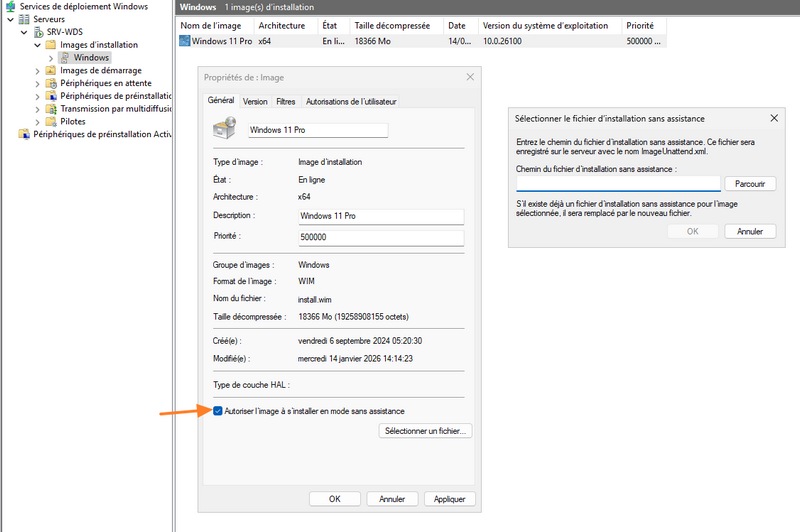
From now on, the entire role is being deprecated starting with the next major Windows Server release: administration console, PXE boot function, CLI management tools, dedicated WinPE components, and more. However, nothing changes on currently supported versions, including Windows Server 2025, whose extended support runs until November 2034.
Add to that the removal of MDT from Microsoft’s official download page in January 2026, and the conclusion is clear: the free MDT and WDS duo, used by many organizations to image their workstations, has seen better days.
Configuration Manager, the solution Microsoft is promoting
Unsurprisingly, Microsoft is pushing its own paid, on-premises solution: Configuration Manager. There are no other Microsoft-branded options anyway, because after that it goes through the Cloud. Incidentally, there is still a link between Configuration Manager and WDS... Unless I am mistaken, by default, enabling PXE on a Configuration Manager distribution point installs the WDS role on the server...
With Configuration Manager, it is possible to do without WDS, but Configuration Manager PXE (without WDS) supports unicast delivery only, not multicast delivery, because multicast depends on WDS. Microsoft also mentions this point in a dedicated migration section.
What alternatives to WDS are available outside Microsoft?
If Configuration Manager is not an option for you, other solutions can be used to deploy computers over the network without relying on the WDS role. Here are a few examples:
- WAPT and its WADS feature : the French vendor Tranquil IT’s solution includes an OS deployment module capable of installing Windows, as well as Debian, Red Hat and their derivatives, over the network (PXE with iPXE) or from a USB drive. Note that WADS is reserved for the paid Enterprise edition. For a hands-on example, you can follow my tutorial to deploy Windows 11 with WAPT and WADS.
- FOG Project : this open source solution (GPLv3 license) is free, including for commercial use, and is installed on a Linux server. It can capture and deploy Windows and Linux images through PXE boot, with a web management interface. It also supports multicast, which is useful for those losing WDS multicast capabilities.
- iVentoy : for smaller needs, this lightweight PXE server, which also works with HTTP Boot on Windows or Linux, boots directly from ISO images (more than 110 supported systems according to the vendor, including UEFI with Secure Boot). I introduced it in this tutorial: iVentoy, a lightweight PXE server for deploying Windows, Linux, and VMware ESXi over the network.
If you know of any other alternatives, feel free to mention them in the comments.
The bottom line: Microsoft is continuing its strategy of gradually abandoning free on-premises deployment tools.