www.it-connect.fr

Windows 11 KB5132061: What You Need to Know About the November 2026 Update
A right-click menu you can finally customize your way, a long-awaited fix for USB audio, and a new tightening of NTLM: the November 2026 update for Windows 11 is a busy one. It is also the last update for Windows 11 23H2. Here is what you need to know about KB5132061.
On Tuesday, November 10, 2026, Microsoft released the November 2026 monthly cumulative updates for Windows 11. They are considered mandatory and will be offered through Windows Update. They are part of a Patch Tuesday that fixes more than 1,000 vulnerabilities in Microsoft products, or even more than 1,200 if you include Edge. Here are the KBs to install depending on your version:
- Windows 11 26H2 and 25H2: KB5132061, with builds 26300.9974 and 26200.9974
- Windows 11 24H2 (Enterprise and Education only): KB5132061 as well, with build 26100.9974
- Windows 11 26H1: KB5132059, with build 28000.3501
- Windows 11 23H2: KB5131087, with build 22631.7711
As announced last month, KB5131087 marks the end for Windows 11 23H2: "Windows 11, version 23H2 Enterprise and Education have reached end of updates", Microsoft says. Home and Pro editions have not been supported since November 2025, so it is time to migrate the last devices to a newer version. For Windows 11 24H2, Enterprise and Education editions remain supported until October 12, 2027.
The KB5127936 improvements are now rolling out broadly
KB5132061 includes the content of the optional KB5127936 update released on October 28, 2026. I covered it in a dedicated article that I encourage you to read, which will save me from repeating myself. Here is a quick reminder of the main points.
On the user side, the most visible change concerns right-click:
- Context menu: File Explorer's context menu opens faster, and a Customize menu link opens a dedicated Settings page. There you can enable or disable built-in commands such as Send to or Create shortcut, add the Print command, place app extensions in the main menu or in a submenu (or hide them), show Cut, Copy, Paste, Rename, Delete, and Share as text instead of icons, and move Properties back to the bottom of the menu.
- File Explorer: the address bar now accepts the ~ shortcut to access the user profile (for example
~\AppData), as on Linux! In addition, search results display the name, location, and date in a consistent layout. - AutoPlay: the dialog box that appears when you connect a phone, camera, or USB drive has been modernized. It supports dark mode and text scaling, and its notifications are available in the Notification Center.
- Phone Link: in the recent items section of the Start menu, hovering over a message received on your smartphone shows a preview.
- Magnifier: each screen can have its own zoom level (enabled by default with displays in Extend mode).
- Narrator: it can read and navigate mathematical equations in Word, PowerPoint, Edge, and Chrome (Narrator + Alt + N). French is not among the supported languages for now.
- Windows Backup: after restoring a profile on a new device, a summary lists what was restored.
- Adaptive hibernation: Windows hibernates less often when the battery is above 80%, and faster when it drops below 10%.

On the admin side, several changes deserve your attention:
- Cloud rebuild: this new recovery option reinstalls Windows 11 from an image and drivers downloaded from Windows Update, without a USB stick or custom image, even when Windows no longer boots. It is launched from Settings > System > Recovery or from the recovery environment (WinRE). You can securely wipe the disk before reinstalling (an irreversible operation) and trigger the rebuild remotely via the Recovery CSP.
- WinRE and Wi-Fi: the recovery environment automatically reuses Wi-Fi profiles saved in Windows, including certificate-based ones. This behavior is enabled by default, but it can be disabled.
- DPAPI: this Windows API allows applications to encrypt secrets (passwords, keys). A warning is now displayed when an application uses its legacy prompt-based mode, which Microsoft will remove in April 2027. Standard DPAPI usage, without prompts, is not affected.
- Built-in apps: the policy that lets you remove certain apps included with Windows now works in multi-session environments (Enterprise and Education editions).
- Windows PowerShell: the names of Windows PowerShell and Windows PowerShell ISE now include version number 5.1.
- IPv6 and CLAT: Windows now supports CLAT (464XLAT) on Wi-Fi and Ethernet interfaces. In plain English, an app that only speaks IPv4 can continue to work on a 100% IPv6 network. I covered this in more detail in my article about the update released at the end of October.
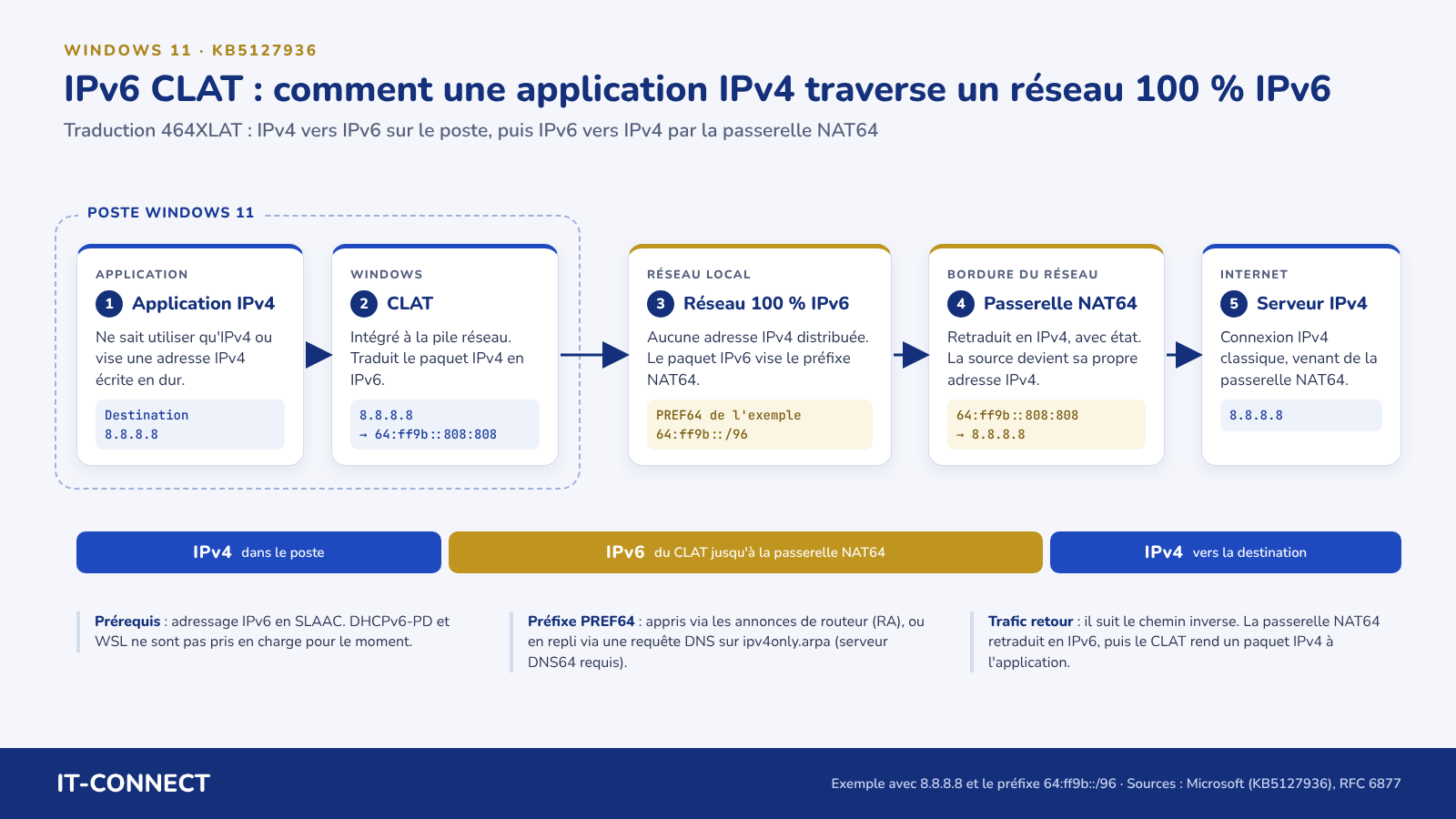
The KB5127936 update released at the end of October 2026 also fixed several bugs, including the Always On VPN remote access issue and WSL2 (nested virtualization could be unavailable on machines with an AMD processor).
NTLM, PowerShell, USB audio: the November-specific changes
The November 2026 update also brings additional changes, one related to NTLM and the other to PowerShell.
NTLM signing is now offered by default
Until now, a Windows client only negotiated NTLM message signing if the application requested it. From now on, it offers it for all connections (non-anonymous). The goal is to make NTLM relay attacks harder. This change, associated with CVE-2026-118737 and documented on this page, affects Windows 11 (from 23H2 to 26H2), as well as Windows 10 Enterprise LTSC 2021 and Windows Server 2016 through 2025. It takes place in two phases:
- Phase 1 (November 10, 2026): clients offer signing by default. Servers still accept clients that do not sign and simply record this information (audit). Nothing should break here: if the server does not support signing, the client gives up on it without failing the connection.
- Phase 2 (May 2027): servers will require signing by default and reject clients that do not offer it, with the
SEC_E_UNSUPPORTED_FUNCTION(0x80090302) error.
You therefore have about six months to identify devices and applications that cannot use signing. The audit generates events in Windows logs, especially IDs 4022 and 4023 in the Microsoft-Windows-NTLM/Operational log. In practice, you need to look at the event details to see whether signing was negotiated (do not rely only on the presence of events with those IDs).
Microsoft explains that two Registry values under HKLM\SYSTEM\CurrentControlSet\Control\Lsa\MSV1_0 can be used to adjust this behavior: ServerRequireNtlmSign set to 1 to require signing immediately (without a restart), and ClientAllowUnsignedNtlm set to 1 to temporarily revert to the old behavior on a client. Anonymous and guest connections are exempt. This hardening is part of Microsoft's strategy to get rid of NTLM! Progress, progress.
PowerShell script signing
After installing this update, Windows checks a PowerShell script's encoding more strictly when signing it and verifying its signature. Until now, a file containing invalid UTF-8 bytes was still decoded. From now on, it is rejected. In production, this can have a consequence: a script that was signed and valid yesterday may fail verification today, even though nobody touched it. And therefore, it does not run.
This tightening is not limited to Windows 11; it also affects Windows 10 and Windows Server (2016 through version 2025). Microsoft clarifies the behavior of PowerShell commands and App Control for Business:
Get-AuthenticodeSignature: this command, which checks a file's signature, returns theNotSignedstatus for a script that is actually signed.Set-AuthenticodeSignature: this command, which applies the signature, fails with theUnknownErrorstatus.- App Control for Business: with this application control feature (formerly WDAC), the affected scripts can run in
ConstrainedLanguagemode, a restricted PowerShell mode. The script is not necessarily blocked, but it may fail during execution.
If your PowerShell execution policy is set to AllSigned, which requires signed scripts, a script considered unsigned because of this change will no longer launch. I think the files to check first are those containing accented characters, especially if they have gone through several editors.
Microsoft provides in this same KB a script named Repair-SignedPowerShellUtf8.ps1, whose Scan mode (default) reports problematic files without changing anything. To fix them, the vendor recommends creating a UTF-8 with BOM copy (a marker at the beginning of the file that indicates its encoding) using the ConvertToUtf8Bom mode, then signing the script again.
Bug fixes
Microsoft has fixed last-minute bugs and added a few changes that were not visible in the optional update:
- USB audio: USB Audio 1.0 devices that no longer started and showed Code 10 in Device Manager now work again with KB5132061. This bug had been around since the September 2026 security update. About time.
- Printing: adding a printer published in Active Directory from Settings > Bluetooth & devices > Printers & scanners no longer fails with error 87 (incorrect parameter). This bug, introduced by the October 2026 update, generally did not affect printers that were already installed.
- Remote Desktop: on 25H2 and 26H2, Microsoft fixes client-side RDP connection failures caused by a certificate inconsistency that appeared with KB5127936.
As of this writing, Microsoft says it is not aware of any issues with these updates. We will have to see whether that still holds true in the coming days...
Windows 11 updates for 2026
These updates are available through Windows Update and in the Microsoft Update Catalog. Below is a summary of the mandatory updates released in 2026 for the different Windows 11 versions.
| Patch for... | Windows 11 24H2/25H2/26H2 | Windows 11 23H2 |
|---|---|---|
| November 2026 | KB5132061 | KB5131087 |
| October 2026 | KB5127648 | KB5126653 |
| September 2026 | KB5124008 | KB5122880 |
| August 2026 | KB5121003 | KB5120240 |
| July 2026 | KB5101650 | KB5099414 |
| June 2026 | KB5094126 | KB5093998 |
| May 2026 | KB5089549 | KB5087420 |
| April 2026 | KB5083769 | KB5082052 |
| March 2026 | KB5079473 | KB5078883 |
| February 2026 | KB5077181 | KB5075941 |
| January 2026 | KB5074109 | KB5073455 |
Note: there will be no optional update in the second half of December 2026. The usual pace will resume in January 2027, as Microsoft does every year.