www.it-connect.fr

Windows 11 KB5127936 Adds a Customizable Context Menu and Major New Features
A right-click menu that opens faster and can finally be sorted to your preferences: that's one of the new features in KB5127936 for Windows 11. But this optional October 2026 update goes much further, with Cloud rebuild, CLAT for IPv6 networks, and the Always On VPN fix, for good this time. Here's what you need to know.
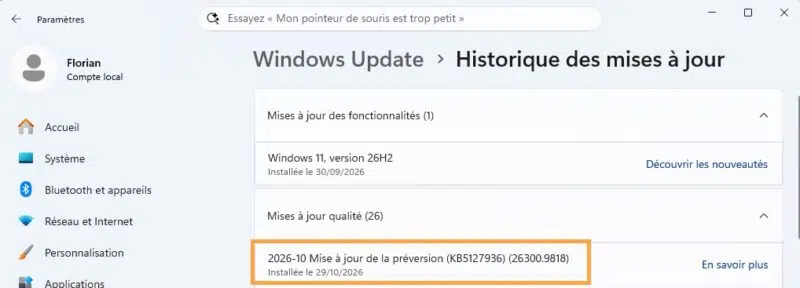
On October 28, 2026, Microsoft released the KB5127936 update for Windows 11 25H2 and 26H2, which move to builds 26200.9818 and 26300.9818 respectively. This is an optional update, with no security fixes, that gives a preview of what to expect with the Patch Tuesday update on November 10, 2026. Windows 11 26H1, for its part, receives KB5127653 (build 28000.3365), which mainly brings over features already delivered to the other releases. As for Windows 11 24H2, it is no longer affected: September's KB5124010 was its last update.
One last important note before we get to the details: most of the features listed below are being rolled out gradually. So don't be surprised if you don't see everything right after restarting your PC.
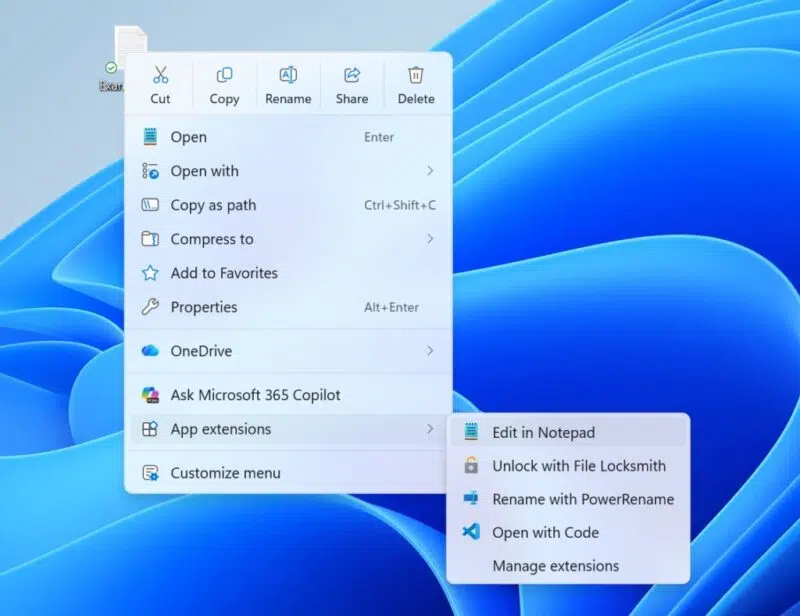
Since Windows 11 was released, File Explorer's context menu has been frustrating users (and plenty of other things too, some would say): slow to appear, cluttered by app extensions, with some commands pushed into the legacy menu (available via Show more options or Shift + right-click). Microsoft has decided to revisit its approach, better late than never. "This update introduces an updated context menu that is faster, simpler, and more customizable.", the Redmond company says.
A Customize menu link appears at the bottom of the menu. It opens a Settings page where you can adjust several items:
- Built-in commands: enable or disable Send to or Create shortcut, and add other commands such as Print.
- App extensions: place them in the main menu or in a submenu, or even hide that submenu.
- Layout: show Cut, Copy, Paste, Rename, Delete, and Share as text instead of an icon row, and move Properties back to the bottom of the menu.
If you do nothing, the default configuration applies. Many users have gotten into the habit of restoring the Windows 10 menu using a Registry key: maybe this new menu deserves a second chance? Up to you.
File Explorer also gets a few refinements. The address bar now accepts the ~ shortcut to access the user profile (for example ~\AppData), as on Linux. The Folder Options dialog finally switches to dark mode, and search results now display the name, location, and date in a more consistent layout.
Other user-side changes:
- Magnifier: each screen can have its own zoom level, and the magnified view on one screen can be locked (Ctrl + Windows + K) while you work on another.
- Narrator: it can read and navigate mathematical equations in Word, PowerPoint, Edge, and Chrome (Narrator key + Alt + N shortcut). French is not supported for now.
- Live captions: a new setting, disabled by default, lets you include or exclude screen reader audio (Narrator, JAWS, NVDA) from the transcription.
- Settings: the Privacy & security page brings together camera, microphone, and location settings, and displays usage information directly.
- Windows Backup: after restoring a profile on a new device, a summary lists what was restored, including settings and Microsoft Store apps.
- XBOX mode: the dedicated gaming task view gets a navigation bar with quick access to Return to desktop and power options.
- Adaptive hibernation: less hibernation when battery level is above 80%, and faster hibernation below 10%.
Cloud rebuild, HVCI, IPv6 CLAT: what changes for admins
This KB includes a series of changes that directly affect IT teams, so we need to talk about them!
First, let's talk about Cloud Rebuild. In July, I introduced you to Cloud rebuild, the feature that reinstalls Windows 11 from the cloud even when the PC no longer boots. Its rollout starts with this update. The Windows image and drivers are downloaded from Windows Update, with no USB key or custom image required. The rebuild is launched from Settings > System > Recovery, or from WinRE when Windows won't boot (Troubleshoot, then the Cloud rebuild option).
Two interesting options are available:
- Data wipe: before reinstalling, it is possible to securely wipe the disk by relying on the storage media's own erase function. Useful before reassigning a machine, but the operation is irreversible.
- Remote orchestration: the rebuild can be triggered via the Recovery CSP, targeting the installed build or a specific build. A way to get a remote machine back on its feet without on-site intervention.
Cloud rebuild needs a network connection, and that's where another feature comes in: WinRE automatically reuses Wi-Fi profiles saved in Windows, including certificate-based ones. This behavior, enabled by default (but which you can disable), also benefits Quick Machine Recovery. For more information on Windows recovery tools, see Microsoft's guide to Windows 11 recovery tools.
Memory integrity is being enabled on more devices. Microsoft is expanding HVCI activation to eligible devices when updates are installed, while respecting choices already made by the user or administrator. The main point to watch is incompatible drivers, which prevent this protection from being enabled. You can check the status of your devices in Windows Security > Device security > Core isolation.
CLAT is coming to Windows: the OS now supports CLAT (client-side 464XLAT translation) on Wi-Fi and Ethernet interfaces. What does that mean? On a 100% IPv6 network, the device has no IPv4 address. The network can rely on NAT64 and DNS64 so a client can still reach a server that is only accessible over IPv4, but under one condition: the application must speak IPv6 and use a DNS name. An application that only knows IPv4, or that connects to a hardcoded IPv4 address, will fail. That is where CLAT comes in, since Windows exposes a local IPv4 interface, translates outgoing IPv4 packets from the application into IPv6, and then the network's NAT64 gateway translates them back into IPv4 toward the destination. Hence the name 464XLAT: IPv4, then IPv6, then IPv4. Hacky? Naaah, just a compatibility layer powered by translation.
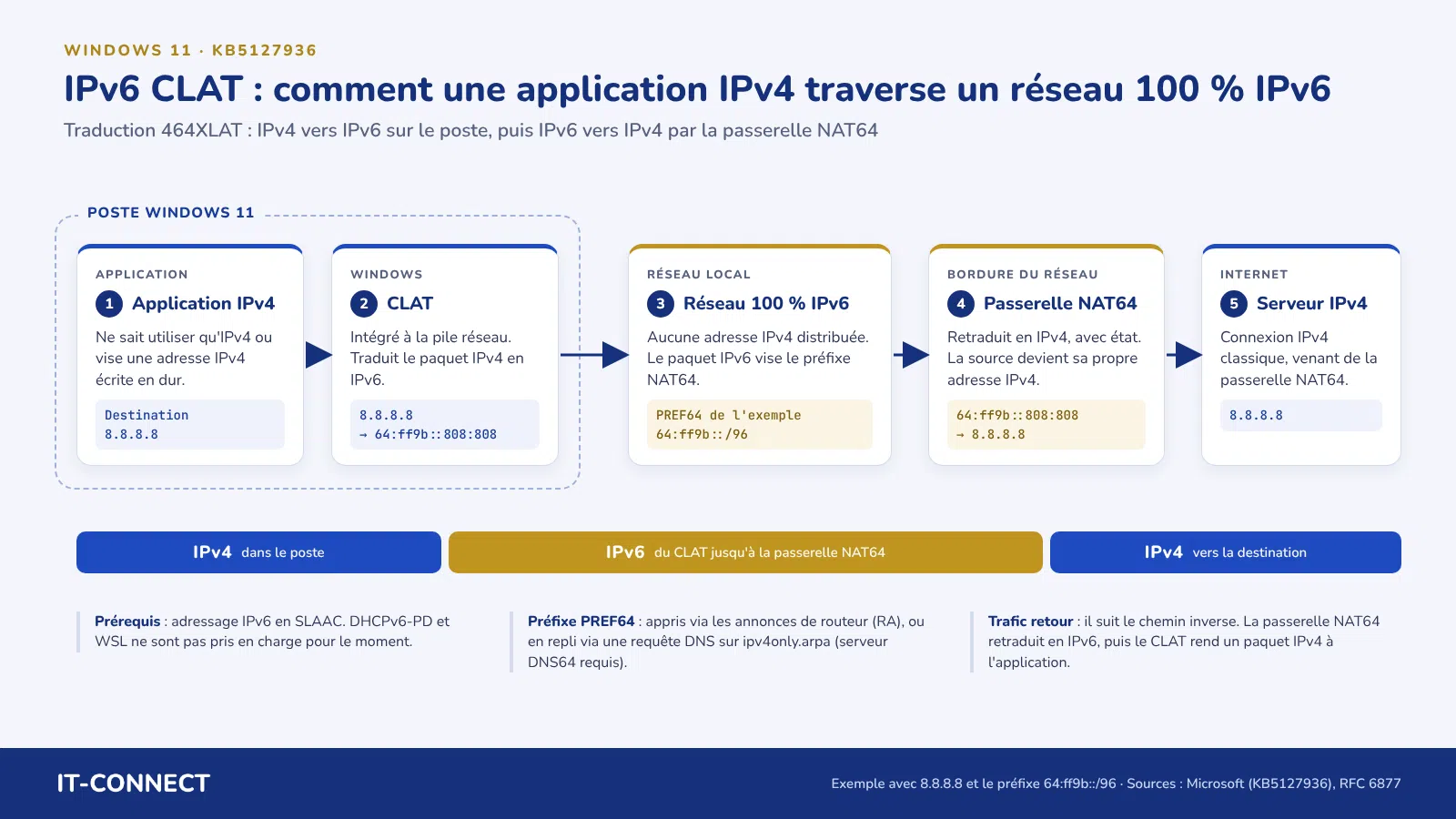
This is a mechanism long found on Android and iOS, and one Windows needed in order to seriously consider IPv6-only enterprise networks. For more on this topic, read this dedicated Microsoft article.
Other changes to know about:
- DPAPI: Windows now shows a warning before prompt-based protection operations. This mechanism will be removed in April 2027. If a business application relies on it, you need to migrate or decrypt the affected data before then. Standard DPAPI uses without prompts are not affected.
- Removal of built-in apps: the policy that removes certain apps included with Windows now works in multisession environments (Windows 11 Enterprise and Education), for example on Azure Virtual Desktop hosts.
- Windows PowerShell: the names Windows PowerShell and Windows PowerShell ISE now include version 5.1, removing ambiguity with PowerShell 7.
Always On VPN, Remote Desktop, App Control: the fixes worth noting
I want to take advantage of this update to come back to one point. In my article on KB5127648 released for the October 2026 Patch Tuesday, I said that the Always On VPN bug had been fixed. Microsoft said so in its release notes, before removing that mention on October 20 and referring to a future release. In the end, KB5127936 delivers the fix: when automatic selection or protocol fallback was configured, connections could get stuck while connecting, sometimes with the error "The specified port is already in use". It seems clear that the issue was more difficult to fix than expected.
The other fixes included in this update are as follows:
- Remote Desktop: non-administrative users could no longer connect to a host with Administrator Protection enabled (error 0xC000000D). This is a known issue related to KB5124010. Microsoft is also fixing the inability to configure, via Intune, the certificate thumbprint policy for approved .rdp publishers.
- Smart App Control: once disabled, it could no longer be re-enabled, with the option remaining grayed out. This bug introduced with KB5127648 is fixed on 25H2 and 26H2, but devices running 24H2 still need a workaround.
- Smart cards: the Windows smart card minidriver now supports RSA-3072 keys on compatible PIV cards. A change that aligns with the move to RSA-3072 announced for Windows code signing.
- WSL2: nested virtualization could be unavailable on machines equipped with an AMD processor.
See you on Tuesday, November 10, 2026, for the next mandatory update!