www.it-connect.fr

EnterpriseEnrollment Is Changing: What Windows Intune Enrollment Teams Need to Know
Starting January 15, 2027, Windows will no longer automatically discover the Intune enrollment service through the EnterpriseEnrollment DNS CNAME record during an “MDM-only” enrollment. Here’s what you need to know.
Microsoft announced this on October 15, 2026 in message MC1509780 published in the Message center, then detailed it in a post on the Intune Customer Success blog. Redmond says January 15 “or shortly after.” The MDM-only mode is not being removed: only DNS-based automatic discovery is going away. That means users will need to enter the Intune enrollment server URL themselves if the enrollment flow does not already provide it.
What is the "EnterpriseEnrollment" DNS record used for?
This DNS record, of the CNAME type, had to be added to the DNS zone of a public domain in a Microsoft Intune tenant during setup. It allows Windows to automatically detect whether an MDM service was available in the Microsoft 365 environment based on the user’s email address when performing the action.
This option applies to Windows and is available under Settings > Accounts > Access work or school > Enroll only in device management.
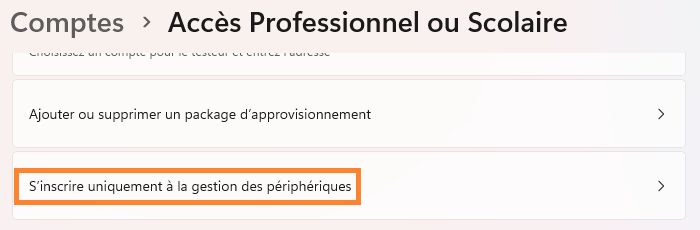
In the case of Microsoft Intune, this option allows a device to be enrolled without being joined to Entra ID, whether in a hybrid or cloud setup.
Who is affected by this change?
This change affects organizations using Windows “MDM-only” enrollment and that have configured an EnterpriseEnrollment CNAME in their DNS so that Windows can automatically find the Intune service. Devices that are already enrolled are not affected. Organizations without this CNAME, or those enrolling devices another way (for example through Microsoft Entra join), are not affected either. In other words, only new MDM-only enrollments will be impacted.
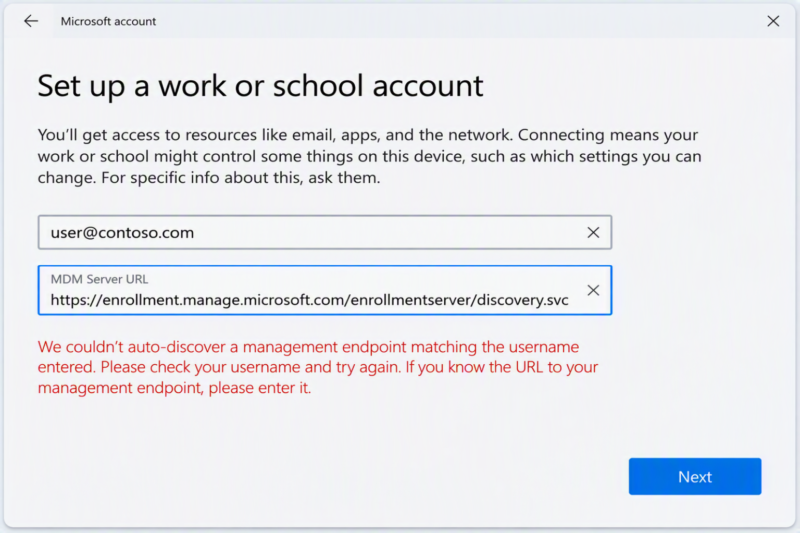
Starting January 15, 2027, users will need to enter the Intune enrollment server URL themselves:
https://enrollment.manage.microsoft.com/enrollmentserver/discovery.svcHow can I tell whether my organization is affected?
Check for the DNS record
There is no magic button to tell you whether you are affected. However, several actions can be taken to understand the impact on your environment.
First, check for the EnterpriseEnrollment CNAME record in the DNS zone for your domain names. I recommend paying particular attention to the domains used for your UPN suffixes. This is the part that comes after the @ sign in a Microsoft 365 identifier.
You can verify the presence of this CNAME record on your public domains using the following PowerShell command:
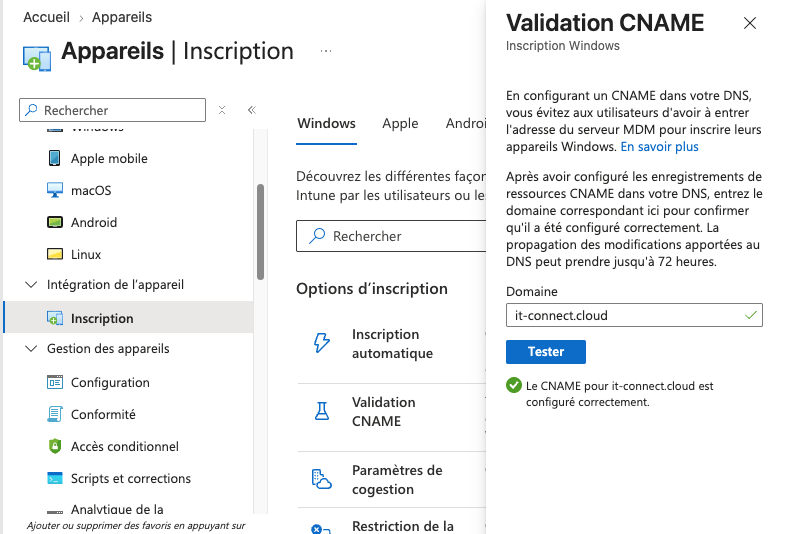
Resolve-DnsName -Name EnterpriseEnrollment.votredomaine.com -Type CNAMEThe CNAME normally points to EnterpriseEnrollment-s.manage.microsoft.com. The “CNAME Validation” test in the Intune admin center can also be used to check this. To access it, navigate to Intune admin center > Devices > Enrollment > Windows > CNAME Validation.
Check for enrolled devices in Intune in “MDM-only” mode
Because this method lets you enroll a Windows computer without joining it to Entra ID, it is important to verify this point to know whether you are affected. You therefore need to look for devices managed in Intune without an Entra join.
You can use the Intune admin center, then navigate to Devices > Windows > All devices. Next, add the “Microsoft Entra device ID” column.
- If the device is not enrolled in MDM-only mode, its Entra ID identity will be shown.
- If the device is enrolled in “MDM-only” mode, no Entra ID identity will be shown.
What changes for the user experience?
The user will have to enter the Microsoft enrollment server URL themselves during a new MDM-only enrollment, if the flow does not already provide it.
Today, the user enters their work email address in the MDM-only flow. Windows then looks for the EnterpriseEnrollment CNAME for the domain in that address. If it finds it, the device locates the Intune service without any further input.
To reduce support calls, update your MDM enrollment documentation before the deadline. If possible, favor a method that does not depend on the CNAME, such as Autopilot or Microsoft Entra join.
| Step | Before | After January 15, 2027 |
|---|---|---|
| Enrollment service discovery | Automatic, via the EnterpriseEnrollment CNAME | No more CNAME-based discovery |
| User input | Email address | Email address, then server URL if not provided |
| Support role | No special requirement | Provide the URL to users (listed at the start of the article) |
Conclusion
This change only affects Windows MDM-only enrollment that relies on the EnterpriseEnrollment CNAME to find the Intune service. Devices that used this method to enroll in Intune will continue to work after January 15, 2027. Only automatic discovery via CNAME is going away, not Intune MDM-only mode itself. Make sure to review your MDM enrollment procedures and documentation to include the service URL.