www.it-connect.fr


Firefox 153 Brings Native Containers to Isolate Your Browsing
With Firefox 153, released on July 21, 2026, containers are now built directly into Mozilla's browser, with no extension to install. The goal: keep your digital life (work, shopping, banking, personal use) separated within a single window, while isolating cookies and ad tracking from one container to another. Here's what we know about this release, presented as a "preview".
The idea behind containers is to open tabs in isolated environments. Each container keeps its own cookies and login sessions, even though all tabs coexist in the same Firefox window. In other words, what you do in one container is not visible from the others, even if they share the same browsing window.
There are several use cases, including staying signed in to multiple accounts on the same website at the same time, each in its own container, without juggling multiple profiles or browsers. If you work with Microsoft 365, this is a good use case.
"This means that what you do in one container is not visible to the other containers. You will no longer have to search for a new hat to wear to a party, only to be bombarded with hat ads every time you click around the Internet for the following weeks.", Mozilla explains in its article.
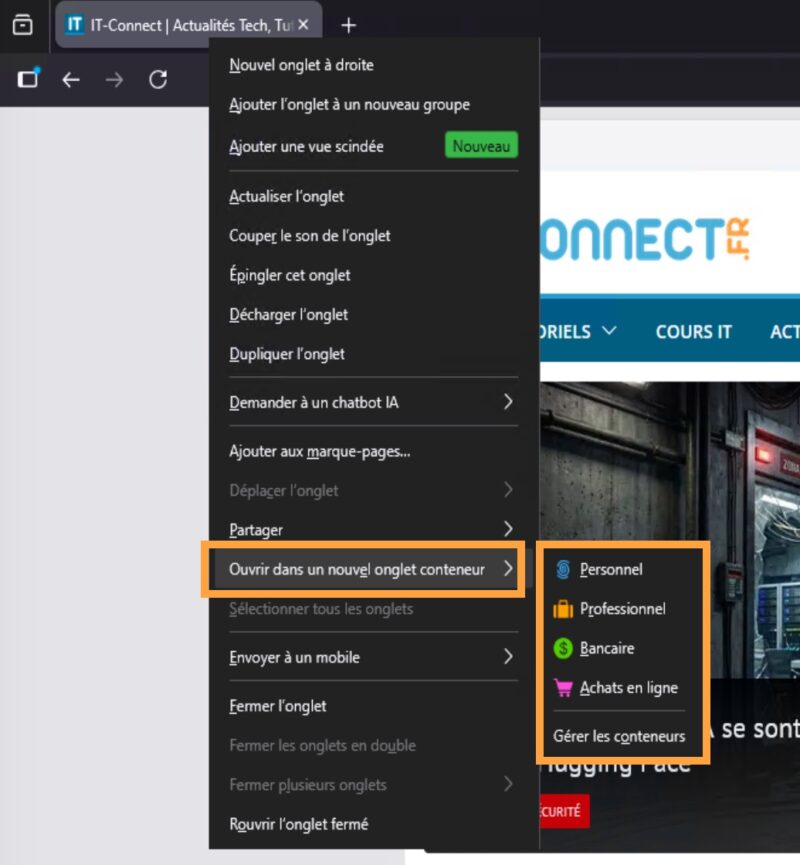
Inside Mozilla Firefox, four predefined containers are available (Personal, Work, Banking and Shopping), and each container has a name, a color and an icon. This visual identity appears in the address bar, as well as in the form of a colored indicator at the top of the tab, making it easy to identify the browsing context at a glance, including for inactive tabs. You can also create your own containers with a custom name, color and icon.
To get started, you can right-click an existing tab to add it to an existing container.
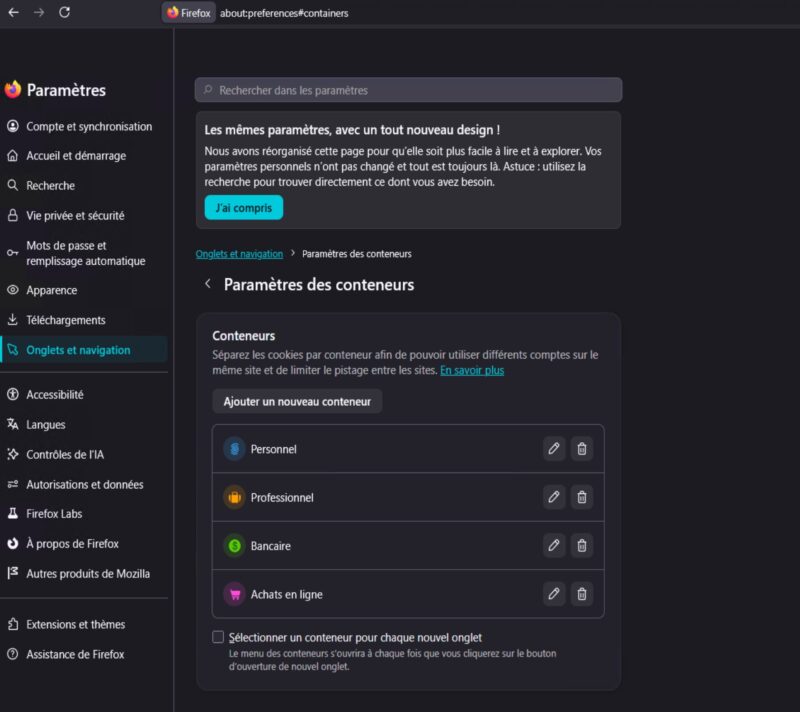
In the browser settings, under the "Tabs and browsing" section, you can also create new profiles. The option called "Select a container for each new tab" makes Firefox prompt you to assign a container every time a new tab is opened.
From extension to native feature, nearly ten years later
This integration did not come out of nowhere. Since February 8, 2017, when it was published in the official add-on catalog, the Multi-Account Containers extension has allowed users to separate their activities into containers.
Mozilla makes no secret of it and says it wants to ensure continuity by integrating the capabilities of this extension directly into Mozilla, natively. Above all, Mozilla promises to preserve the behavior, flexibility and experience that long-time users are used to.
However, this is an early version of the feature integrated into Firefox. Mozilla acknowledges that not all Multi-Account Containers features are yet present in the native version. According to the official documentation, the extension still has the edge thanks to additional capabilities: automatic site assignment to a given container, sync between devices, and integration with Mozilla VPN and custom proxies. The good news is that no action is required: the extension can coexist with the built-in containers. So there is no need to uninstall it.
Firefox 153: an ESR release
Firefox 153 is also an ESR release (Extended Support Release), the channel preferred by enterprises, which later receives only security fixes, with no feature updates. In other words, native containers are arriving in the branch that many organizations deploy across their fleets.
This release also marks the end of a cycle. Firefox 153 is among the last versions shipped on a four-week cadence, before the switch to a new major release every two weeks starting in September.