www.it-connect.fr


PHP Zero-Day Alert: Two Critical Flaws Leak Early, Emergency Patch Due October 21
If you administer a web server with PHP installed, today may be a busy one. Two critical security flaws in PHP are scheduled to be patched this Wednesday, October 21, 2026, and the PHP team is urging everyone to get ready. That is all the more important because these vulnerabilities may already have leaked.... Here is what we know.
On October 20, 2026, the PHP security team published an unusual announcement on php.net: a security update for PHP will be released on Wednesday, October 21, 2026 at 14:00 UTC, or 4:00 PM Paris time. It is expected to fix two critical vulnerabilities, both rated 9.2 out of 10 according to CVSS v4.0.
"We invite all PHP users to prepare now so they can update as soon as the new version becomes available.", it reads.
This is hot, but we do not know much more: neither the affected versions, nor the fixed versions, nor how these flaws can be exploited (which is not necessarily a bad thing for now). Those details will be added to the advisories that will accompany the security fixes.
The PHP team also warns: "We reserve the right to publish earlier", especially if technical details become public or if active exploitation is observed.
This warning is probably not trivial. In fact, a post published on the Hacker News forum, since removed, announced two flaws leading to remote code execution (RCE) in PHP, with a CVSS score of 10. And these vulnerabilities would affect many PHP versions, going all the way back to PHP 5.
watchTowr Confirms the Information Leak
Researchers at watchTowr have confirmed the existence of these two vulnerabilities, tracked as CVE-2026-109618 and CVE-2026-109619. "We can confirm that these vulnerabilities are real", says Benjamin Harris, CEO of watchTowr. According to him, they would affect PHP 5, 6, 7 and 8.
watchTowr says it has reproduced CVE-2026-109618, without publishing technical details before the patches are released. For now, these flaws do not appear to be exploited by cybercriminals, but the situation could change quickly. watchTowr therefore mentions two CVE identifiers that were not cited in PHP's official announcement.
Session Upload Progress: The Lead to Watch While Waiting for the Patch
Researcher Kirill Firsov, who appears to be linked to the discovery, referred to these flaws as "php2shell" on X, recommending a temporary measure: disable PHP's Session Upload Progress feature. The Japanese company GMO Flatt Security says the same thing in its analysis. According to its own research, this would involve a memory corruption issue tied to this function in the session extension, which is enabled by default. However, it admits it cannot guarantee 100% that this measure will be effective until the fixes are released.
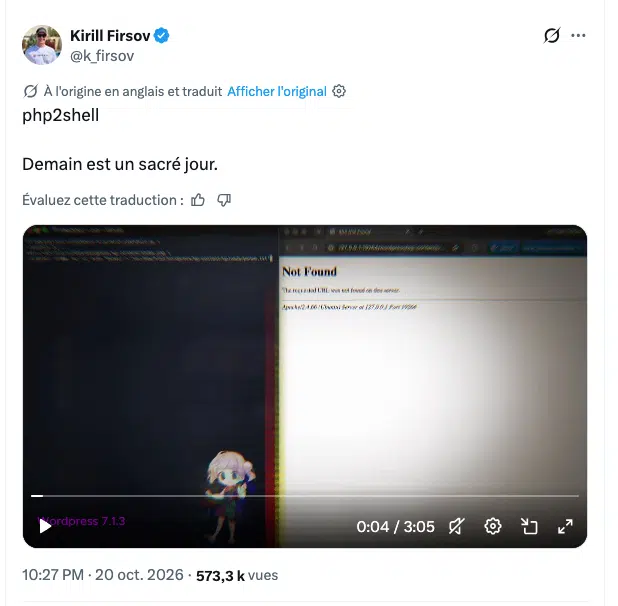
The PHP team has neither confirmed nor denied this lead... Now, all that remains is to wait until 4:00 PM. In the meantime, here is what you can do:
- Inventory: identify all servers and containers running PHP, including forgotten instances.
- Temporary measure: set the
session.upload_progress.enableddirective toOffin thephp.iniused by the web server (on Debian and Ubuntu, the one for PHP-FPM or Apache, not the CLI one), then reload the service. Be aware that upload progress bars based on this feature will no longer work. - Update: install the new versions as soon as they are released. If you use your distribution's packages, also monitor the vendor's security advisories.
- End-of-life versions: only branches 8.2 to 8.5 are still supported by the PHP project. Servers running PHP 8.1 or earlier are therefore unlikely to receive an official fix, which makes the temporary measure even more important while you plan a migration. Unless the PHP team makes an exception...
How Do You Apply the Temporary Measure?
The method to use depends on your environment, here are some instructions to help you:
- Server with PHP-FPM (which is recommended over the Apache module): create a dedicated file, for example
99-php2shell.ini, in theconf.dfolder of PHP-FPM (/etc/php/8.4/fpm/conf.d/on Debian 13), with the linesession.upload_progress.enabled = Off, then reload PHP-FPM. All pools are covered and the file will remain in place when an update is installed (you can remove it once the patches have been applied). My tutorial on configuring Apache2 with PHP-FPM explains the organization of these files in detail. - Apache with mod_php: use the same approach in Apache's
conf.dfolder (/etc/php/8.4/apache2/conf.d/), then reload Apache. - Shared hosting: add the
php_flag session.upload_progress.enabled offdirective in.htaccessif the hosting provider usesmod_php. - Docker containers: with the official
phpimages, place the.inifile in/usr/local/etc/php/conf.d/(via a volume mount or Dockerfile), then restart the container.
To verify, rely on a phpinfo() called through the web server (remove the page afterwards) or on the php-fpm -i command.
We will talk about it again later today...!