www.it-connect.fr

Microsoft 365 Brings Native Markdown Editing to OneDrive and SharePoint
Markdown is now natively supported in SharePoint and OneDrive! Microsoft has just announced support for .md files across its Microsoft 365 ecosystem. The goal? To make it easier to manage instructions for AI, while also giving users editing capabilities.
A Markdown Editor Built Right Into M365
With this update, currently rolling out for both consumers and businesses, Microsoft is introducing a new modern editor to support .md files. This new interface offers the following features:
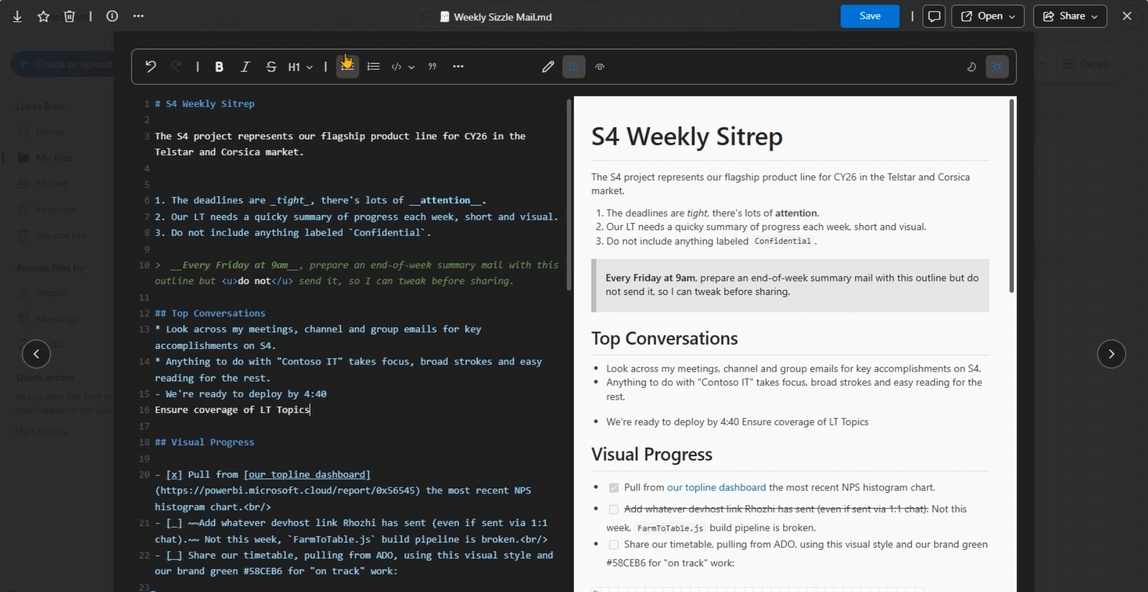
- A native editor : users can edit files directly from SharePoint and OneDrive. It is possible to switch between three modes: Preview, Edit, or Split. The latter lets you edit the Markdown document while seeing the live rendered output.
- Clean rendering : tables, checkboxes, links, and code blocks display correctly, with syntax highlighting for code.
- A Markdown formatting toolbar : no need to know the syntax by heart (even though it is pretty easy!). A toolbar makes it simple to insert headings, images, code blocks, or lists.
- Preview mode : designed for users who are less familiar with Markdown, this mode converts raw source code into a formatted view.
Starting now, from the SharePoint and OneDrive web interface, it is possible to create or upload Markdown files using the usual buttons. Since these .md files are stored in SharePoint and OneDrive, they fit into the Microsoft 365 workflow and can be shared and opened from anywhere, whether in Teams, Outlook, or a web browser.
Markdown as the Foundation for AI and Agents
If the Redmond company decided to add Markdown support, it was no coincidence. In fact, Markdown files act as durable artifacts capable of storing the rules, preferences, and repeatable processes that guide how AI operates.
As Microsoft explains: "AI in SharePoint can remember team preferences and learn skills", which can then be shared across all employees. Technically, this "group memory" relies on .md files stored in a library called Agents Assets library.
"This is the first in a long line of use cases where agents can leverage SharePoint and OneDrive content management capabilities to store knowledge and context.", Microsoft states in its article.
Want to learn Markdown? Check out our tutorial: