www.it-connect.fr


Firefox 160 Adds Mini Window, PiP Speed Controls, and On-Device Speech Recognition
An always-on-top tab while you work elsewhere: that’s Mini Window, the headline feature in Firefox 160. Here’s what’s new!
Firefox 160 has been available since November 10, 2026, and this release introduces a pretty cool feature: Mini Window. The idea is simple: you can move an entire tab, or just part of a page, into a small window that stays displayed above the others. Everything happens with a right-click: on the tab to move it entirely, or inside the page to select the area to detach. Here, Firefox takes the core idea behind Picture-in-Picture and extends it to any web content, not just video.
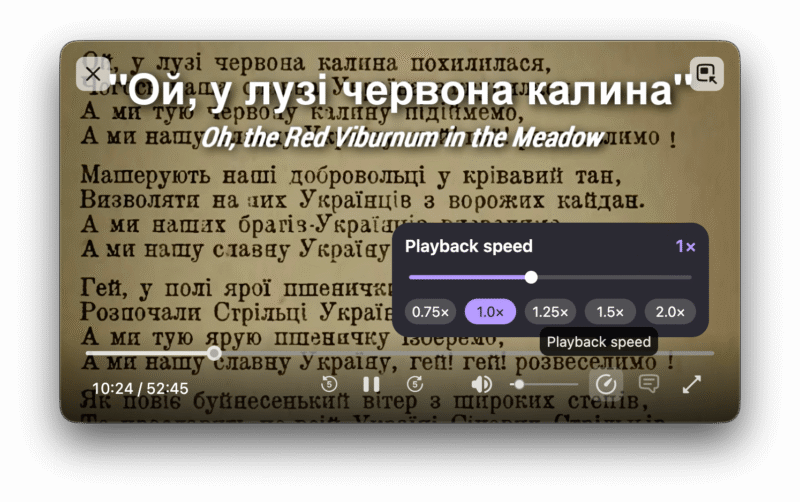
Here is a preview:

This can be handy for keeping an eye on a dashboard or a ticket queue without juggling between windows. Up to now, on Windows, you had to rely on a tool like Always On Top from the PowerToys suite.
Picture-in-Picture, speech recognition, and the address bar
Here are the other changes included in Firefox 160:
- Picture-in-Picture: the floating player now includes a playback speed control, from 0.25x to 2x.
- Speech recognition: the Web Speech API now supports real-time transcription in 40 languages, performed on-device. Audio is therefore not sent to a remote service. This feature is available only in the desktop version of the Firefox browser.
- Media formats: MKV files containing a FLAC, MP3, or PCM audio track are now compatible with the browser’s built-in player.
- macOS: WebGL rendering now uses Apple’s Metal graphics API, which may improve performance on some websites.
- Address bar: the contrast between the domain name and the rest of the URL has been increased.
Finally, Organize Tabs, which suggests and names tab groups in Smart Window, is now available in French (gradual rollout). I mentioned this feature when AI-powered Smart Window arrived in France with Firefox 155.
Local network access and mailto links: two more changes
Sites that repeatedly ask to open mailto: links and other types of links in their web app, much like a webmail service, can now be blocked using a new Never allow button. Blocked sites can then be managed in the settings.
On Android, local network access restrictions are enabled by default. A site must ask for your permission before connecting to a device on the local network or to a local service on the device. On the desktop version, this protection has been enabled by default for everyone since Firefox 153, and I explained when Firefox 154 was released that it had been extended to WebSocket connections.
To learn more about this release, check out this page.