www.it-connect.fr

Proton Mail Finally Sorts Your Emails Automatically — Without Reading Them
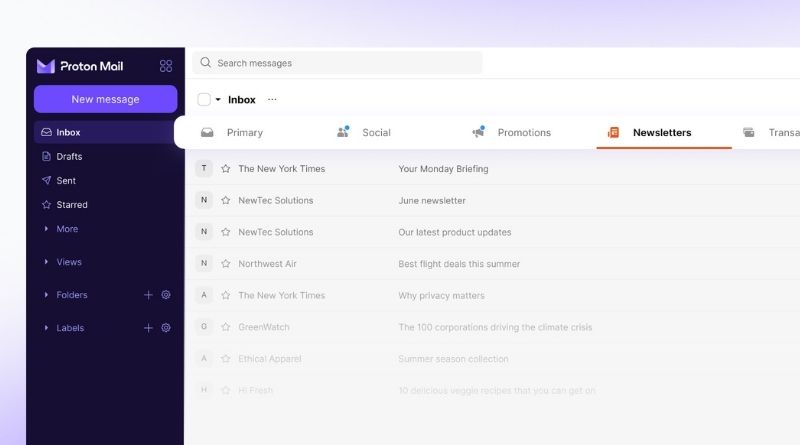
Proton is rolling out a new feature in Proton Mail that is reminiscent of what Gmail has offered for ages: organizing emails into categories. Your emails are now displayed across 6 different views, with messages sorted automatically. But beware: in keeping with its privacy promise, the sorting is done without reading your emails.
Six categories, including two hidden by default
Proton has finally added a long-awaited feature, and I would even say, a feature that had been planned for a long time. It was already listed in the roadmaps published in fall 2025 and then in spring 2026. I’m referring here to organizing emails by category.
Each new message received is automatically placed into one of the six categories offered by default by Proton:
- Primary: personal and professional messages, important notifications. Always enabled, it cannot be hidden or disabled.
- Social Networks: notifications from social networks.
- Promotions: commercial offers, discounts, and sales.
- Newsletters: editorial content and non-promotional information.
- Transactions: reservations, invoices, and orders.
- Updates: automatic confirmations and alerts.
As shown in the image below from my Proton account, two categories are hidden by default: Transactions and Updates.
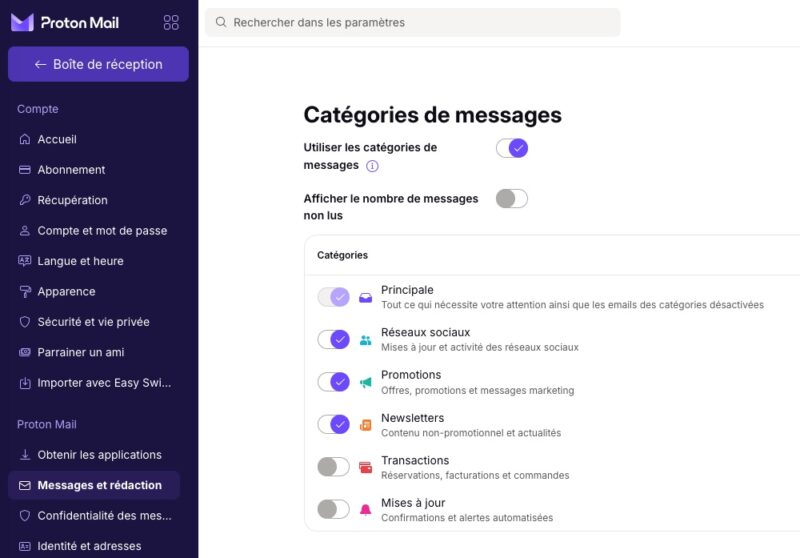
Proton’s classification is not set in stone: a message filed in the wrong category can be moved. As for your email history, existing emails will not be reclassified retroactively; they are assigned to the Primary category. In any case, this category-based view is optional: you can enable or disable it at any time.
Sorting based on metadata, not content
When talking about Proton, privacy and user data protection are naturally front and center. So how can it classify emails if Proton says it cannot read them? In practice, Proton says it categorizes messages without reading their content and relies on metadata. Proton also takes the opportunity to remind users that its encryption model remains unchanged.
However, Proton does not specify which metadata is used. One can imagine that Proton looks at the sender’s domain, mailing list headers (List-Unsubscribe, List-ID), or automated sending markers such as Precedence: bulk. These are signals that can be used without ever reading the message content, but these are only my assumptions.
As usual, Proton did not miss the chance to take a shot at Gmail and Outlook, pointing out that Google displays ads in the Promotions and Social tabs. Finally, note that all ProtonMail accounts can benefit from this new feature, both on the web and on mobile.
What about you — will you enable categories in Proton Mail?