www.it-connect.fr


Claude Code Mods Let You Customize the Interface, Commands, and More
Do you use Claude Code? You can now change its behavior, customize its interface, and add your own features thanks to mods. But this new freedom comes at a cost. Here’s what you need to know.
The Claude ecosystem keeps growing and evolving. After cloud sessions became stable at the end of September (incidentally, Anthropic is offering you $250 in Claude Code Cloud credits), Anthropic announced on October 1, 2026, the arrival of mods. The idea is simple: change the tool’s behavior, customize its interface, or bolt on your own features with a few lines of TypeScript.
Don’t know how to write two lines of TypeScript? That’s not a big deal, because as you know, Claude can help. Describe what you need in a session, and Claude will write the mod for you. In any case, note that mods are enabled by default starting with Claude Code version 2.1.287.
They work in the CLI and in the Code tab of the Claude Desktop app. If you are new to the tool, this tutorial on installing and using Claude Code on Windows and Linux will help you get started.
What exactly is a mod?
According to the official Claude Code documentation, a mod is a plugin made up of event handlers written in JavaScript or TypeScript. Claude Code calls them when an event occurs: a tool call, a submitted prompt, a UI element being displayed. The mod can then observe the event, modify it, or take it over completely.
Unlike traditional hooks, which are declared in a configuration file to launch a shell command or an HTTP request, mods run inside Claude Code itself. That creates different opportunities, because a mod can:
- Modify the interface: add a panel or a banner above the prompt, or redraw existing elements such as the spinner.
- Intervene in a tool call: pause it to ask you a question, answer it without running the tool, or redirect a request to another model.
- Add commands: a slash command that runs your function without involving Claude, even while it is working.
Among the examples shown by Anthropic is the Blast Radius mod. It intercepts risky shell commands, such as rm -rf, git reset --hard or a force push, before they are executed, and displays in a side panel what they would affect. Then you can confirm or cancel. A safeguard that can save you from a few cold sweats.
Mods are distributed as plugins and installed with the /plugin install command. Some Claude Code features are already mods, such as /diff or support for AGENTS.md files. "Everyone works differently, so there is no reason why everyone should have the same Claude experience", summarizes Boris Cherny on X.
A mod runs with your permissions
A mod runs with your permissions, without a sandbox: it can read and write files, launch processes, make network requests, read your environment variables (and therefore your API keys), see every prompt, and rewrite tool calls. Claude Code sandboxing does not change that, because it only isolates Bash commands launched by Claude.
Another important point: mods are included in Claude Code’s permission rules. As a reminder, an ask rule requires your confirmation before an action (for example, a Bash command), while a deny rule forbids it. A mod can approve a tool call subject to an ask rule on your behalf: the confirmation prompt never appears.
Deny rules, however, only resist mods where sec-default is loaded, an internal safeguard built into Claude Code. It is active on devices with managed settings (deployed through file, MDM, or from the admin console) and for Team or Enterprise accounts. On a personal machine with a Pro or Max subscription, this safeguard is not loaded. And even then, blocking Claude from reading the .env file does not stop a mod from reading it by other means.
Still, this is not an open bar. Anthropic has planned a few checks and restrictions for mods:
- Pre-install audit: the
claude plugin validatecommand lists the events intercepted by a mod and the actions it requests, without running it. - Protected permission prompt: a mod can restyle much of the interface, but not the permission prompt.
- Enterprise-side control: the
allowManagedModsOnlyoption in managed settings blocks all mods imported by users, including those written by Claude during the session. - Disabling: the
--safe-modeoption turns off installed mods for the duration of a session, while thedisableAllHookssetting disables them everywhere... including classic hooks.
Mods are a bigger new feature than they may seem at first glance, especially when you look at the possibilities they open up... This is even more true when it comes to using Claude Code in an enterprise environment.
Hands-on example: IT-Connect news in Claude Code
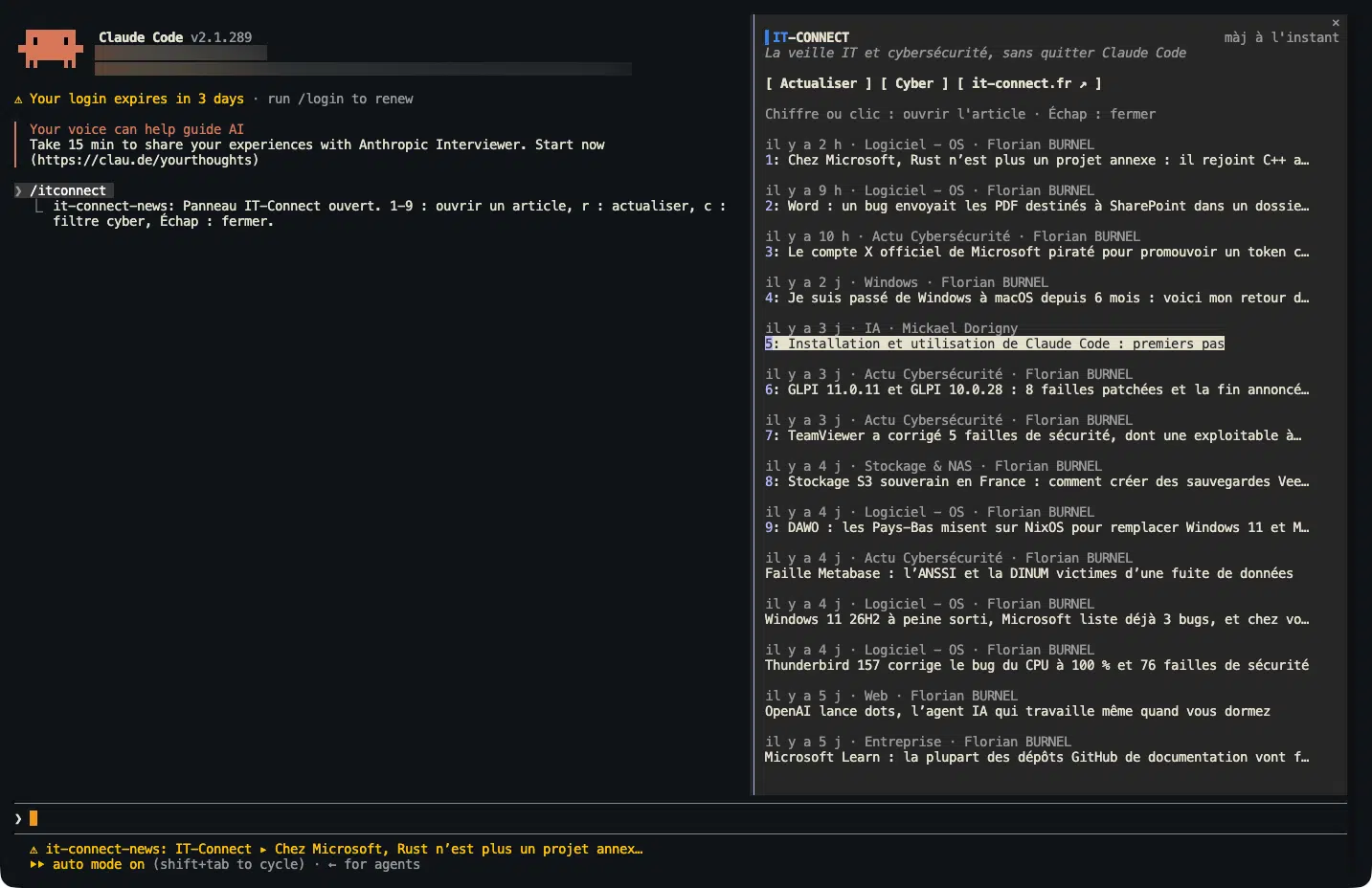
To wrap up, let’s look at Claude Code mods in practice. I asked Claude to write me a mod that displays the latest IT-Connect articles without leaving Claude Code. It did not start from scratch: Claude Code includes a dedicated skill for mod authoring (plugin-authoring).
Here is what the result does:
/itconnectcommand: opens a panel with the latest published articles. For each one, the clickable title, age, category, and author.- NEW badge: marks articles published since you last opened the panel. The mod remembers already seen articles from one session to the next.
- Cyber filter: the
ckey, or the/itconnect cybercommand, keeps only security-related news. - Background monitoring: the RSS feed is checked again every 15 minutes. A notification appears for each new article, and the status line displays the latest published title.
- Text fallback: in the VS Code extension, which does not display mod panels, the command simply returns the list of articles.
The mod is made up of a few files, each with a specific role:
| File | Role |
|---|---|
| .claude-plugin/plugin.json | The manifest: name, version, description, and plugin author |
| hooks/hooks.json | Tells Claude Code which code file to load |
| hooks/register.tsx | The mod logic: /itconnect command, timer, notifications, panel rendering |
| hooks/feed.ts | RSS feed reading: article extraction, cyber filter, link checking |
| types/index.d.ts | The data structure kept by the mod during the session (article list, active filter, etc.) |
| tests/it-connect-news.test.tsx | Automated tests, run with the claude plugin test command |
| README.md | Documentation: features, installation, and access used |
The logic relies on several events: session start (command registration, first feed read, timer launch), execution of /itconnect, and display of the side panel. In this example, the tests, also written by Claude, verify feed reading, the cyber filter, link opening, and panel display in the terminal and in the desktop app.
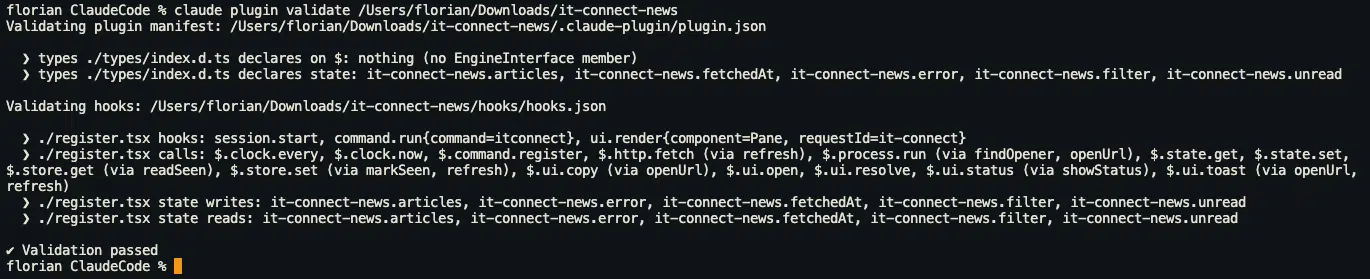
Before enabling it, the claude plugin validate command lets you list the intercepted events and the calls made. Here, there is only one network request to the IT-Connect feed, a storage area for already seen articles, the interface, and the clock. No file reads, no process launches, no access to environment variables, and no model calls.
There are two ways to load a mod stored on your machine:
- For one session: from the terminal (not from an already open Claude Code session), launch Claude Code with the
--plugin-diroption followed by the path to the mod folder. For example:claude --plugin-dir ~/claude-mods/it-connect-news. The mod is loaded only for that session: you will need to pass the option again next time. - For all sessions: declare the folder in your
~/.claude/settings.jsonsettings file, using theCLAUDE_CODE_PLUGIN_DIRSvariable placed in the env block. The mod will then load at every launch, including in the Code tab of the desktop app. Note that this variable expects the folder for each mod, not a parent folder containing them all: to declare several, separate the paths with colons on macOS and Linux, or with a semicolon on Windows.
{
  "env": {
    "CLAUDE_CODE_PLUGIN_DIRS": "~/claude-mods/it-connect-news"
  }
}
Depending on the window size, the panel either appears next to the conversation or the information is displayed above the prompt. You can see an example above.
If you’re interested in this mod, let me know in the comments and I’ll make the code available on GitHub.