www.it-connect.fr


Debian 13 Kernel Update Patches More Than 1,300 Security Flaws
The latest security bulletin published by Debian for the Linux kernel in Debian 13 (Trixie) is massive: it references more than 1,300 vulnerabilities fixed in a single update. A staggering number... Here’s what you need to know.
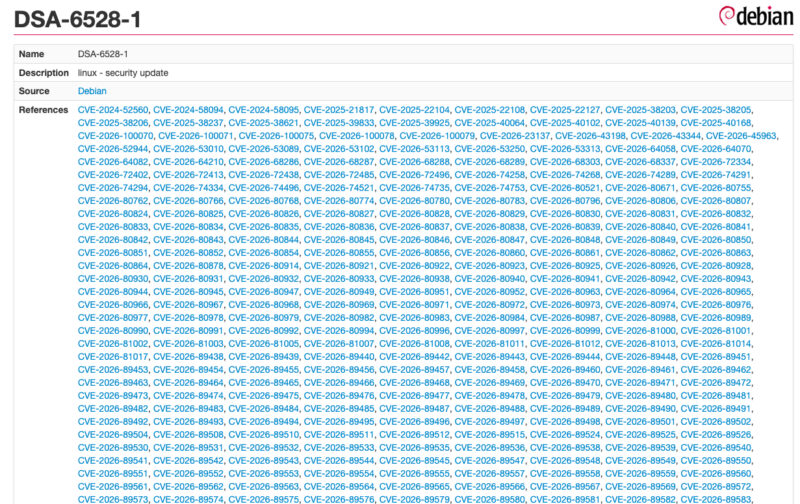
A few days ago, the Debian security team released a new security bulletin about the linux package, in other words the kernel, for the current stable distribution: Debian 13, also known as Trixie. The bulletin mentions several vulnerabilities that could lead to privilege escalation, denial of service, or information leaks. Standard stuff, you could say.
Then comes the list of CVE identifiers. It is long... very long. In fact, it contains more than 1,300 CVE references, which means just as many vulnerabilities (CVE-2024-52560, CVE-2026-100079, and so on). To fix them, Debian released kernel version 6.12.111-1. Yet this is not the first time Debian has patched vulnerabilities recently: this kernel update arrives just a few weeks after the release of Debian 13.7, a version that already included around a hundred fixes (across many packages).
The security bulletin does not specify which flaws are the most severe, or whether any are being actively exploited. If you want the details, you have to go through Debian's dedicated tracking page for this DSA and browse CVE by CVE. Good luck.
Why are there so many CVEs in a single bulletin?
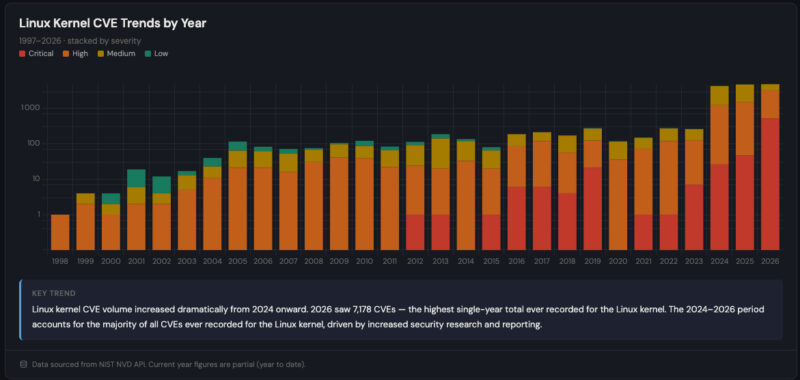
Since February 2024, Linux kernel developers have had their own CVE Numbering Authority (CNA) and assign a CVE identifier to most bugs they fix. The reasoning is that almost any kernel bug can have a security impact. Add to that AI-assisted vulnerability research, which has dramatically increased the number of discoveries well beyond Liux.
Figures compiled by the Linux CVE Tracker site from the NVD database show how much the pace has changed: 7,178 CVEs published for the Linux kernel since the start of 2026, compared with 5,681 across the whole of 2025. September 2026 was the busiest month, with 2,118 CVEs on its own.
How do you apply the update?
On a server or workstation running Debian 13, the usual method is enough:
- Update : run
apt updatethenapt full-upgradeto get kernel version6.12.111-1. - Reboot : the new kernel is only loaded after a restart. Without a reboot, the machine keeps running the old kernel, and therefore the vulnerabilities remain.
- Verification : after rebooting, the
uname -vcommand displays the Debian package version of the running kernel. It should mention 6.12.111-1 (or a later version, depending on when you do this).