www.it-connect.fr


How a Stolen ConnectWise Credential Exposed Hundreds of Microsoft 365 Tenants
A stolen credential at ConnectWise gave direct access to hundreds of Microsoft 365 tenants, with no MFA to bypass. If you run a tenant, here’s what you need to check immediately.
The ConnectWise Cloud Backup service, formerly SkyKick Cloud Backup, has been down since October 17, 2026. Popular with MSPs for backing up their customers’ Microsoft 365 data, it was used as an entry point by an attacker. In a new security advisory, ConnectWise refers to unauthorized access to application identities in its Cloud Backup environment. Microsoft Threat Intelligence, meanwhile, says in a post on X that an active supply chain attack is under way.
As a reminder, this kind of solution relies on a multi-tenant application registered in Entra ID. An administrator grants it application permissions, with no signed-in user, so it can read and restore mailboxes as well as OneDrive, SharePoint, and Teams data. The application proves its identity with a secret or certificate held by the vendor... and the same credential works across every tenant that has granted consent. That is the core problem.
One script, one IP address, and hundreds of tenants
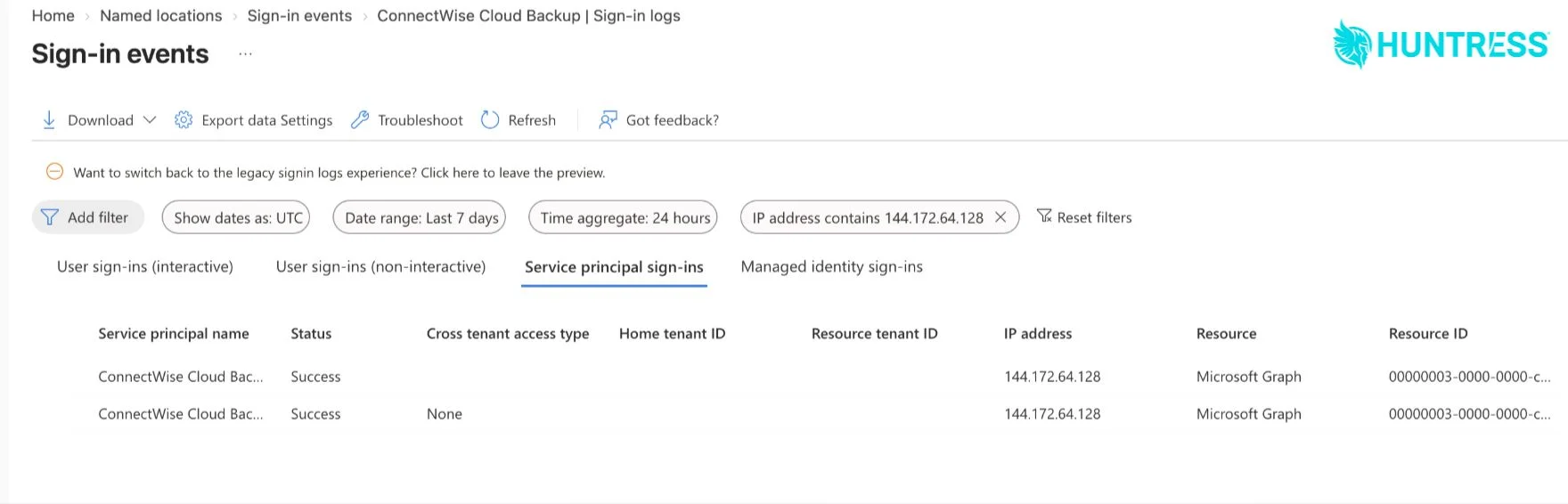
With a single stolen credential, an attacker can then target X Microsoft 365 tenants. That is exactly what happened, according to a report published by Huntress. Huntress researchers explain that the application identity obtained Microsoft Graph tokens from the address 144.172.64[.]128 (RouterHosting), on October 15 between 06:13 and 08:34 UTC.
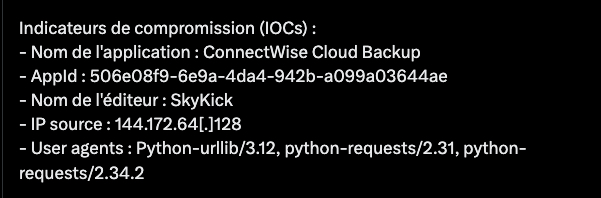
The tenants were targeted one by one, a few seconds apart and in order of their identifier (GUID): the signature of a script that runs through a list of targets sequentially. The authentication type seen in the logs shows that the credential in use belongs to ConnectWise, not its customers. In other words, the issue is on the vendor side. “Nothing a customer did in their environment could have produced this.”, Huntress notes.
As of the evening of October 16, Huntress said 162 Microsoft tenants had been hit. The campaign then intensified, because in an October 17 update, Huntress said it had identified nearly 1,000 Entra tenants that received sign-in attempts from this IP, more than 300 of which succeeded.
So what did this Microsoft 365 access actually allow on the targeted tenants? According to Todyl, the attacker obtained the same access as the backup application: "This access inherited the application’s existing consent, which grants read and write access to emails and their attachments (full mailbox access via Exchange Web Services), OneDrive and SharePoint files, and Teams chats, including the ability to restore data."
Todyl did not observe any changes in the Entra ID identity management service. Huntress, on the other hand, says that on one tenant, the ConnectWise Cloud Management - MS Teams application assigned itself the Global Administrator role, then added client secrets to two other applications, including Huntress’s own. The whole operation took about five minutes, with secrets valid until 2028.
What ConnectWise has done, and what you still need to do
According to its status page, ConnectWise disabled seven application identities on October 17 at 07:00 UTC and revoked the certificates for the affected connections. Right now, the situation is critical: backups are no longer running, restores are unavailable, and there is no indication of when the service will come back online. The archives would remain encrypted and isolated, according to the vendor. "Previously issued access tokens may remain usable until they expire or are invalidated," ConnectWise said.
In any case, even if ConnectWise has stopped the bleeding, that does not undo actions already carried out against some of the targeted tenants.
So, if you use a SkyKick or ConnectWise Cloud product, here are the recommended checks:
- Disable without deleting: in Entra ID enterprise applications, look for ID
506e08f9-6e9a-4da4-942b-a099a03644aeand disable sign-in in its properties. Deleting it would remove the consent. Do the same for other ConnectWise or SkyKick applications. - Analyze application sign-ins: in Entra ID sign-in logs (Monitoring > Sign-in logs), open the Service principal sign-ins tab and filter on the application ID. The default tab, user sign-ins, will not show these events. Any IP outside Microsoft ranges should raise an alert.
- Audit secrets and certificates: remove any credential added since October 13 that you did not create, across all your applications.
- Check roles and conditional access: remove any unintended roles assigned to these applications and review their exclusions.
- Inspect Exchange Online: look for suspicious forwarding, rules, and delegations.
A backup application needs to be able to read everything. Its credentials are therefore equivalent to those of an administrator, without MFA protection. And in a case like this, for MSPs, the impact is multiplied. What I also want to say is that if you outsourced your tenant backup to a provider and do not know which solution is being used, it is time to ask them.
What do you think?