www.it-connect.fr

Microsoft Delays SSPR and Entra Connect Sync Changes: New Dates to Know
Microsoft has pushed back the schedule for two major changes in Entra ID. The first concerns SSPR, which will require registered authentication methods starting in November 2026. The second concerns Entra Connect Sync: synchronization will stop in April 2027 on servers that do not meet the new prerequisites, including those already in place. The dates in our two previous articles are therefore no longer current. Here is what you need to know.
This article reviews these new timelines and what they mean in practical terms. It complements the previous articles published:
- Password reset in Entra ID is changing in 2026
- Transition from Microsoft Entra Connect Sync to Cloud Sync
SSPR: what changes by November
On August 4, 2026, Microsoft updated message MC1325414 published in the Microsoft 365 Message Center. The registration campaign began on October 5, and enforcement will start on November 7, with a gradual rollout through mid-November.
The core requirement does not change. After that date, SSPR will no longer accept directory attributes (mobilePhone, businessPhone, otherMails) unless they have been explicitly registered as authentication methods. A user without a registered method will no longer be able to reset their password. Microsoft says that 86% of verifications already use registered methods.
Reminder: what is SSPR? SSPR (Self-Service Password Reset) is Microsoft Entra ID's self-service password reset feature used by Microsoft 365. It allows a user to reset a forgotten password or unlock an account without contacting the IT support team.
Here are the actions you can take to prepare for this change:
- Measure coverage for affected users: in the Entra admin center, open Authentication methods > User registration details, then filter on "SSPR capable: Not capable".
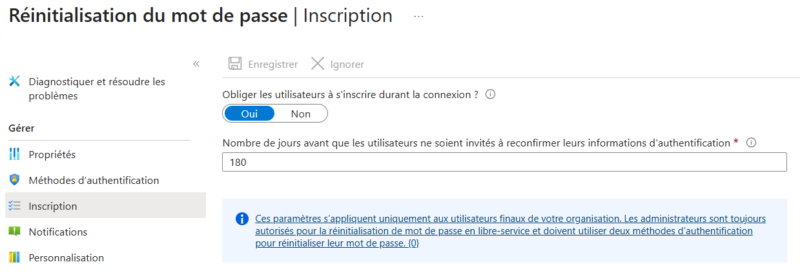
- Configure the registration campaign: make sure it is not disabled so users are prompted to register automatically. In the Entra admin center, open Password reset, then select Registration and verify that the setting "Require users to register when signing in" is set to "Yes".
- Check the SSPR policy: a method such as the Authenticator notification must be declared as an accepted method for SSPR, otherwise the user will appear as not capable.
- Do not forget administrator accounts: they are affected just like everyone else.
- Prepare support: plan an assisted registration process for users who cannot complete it on their own.
- Notify users: they can go to mysignins.microsoft.com/security-info to register their methods.
Entra Connect Sync: prerequisites to meet before April 7, 2027
Microsoft has moved the deadline from September 30, 2026 to April 7, 2027. Entra Connect Sync servers must now be running version 2.6.84.0 or later, and use application-based authentication, before this new date. If these prerequisites are not in place by then, all synchronization services will fail until the upgrade is completed.
Reaching version 2.5.79.0, as stated in my previous article, is therefore no longer enough. Here are the key version points to keep in mind:
- Minimum version: 2.6.84.0. It can only be downloaded from the Entra admin center.
- Version 2.6.79.0: Microsoft removed it after discovering an issue. If it is installed, upgrade to a newer version.
- Version 2.5.79.0: support ends on October 23, 2026. A 2.x version is supported for 12 months after the release of a newer version.
- Latest version: 2.6.92.0, released on September 23, 2026, includes security fixes. Aim for this version rather than the minimum.
Application-based authentication is the real change. It replaces the password-protected connector account. Upgrading Entra Connect Sync alone does not configure it, as we will see below.
Switch Entra Connect Sync authentication to an application
With this method, Entra Connect Sync authenticates to Entra ID using an application identity and a certificate (OAuth 2.0 client credentials flow). It no longer uses a connector account with a password. There are three management modes:
- Managed by Entra Connect (default): Entra Connect creates the application and certificate, then automatically handles renewal.
- Bring Your Own Certificate (BYOC): you configure the application certificate yourself.
- Bring Your Own Application (BYOA): you manage the application, its permissions, and its certificate.
To check and identify the authentication type used by the Entra Connect service, run the following PowerShell command on your Entra Connect Sync servers:
Get-ADSyncEntraConnectorCredentialIt displays the authentication type used by the connector: the value should indicate an application, not a service account.
If you are still using a service account, it is possible to switch to application-based authentication with the Entra Connect Sync wizard for the default mode. The BYOC and BYOA modes can only be configured through PowerShell.
To do this, launch the Entra Connect wizard, open Additional tasks, and choose "Configure application-based authentication to Microsoft Entra ID".
Several points require attention:
- Entra Connect does not automatically switch an existing server. After every upgrade, check the authentication type.
- No silent fallback starting with version 2.6.84.0: if the configuration fails, the wizard stops with an error instead of reverting to the old account.
- Certificate renewal: it is automatic in the default mode, unless the synchronization scheduler is paused.
- Synchronization Service Manager: do not change the Entra ID connector configuration from this console on older versions. Microsoft fixed in version 2.6.1.0 a flaw that removed application-based authentication settings.
- The service account used before migration is not deleted automatically. Remember to remove it from your environment.
Conclusion
To conclude, here is the action plan below, which summarizes the steps to take for these two changes.
| Before | Action |
| October 23, 2026 | Entra Connect Sync: stop using version 2.5.79.0, whose support is ending. Move to at least 2.6.84.0, ideally the latest version. |
| November 7, 2026 | SSPR: check coverage of registered methods, verify the campaign, and prepare support. |
| April 7, 2027 | Entra Connect Sync: have version 2.6.84.0 or later with application-based authentication on every server. |
Sources:
- Entra Connect version history
- Security hardening update for Microsoft Entra Connect Sync
- Migrate Entra Connect authentication to an application