www.it-connect.fr

Microsoft Entra Connect Sync to Cloud Sync: What You Need to Know
Microsoft announced the transition from Entra Connect Sync to Entra Cloud Sync in its monthly article about Entra ID updates. These tools are used to synchronize user and computer accounts from an Active Directory to Entra ID, helping unify account management and the user experience. Let’s take a detailed look at this announcement and the key points to remember.
Reminder about supported Entra Connect Sync versions
Before diving into the subject, it is important to remember that as of September 30, 2026, versions of Microsoft Entra Connect Sync (formerly Azure AD Connect) earlier than version 2.5.79.0 will no longer be supported or function. It is therefore important to update your installations if you are affected.
To check the version of Entra Connect Sync currently installed in your environment, several methods are available.
Graphical methods
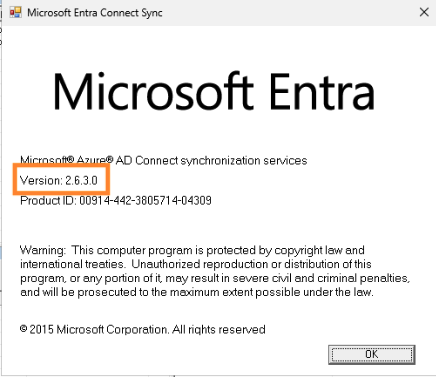
Option 1: from Entra ID Synchronization Service Manager
Open the Synchronization Service Manager console for Entra ID Connect. Then click Help > About and check the version.
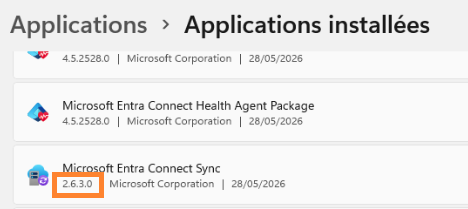
Option 2: From installed apps
Go to Windows Settings > Apps > Installed apps. Search for Microsoft Entra and check the installed version.
The PowerShell method
It is also possible to check the installed Entra Connect Sync version using PowerShell. To do this, run PowerShell as administrator, and after importing the ADSync module, run the following command:
(Get-ADSyncGlobalSettings).Parameters | Where-Object {$_.Name -eq "Microsoft.Synchronize.ServerConfigurationVersion"} | Select-Object -ExpandProperty Value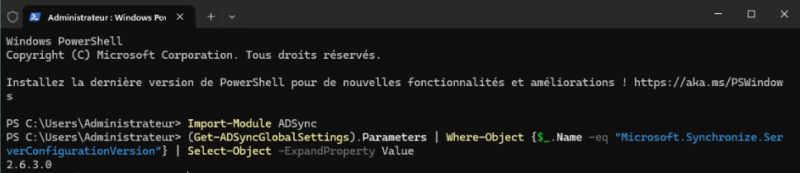
Announcement of the transition to Entra Cloud Sync
Microsoft announced the transition of Entra Connect Sync instances to Entra Cloud Sync in its April 2026 monthly updates post. The vendor highlights reduced local maintenance complexity, improved security, and easier management for administrators.
Indeed, Entra Cloud Sync uses a synchronization engine managed by Microsoft in the cloud. In practical terms, you install a lightweight agent on your infrastructure instead of one or more dedicated servers. Entra Cloud Sync supports multi-agent deployment to ensure high availability for identity synchronization from On-Prem to Entra ID.
Microsoft also stated that the rollout will take place in several phases, depending on the features used by organizations.
"As Entra Cloud Sync capabilities expand, we will progressively notify later groups and ensure they can successfully transition once equivalent support is available in Entra Cloud Sync.", explains the Microsoft Entra documentation.
This detail is important, because Cloud Sync does not yet support all the features available in Connect Sync. As of today, the following features are not yet available in Cloud Sync:
- PTA authentication
- Seamless SSO
- Device writeback
For these features, you must wait until Microsoft integrates them into Cloud Sync. In the meantime, it is possible to set up coexistence with Entra Connect Sync. This second option is useful to ensure a gradual migration when the time comes.
A phased migration starting in July 2026
This transition will be carried out in two major distinct phases. Starting in July 2026, organizations for which Entra Cloud Sync meets their current Connect Sync use cases will be notified via the M365 Message Center, Entra Connect Health and by email. The vendor says that personalized migration support will be provided through dedicated guidance and resources. Detailed documentation will also be available.
If your organization relies on features unavailable in Cloud Sync, or if your directory has a large number of objects (users, groups, computers), you will not be in the initial waves. Affected organizations will be informed once Cloud Sync meets their needs.
The second phase will extend into 2027, but Microsoft has not yet shared all the details. The Redmond company should ensure that everyone can migrate, and therefore that Cloud Sync offers the same features as the on-premises version.