www.it-connect.fr

Entra ID Password Reset Is Changing in 2026: What You Need to Know
Starting on September 7, 2026, self-service password reset (SSPR) in Microsoft 365 will change. It will require authentication methods that are explicitly registered on the user account. After that date, SSPR will no longer use contact information defined in Entra ID profile attributes.
Self-service password reset (SSPR) allows a user to change and reset their password independently. This feature helps reduce the workload for IT support teams and makes users more autonomous in handling this task.
SSPR Features and Entra ID Licenses
Self-service password change and reset are Microsoft Entra ID capabilities made up of 3 features. Let’s review the 3 features and the licenses that provide access to them.
| Feature | Entra ID Free | M365 Business Standard | M365 Business Premium | Entra ID P1 (standalone add-on or included license plan) |
| User password change from their account. Cloud-only change cloud. | ✅️ | ✅️ | ✅️ | ✅️ |
| User self-service password reset when a password is forgotten. Cloud-only change. | ✅️ | ✅️ | ✅️ | |
| Write-back of a password changed or modified in Entra ID to Active Directory. For hybrid environments using Entra Connect Sync and Cloud Sync. | ✅️ | ✅️ |
What Does This Change Mean?
When a user wants to reset their password, they must prove their identity using an authentication method. Today, the service verifies the user’s identity using directory information such as a personal or work mobile phone number, or an alternate email address. This information is stored in the user profile, but it is not necessarily verified by Entra ID.
Starting on September 7, 2026, SSPR will require users to prove their identity with authentication methods registered on their Entra ID account. Users can manage them from their account settings at mysignins.microsoft.com/security-info/.
Authentication Methods Compatible with SSPR
Microsoft clearly states in its documentation which authentication methods are, or are not, compatible with SSPR.
Here is the list of methods currently available and compatible with SSPR (subject to future changes):
- Microsoft Authenticator push notification
- E-mail OTP (one-time password)
- SMS sign-in with an explicitly registered mobile number
- Voice call to an explicitly registered phone number
- Hardware and software OATH token
The following methods are not compatible with SSPR:
- Passkey / FIDO2 security key
- Windows Hello for Business
- Certificate-based authentication
- Temporary Access Pass (TAP)
How Can You Prepare for This Change?
A registration campaign for authentication methods compatible with SSPR will be launched by Microsoft starting July 6, 2026. Only accounts that do not have any of the compatible authentication methods listed above will be affected.
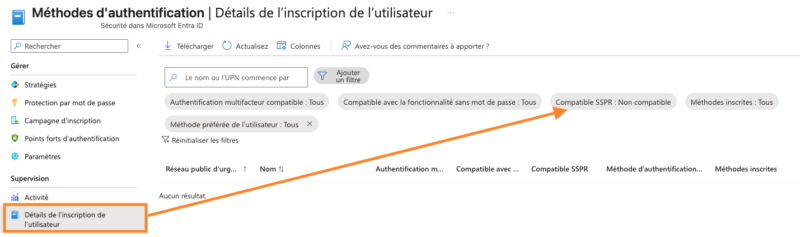
Microsoft 365 / Entra ID administrators can now identify users who do not have SSPR-compatible authentication methods. To do this, go to the Entra ID admin center > Authentication methods > User registration details. You can apply the filter "SSPR compatible: Not compatible" to see the affected users.
Sources :
- Authentication methods supported in Entra ID - Microsoft Learn
- Compare Entra ID SSPR editions and features - Microsoft Learn
- M365 Message center (MC1325414)