www.it-connect.fr

Microsoft 365: SMS and Voice MFA Is Ending in Favor of Passkeys
Microsoft announced on July 13, 2026, the end of multifactor authentication via SMS and phone calls in Entra ID, in favor of passkeys. This change takes effect on September 1, 2026, so it is coming very soon. In this article, we will look at the impact of this change, the rollout timeline, and the available authentication methods.
End of SMS and voice call authentication support in Entra ID
In response to the growing wave of identity-based attacks, especially in the age of AI, Microsoft is modernizing authentication in Entra ID by making passkeys the default method. This is also a phishing-resistant method. The rollout of this change will begin on September 1, 2026: users still authenticating with SMS or voice call will see the feature enabled automatically and will be prompted, during their next multifactor authentication, to register a passkey.
According to Microsoft documentation, this prompt can still be dismissed until February 1, 2027. In the default configuration (Microsoft-managed state), postponement is unlimited: the user can defer passkey enrollment at every sign-in. An administrator can, however, choose otherwise and require enrollment earlier.
Only after February 1, 2027 does the change become mandatory for all tenants, with no opt-out option. That date also marks the end of native support for SMS and voice methods by Microsoft. These options will remain available only through Microsoft Security Store telecom partners, at the expense of organizations that want to keep them.
This shift is based on a shared assessment by several cybersecurity players, including Redmond itself. Unlike SMS and voice calls, which rely on shared secrets that can be easily intercepted or hijacked through social engineering, passkeys rely on public-key cryptography. The result: they are phishing-resistant while also simplifying the sign-in experience (once users get used to them).
This urgency is reinforced by the rapid evolution of threats. According to Microsoft Threat Intelligence, AI-powered phishing campaigns achieve click-through rates of up to 54%, compared with around 12% for traditional campaigns. At the same time, techniques such as SIM swapping or MFA bypass are becoming increasingly accessible through ready-made kits.
AI is therefore paving the way for the industrialization of account compromise. Once an identity is compromised, an attacker can automate discovery, privilege escalation, and lateral movement faster than a human could. This makes the adoption of phishing-resistant methods more urgent than ever, and explains why Microsoft is choosing to accelerate the transition.
How can you keep MFA via SMS or voice calls?
Today, multifactor authentication via SMS and voice calls is natively supported in Entra ID at no additional cost. Once these native methods are removed, it will still be possible to use a third-party telecom operator.
However, be aware that this solution will generate additional costs, billed directly by the operator responsible for delivering SMS messages and voice calls.
Timeline for retiring MFA via SMS and calls
To make things clear, here is Microsoft’s planned timeline for this significant change.
| Date | Step |
| September 1, 2026 | Users for whom multifactor authentication via SMS and/or voice calls is enabled will be prompted to register a passkey during their next multifactor authentication. |
| September 18, 2026 | The list of telecom operators allowing SMS and voice multifactor authentication to remain available will be published, along with commercial terms and pricing. |
| October 30, 2026 | It will be possible to configure a third-party telecom operator to keep SMS and voice call authentication through the Microsoft Security Store. |
| February 1, 2027 | Microsoft ends the SMS and voice call authentication service natively available in Entra ID. |
| After February 1, 2027 | Users using SMS or voice calls for multifactor authentication will need to register a passkey before they can sign in to their account. Microsoft will enable passkey registration by default across all tenants, with no opt-out option. |
Preparing for the removal of SMS and call authentication from Entra ID
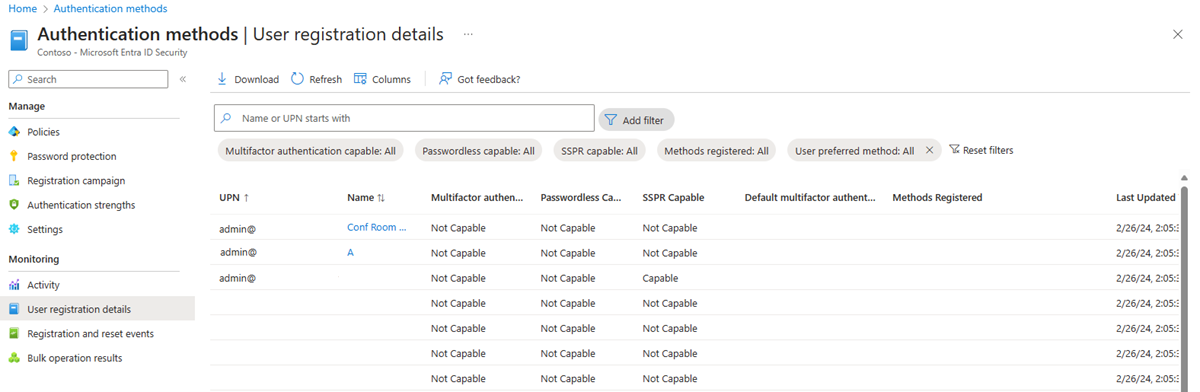
The first step is to identify the users in your tenant for whom SMS and/or voice call authentication methods are enabled. To get this information, go to Microsoft Entra admin center > Authentication methods > Monitoring > User registration details.
Next, adjust the report filters to identify only users who have a phone authentication method. You can download the updated report to prepare your communication campaign.
The second step is to identify the type of passkey that will suit your users. Entra ID supports two types of passkeys:
- Synced passkeys : these are passkeys stored in a credential manager (a feature provided by password managers), such as Bitwarden, iCloud Keychain, or those found in browsers. They can be synchronized across the user's devices.
- Device-bound passkeys : these are tied to a device, such as a smartphone through Microsoft Authenticator, passkeys with Windows Hello, and FIDO2 security keys.
To enable passkeys for your tenant and plan your deployment, see these two official resources:
Available authentication methods in Entra ID
If you do not want to require passkeys for your users, you can consider moving to another authentication method. The table below lists the authentication methods available in Entra ID and how they can be used: as a primary, secondary, and account recovery (SSPR) method.
| Method | Primary authentication | Secondary authentication | Account recovery (SSPR) |
| Authenticator Lite (via Outlook on mobile) | ❌ | ✅ | ❌ |
| Certificate-based authentication | ✅ | ✅ | ❌ |
| ❌ | ✅ | ✅ | |
| External MFA | ❌ | ✅ | ❌ |
| OATH hardware tokens | ❌ | ✅ | ✅ |
| Passwordless authentication with Authenticator | ✅ | ❌ | ❌ |
| Microsoft Authenticator push notification | ✅ | ✅ | ✅ |
| FIDO2 passkey | ✅ | ✅ | ❌ |
| Passkey in Microsoft Authenticator | ✅ | ✅ | ❌ |
| Password | ✅ | ❌ | ❌ |
| MacOS PSSO | ✅ | ✅ | ❌ |
| QR Code | ✅ | ❌ | ❌ |
| SMS | ✅ | ✅ | ✅ |
| OATH software tokens | ❌ | ✅ | ✅ |
| Synced passkeys | ✅ | ✅ | ❌ |
| Temporary Access Pass (TAP) | ✅ | ✅ | ❌ |
| Identity verification with Entra ID Verified | ❌ | ❌ | ✅ |
| Voice call | ❌ | ✅ | ✅ |
| Windows Hello for Business | ✅ | ✅ | ❌ |
Conclusion
Microsoft is driving a major shift toward passkeys, which are more secure and better suited to today’s identity attack methods, especially those powered by AI. Organizations need to prepare for this migration while ensuring clear communication with their users.
References:
As a freelance consultant specializing in the Microsoft Cloud Infrastructure & Modern Work ecosystem, I can help you with this transition. Feel free to contact me if needed.