www.it-connect.fr


Windows Forensics Part 9: What the Recycle Bin Can Reveal
The Recycle Bin is a built-in Microsoft Windows feature that temporarily stores files deleted by a user. Instead of deleting an item immediately, Windows moves it to a specific location so it can be restored. Let's explore what it can reveal in a forensic context.
In digital investigations, the Recycle Bin is a particularly interesting artifact. It can prove that a user deleted a file, reveal its original location, its size, and the exact date and time it was deleted. However, by itself, the Recycle Bin does not prove an intent to permanently destroy data, since a file can still be restored.
In this ninth part of the Windows forensic series, we will look at how the Recycle Bin works internally (the $Recycle.Bin folder, $I and $R files), then analyze its contents with Eric Zimmerman's RBCmd tool. If you missed the previous episodes, you can read part 8 on ShellBags and part 7 on LNK files.
How the Windows Recycle Bin Works
The $Recycle.Bin Folder
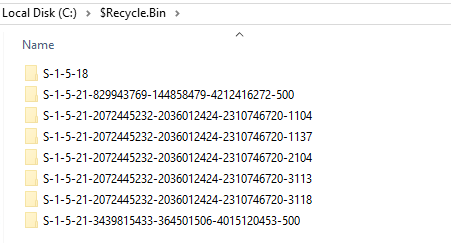
When a file is deleted, Windows does not erase it immediately. It is moved to the hidden system folder $Recycle.Bin, located at the root of each partition.
This folder contains a subfolder for each user, identified by their SID (Security Identifier). Each user therefore has their own Recycle Bin, isolated from others and protected by the permissions (ACLs) applied to these folders. By default, these permissions prevent access to deleted items belonging to another account.
$I and $R Files
When a file is deleted, Windows renames the deleted file and creates an associated metadata file. This metadata makes it possible to recover:
- The original name and path of the file
- Its size before deletion
- The exact date and time it was deleted.
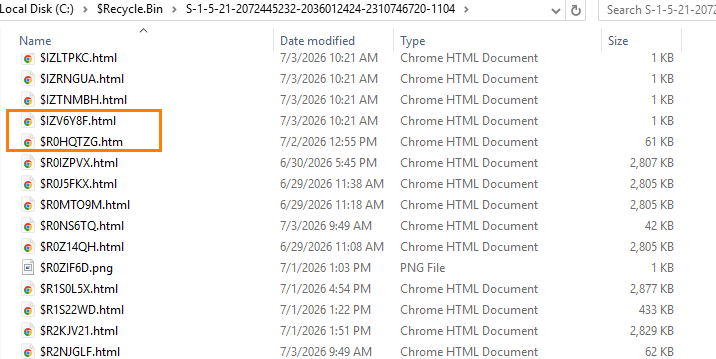
Inside this folder, Windows automatically creates two files:
- a file whose name starts with
$I, which contains deletion metadata. - a file whose name starts with
$R, which corresponds to the actual content of the deleted file.
For example, deleting the file:
C:\Users\Mehdi\Desktop\Secret.docxGenerates:
$I4A8B2.docx
$R4A8B2.docx
The $I file indicates in particular:
- The original path.
- The file size.
- The date and time of deletion.
The $R file, on the other hand, contains the document itself and can be restored as long as the Recycle Bin has not been emptied.
Analyzing Deleted Files
To analyze files present in the Recycle Bin, we will use RBCmd (Recycle Bin Command), a command-line tool developed by Eric Zimmerman, who is also behind several tools used in this series (PECmd, LECmd, SBECmd). It is open source and free.
- Official website (Eric Zimmerman's tool suite) : ericzimmerman.github.io/
- GitHub repository : github.com/EricZimmerman/RBCmd

Download the latest version of the tool, then extract its contents into a folder. Make sure all files were extracted correctly, especially the DLL libraries, which can sometimes be removed by some antivirus products.
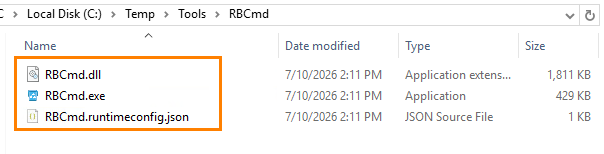
Then open a Command Prompt (CMD), preferably in administrator mode, move to the folder containing RBCmd.exe, and run the following command:
RBCmd.exe -d "C:\$Recycle.Bin" --csv "C:\Chemin_de_sortie"
A few notes on the options:
-d: folder to process recursively (use-fto analyze a single$Ifile)--csv: folder where the CSV report will be saved (preferably, the path should be enclosed in double quotes)--csvf: custom name for the CSV file (optional)--dt: custom date display format (optional)
Note: depending on the RBCmd version, direct analysis of C:$Recycle.Bin may not work because of folder permissions. In that case, analyze the user’s SID-specific folder directly, or use the -f option on a specific $I file
Once the analysis is complete, the tool indicates the number of artifacts analyzed as well as the location of the generated CSV report.
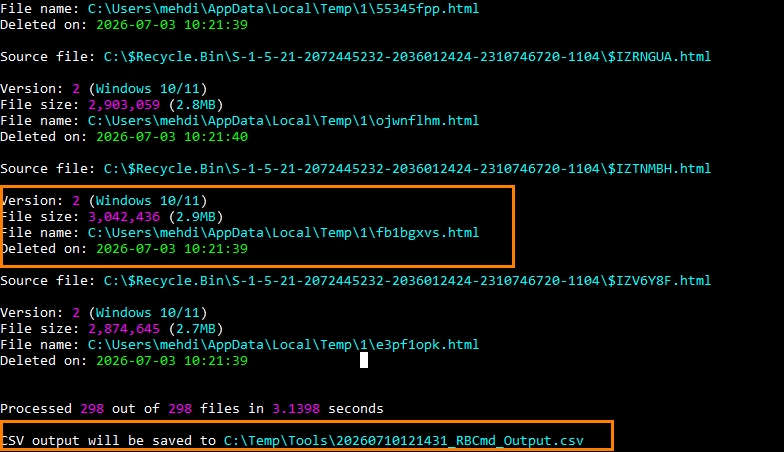
Open the CSV file to review the collected information.

We can notably recover:
- The name of the deleted file
- Its original path
- Its size
- The date and time of deletion
- The user (SID) who owns the Recycle Bin.
The example below shows several deleted files along with their deletion date.

Notes
When a file is restored from the Recycle Bin, the $I/$R pair is removed from it and the file is placed back in its original location. If that same file is deleted again, Windows creates a new $I/$R pair containing a new deletion date. The previous artifact is not reused.
If a file is permanently deleted (for example with Shift + Delete, via a command line, or after emptying the Recycle Bin), no new $I/$R artifact is created. Deletion information must then be sought in other Windows artifacts, such as the MFT, the USN journal, or forensic disk copies.
Conclusion
The Recycle Bin is a valuable artifact during a digital investigation. Thanks to the $I and $R files, it is possible to reconstruct the context of a deletion by identifying the file involved, its original location, and the date and time of the operation. Although it cannot by itself prove permanent deletion, analyzing it alongside other Windows artifacts provides essential evidence for rebuilding the event timeline.