www.it-connect.fr

Windows 11 Will Start Enabling Memory Integrity on PCs in October 2026
Have you ever opened Windows Security, under Core isolation, only to find that memory integrity was disabled on a fairly recent PC? Microsoft is about to take care of that for you. Starting in October 2026, Windows monthly updates will enable this protection on machines deemed ready. Here’s what you need to know.
"Security works best when protection is built in, not bolted on", as the first line of the article published by Peter Waxman on Microsoft’s Windows IT Pro blog states. In this article, he discusses an upcoming change in October 2026 on Windows machines: the enabling of memory integrity on more eligible devices, and on some of them, virtualization-based security (Virtualization-based Security - VBS) will also be enabled.
The built-in Windows feature known as "Memory integrity" and also called HVCI (Hypervisor-protected Code Integrity) relies on the Windows hypervisor to create an isolated environment, out of reach of the kernel itself. That is where kernel-mode code integrity checks run. The result: only trusted drivers and kernel code can load. An unsigned driver, or one that is signed but known to be vulnerable, is blocked before it can reach the system’s core components.
"Built on virtualization-based security (VBS), memory integrity helps protect critical Windows components from tampering. It serves as the foundation for modern security innovations such as hotpatch updates, which improve the user experience and productivity while strengthening protection.", it says.
This is not a new feature. What is new is Microsoft’s intention to enable it by default on more machines. In fact, this feature has existed since Windows 10 as an optional security feature. In Windows 11, Microsoft enables it by default, but only during a clean installation on compatible hardware, as well as on Secured-core PCs. Machines upgraded from Windows 10 to Windows 11 have remained without this protection, and these are among the systems Microsoft is now targeting.
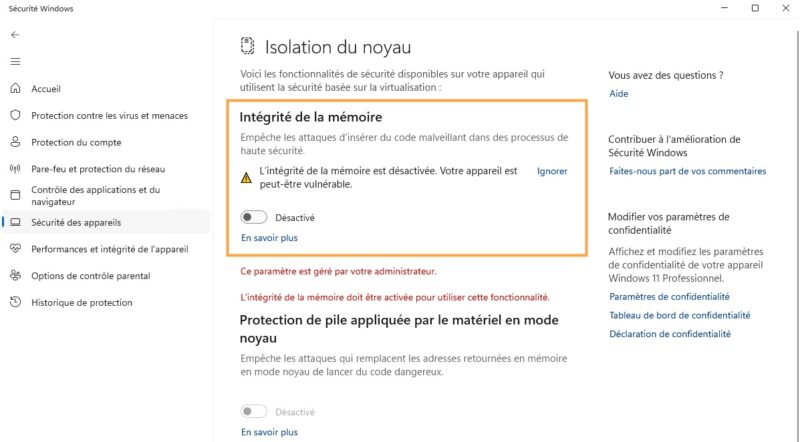
You can check its status in the Windows Security > Device security > Core isolation > Memory integrity app.
A gradual rollout with a prior assessment
Before deciding whether memory integrity should be enabled on a Windows machine, the system will assess the device’s state: hardware, compatibility, performance, compliance with Windows 11 requirements, and recommended built-in protections. The decision will be made based on this analysis, and in all cases, deployment will begin in October 2026. This is likely to be a change delivered through the cumulative updates associated with Patch Tuesday on October 13, 2026.
What are the hardware criteria? If we look at the Microsoft Learn documentation dedicated to this feature, it lists the following requirements:
- Processor. 8th-generation Intel or newer, AMD Zen 2 or newer, Qualcomm Snapdragon 8180 or newer.
- Memory. At least 8 GB of RAM on x64 systems.
- Storage. An SSD of at least 64 GB.
- Firmware. Virtualization enabled in the BIOS/UEFI.
- Drivers. Only drivers compatible with memory integrity.
In enterprise environments, if you enabled or disabled the feature through GPO, Intune, or the registry, Windows Update will not touch it.
In any case, you should remain cautious because this feature can affect the loading of one or more drivers. In the worst case, if a critical driver fails to load because it is too old, for example, enabling this security feature can cause a boot failure (Blue Screen of Death, ring a bell?).
To troubleshoot a blocked driver issue, Microsoft says to check Event Viewer in the following log: Applications and Services > Microsoft > Windows > CodeIntegrity > Operational. Compatibility events are associated with ID 3087.
One more item to address as we head into fall 2026: check where you stand with memory integrity and VBS before October, using the official configuration guide.