www.it-connect.fr


NIS 2: Why Windows Logon Is the Blind Spot in Your Access Controls
In most companies, access to a Microsoft 365 mailbox is better protected than the sign-in used on the workstation that provides that access. MFA has been rolled out across SaaS applications, sometimes because the vendor required it, sometimes because the CISO simply knows it is essential. Meanwhile, Windows sign-in often still relies on a simple username-and-password pair. The same is often true for Remote Desktop (RDP) connections and VPN access. This gap is largely explained by how easy it is to deploy in the cloud: it is built in, unlike adding MFA to a Windows session.
In the context of NIS 2 and the tightening of access control requirements, this gap is also becoming a compliance issue. In this article, I will review what the directive actually expects in terms of authentication, then look at how to add strong authentication to these Active Directory entry points without redesigning the existing infrastructure.
This article includes commercial content for Specops Software.
Does NIS 2 require MFA for Windows sign-in?
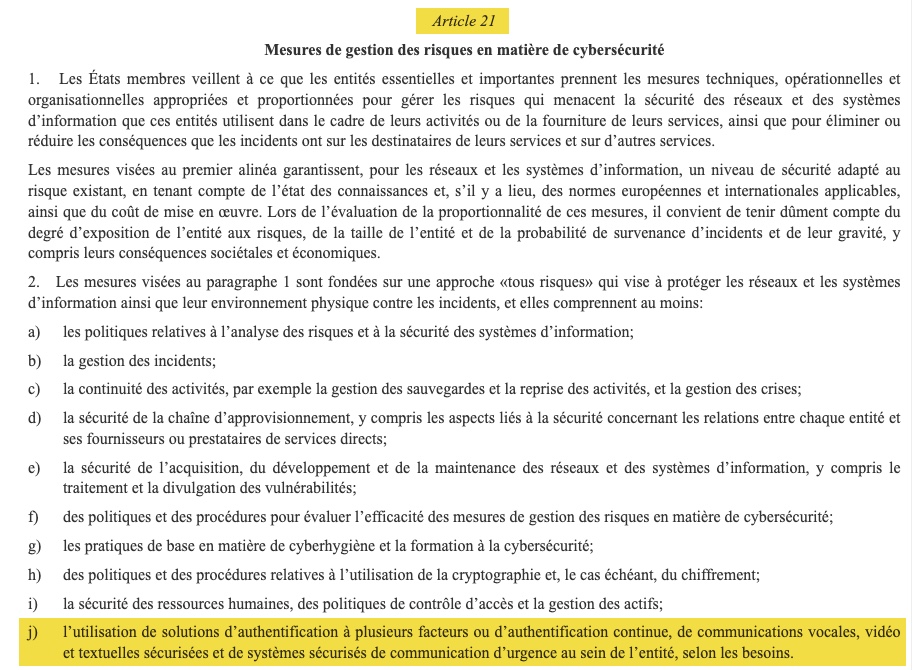
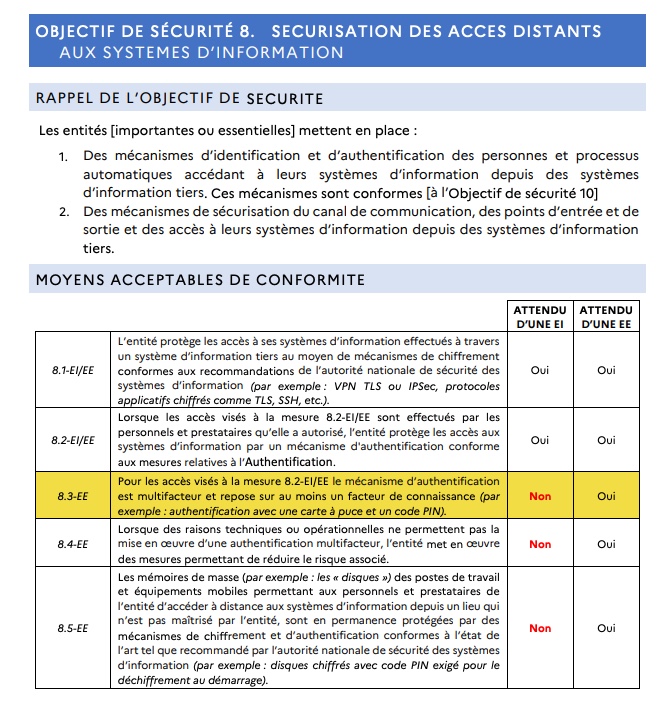
NIS 2 mentions multi-factor authentication in Article 21.2.j, but adds the wording "as appropriate", without naming any specific entry point. In the French implementation led by ANSSI, MFA is expected for essential entities for all remote access, which covers VPN and externally exposed Remote Desktop. For important entities, and for all access that is not remote access, including workstation sign-in in the office, an authentication mechanism based on a single secret remains acceptable.
Essential entities and important entities. What does that mean?
NIS 2 divides regulated organizations into two categories, based on the criticality of their sector and their size. ANSSI defines essential entities (EE) as those with at least 250 employees, or with annual turnover above 50 million euros and annual balance sheet total above 43 million euros. Important entities (EI) are those that do not fall into the first category but have at least 50 employees or annual turnover and balance sheet total above 10 million euros. Exceptions exist regardless of size, notably for service providers, electronic communications operators, and public administration.
In other words, password-only Windows logon may be enough to check the regulatory box. It is not enough to protect you, and that is the real issue.
The MFA paradox: protected in the cloud, exposed internally
What Microsoft 365 MFA does not cover
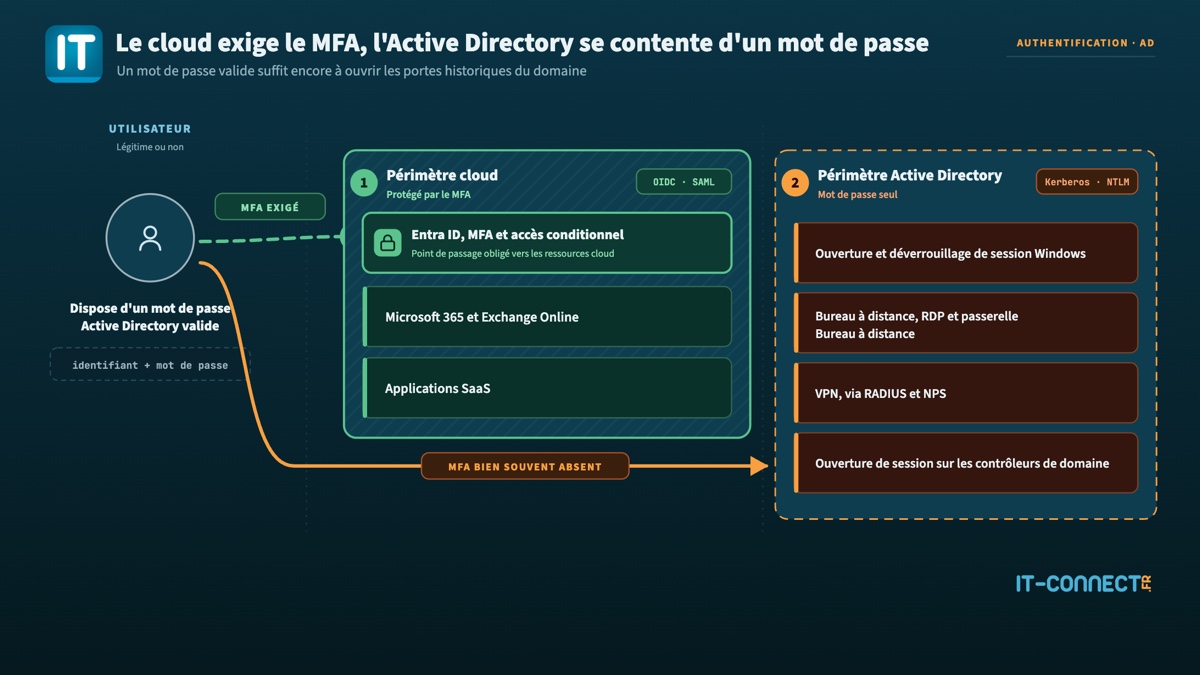
Enabling MFA in Entra ID protects access to cloud services. By that I mean access to Microsoft 365 tools and other applications where authentication is federated. However, it does not protect Kerberos (or NTLM) authentication against your domain controllers. An attacker with a valid Active Directory password, obtained through an infostealer, a data breach, or password spraying, will never go through the Entra ID sign-in page. They will try to log on directly to a computer if they are already on your local network, or they will try to open an RDP session or build a VPN tunnel if they are remote.
It is worth repeating that the local directory and the cloud tenant are two separate authentication planes. Each has its own access rules.
Microsoft has started to address this with Entra Private Access for domain controllers. It deploys a component on domain controllers to intercept Kerberos exchanges and apply cloud-based conditional access policies, including to protocols that do not natively support these controls. The approach is interesting, but it depends on the Global Secure Access client being present on endpoints, not to mention the appropriate Entra licenses. It is a project in its own right for strengthening access to resources, whether in the cloud or on-premises. In any case, it does not apply to Windows sign-in: that is exactly the topic covered in this article.
For the vast majority of Active Directory infrastructures in production today, the observation remains valid: Windows logon, RDP, and VPN escape conditional access policies. More importantly, these entry points also escape MFA.
Entry points that still rely on single-factor authentication
In a classic Active Directory environment, the list is short but enough for an attacker:
- Sign-in and unlock on Windows 10 and Windows 11 workstations.
- Remote Desktop connections to servers, an RDS server, or a Remote Desktop Gateway. Here we are talking about the RDP protocol.
- VPN connections through Active Directory, a RADIUS / NPS server.
- Sign-in on servers, including domain controllers.
That last point deserves attention. ANSSI refers to the set made up of the directory and the resources used to control it as the core of trust, and explicitly cites Tier 0 of an Active Directory domain as an example. An interactive session opened on a domain controller with only a password is therefore access to the most sensitive asset in the information system.
What NIS 2 and ReCyF actually expect
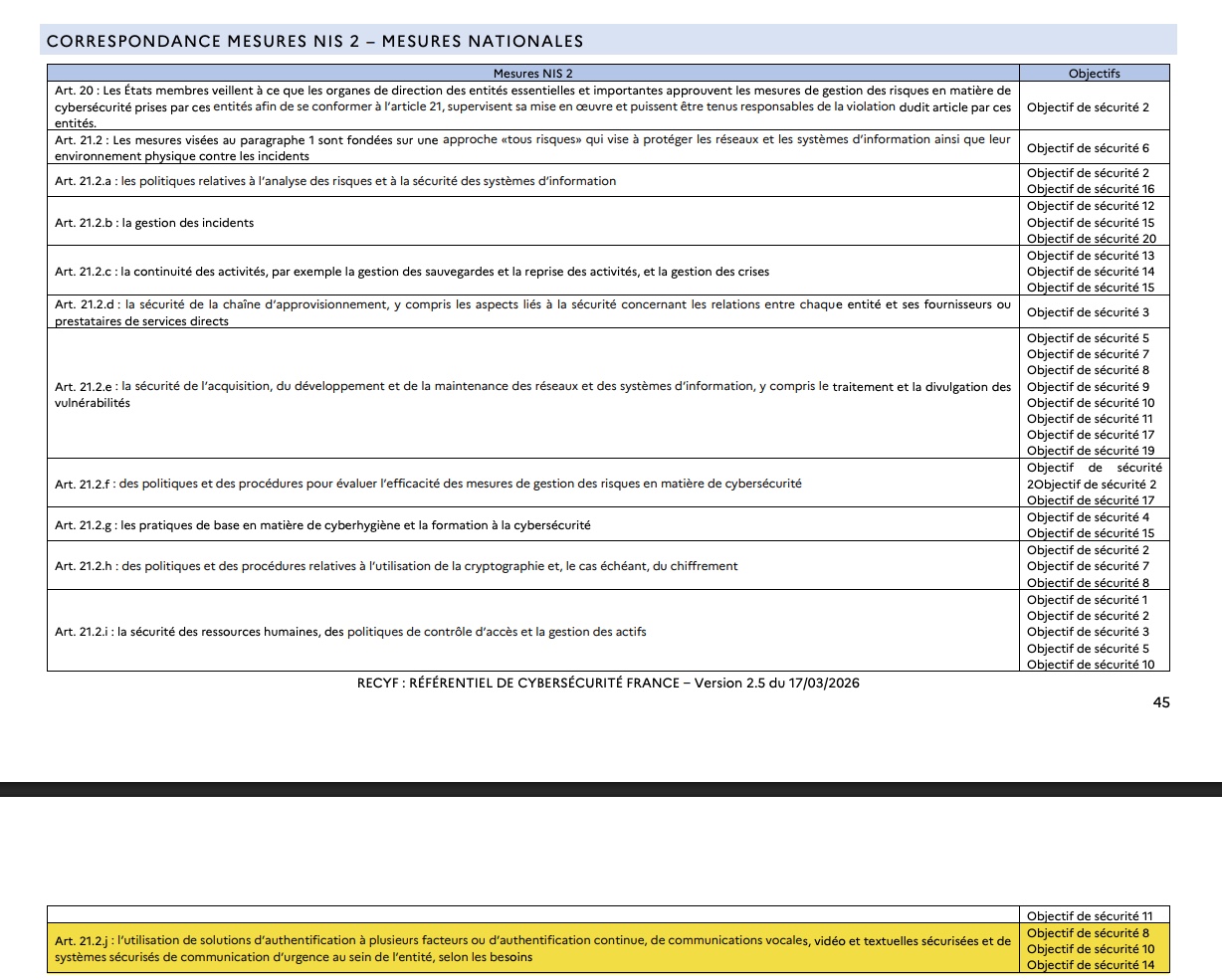
Article 21.2.j of Directive (EU) 2022/2555 mentions “the use of multi-factor authentication or continuous authentication solutions” within the entity, “as appropriate”. This wording leaves a great deal of room for interpretation to EU member states, and France has used that room.
The French reading: the Référentiel Cyber France
Since March 17, 2026, ANSSI has made the ReCyF (Référentiel Cyber France) available, currently distributed as a working document. It corresponds to the cybersecurity reference framework mentioned in Article 14 of the Resilience bill, and lists 20 security objectives along with acceptable means of compliance. The idea is to guide businesses toward NIS2 compliance.
Three objectives are directly relevant to our topic today:
- Objective 8, securing remote access. For an essential entity, MFA becomes the rule for all remote access. Measure 8.3-EE requires the authentication mechanism to be multi-factor and to rely on at least one knowledge factor, with the ANSSI example being a smart card with PIN code. Measure 8.4-EE provides a fallback clause: when technical or operational reasons prevent MFA from being implemented, the entity puts in place measures to reduce the associated risk.
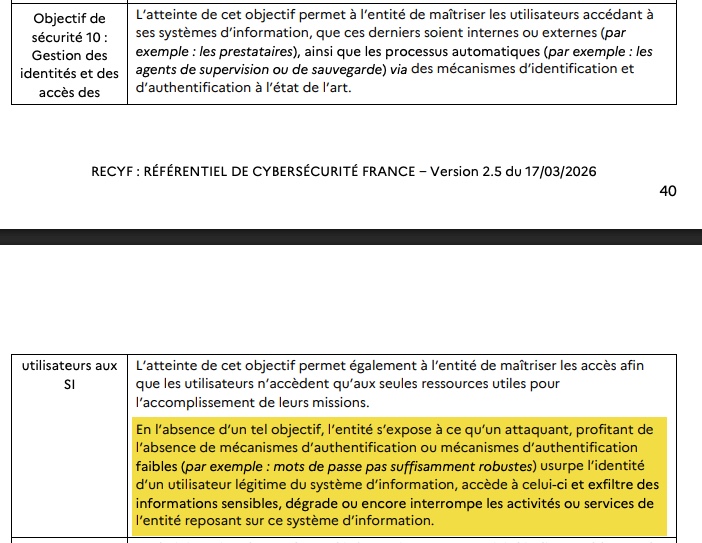
- Objective 10, identity and access management. Measure 10.B.1-EI/EE requires an authentication mechanism involving at least one secret element, citing both a password and a smart card with PIN code. Single-factor authentication therefore remains compliant.
- Objective 11, administration control. It requires dedicated administrative accounts and, for essential entities, reinforced protection of the core of trust.
Note: in ReCyF, the suffix of each measure indicates its target: -EI/EE for a measure expected from both categories, -EE for a measure expected only from essential entities.
The next question is what the reference framework means by remote access. It refers to access to the entity’s information systems from outside, passing through a network it does not control, and performed by its staff or service providers. My reading is as follows. A teleworker’s VPN connection and an RDP session opened from the Internet are therefore included. Signing in on a workstation left in the office and connected to the internal network is not.
The nuance to keep in mind is that the framework is objective-based, not product-based. Acceptable means of compliance are not mandatory, but an entity that applies them can rely on them during an ANSSI audit. An alternative measure remains possible, provided it is justified in the compliance assessment.
Where does the transposition stand?
The Resilience bill has still not been enacted. It was adopted by the Senate in first reading on March 12, 2025, then examined by a special committee in the National Assembly, without completing its legislative path. On July 8, 2026, the European Commission referred France, Ireland, Spain, and the Netherlands to the Court of Justice of the European Union. I covered this point in a dedicated article on the CJEU referral and the transposition delay.
In practical terms, the obligations are not yet legally enforceable, but the technical framework has been published and ANSSI is urging future in-scope entities not to wait. Above all, these are actions that take several months to complete, so do not leave it to the last minute.
Why aiming for the regulatory minimum is a bad calculation
If you are an important entity, ReCyF does not require MFA. That does not make password-only authentication defensible. The justification associated with Objective 10 is explicit. In the absence of an authentication mechanism, or with a weak mechanism, with ANSSI citing the example of “passwords that are not strong enough”, an attacker impersonates a legitimate user, gains access to the information system, and exfiltrates sensitive information, or even degrades or interrupts the entity’s activities.
I prefer to reason the other way around. The question is not “what do I need to do to be compliant”, but “what are my entry points with single-factor authentication, and what do they provide access to”. More importantly, we often see that access not protected by MFA (or by a robust access method) is a highly exploited entry path for cybercriminals. It makes sense to roll it out everywhere, even if that means going beyond the compliance objectives.
Adding MFA to Active Directory without rebuilding the infrastructure
Native options and their limits
Active Directory does not provide a native way to add a second authentication factor on top of the password. Native approaches can still go beyond simple password authentication, but they all rely on changing the authentication method rather than adding an extra layer:
- Smart cards, with certificate-based authentication via PKINIT. This is the mult-factor mechanism historically supported by Kerberos, strong and phishing-resistant, but it requires a certificate management infrastructure.
- Windows Hello for Business, which provides passwordless authentication backed by the TPM. Deploying it in a hybrid environment requires specific preparation, especially around cloud Kerberos. We will be publishing technical resources on this topic soon.
- FIDO2 security keys for on-premises resources. Unlike smart cards, this path does not rely on your PKI but on Microsoft Entra Kerberos. A Kerberos server object is created in the local directory and then published to Entra ID through Entra Connect.
If you are considering strengthening access protection on your on-premises infrastructure, these options are worth evaluating. Another approach is to add an overlay, and that is what we will discuss now.
The overlay approach
The alternative is to intercept authentication at the level of the Windows credential provider and the RADIUS server, without changing the directory schema or the authentication protocols. An agent is deployed on endpoints, a server-side component talks to the directory, and the second factor is requested after the Active Directory password is entered.
That is the approach chosen by Specops Secure Access, and it is the one that requires the least change to what already exists.
Specops Secure Access applied to Active Directory entry points
Architecture and integration
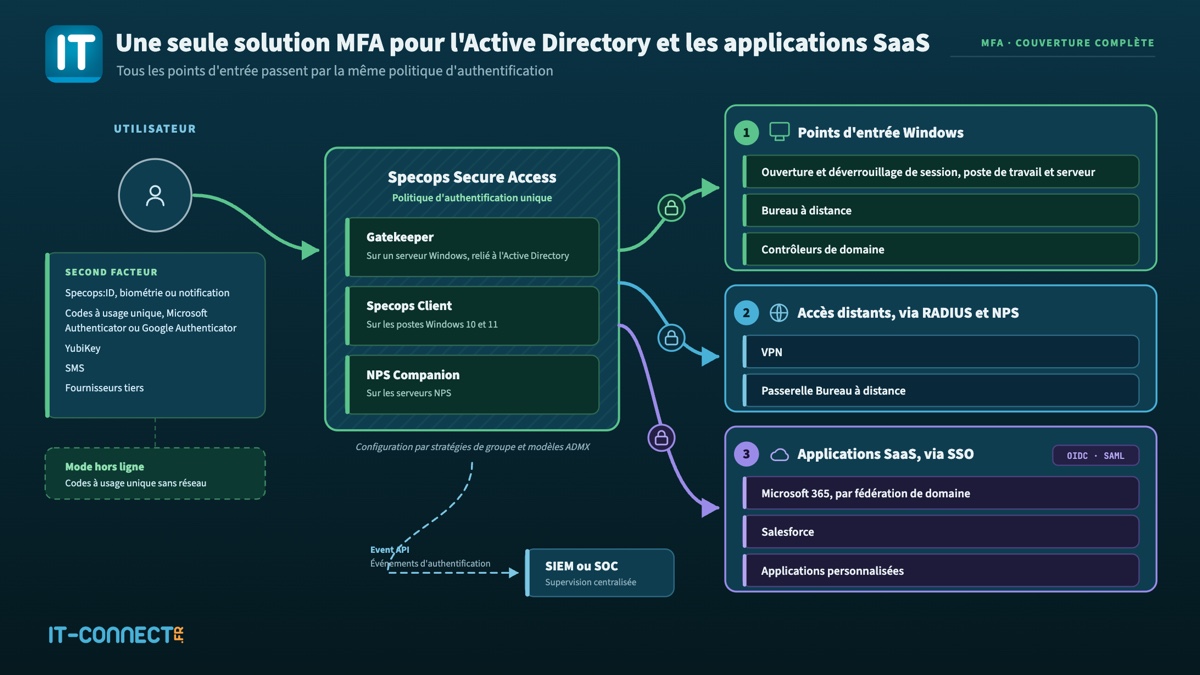
The solution relies on two, or even three, components depending on the services you want to cover. A Gatekeeper installed on a Windows server provides the link with the Active Directory directory (or several for redundancy). The Specops Client is deployed on domain-joined Windows endpoints. For RADIUS scenarios, the NPS Companion component must be installed on all NPS servers. This component extends the NPS configuration so it can communicate with Specops Authentication web services when a user attempts to authenticate through the VPN or the Remote Desktop Gateway.
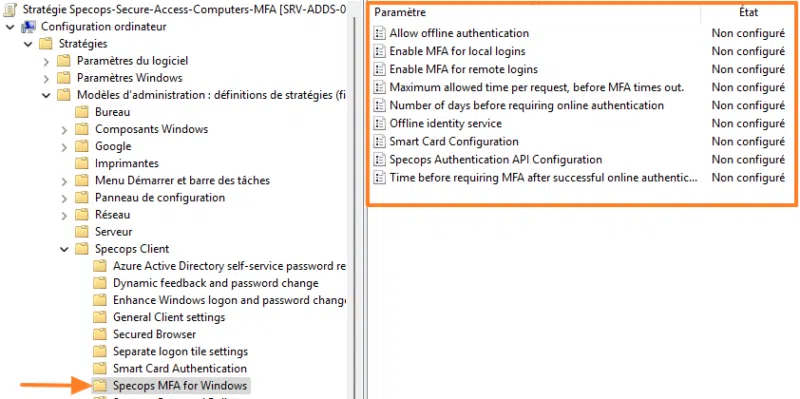
Configuration is done through Group Policy after integrating administrative templates (ADMX) developed by Specops Software. This allows you to use the tools you already know to configure the solution. The benefit is that you reuse your usual OUs and security groups, without introducing a parallel management tool.
Covered scenarios
The current version of Specops Secure Access covers the following scenarios:
- Windows sign-in and session unlock, on workstations as well as servers.
- Remote Desktop connections, directly to a server over RDP or through a Remote Desktop Gateway.
- VPN connections compatible with RADIUS, based on NPS.
- Sign-in on domain controllers.
The last item in this list is particularly interesting in light of ReCyF Objective 11. Protecting interactive access to the core of trust with a second factor directly addresses the compromise scenario described by ANSSI, where an attacker obtains administrative rights over the directory.
Authentication methods
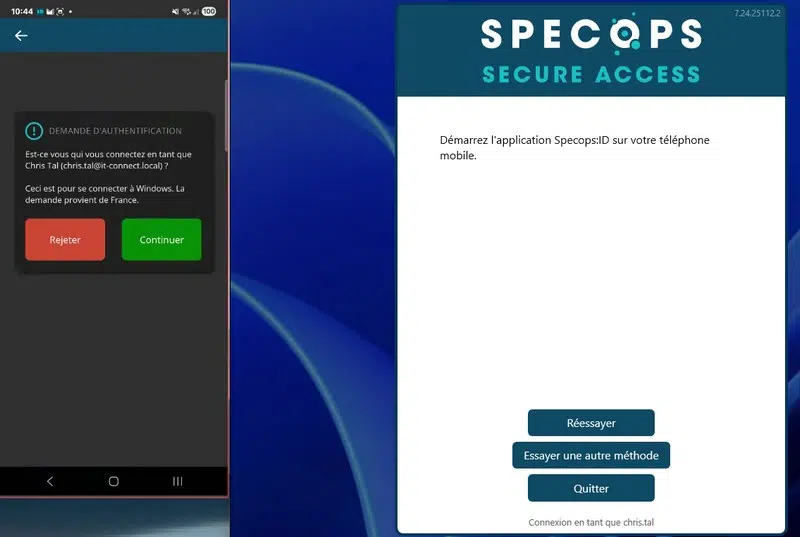
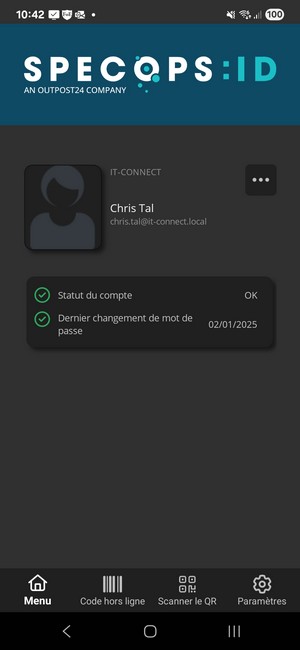
The solution supports the Specops:ID mobile app with biometric verification, one-time codes via Microsoft Authenticator or Google Authenticator, YubiKey keys, and SMS. On that last point, I stand by my position: SMS is a valid factor, but a vulnerable one (interception, SIM swapping, etc.).
The Specops solution can also rely on third-party identity services such as Duo, Okta, PingID, or RSA SecurID.
Extending strong authentication to SaaS applications
One of the recent additions to Specops Secure Access is support for SSO for SaaS applications, using OpenID Connect and SAML. Specops then acts as the identity provider for cloud applications. The solution supports scenarios for Microsoft 365 (by federating the domain in Entra ID), for Salesforce, and for custom applications.
The value is in addressing both halves of the problem with the same application stack. Let me explain. You apply a single authentication policy that spans Windows sign-in all the way to cloud applications, instead of stacking one identity provider for the cloud and a separate MFA solution for on-premises access.
Offline authentication
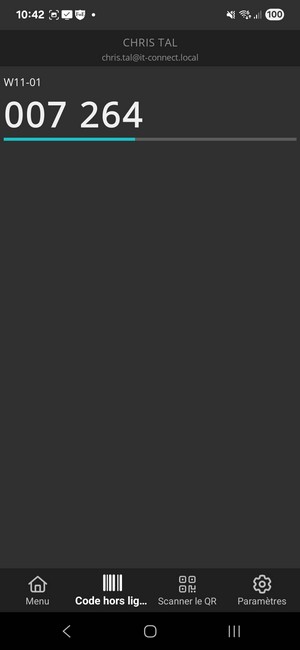
What happens when the user has no network access? Specops Secure Access offers an offline mode based on one-time codes generated by an authenticator app or a YubiKey. A salesperson on the road, a field technician, or a user in a low-connectivity area can sign in without network access. That is essential to avoid being stuck at the Windows sign-in screen...
Note that the service still depends on the Specops cloud for initial enrollment and for online authentications.
Visual location: screenshot of the Windows sign-in screen showing the second-factor prompt after password entry. Alt text: Multi-factor authentication prompt at Windows sign-in with Specops Secure Access
Strengthen access without degrading the user experience
Tuning how often prompts appear
To strike a good balance between security and end-user convenience, Specops Secure Access provides two settings.
The first is to space out prompts after a successful authentication. Specops describes this customizable “remember me” setting as applicable to sign-in and unlock, VPN, and RDP. For reference, this setting is named “Time before requiring MFA after successful online authentication”. You can set it to a few hours to cover a full workday or half day without overloading users with prompts.
The second is the Trusted Network Locations feature available for MFA scenarios with Windows. It allows you to define IP ranges, typically corporate sites, where only the password is requested and MFA is applied everywhere else. Use sparingly, but it does provide some flexibility.
I would add one caveat here. Treating the IP address as a trust factor amounts to assuming the internal network is safe, which is exactly the assumption that Zero Trust asks us to abandon. A compromised endpoint on the LAN is still on a trusted range.
Planning for exceptions and fallback scenarios
The solution also provides settings to handle exceptions and unexpected situations, including:
- An exclusion group can be defined to exempt certain accounts from MFA, through a GPO targeting a security group declared from the Gatekeeper. Reserve this for interactive service accounts and some technical cases where it is justified. Since we are talking compliance, this will of course need to be reviewed during the annual account reviews required under ReCyF Objective 10.
- The ADMX setting "Allow local users when MFA is enabled" can, if disabled, prevent sign-in with a local account. This is a good practice to avoid the local administrator account becoming the MFA bypass path.
- An emergency break-glass account, documented and monitored, must remain available in the event the service becomes unavailable.
- Multiple Gatekeepers in production, so this component does not become a single point of failure in the authentication path.
Getting enrollment right
Your users need to enroll to benefit from MFA. That is the baseline with any solution. During the first authentication, the Specops client installed on the Windows endpoint will guide the user through this enrollment phase. This is not done in isolation, and your users may already have completed it. How is that possible? If you already use Specops uReset (the self-service password reset solution), the existing information can be reused.
Settings can be applied by group, so a phased rollout is possible. I would even say it is recommended. For example, start with a pilot group made up of administrators and mobile users, then roll it out to the rest of the estate.
Logging and proving, the other half of the job
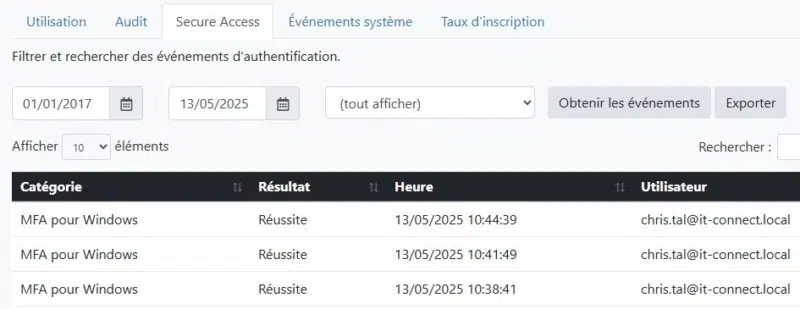
Deploying MFA is not enough; you also need to demonstrate it and track how it is used. Specops Secure Access exposes an Event API that can forward authentication events to a SIEM or SOC. The Specops portal also provides access to the event history.
This aligns with ReCyF Objective 20, applicable to essential entities, which requires collecting monitoring data, processing it, and retaining it for at least three months. If you do not already have a log repository, log centralization is the prerequisite to address alongside the authentication project, not afterward.
What to keep in mind before getting started
Now that you know a technical solution exists, here is the key takeaway before starting such a project:
- An agent must be deployed on every endpoint, which means you need a suitable tool to install it across X endpoints and manage future updates.
- The solution is proprietary and backed by a cloud service, with a licensing model defined by the vendor.
- The client scope is limited to 64-bit Windows 10 and Windows 11 domain-joined devices. Linux and macOS endpoints are not supported.
- Not all proposed methods are equal. For sensitive accounts, favor a phishing-resistant method.
- MFA does not replace password hygiene. A second factor adds a barrier, it does not fix a weak password policy. Both topics must be addressed together, as I explained in the article on hardening Active Directory accounts for NIS 2.
- MFA does not cover session theft. Once authentication is complete, a stolen token or session remains usable. That is the limit addressed by approaches based on device validation and continuous verification.
Conclusion
Windows logon, RDP, and VPN form a trio that many organizations have left aside while rolling out MFA in the cloud. The French reading of NIS 2 only covers them partially, and only for essential entities. Limiting yourself to that reading would miss the point, because these are precisely the entry points an attacker with a valid password will use.
Specops Secure Access provides a concrete answer to this real-world problem: an MFA overlay built on the directory and GPOs, including offline mode for remote users and now an extension to SaaS applications via OIDC and SAML. Support for domain controllers also makes it a relevant tool for protecting the core of trust.
It is not a passwordless solution, and it is not the only possible approach. But for an organization that needs to raise the security level of its Active Directory access, it is well worth looking at.
To continue reading on this topic, here are some useful links:
- Specops Secure Access, the official page
- The Référentiel Cyber France (ReCyF) v2.5 PDF
- The NIS 2 directive text on EUR-Lex
- ANSSI’s simulator to check whether you are affected
- My hands-on review of Specops Secure Access