 www.it-connect.fr

Windows Server Gets Out-of-Band Updates to Fix RDS Bug and More
On September 14, 2026, Microsoft released around ten out-of-band updates for Windows Server, Windows 11, and Windows 10 to patch the Remote Desktop Services (RDS) bug, but that’s not all. Here’s what you need to know about these new updates.
A quick reminder of the context: I published an article last week about RDS servers no longer responding after the September 2026 updates were installed. Microsoft acknowledged the issue on September 11, 2026, then quietly released a KIR fix to be deployed via GPO. It is now accompanied by a wave of out-of-band updates. For those who want the technical details, I covered this procedure in a dedicated article about the September 2026 RDS bug, which I have just updated with the new KBs.
One out-of-band update for every Windows version
Here is the list of updates published by Microsoft that you need to install to resolve the RDS bug:
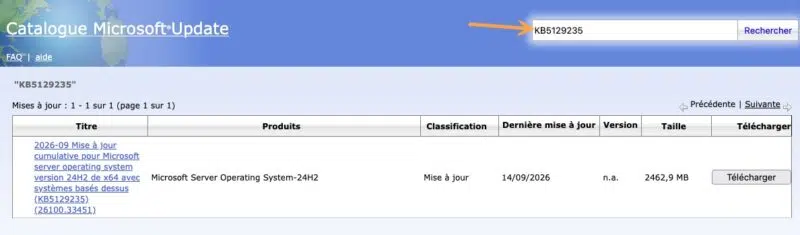
- Windows Server 2025 : KB5129235 (build 26100.33451)
- Windows Server 2022 : KB5129237 (build 20348.5631)
- Windows Server 2019 and Windows 10 LTSC 2019 : KB5129238 (build 17763.9247)
- Windows Server 2016 and Windows 10 LTSB 2016 : KB5129239 (build 14393.9514)
- Windows Server 2012 R2 : KB5129243 (Monthly Rollup)
- Windows Server 2012 : KB5129244 (Monthly Rollup)
- Windows 11 26H1 : KB5129194 (build 28000.2956)
- Windows 11 24H2 and 25H2 : KB5129195 (builds 26100.9457 and 26200.9457)
- Windows 11 24H2 and 25H2 in hotpatch : KB5129241 (builds 26100.9448 and 26200.9448)
- Windows 11 23H2 : KB5129242 (build 22631.7584)
- Windows 10 22H2 and Windows 10 LTSC 2021 : KB5129236 (builds 19045.7727 and 19044.7727)
These updates are cumulative. In other words, they include all fixes from the September 8, 2026 update, so there is no need to install that update first. If you removed it in an emergency to restore a working RDS environment, I recommend installing the out-of-band update directly. And if you deployed the KIR fix, you can safely install this KB on top of it. The only exception is the hotpatch update KB5129241, which requires KB5124008 from September 8 to already be installed, but it applies without a reboot.
In most cases, the update is not delivered directly through Windows Update. You need to go to the Microsoft Update Catalog to download the update package and then install it. Just search for the update by name.
RDS, but not only
As you may have guessed, this update fixes the bug affecting Windows Remote Desktop Services (RDS). Microsoft states this clearly, which is reassuring. However, that is not the only issue fixed by this update.
On Windows 11, it also fixes an issue with folder sharing between the Windows host and Linux virtual machines managed by the HCS (Host Compute Service) via Plan9: shared folders were no longer showing up, or were no longer accessible, from the guest. This bug was part of the known issues in KB5124008.
Also for Windows 11, this update includes protections for a security vulnerability: CVE-2026-62721, a local privilege escalation through the User-Mode Power Service (UMPS). A security patch in an out-of-band update is quite surprising, especially since this flaw had not been widely discussed. In reality, Microsoft appears to have forgotten to include the patch for this issue in the September 2026 updates for Windows 11. "The CVE database has been updated with links to the security updates for Windows 11, versions 26H1, 25H2, and 24H2, to address a fix that had been omitted. Microsoft recommends installing these updates as soon as possible.", it says.
Finally, on Windows and Windows Server, this update also resolves a bug affecting audio devices. Microsoft explains that USB Audio Class 1.0 devices that worked in stereo but failed in 8-channel mode or 3D audio are now working normally again. However, devices that simply refuse to start, with a Code 10 error in Device Manager, are still broken. "Microsoft is working on a resolution and will update this documentation when more information becomes available", it says on the KB5129235 page.











If I insall this is the KIR fix through GPO not required, or do I still need to do the GPO fix after?