www.it-connect.fr

Meta’s Muse Image Lets Others Reuse Your Instagram Photos: How to Stop It
On July 7, 2026, Meta unveiled Muse Image, its first in-house image generator, and users have reason to be concerned: any user can draw from photos on a public Instagram account to create a visual, without getting the person’s consent. Here’s what we know, and how to take back control of your content.
Muse Image, or how your public photos become raw material
Developed by Meta Superintelligence Labs, the team led by Alexandr Wang, Muse Image is integrated into Meta AI, Instagram, and WhatsApp. Beyond the usual ability to generate images from text, the tool introduces a controversial feature: the possibility of mentioning a public Instagram account (via its @) in a prompt so the AI can generate a new image based on that account’s public photos.
The problem is that Meta decided to enable this feature by default on all public adult accounts. As is often the case, Meta has therefore chosen an opt-out model, with the feature remaining active until the user disables it manually. While also taking into account that:
- Private accounts and accounts belonging to users under 18 are automatically excluded.
- No notification is sent when your photos are used as raw material for a creation initiated by another person.
- Disabling the feature only applies going forward, because images already generated from your content are not deleted.
What you need to understand is that this is not about Meta training its models on public posts. No, this is a different issue: other users are generating images on demand from your photos.
Muse Image will generate images from those of other users. That is a fact. However, this must be done in compliance with Article 50 of the European AI Act, which requires AI-generated content to be labeled and disclosed. In practice, Muse Image will have to make its images identifiable as artificial, with the goal of limiting the spread of deepfakes: a real risk when someone else’s images are being used.
How to disable content reuse
Whether the setting is already visible for you or not, the reflex is the same: check it and turn it off if you do not want your photos to be reused. The steps, as described on the Instagram help page, are as follows:
- Open your profile, then tap the three horizontal bars in the top-right corner.
- Go to the Sharing and reuse section.
- Find the option Allow others to reuse your content on Instagram and with Meta AI features.
- Disable the option for posts and for Reels.
This new section is not yet visible to everyone. Personally, it does not appear on my smartphone. As shown in the image below, only the usual options are visible.
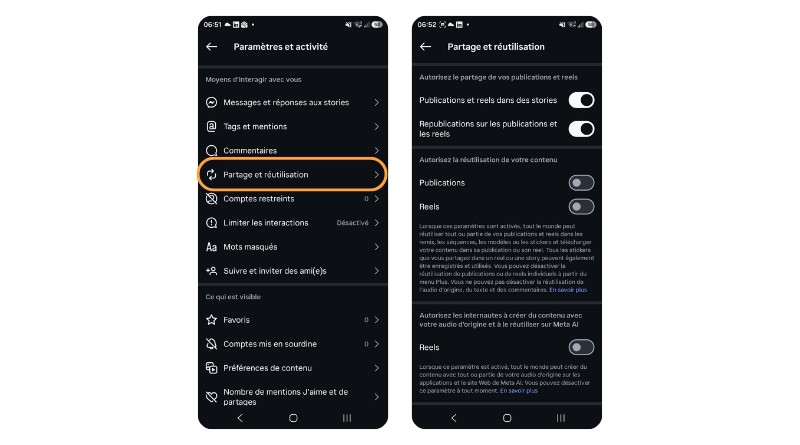
The rollout of this setting is gradual, so the option may not yet appear for you (as is the case for me). Then again, the most radical solution is still to switch your account to private, which prevents any third party from drawing from your posts. An option that not everyone can afford to use (professional accounts, for example).
Finally, there is another point to take into consideration: in Europe, this new opt-out-based option is unlikely to please the authorities. This new Meta feature may not withstand scrutiny from European regulators, which could call its rollout in the EU into question. Stay tuned.