www.it-connect.fr

Microsoft 365: Cross-Tenant Email Recall Is Coming Soon
Accidentally sending an email to the wrong company or the wrong person, then making it disappear from the recipient’s inbox? Exchange Online will soon make that possible. Microsoft is rolling out cross-tenant message recall, a long-requested feature by Microsoft 365 users. Until now, the feature stopped at the tenant boundary: you could recall a message sent to a colleague, but never one sent to a partner or a customer. That limitation is about to go away, but keep in mind that several conditions must be met. Here’s what we know.
Message recall finally crosses the tenant boundary
Message recall is nothing new in the Microsoft ecosystem. Since April 2023, Exchange Online has relied on a so-called "cloud" recall, handled server-side by a background agent rather than by the Outlook client.
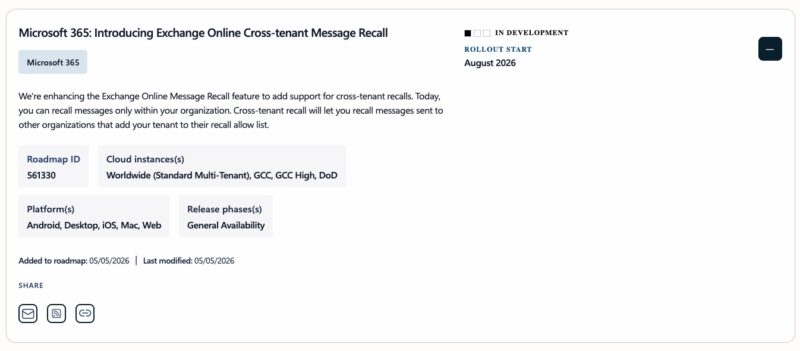
One limitation remained: recall only worked within the same Microsoft 365 tenant. As soon as an email left the sender’s organization for an external recipient (partner, subsidiary, service provider, etc.), it became impossible to retrieve. Microsoft is now filling that gap, as specified in the Microsoft roadmap entry 561330.
How do you enable cross-tenant recall?
The decision rests entirely with the organization receiving the messages. In other words, the recipient tenant decides which external organizations are allowed to recall emails from its users’ mailboxes, through an allow list. This significant restriction may lead to some friction and confusion for users...
Take the example given by Microsoft in its blog post dated July 10, 2026. If Fabrikam wants to be able to recall a message sent to a Contoso employee, then Contoso must first add Fabrikam’s tenant to its own allow list. The recall is then handled like a standard internal recall. Otherwise, the request fails and the sender receives a status report indicating that the message cannot be recalled across organizations. Each organization therefore keeps control: authorization governs inbound recalls, tenant by tenant.
This mechanism does, however, require both parties to be Microsoft 365 organizations. If the recipient uses an external mailbox provider (Gmail, or another provider), the message remains out of reach: just like internal recall, the feature stops at the Exchange Online service boundary.
Another important point: the feature is not enabled by default. Administrators will need to enable it and then add at least one trusted tenant. This is done through PowerShell using Exchange Online (remember the Exchange Online module to connect).
To enable or disable the feature at the tenant level:
Set-CrossTenantRecallConfiguration -CrossTenantRecallEnabled $trueThe default value is $false. To add trusted tenants to the allow list:
Set-CrossTenantRecallConfiguration -AllowedSenderTenantIds @{Add="tenantId 1","tenantId 2"}And to remove one or more tenants from the list:
Set-CrossTenantRecallConfiguration -AllowedSenderTenantIds @{Remove="tenantId 1","tenantId 2"}From the recipient’s perspective, the experience does not change compared with an internal recall. If the tenant receiving the message has enabled recall notifications, those notifications also apply to cross-tenant recalls. In other words, deployment requires upstream coordination between the two organizations, because this is not just a simple checkbox on the sender’s side.
A gradual rollout starting in mid-August 2026
Microsoft plans to begin rolling out the feature in mid-August 2026, with full availability expected by mid-September 2026. All Microsoft 365 tenants, including those in Europe, will be able to benefit from this new feature.
Although this feature is useful for users, it also raises questions: what about preserving evidence when a message disappears from an inbox, or if an attacker uses it to erase traces of a malicious email? Microsoft’s chosen model is restrictive, but it partly limits this scenario, since an external tenant can only recall a message if it is explicitly listed on the recipient’s allow list.