www.it-connect.fr

Windows 11: Phone Link’s Cross Device Service Is Draining Your PC’s RAM
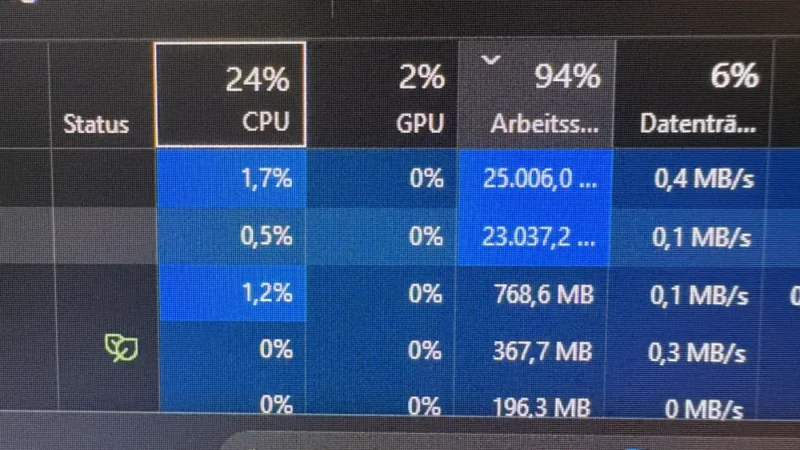
25 to 30 GB of RAM swallowed during a gaming session, Task Manager taking three minutes to open, and internet throughput collapsing. The suspected culprit? Cross Device Service, the service behind Phone Link on Windows 11. Users say it has been causing a memory leak since 2023, and Microsoft still has not officially acknowledged it. Here’s what we know.
A memory leak reported since 2023, never acknowledged by Microsoft
This issue does not appear to be new, and it resurfaced following a report published by Neowin. On Reddit, one user says they saw the Cross Device Service process consume between 25 and 30 GB of RAM while gaming. Enough to slow down the entire machine and even drop internet throughput from 900 to 150 Mbit/s.
As a reminder, Cross Device Service is the background component that powers Phone Link, Microsoft’s app for connecting a smartphone to a Windows PC (see our tutorial on connecting an Android smartphone to Windows 11). It handles clipboard sharing, notification syncing, remote phone control, and continuity across your devices. This is not an app that should bog down your PC. And yet.
The problem is not new. According to Neowin, the first reports go back at least to 2023. Several users describe the same service consuming around 15 to 20 GB of RAM once a day, forcing them to manually end the process through Task Manager to get a responsive machine again. On the Microsoft Q&A forum, one user says the issue regularly pushes their PC above 90% RAM usage.
The behavior seems to build up over time rather than causing a spike right after startup. It is as if the service keeps eating more and more memory as the hours pass. Personally, I have never run into this issue or even observed it: what about you? I’d be interested in your feedback.
For its part, Microsoft has not confirmed any possible memory leak in the Phone Link app for Windows 11. So these are user reports, here and there, but what stands out is the repetition of the complaints. Some users appear to be affected by this bug, but it is hard to tell whether it is tied to a specific update, a particular Phone Link version, or a given hardware configuration.
A few tips, but no real fix
In the absence of an official fix, the workarounds shared online remain generic and do not necessarily solve the issue for everyone. Here are a few suggestions mentioned on the Web:
- Install the latest Windows 11 and Phone Link updates, in case the fix arrives that way (check the Microsoft Store)
- Disable the Mobile Devices entry in the Task Manager Startup tab.
- Manually end the faulty process in Task Manager to free up RAM, knowing that the leak may come back when the service restarts.
- Completely disable Phone Link if nothing else works, even if that means losing synced notifications, shared clipboard, calls, and continuity between devices.
To keep the convenience of synchronization without relying on Microsoft’s service, there are alternatives. In fact, I recently introduced Sefirah, the open-source app that connects Android to Windows and Linux locally, without an account or cloud, in the same vein as KDE Connect.