www.it-connect.fr

Automate Application Management in Intune with Robopack
Managing and regularly updating third-party applications across an IT environment is one of the most demanding operational challenges for system administrators. The reason: frequent application updates and the need to react quickly to patch the latest security vulnerabilities.
To address this challenge with Microsoft tools, technical teams can rely on solutions such as Intune and MECM (formerly SCCM). Intune is also the preferred solution in companies equipped with Microsoft 365. It provides comprehensive device management across multiple platforms (Windows, macOS, Android, etc.), while also enabling application deployment.
However, when it comes to managing the software lifecycle, technical limitations can quickly appear. In fact, if you are used to packaging applications for Intune, you know that it is often necessary to manually convert installation files to the .intunewin format using the Microsoft Win32 Content Prep Tool. It is a tedious process, because packaging into this format is not the only step. You also need to identify valid arguments for silent installation (such as /silent, /q or /norestart), write detection rules or PowerShell scripts, and then register the application in the Microsoft Intune portal.
The story repeats itself with every new version of an application: download the new installer, package it, update the detection logic, and configure supersedence rules in Intune. Packaging work can represent hours and hours per week in some companies. Time is spent completing this task, and on top of that there is a risk of human error (wrong parameters, accidental deployment, etc.).
It is precisely to fill the gaps in Microsoft Intune and to help packagers that the Robopack solution was developed. Built in Denmark, this solution was designed to plug into Intune, and above all, it can fully automate application management.
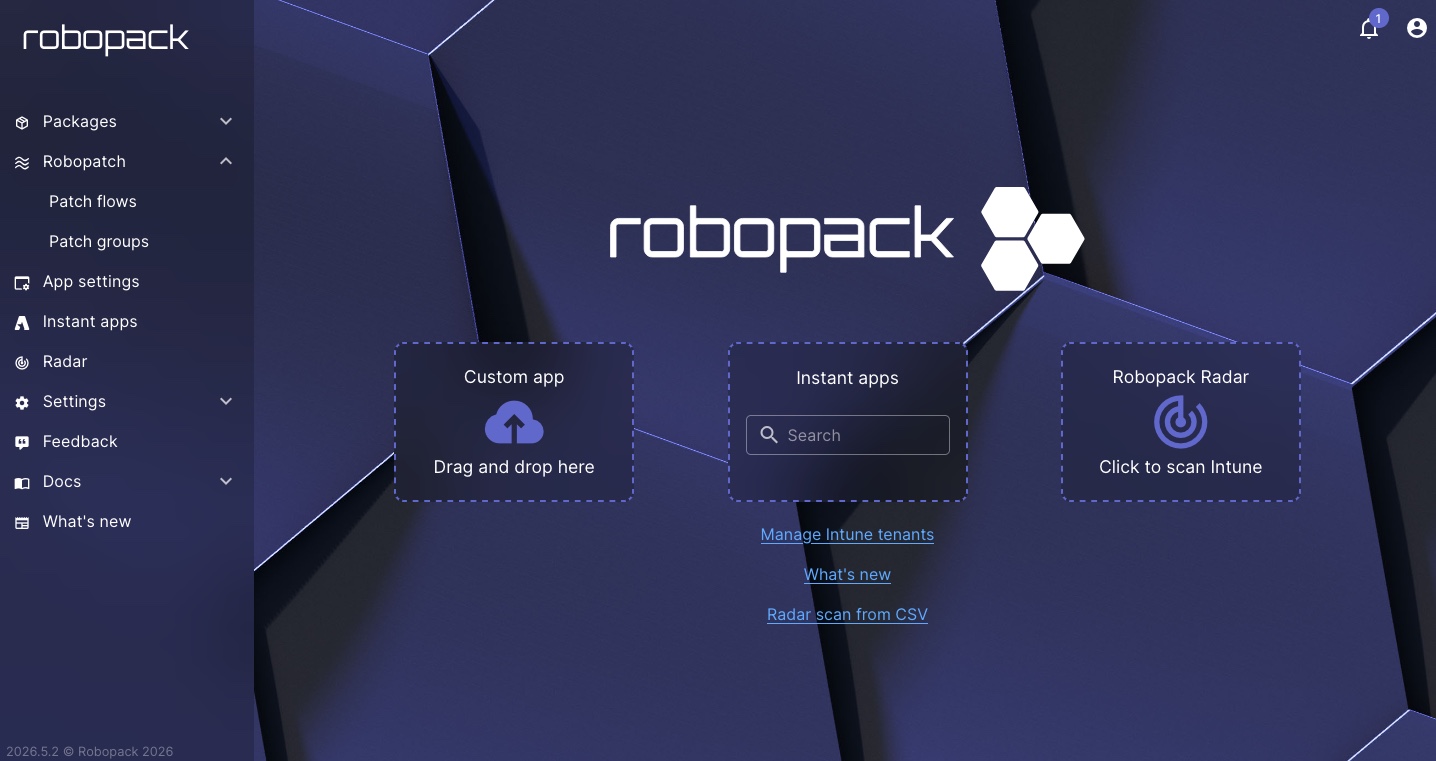
This article includes promotional content for Robopack.
The concept and architecture of Robopack
Robopack is presented as a cloud-based SaaS platform specifically designed to orchestrate and automate application management directly within Microsoft Intune. Integration is straightforward because it plugs into Microsoft Intune by registering an application in your Microsoft 365 tenant. All Robopack orchestration is therefore visible on the Intune and Entra ID side, where the solution takes over application management on your behalf.
Above all, you do not need to deploy anything on your devices: it is agentless, so it does not impact endpoint performance. It leverages the mechanisms already available in Intune and Entra ID to execute the actions configured from its portal.
The Robopack solution is suitable for businesses with a single site, those with multiple branches, and even MSPs. In fact, it can oversee thousands of workstations and a large number of applications, whether on a single Microsoft 365 tenant or across multiple tenants.
Finally, note that Robopack’s infrastructure is hosted in Denmark, within the European Union. This is an important point with regard to the GDPR and digital sovereignty for businesses.
The Radar feature: application mapping
The first pillar of RoboPack is its module called Radar. You cannot secure what you cannot see, so Robopack helps you gain a complete view of your application estate. To do this, Robopack scans your entire Intune tenant to collect information from two places:
- It lists all applications configured and deployed through Intune.
- It queries the inventory of discovered applications reported by Microsoft 365 for each device.
Thanks to this analysis, you know exactly which applications are deployed on your devices, which versions are installed (fragmentation is not uncommon), and on which devices the various applications are installed.
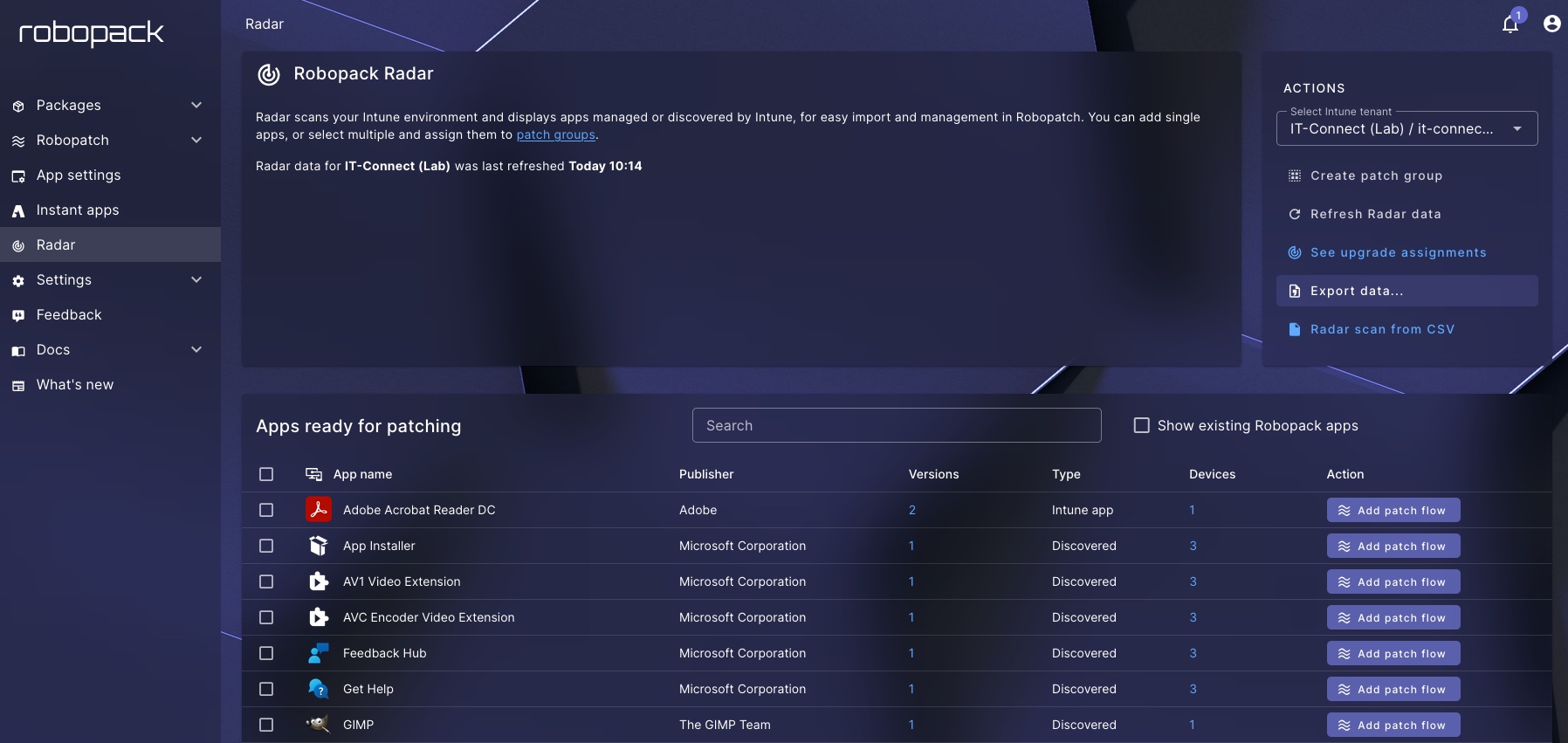
Once you have this overall view thanks to Robopack Radar, you can move on to remediation by initiating a patching flow. Two approaches are available:
- Patch Flow : a workflow to automate patching for a specific application.
- Patch Groups : a workflow to automate patching for a set of applications (for example: office applications).
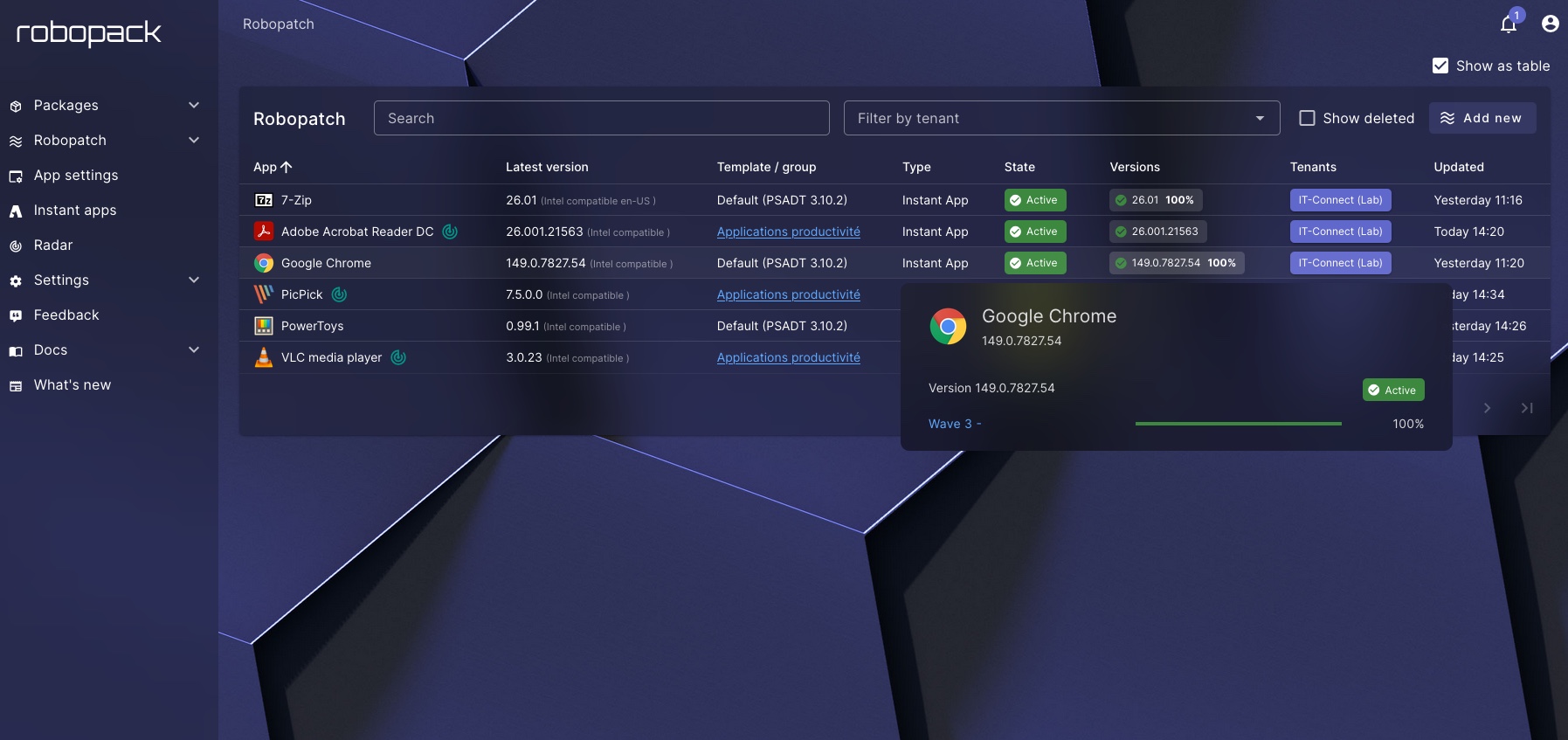
Once an application is linked to a Robopack workflow, its lifecycle will never be static again. Above all, the administrator no longer has to worry about publishing future versions: as soon as an available update is approved by RoboPack, it is automatically injected into the workflow and deployed to your devices.
On that note, Robopack offers far more flexibility than Microsoft Intune and provides wave-based orchestration. In other words, Robopack can manage the phased rollout of each application. This is essential to avoid a bad update from disrupting your business operations.
It is therefore quite common to imagine a rollout in three waves:
- Wave 1: the IT pilot group. The technical team receives the update first.
- Wave 2: the pilot users group. This step expands testing to a small group of users (volunteers), making it possible to validate the software’s behavior in real-world conditions.
- Wave 3: broad deployment. Once the previous steps are validated, the software is deployed to all workstations in the company. You are free to restrict this wave, add filters, or even create an additional wave.
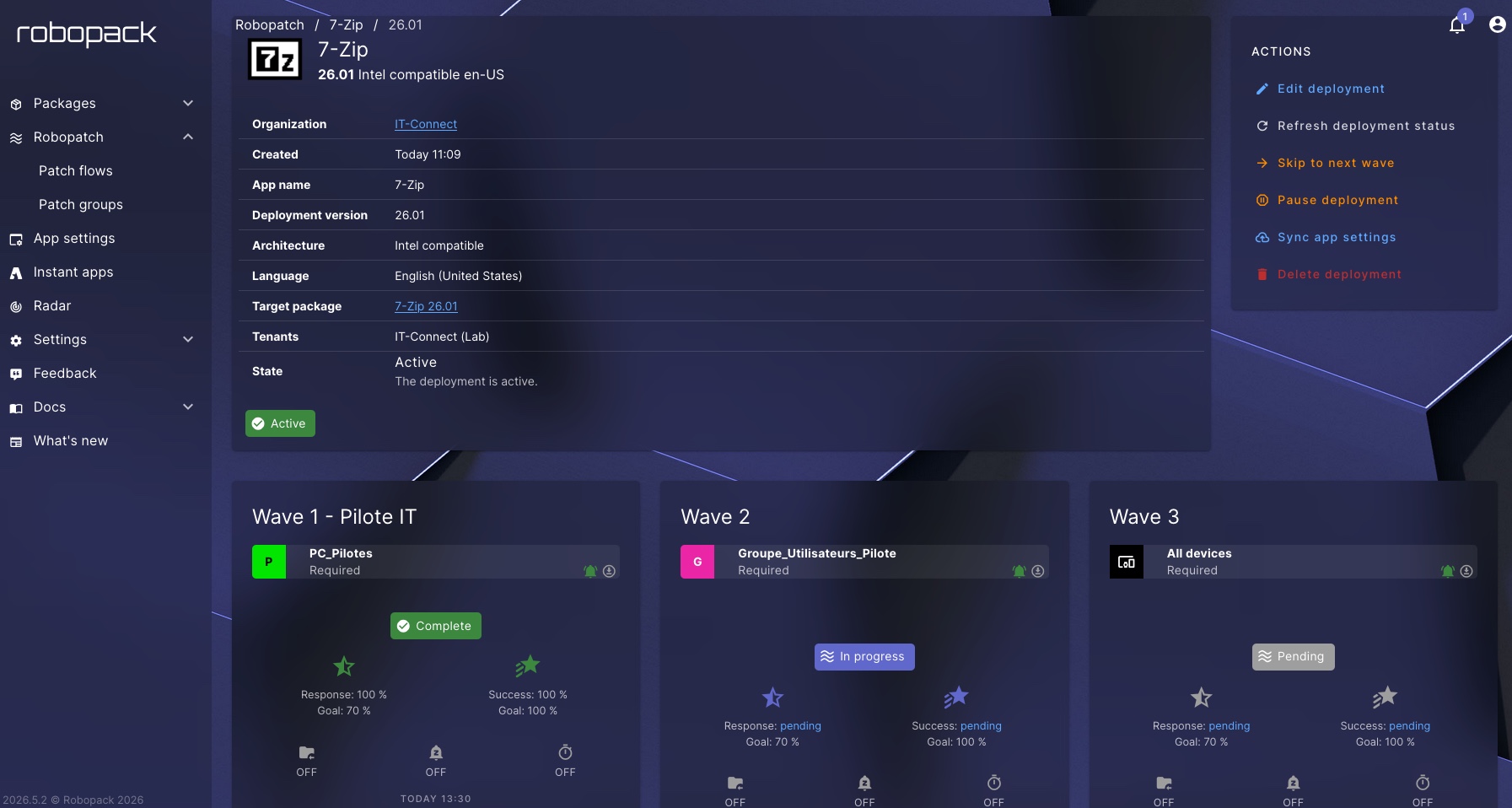
Each wave can be customized according to a set of criteria to provide precise control. There are two key criteria in particular that determine whether Robopack should move to the next wave:
- Response rate : what percentage of machines must have attempted installation of this version.
- Success rate : among those machines that attempted installation, what is the success percentage? This is the minimum required to consider moving to the next wave.
If these thresholds are met, Robopack automatically validates the move to the next wave (unless you configure the wave so that it does not). Otherwise, deployment is blocked, protecting the rest of the fleet.
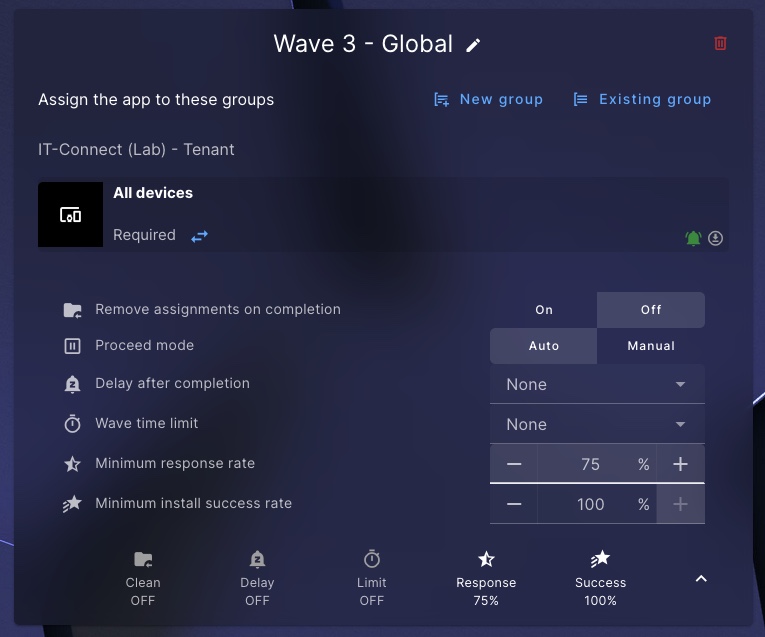
Note : for MSPs, it is possible to apply a workflow across a set of Microsoft 365 tenants.
Radar Tracking: fight Shadow IT
It is essential to distinguish between people who need an application and those who simply have one. What we just saw above addresses the first condition.
In other words, if a user managed to install an application on their own and their machine is not within the scope of the workflow defined earlier, then it is considered out of scope. As a result, they have the application on their machine, but it will never be updated.
Even if it is a security update, this machine will not receive it: this is a major blind spot for the overall security of the information system.
To address this non-compliance issue, Robopack offers a feature called Radar Tracking. When enabled on a workflow, it scans all tenant inventory reports. As soon as it detects that a computer has the application covered by the Patch Flow, it immediately identifies that device as needing to be included in the management scope.
As a result, the application will also be updated on that device, even though it was not part of the initial scope.
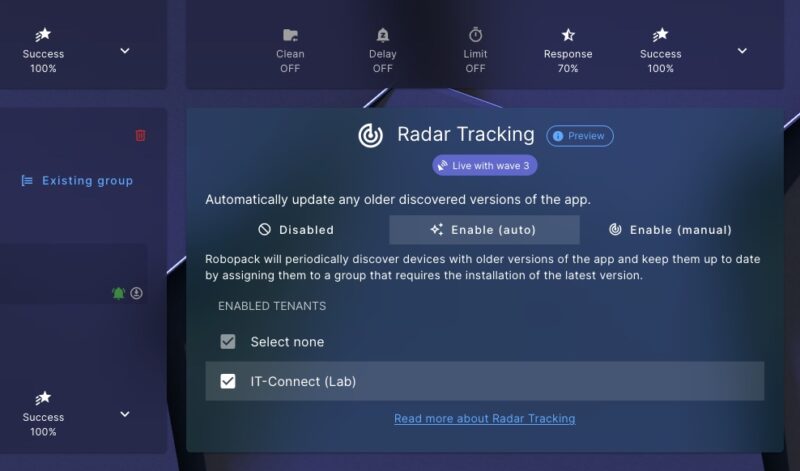
Note: on the Microsoft Entra ID side, Robopack will create a security group and inject the detected computer object into it. This generated group is then attached by Robopack to the application deployment waves within Microsoft Intune.
The Robopack application library
Robopack offers "Instant Apps", a catalog that brings together more than 46,000 prepackaged and documented applications. This highly comprehensive catalog covers many needs, and above all, it will greatly simplify the deployment of a new application.
Forget the usual (and tedious) process of creating an application in Intune while first researching the right switches for silent installation and everything that follows. Robopack removes that step.
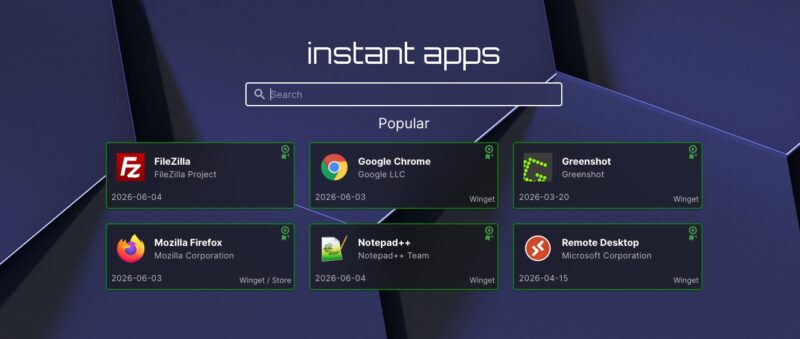
Robopack’s catalog consists of tested, verified, documented applications that are ready to deploy. Even though everything is ready, you can still view the details associated with each package (including the commands used). In all cases, a simple click on the import option is enough to import the application into your Robopack workspace or directly into your Intune library.
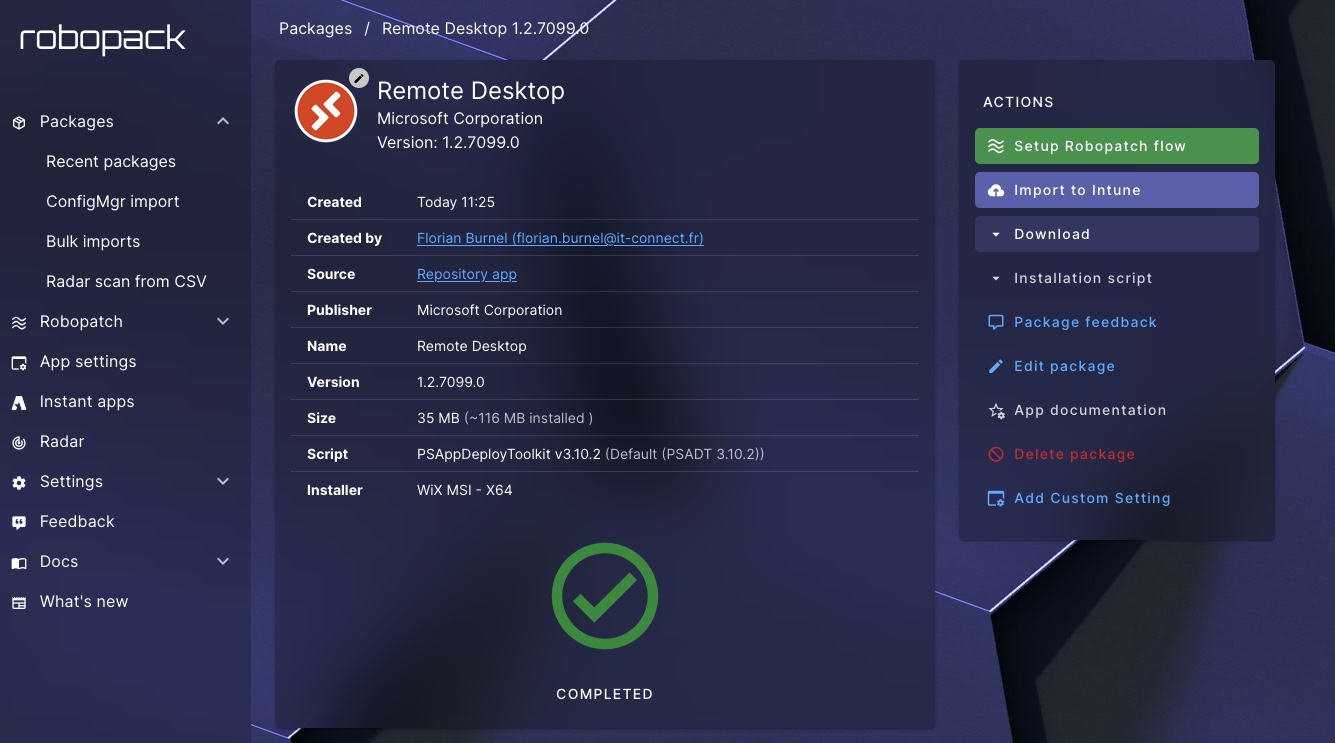
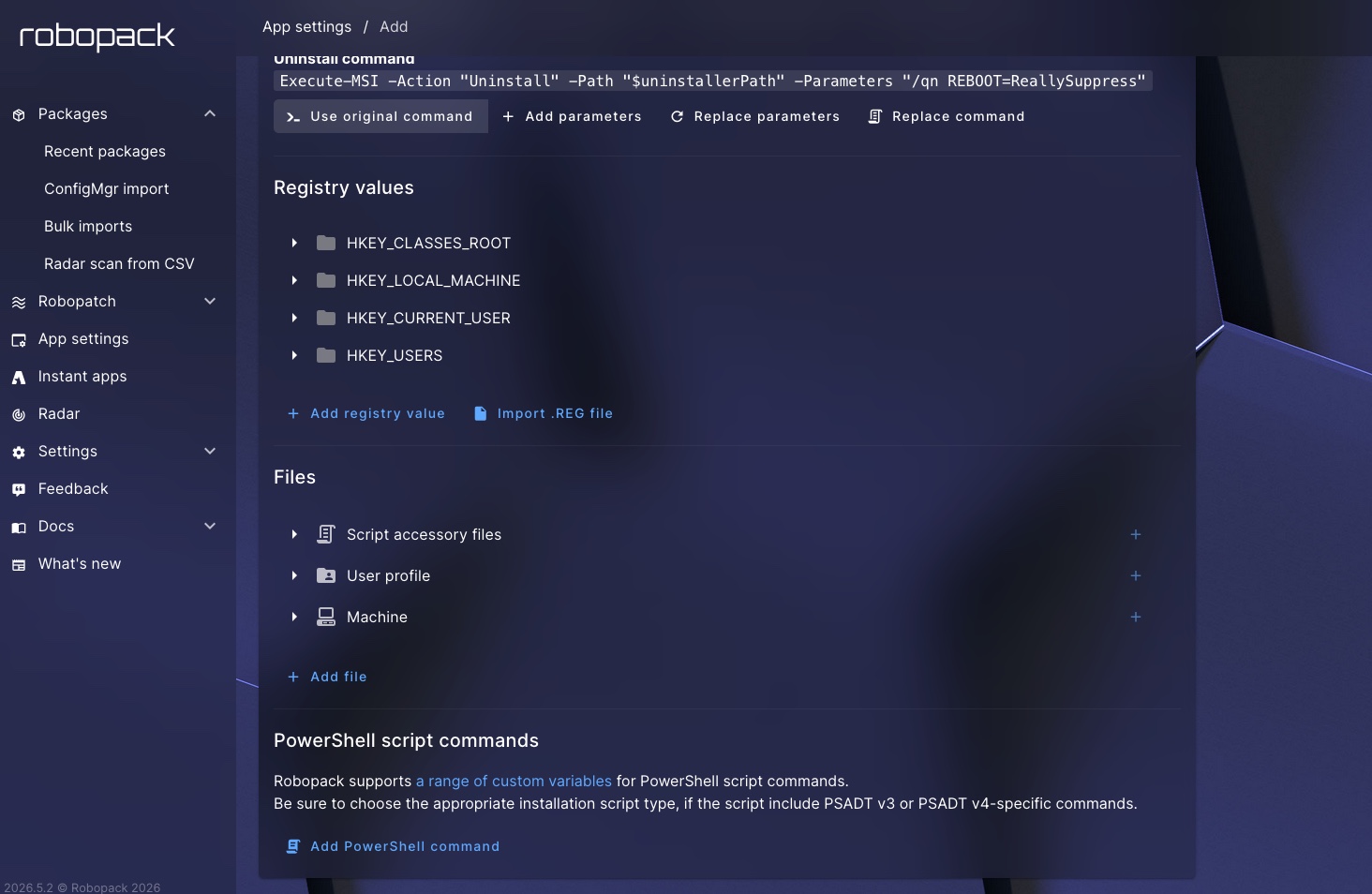
Although Robopack handles all packaging steps for you, you remain in control. We will see this later with the deployment of a custom application, but in practical terms Robopack enables several actions:
- Command-line changes: the administrator can modify the installation command, for example by adding specific parameters to prevent the workstation from restarting automatically.
- Registry value injection: the interface allows you to define registry keys and values (strings, DWORDs, etc.), which can be used to preconfigure the application.
- Local file deployment: to configure an application, you can also ask Robopack to upload specific configuration files (such as
.ini,.xml, or even a license file). - PowerShell script integration: to go even further and address certain complex scenarios, Robopack allows you to insert PowerShell code blocks to be executed at specific times (for example, post-installation).
Custom applications: automate tailored packaging
While Robopack’s Instant Apps catalog covers most needs, every organization has its own line-of-business applications. As a result, they are not always available in public catalogs (such as WinGet and the Microsoft Store). To meet this need, Robopack also offers the "Custom Apps" module.
Its goal: industrialize the creation of custom packages. Even if it is a specific application, Robopack is there to help you.
The process works as follows:
- The administrator uploads an installation file (EXE, MSI) to Robopack.
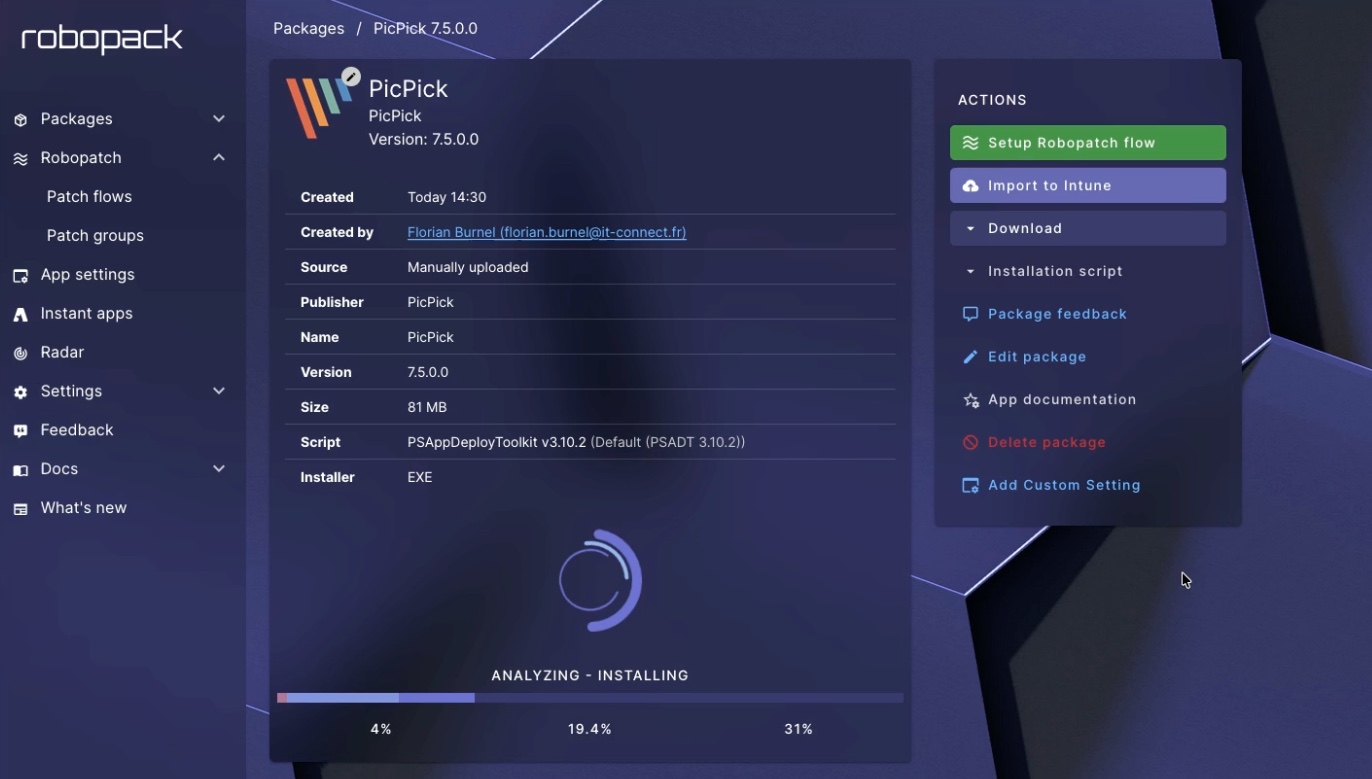
- The platform takes the lead and launches an 8-step process that starts with a security scan to verify that the installer is safe. Then, Robopack determines how the application installs so it can create a ready-to-use package with the PowerShell App Deployment Toolkit (PSADT).
All of this work happens in the background on Robopack’s servers in Denmark. Even if the exact recipe is kept secret, what I do know is that Robopack provisions a disposable virtual machine to test your package. It detects system changes, looks at which entries are created in the Windows Registry, and more, in order to determine how to install the application silently and automatically.
About three minutes later, the ready-to-use package comes out of the Robopack factory: that is when the solution’s name really makes sense. Most importantly, you have just saved several hours of work (and sometimes hours of frustration). If it does not work, because yes that can happen, Robopack support is there to take over and find a solution.
Conclusion
Robopack is a solution with strong added value for companies that want to properly manage the application lifecycle across corporate devices. Although Robopack currently only supports Windows, macOS support is under development and is planned for 2026.
The Robopack solution is offered in two plans:
- Free for up to 100 devices and 1 tenant.
- Paid to remove the various limits, with a cost of 900 euros per year for 101 to 256 devices. Beyond that, expect between 3 euros and 3.50 euros per year per device.
When you look at the benefits of this solution, the investment will undoubtedly pay for itself very quickly. There are benefits at several levels, especially in terms of security and device administration. Above all, your technical team no longer performs manual application packaging: that means time saved every day. Those saved hours can then be used for tasks with greater added value.
Want to test it? Follow this link! If you request a demo, note that it will be delivered in French.
FAQ - Robopack
What is Robopack?
Robopack is a centralized cloud SaaS platform designed to automate the lifecycle and deployment of applications within Microsoft Intune. Its integration is native through Microsoft Graph secure APIs, which allows it to synchronize the application catalog and orchestrate deployments directly on the organization’s Intune tenant without a heavy intermediary.
Does the Robopack solution require an agent to be installed on client devices?
No, Robopack is agentless. It does not require any service or software to be installed on end-user workstations. All deployment, update, and inventory actions rely on the native mechanisms of Microsoft Intune.
Where is Robopack data hosted?
All Robopack infrastructure, servers, and data repositories are located and hosted in Denmark, a member of the European Union. This geographic footprint ensures compliance with the General Data Protection Regulation (GDPR).
What is the difference between the Radar module and Radar Tracking?
The Radar module is a global inventory and mapping tool that scans the Intune tenant to list installed applications (whether they come from Intune or are discovered on devices) along with their respective versions.
Radar Tracking is a feature that automatically creates security groups in Microsoft Entra ID to dynamically include all endpoints where a specific application has been detected (including outside official channels), in order to force them into the update flow.
How do deployment waves work in Robopack?
Deployment waves make it possible to plan a phased application rollout across devices. Rather than targeting the entire fleet at once, Robopack orchestrates deployment by distributing the application in successive waves. For example, it can start with an IT pilot group (Wave 1), then a business test-user group (Wave 2), before extending deployment to all workstations (Wave 3).
What is the PSADT framework used by Robopack?
PSADT (PowerShell App Deployment Toolkit) is an open source framework that provides a set of functions and a robust structure for automating application deployment in enterprises. Robopack uses this framework to wrap custom applications and turn them into ready-to-use packages. Using this framework is essential to ensure standardized error handling, silent installations, and consistent logging.
What is a Patch Group?
A Patch Group is a logical model for applying the same wave-based deployment policy to multiple applications at the same time. In other words, instead of having to configure an individual Patch Flow for each piece of software, you use a group-based approach. In addition, for an MSP provider, this makes it possible to industrialize maintenance for dozens of applications across multiple customer tenants in a single standardized operation.