 www.it-connect.fr

September 2026 RDS Bug on Windows Server: How to Fix It Now
As you may know, the September 2026 updates bring a nasty bug that is crippling Windows Server Remote Desktop Services. All Windows Server versions are affected, and a fix is starting to circulate. The only question is: where do you find it? Here’s how to resolve the issue right now.
As a reminder: I published an article last week about RDS servers that stop responding after installing the September 2026 updates. The scenario is as follows: a few hours of normal operation, then frozen sessions, impossible disconnections, and new connections blocked until the server is forced to reboot.
Uninstall the update? Not so fast. The temptation is strong to remove the cumulative update. But it seems useful to remind you that this September 2026 Patch Tuesday fixes two already exploited zero-days, as well as the CVE-2026-69525 vulnerability, a remote code execution flaw in... Remote Desktop Services, with a CVSS score of 9.8. From a security standpoint, it is better to keep this patch installed (and you will be able to keep it).
Microsoft acknowledges this RDS issue
Microsoft has acknowledged the issue: progress! Indeed, on September 11, 2026, a new entry titled "Remote Desktop Services might stop responding after Sept. 2026 security update" was added to the Windows dashboard.
Microsoft describes the issue as follows: "In some environments, the RDS service may become unstable, which can cause RDP connections to fail after a few minutes, sign-in problems, or servers to get stuck on the 'Please wait while the Remote Desktop is being configured' screen. Related tools, including Microsoft Management Console (MMC), RDS Licensing Diagnoser, and File Explorer, may also stop responding. In addition, the Windows Update page may stop responding and continuously display a loading indicator."
This message also confirms that the issue affects all RDS servers, unless you are still using a prehistoric version of Windows Server. In fact, the bug affects Windows Server 2012 through Windows Server 2025, and Microsoft even mentions Windows 10 and Windows 11 (probably because those are the RDP clients).
A KIR fix as the solution
On its website, Microsoft currently lists the status as: Mitigated. However, that page does not include any link that can help us... What is Microsoft hiding?
It turns out that the American vendor has published a Known Issue Rollback (KIR) fix, to be deployed through Group Policy on managed machines. However, the information was shared only through the Microsoft 365 admin center, not via the public page (this is not the first time).
Links to the long-awaited fix are starting to circulate, notably on Citrix support, and you will now find them here on IT-Connect as well. Here are the MSI packages published by Microsoft, identified by the KB number of the affected update:
- Windows Server 2025 : KB5122871
- Windows Server 2022 : KB5122882
- Windows Server 2019 : KB5122876
- Windows Server 2016 : KB5123099
- Windows Server 2012 R2 : KB5123066
- Windows Server 2012 : KB5123065
What should you do with this package? KIR fixes are nothing new, but you may not use this mechanism regularly. In this case, I think you will want to use it, because the situation is truly blocking for anyone running an RDS server.
Deploy the KIR fix through GPO
Start by downloading the MSI package corresponding to the Windows version of your RDS server. Then follow the steps below.
1 - Install the MSI package on a machine capable of creating a new GPO (a domain controller, an admin workstation, etc.)
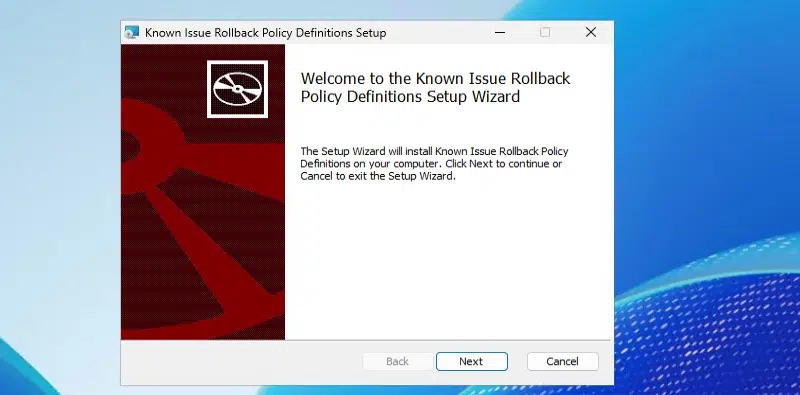
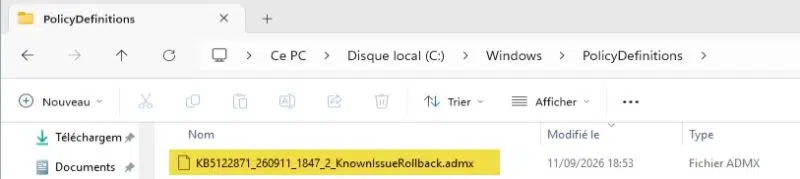
2 - Installing the MSI package adds the ADMX template (and its ADML language file) to your local machine. It is stored in the local directory: C:\Windows\PolicyDefinitions. However, if you have a central store on your SYSVOL to store ADMX files, this will not work. You must move this ADMX file and the ADML language file (English only) to your central store. For example: C:\Windows\SYSVOL\domain\Policies\PolicyDefinitions.
3 - Create a new GPO and link it to the OU that contains your RDS server.
4 - Configure Group Policy to disable the setting corresponding to the KIR patch you just integrated.
- Computer Configuration > Administrative Templates > KB5122871 260911_18472 Known Issue Rollback
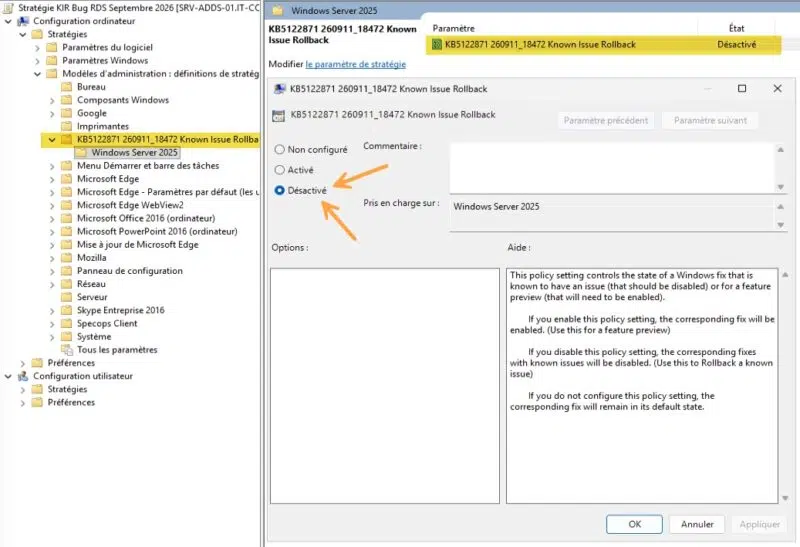
5 - Apply the GPO with the usual gpupdate /force on the affected servers and restart your server (which will also restart the RDS services). Thanks to this patch, the RDS bug should be a distant memory!
What does the KIR patch do to fix RDS?
What exactly does this fix do? I opened the ADMX file intended for Windows Server 2025. The policy writes a single DWORD value, named 1501792398, under the key HKLM\SYSTEM\CurrentControlSet\Policies\Microsoft\FeatureManagement\Overrides. When set to Disabled, this value is set to 0, which turns off the feature flag causing the issue. That is why you must choose Disabled.
Were you able to deploy the KIR fix on your side? Your feedback is welcome in the comments.









On several hosts (WinServ 2019 and 2022), the problem with RDP appeared again after applying the so-called official rollbacks (KBxxxxxx). The journal also records problems with vinlogon 6005.
Who else can share information about how this solution worked for someone?
Can you confirm that the correct setting on the KIR GPO should be deactivate? Other documentation I have seen should have that enabled.
Hello,
Yes, you need to disable this setting (this is how KIR parameters work, as Microsoft explains in its documentation).
But now, there are new out-of-band updates for Windows Server.
https://support.microsoft.com/en-us/servicing/os/windows-11/2026/09/kb5129195-windows-11-24h2-25h2-security-update
Looks like a fix OOB update was released for windows 11
Fix/update for 2012 R2 server was pulled and a new one issued 2 days ago, current link in this article is dead. The new fix is KB5129243.
MS Article:
https://learn.microsoft.com/en-us/windows/release-health/resolved-issues-windows-8.1-and-windows-server-2012-r2
Download:
https://www.catalog.update.microsoft.com/Search.aspx?q=kb5129243
This resolves RDP connection issue and mitigates the audio issue. The incorrect reporting of Defender as inactive/disabled is “confirmed”.