www.it-connect.fr

Windows 11 KB5124008 Brings Taskbar Changes and Bug Fixes in September 2026 Update
KB5124008 and KB5122880: these are the two updates released on Tuesday, September 8, 2026 by Microsoft for machines running Windows 11 24H2, 25H2, and 23H2. On the menu: the expected new features, including a movable taskbar, a resizable Start menu, and several bug fixes. Let’s take a look!
Reminder: the September 2026 Patch Tuesday is the largest ever released by Microsoft, with 973 vulnerabilities fixed, including 113 critical ones. Windows alone is affected by 723 of these security flaws.
Depending on the Windows 11 version you are using, here is the update you will receive:
- The KB5124008 update targets Windows 11 25H2 (build 26200.9445) and Windows 11 24H2 (build 26100.9445),
- The KB5122880 update is available for Windows 11 23H2 (build 22631.7582).
In both cases, these cumulative updates include the latest security fixes, as well as the non-security changes already delivered by last month’s optional update. I’m referring here to KB5120998, released on August 27 for versions 24H2 and 25H2.
The Main Windows 11 Changes
This update includes all the new features from the August preview, including long-awaited additions such as the taskbar finally being movable to different areas of the screen!
👉 Taskbar: finally movable
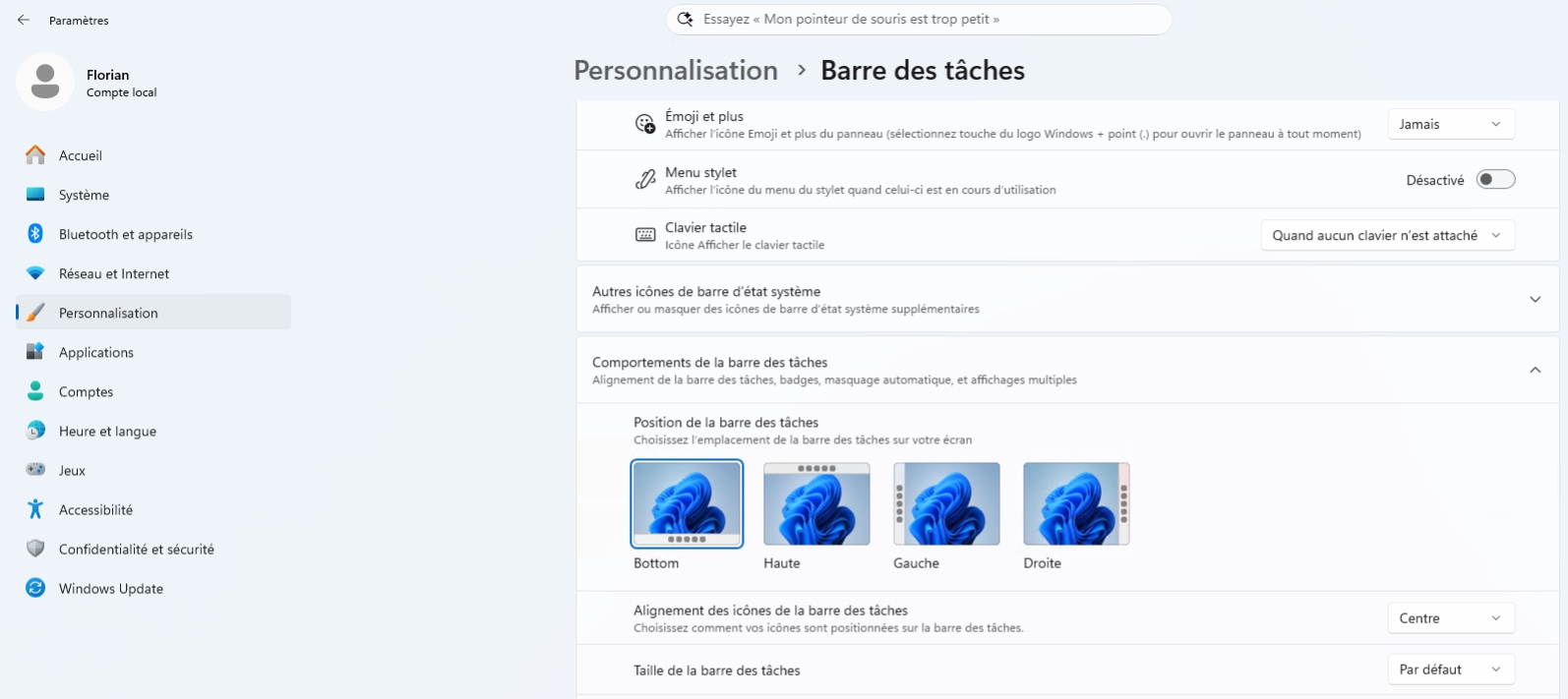
This is the most anticipated new feature. The taskbar can now be positioned at the bottom, top, left, or right of the screen through Settings, Personalization, Taskbar, Taskbar behaviors. A compact taskbar option also appears to save space on smaller screens. Note, however, that search and compact mode are only supported for the top and bottom positions.
👉 Start menu: more customizable
You can choose a small or large size for the Start menu, in addition to automatic mode. The "Recommended" section has been renamed "Recent"; it is now possible to hide its name and your profile picture, and the Start menu settings page has been redesigned with independent toggles for the Pinned, Recommended, and All sections.
👉 Administrator Protection: finally available
Announced with KB5067036 in October 2025, the Administrator Protection feature is beginning to roll out in the stable release. It remains disabled by default and can be enabled via Intune (OMA-URI) or Group Policy. As a reminder, it introduces profile separation and just-in-time privileges for administrative tasks. If you want to test it, my tutorial on Administrator Protection for Windows 11 explains how it works and how to deploy it.
👉 Fixes common to all three versions
The two updates fix a Remote Desktop audio redirection issue that could prevent sound from a remote session being played on the local machine. They also improve OMA-DM client logging to make it easier to troubleshoot connection issues to management servers, and adjust Morocco’s time zone, which will switch to permanent UTC+00:00 as of September 20, 2026.
I invite you to read my dedicated article about KB5120998 to learn about all the new features. Here, I’ve covered the essentials!
The August Preview Bugs Are Fixed
The KB5120998 update released by Microsoft at the end of August caused several bugs. The good news is that Microsoft has fixed them, so they are no longer present in the mandatory update that has just been released. These bugs include:
- Mouse pointer: custom pointer settings, including style and color, were not displayed correctly. The selected options now work as expected again.
- Black wallpaper: the wallpaper and other personalization settings could fail to load, leaving a completely black desktop.
- Teams and Outlook on Arm64: both apps could close unexpectedly on PCs equipped with an Arm chip.
At the moment, Microsoft says it is not aware of any known issues associated with KB5124008 and KB5122880. That said, they have not even been available for 24 hours yet.
Windows 11 Updates for 2026
These updates are available now through the usual channels, starting with Windows Update. You can also download the packages from the Microsoft Update Catalog for offline installation.
Microsoft is also taking this opportunity to remind users of two deadlines to add to their planning:
- Windows 11 24H2 : the Home and Pro editions will reach end of updates on October 13, 2026, making KB5124008 the penultimate monthly update for these editions. Enterprise and Education editions remain supported until October 12, 2027,
- Windows 11 23H2 : the Enterprise and Education editions will reach end of updates on November 10, 2026.
Below is a summary of the mandatory updates released in 2026 for the various Windows 11 versions.
| Patch from... | Windows 11 24H2/25H2 | Windows 11 23H2 |
|---|---|---|
| September 2026 | KB5124008 | KB5122880 |
| August 2026 | KB5121003 | KB5120240 |
| July 2026 | KB5101650 | KB5099414 |
| June 2026 | KB5094126 | KB5093998 |
| May 2026 | KB5089549 | KB5087420 |
| April 2026 | KB5083769 | KB5082052 |
| March 2026 | KB5079473 | KB5078883 |
| February 2026 | KB5077181 | KB5075941 |
| January 2026 | KB5074109 | KB5073455 |