www.it-connect.fr


Windows 11: Microsoft Is Testing Project Pantheon, an AI Memory You Control
An app that only remembers what you choose to share, and can pass those memories on to Claude or Cursor. That’s the idea behind Project Pantheon, an AI app Microsoft is quietly testing on Windows 11. If this sounds a bit like Recall, you’re not entirely wrong. Here’s what we know.
Microsoft has made no announcement about Project Pantheon, yet this app is already starting to generate buzz. The information comes from journalist Gareth Smith at Windows Latest, who was able to install and use it.
It’s not entirely clear what it will ultimately be called, because the test version is named Context Vault, the underlying platform is called Context IO, and the earliest versions were called Projects. Project Pantheon is the codename given to the whole package.
Why is this project getting attention? Because it looks a lot like Recall, while taking the problem in the opposite direction. Think back to Recall, the Windows 11 feature that raised major concerns among users. And for good reason: the idea was that Recall captured your PC screen every few seconds at regular intervals (but only on Copilot+ PCs).
Pantheon, on the other hand, reverses the approach: it only records what the user chooses to save.
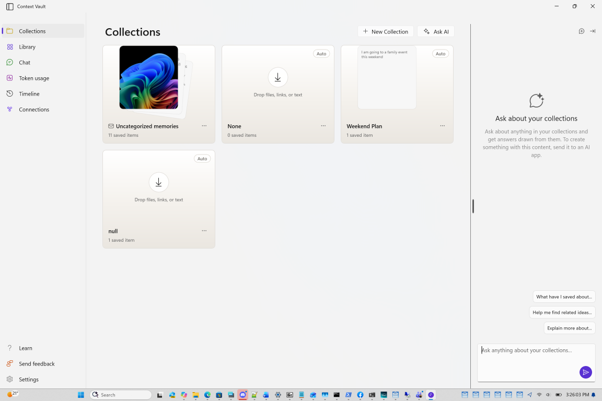
Context Vault: a “second brain” you fill in by hand
Context Vault lets you save web pages, files, screenshots, copied text, audio, and video as memories. They are organized into collections, then queried through an AI. In other words, it acts as a kind of information memory that artificial intelligence can access. The selective nature of the stored information is what sets it apart from Recall.
The app integrates directly into the Windows 11 shell:
- Multiple entry points: browser extension, File Explorer, Share menu, screenshot, clipboard, Click to Do, and compatible apps.
- App actions: two actions are listed under Settings > Apps > Actions, Save image to Projects and Save selected text to Projects, still using the old name.
- Chat: a dedicated page lets you list your collections, summarize one, ask what you’ve been working on, or draft text from a collection.
- Automatic collections: the app can create its own collections, labeled “Auto”.
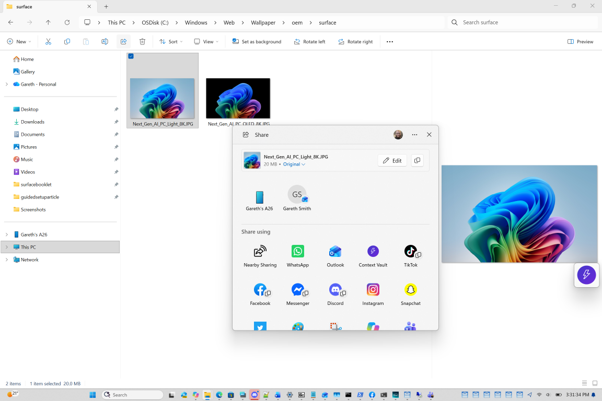
Cloud models and MCP server: what will interest admins
The test version relies on AI models hosted in the cloud. That means no NPU is required, and a Token usage page lets you track consumption. In other words, Pantheon would not be limited to Copilot+ PCs, unlike Recall.
There is also an interesting point: the built-in MCP server. This allows third-party tools such as Claude or Cursor to use the stored memories. You would therefore be able to choose the tool you prefer to interact with this feature. The ideal setup would be to use a local AI, which would make sense especially since Microsoft wants to turn Windows into a platform for AI agents, with MXC to contain them.
On the security side, and still according to Windows Latest, Microsoft is reportedly considering several protections: encryption at rest, per-app access control, Windows Hello protection like Recall, consent settings, and policies that would let IT disable the app.
As always with this kind of project, the big question is whether Pantheon will ever move beyond the experimental stage. And if it does, where will these memories be stored? When does the cloud come into play? Microsoft will inevitably be expected to answer questions like these.
What do you think?