www.it-connect.fr

Windows Recycle Bin Bug Affects All Supported Versions After June 2026 Updates
Microsoft has just confirmed a new Windows bug following the installation of the June 2026 security updates: permanently deleting a file from the Recycle Bin displays an inconsistent file name in the confirmation dialog. It is only a display bug, but it is enough to create doubt when you confirm a deletion.
An internal file name appears in the dialog box
The issue has been added to Microsoft’s Windows Release Health dashboard, which tracks known update-related issues. When you permanently delete an item from the Recycle Bin, the confirmation window does not show the original file name, but its internal storage name, such as $Rxxxxx.ext.
On its website, Microsoft states: "When permanently deleting a single item from the Recycle Bin, the confirmation dialog shows the Recycle Bin internal file name (for example, $Rxxxxx.ext) instead of the original file name."
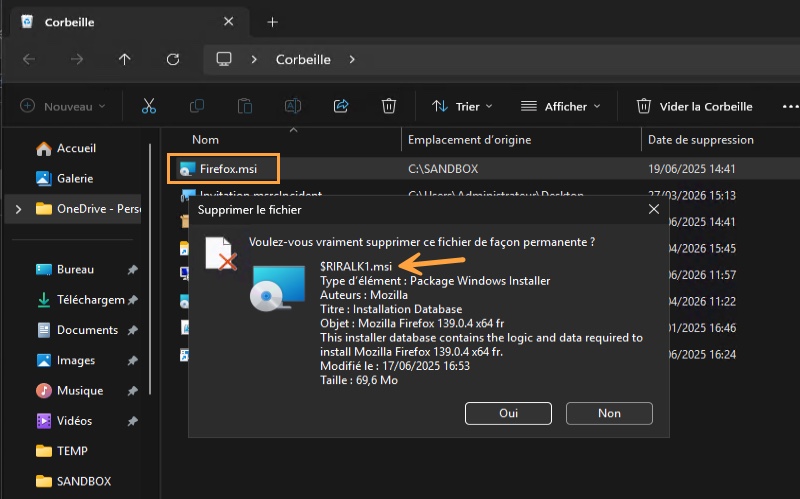
This is simply a display issue, even though it may look like the Recycle Bin is deleting a different file. The Recycle Bin itself still shows the original name, and restoring a file also brings back the correct file name. In other words, only the permanent deletion confirmation window is affected, and the risk is limited to deleting a file while thinking it is another one.
It is something you do only occasionally, but it is worth knowing about.
All supported versions are affected
This bug does not discriminate between Windows versions and appears after installing the June 2026 security updates. For example, on Windows 11, this is KB5094126.
Microsoft provides the full list of systems affected by this bug:
- Client devices: Windows 11 versions 26H1, 25H2, 24H2 and 23H2; Windows 10 version 22H2; Windows 10 Enterprise LTSC 2021, LTSC 2019 and LTSB 2016.
- Servers: Windows Server 2025, 2022, 2019, 2016, 2012 R2 and 2012.
As for the fix, Microsoft is working on a patch that will be included in a future Windows update. However, businesses and home users are not being handled the same way! The Redmond company is offering a temporary fix to businesses (which must contact professional support), while home users will have to wait.
Another bug tied to the June 2026 updates
This Recycle Bin bug is not the only issue this month. A few days earlier, Microsoft confirmed another problem related to the same updates: some third-party applications can no longer launch Word, Excel, PowerPoint, Access, and other Office apps, or open documents, after installing the updates released starting June 9, 2026.
The cause is the OLE automation mechanism used by these applications to communicate with the Office suite. I do not know whether you have encountered this issue, but among the reported software are Zotero, CCH Engagement, and even dental solutions such as Dentrix. It is a bug that could potentially disrupt professionals’ daily work.