www.it-connect.fr

Windows 11 KB5083631 Brings Xbox Mode and Other Notable New Features
On April 30, 2026, Microsoft released the new optional update for Windows 11: KB5083631. It provides a preview of the changes and new features included in the upcoming mandatory update, scheduled for release on Tuesday, May 12, 2026. Here is what you need to know.
With this update, Windows 11 25H2 and Windows 11 24H2 gain a set of new features and improvements, some of which will be enabled gradually by Microsoft.
👉 Xbox Mode for Windows 11
This update adds Xbox Mode to Windows 11, delivering an experience similar to a Xbox gaming console. In other words, this interface puts video games front and center and limits background activity so the machine stays "focused" on running the game. Microsoft says this mode can be enabled from the Xbox app or with the following shortcut: Windows key + F11.
This feature allows you to:
- Browse and launch your games through an interface optimized for controller use.
- Access a library bringing together the full Xbox Game Pass catalog as well as your installed games from major PC platforms (Steam, Epic Games Store, etc.).

👉 File Explorer
File Explorer gets several improvements through this update:
- Support for new archive formats: uu, cpio, xar and NuGet (nupkg),
- Display and sorting preferences are preserved in folders such as Downloads and Documents when applications launch File Explorer directly in those locations.
- Fix for a bug where a white flash could appear when opening This PC or resizing the "Details" pane in dark mode.
- This update improves the handling of
explorer.exeprocesses so they stop after File Explorer is closed.
👉 AI agent tracking
Windows now simplifies the management of your automated tasks with a new integration in the taskbar.
- Real-time progress: track the progress of your agents (whether internal or third-party), especially with Microsoft 365 Copilot's Researcher agent.
- Interactivity: by hovering over the Copilot icon, you can see the status of your report without leaving your active window.
- Notifications: Windows alerts you as soon as the job is done, letting you jump to the final result.
👉 Batch script processing
Microsoft has introduced a new way to harden the processing of Batch files (CMD scripts). Running these scripts can create attack vectors if the file is modified while it is executing. In response to this issue, Microsoft introduced a new Registry setting called LockBatchFilesWhenInUse.
It makes it possible to enforce a secure execution mode that locks the Batch file, preventing any modification until the process is complete. This feature is enabled through a Windows Registry change:
- Key:
HKEY_LOCAL_MACHINE\Software\Microsoft\Command Processor - Value:
LockBatchFilesWhenInUse(DWORD, value 0 or 1)
This new feature was tested with Windows Insider Program members in early March 2026 (see this article).
👉 Group Policy / Intune
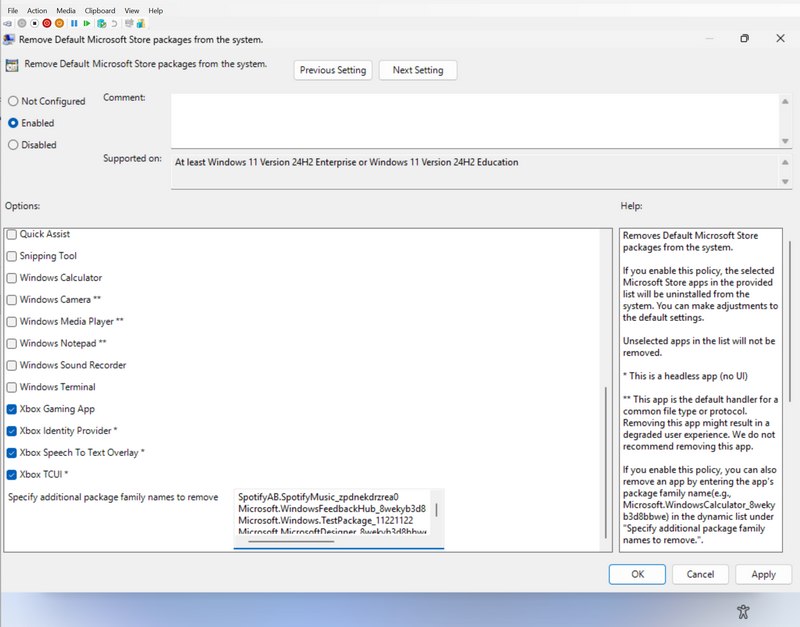
This update adds support for a custom list to define which preinstalled apps should be removed, whether through Group Policy or Microsoft Intune. This change was tested last March with Windows Insider Program members. It is now included in stable Windows 11 releases thanks to this new update.
👉 Windows Hello
Microsoft says this update improves the reliability of Windows Hello facial recognition. Another interesting point is that Windows Hello fingerprint data will be preserved during a Windows upgrade.
👉 Storage
The display of information for large storage volumes becomes smoother in advanced settings, ensuring better responsiveness when viewing your disks and partitions. Most notably, with this update Microsoft removes a long-standing limit by extending the FAT32 volume formatting cap via command line from 32 GB to 2 TB.
Fixes for several known issues
This update also fixes several known issues, and these changes are enabled as soon as KB5083631 is deployed. The items mentioned above are part of a gradual rollout.
- Remote Desktop: several fixes target the Remote Desktop (RDP) experience, including a fix for a display bug with the new RDP security warnings on multi-monitor setups with different scaling levels. There is also improved Kerberos authentication through Remote Credential Guard.
- Smart Card: event logging related to the CVE-2024-30098 vulnerability now includes the name of the affected applications. This makes it easier for administrators to identify software using smart cards that needs an update.
Finally, Microsoft continues to roll out the new Secure Boot certificates, as it has done for several months. This update is available directly through Windows Update.