www.it-connect.fr

Microsoft Tier Model: Is On-Premises Making a Comeback?
For years, Microsoft has talked to us about nothing but the Cloud, spending its amusing years reshuffling SaaS console menus and renaming whatever happened to pass through Marketing’s hands. On-premises tools are slowly disappearing from its catalog, leaving room only for tools that cost an arm and a leg, with monthly bills rising just as fast as the products replacing them lose features... So seeing a tool come back that suggests a likely focus on sovereign technologies that shaped my early years as a young IT guy could only make me happy.
Yet, in this month of July 2026, Joel Platek, alias VAsHachiRoku, published a PowerShell module named Active Directory Tier Model. Naturally, Gérard is talking about it like crazy on every social platform he knows (especially nikel-in, to be honest). As someone who has always been passionate about AD and specializes in security, I couldn’t ignore the fact that a Redmond guy was releasing a tool that, let’s be honest, might do HardenAD’s job (we’re allowed to be proud, 8 years of work after all).
So I decided, with Florian’s kind approval, to write an article about this module, not as a prosecution brief but, on the contrary, with an open mind - and since, after all, I co-developed the HardenAD model, it would be a shame not to compare the two tools and see what each one can bring to the other.
Gérard, if you’re reading this, this analysis is for you...
What is Microsoft’s tiering model module?
First of all, I read the official documentation (available here: microsoft.github.io/ActiveDirectoryTierModel/), just to understand the stakes – to keep it simple, we are back to the ESAE (Enhanced Security Admin Environment) model, simplified as much as possible in this context:
- Tier 0 (identity),
- Tier 1 (servers),
- Tier 2 (users and groups).
Don’t look for legacy management or cloud integration here; those use cases are not supported in this version. As with hardenAD, the script performs actions in your directory (creating OUs, groups, implementing ACLs, deploying GPOs). So far, nothing new: OU segmentation, security based on Microsoft security standards.
First observation: universal groups are present, which we do not use with HardenAD. Second observation: although the documentation is fairly complete, the model and the script’s usage remain fairly complex to integrate. Finally, this script only works with PowerShell 7+ and Pester 5.7.1 (we’ll come back to that) and is designed to be run from an admin workstation.
146 GPOs are included in the model, covering Windows 11, Windows Server 2025, Edge and Microsoft 365 baselines (the Office suite). The script is designed to fit into a CI/CD environment (Azure + GitHub Actions) and, in fact, its repository contains quite a few traces of that (think about cleaning them up...).
At this stage, it’s important for me to be honest: Microsoft Tier Model and HardenAD clearly do not cover the same goals, which makes the comparison tricky – Microsoft’s script seems more like a baseline meant to speed up a rapid rebuild (which, after all, is the author’s job), whereas hardenAD is designed to help IT teams improve overall security while keeping control of the model.
Microsoft Tier Model’s strengths
One of the major differences between our two models is that, on Microsoft’s side, there is fine-grained handling of 22 privileges that grant elevated rights: for example, SeTcbPrivilege, SeCreateToken, SeLockMemory are explicitly emptied. On the other side, hardenAD focuses more on blocking permissions to avoid leaving traces between tiers (and thus curb certain bad practices through practice itself).
The other major strength of this module is the richness of its OS/application baselines (Credential Guard, VBS, ASR/EDR, forced SMB 3.0+, Kerberos anti-bruteforce). It goes deep into Microsoft 365 applications, which is a real plus for many companies! Finally, it enables Microsoft Defender device tagging by default.
That makes this model a solution exclusively dedicated to 100% Microsoft environments... With it, you don’t take non-Microsoft tools into account, whether that’s the EDR or OnlyOffice... And that’s a shame (especially since Microsoft’s EDR is not really the standard).
To help you better understand Microsoft’s Tier Model, here is a summary of what it does in its current version.
OUs created (Phase 1 - 31 total)
- Tier structure under
Tier Model Administration: Tier 0/1/2 → Accounts, Groups, PAW Devices, Service Accounts - Root OUs: Tier 0/1 Member Servers (+ Server Staging), Tier 2 End-User Accounts/Devices/Groups (+ Disabled Accounts/Devices, Contacts, Distribution Groups, Security Groups)
- PAW Staging, PAW VPN Accounts, Tier Model Computer Quarantine
Groups created (Phase 2 - 26 total)
- Per tier: Admins, Operators, Server Operators, PAW Devices, Service Accounts, Vpn Accounts
- Tier 0/1 only: universal groups (Member Servers, PAW Devices) tied to Auth Silos
- Tier 1: Server Domain Join
- Tier 2: Account/Device/Group/Help-desk/Local Device/Computer Quarantine Operators (more granular delegation)
- PAW Domain Join (cross-tier)
Accounts created (Phase 3 - 2 service accounts, disabled by default)
svc-pawdomainjoin→ member of PAWDomainJoinsvc-t1srvdomainjoin→ member of Tier1ServerDomainJoin- No user account or admin account created
ACLs applied to OUs (Phase 4 - 101 ACLs)
- Admins/Operators rights per tier on their respective OUs (Accounts, Groups, Devices, Service Accounts, PAW Staging/VPN)
- Specific Tier 2 delegations (Account/Device/Group/Helpdesk Operators)
GPOs created/imported/linked (Phase 5 - 146 GPOs)
Per tier and per scope (DCs, PAWs, Servers, EUD, EUA):
- Account Restrictions (very broad deny rights)
- Password/Lockout Policy (14 characters, history 24, lockout after 3 attempts/15 min)
- Windows LAPS (30-day rotation, history 3, 24h grace)
- Defender Antivirus, BitLocker, AppLocker, Firewall, PowerShell Auditing, Advanced Audit Policy baselines
- Product baselines: Windows 11 25H2, Windows Server 2025, Edge v139, IE11, Microsoft 365 Apps v2412 (macros, DDE, legacy file block)
- SHF (Secure Host Foundation) and SOE (Standard Operating Environment) - compliance/custom containers
- MDE Device Tagging (
Group = Tier0/1/2) - Hardened UNC Paths (SYSVOL/NETLOGON)
- Tier 0/1 Servers Account Restrictions — Override template (Deny Batch/Network/RDP/Service)
ADMX/ADML templates imported (Phase 6 - 30 ADMX files + equivalent en-US ADML files)
- Office (access/excel/onent/outlk/ppt/proj/pub/word/visio 16, lync, teams)
- Edge (msedge, msedgeupdate, webview2)
- Security (DeviceGuard, KDC, Kerberos, LAPS, LocalSecurityAuthority, MSS-legacy, SecGuide, Sudo)
- Networking (LanmanServer/Workstation, NetworkProvider, UserProxySettings)
- System (Printing, WindowsDefender, GameDVR)
Items explicitly excluded by default
- MSA, GMSA, DMSA (options not enabled unless
-Include*is explicitly used) - Automated rollback (pattern = deletion + redeployment)
- Schema extension (never performed by the tool)
- Legacy LAPS (
ms-Mcs-AdmPwd) - Windows LAPS only
In short, the Microsoft model script performs 664 actions on the target environment, from creating users and groups to deploying Group Policy.
Questions raised by the model
Once deployed, the model led to discovery and its share of questions. I’ll walk you through them here, in the order I asked myself...
Deployment: a first hiccup
First, regarding installation: if you follow the documentation to the letter, your installation will fail. Not because the development is bad, but because the code used for prerequisites does not keep up with software evolution: once Pester is installed as the documentation tells you to do, you’ll get a prerequisite error:
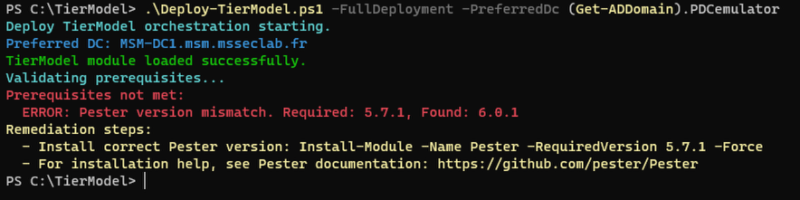
The problem is that the script compares a string to determine a version number – but with a string, numeric comparison is not possible without conversion work... The fix is quite simple: either modify the prerequisite file to specify version 6.0.1, or force the installation of Pester 5.7.1 (the option I chose, to make sure I didn’t skew the analysis).
Another point to watch: the code is clearly designed to work with an English AD. I haven’t checked every line of code, but the writing logic clearly shows that multilingual mode was not a concern for the author. The best clue here is the update of your ADMX base, which is enriched only with English ADML files. Something to test, then, but I can already picture issues with certain GPOs that reference NT accounts.
UPN or not UPN, that is the question...
Another interesting point, and one that surprised me at first, is the absence of a UserPrincipalName (UPN) on the two service accounts created by the script. I’ve always had the reflex to set it: not a security requirement, just an operational habit.
So: what’s the advantage of not setting it? And what are the operational consequences?
First, an important point: a account with no value in the UserPrincipalName attribute actually still has a default UPN, existing but non-declarative, made up of two values combined: sAMAccountName@DnsDomainName.
By not setting an alternate UPN, several benefits appear:
- Reduced attack surface via AD CS (impersonation): a classic abuse scenario relies on overwriting the victim’s UPN (an opening when a GenericWrite permission is set on the account), which allows the attacker to issue a certificate for any user in the domain by placing the desired value in the UPN. A user without a UPN, on the other hand, falls back to implicit mapping based on the SID, making the attack ineffective (this is an additional protection, not a fix for the flaw).
- No more conflicts between UPN and sAMAccountName: by Microsoft’s own admission, these conflicts introduced impersonation vulnerabilities, since fixed with the latest updates. But who says new ones won’t be found... (see support.microsoft.com).
- No inter-forest or inter-domain collision: attribute uniqueness is poorly controlled and, while ADUC prevents duplicates, it is perfectly possible to create them by script. A account without a UPN cannot create a duplicate (
sAMAccountNameis unique). - Tier 0 hygiene: for Tier 0 service or admin accounts that have no cloud or web application use, the UPN brings nothing and adds another piece of enumeration data (often = email address, therefore a phishing pivot).
However, this approach cannot be generalized to all accounts:
- Blocking for Entra ID / M365: the UPN is required as soon as you integrate Entra ID or prepare a cloud migration, and Entra Connect uses
userPrincipalNameas the default sign-in name. - Certificate-based authentication: when no explicit UPN is defined, the implicit UPN appears in the issued certificate, if the template allows it. This works, but anything that consumes "UPN in SAN" (802.1X, VPN, Citrix FAS, smart card) must be validated - especially since, as of September 9, 2025, the
StrongCertificateBindingEnforcementkey is permanently ignored and Enforcement mode is the only available one. - Third-party applications: many LDAP/SAML/SCIM applications bind hardcoded to the
userPrincipalNameattribute. Without a value, the user becomes invisible or cannot be provisioned. - Broken UPN sign-in after restructuring: even after a domain rename or move, the user can still log on with the UPN - a benefit lost.
- Kerberos and multi-domain forests: in a multi-domain forest, the
user@dns.domainlogon relies on resolution through the Global Catalog; the implicit fallback works, but any business-specific alternate suffix (@msseclab.fr on a mssec.lab forest, for example) disappears.
So it’s a good thing that the script created these two accounts without UPNs, to protect them from impersonation and to respect the principle of minimizing the exposure surface of accounts (UPN not needed and not mandatory? Don’t declare it). More broadly, you can even have different policies:
| Type of account | UPN |
|---|---|
| Standard users | Explicit, routable = email address |
| Service accounts (non-cloud) | Blank, or dedicated non-mailable UPN |
| Tier 0 / admin accounts | Preferably blank, otherwise a dedicated suffix isolated from the email suffix |
| gMSA / machine accounts | Not applicable (implicit UPN) |
Use universal groups?
This is an interesting point, so let’s start with a quick reminder about group scopes:
| Type | Can contain | Can be a member of |
|---|---|---|
| Global | accounts + global groups from the same domain | global (same domain), domain local, universal |
| Universal | accounts, global groups, universal groups from the whole forest | universal, domain local |
| Domain local (DL) | accounts, global groups, universal groups from the forest + DL groups from the same domain | DL from the same domain |
The canonical multi-domain design is AGUDLP : account → global (account’s domain) → universal (forest aggregation) → domain local (resource domain) → permission. The universal group (UG) serves exactly as the cross-domain join layer, and it contains groups, not users - which makes it stable and therefore cheap to replicate.
In the module’s case, only 4 groups are declared universal:
- Tier 0
- Tier 0 Member Servers
- Tier 0 PAW Devices
- Tier 1
- Tier 1 Member Servers
- Tier 1 PAW Devices
Which gives us:
- Member Servers is the set of members subject to the Tier 0 (or Tier 1) authentication silo and to the IPsec rules enforcing encrypted RDP/WinRM between Tier 0 (or Tier 1) PAWs, domain controllers and Tier 0 (or ti... Well, you know what I mean!).
- PAW Devices contains the accounts subject to the Tier 0 (or Ti... Okay, okay) authentication silo and mandatory IPsec for RDP/WinRM between Tier 0 (or ...?), DCs and Tier 0 member servers (yes. Again...).
Universal groups are therefore used for the AD silo strategy. However, there are several points of caution to keep in mind:
- A universal group cannot contain a domain local group, nor a global group from another domain - this is the limitation that most often breaks improvised multi-domain designs.
- The classic anti-pattern: putting thousands of users directly into a universal group. You pay both the replication cost and the loss of delegation by domain.
- Conversion: Global → Universal is only possible if the group is not a member of any other global group. Domain local → Universal is only possible if it contains no DLs. Useful to know before a migration.
- Token bloat: deep nesting of universal groups inflates the PAC. Beyond ~1,015 SIDs, logon fails, and long before that you hit Kerberos limits (MaxTokenSize). Universal groups contribute twice as much in a multi-domain forest, since SIDs come from everywhere.
Regarding authentication silos, we have fewer choices:
- The silo itself :
msDS-AuthNPolicySilois an object in the Authentication Policies container (CN=AuthN Policy Configuration,CN=Services,CN=Configuration) - so it is forest-wide replicable - but silo members (themsDS-AssignedAuthNPolicySiloattribute) are user, computer or service accounts from the same domain as the controller issuing the TGT. The silo is applied by the KDC of the account’s domain. There is no “cross-domain” silo: in a multi-domain forest, you need one silo per domain, even for a logically unique Tier 0. - Access conditions : policies are expressed in SDDL, typically:
O:SYG:SYD:(XA;OICI;CR;;;WD;(Member_of {SID(GROUP)})). Universal group SIDs work, including those coming from another domain in the forest, since the KDC evaluates membership from the PAC built via the GC. This is even the proper use case: a universal “Tier0-Admins-Forest” group referenced in multiple silo conditions. - The trap : evaluating
Member_ofon remote universal groups introduces a dependency on the GC when the ticket is issued. For a site without a reachable GC and with Universal Group Membership Caching (UGMC) poorly configured, authentication fails for a Tier 0 account, which is exactly the account you need when things go wrong. For Tier 0, the most robust practice remains: Tier 0 accounts per domain, in domain global groups, silo and local domain policies, with UG reserved for cross-cutting aggregation (permission assignment on shared resources, forest GPO filtering), not the critical authentication path. But to be fair: if you only have GCs on your sites (which is the standard today), you have nothing to fear from using a UG. - Interaction with Protected Users (PU): this group is global and its behavior cannot be modified, but it exists in each domain; the protections (no delegation, AES only, 4-hour TGT) apply per domain. A UG does not replace Protected Users, the two are combined. However, the PU group is not compatible with a universal group. Is that a problem? No - authentication silo policies provide the same security level if you configure them properly (see this page).
This configuration is suitable for a multi-domain environment, but it only adds complexity in a single-domain environment - further proof that this is a reconstruction script, more geared toward large companies calling Microsoft for help with remediation. Is this a security issue? No. But be careful about the limitations it implies.
And what about AD silos: is it mandatory to use a universal group?
No, it is not a technical requirement. The actual behavior of silo membership does not depend on a group to define members. Assignment is direct on the object: each user, computer or service account is referenced in the silo’s msDS-AuthNPolicySiloMembers attribute, and the object itself carries msDS-AssignedAuthNPolicySilo. This is a back-link/forward-link relationship, not a group resolution.
So why do we systematically see a universal group in implementations?
It’s a management convention, not a requirement: the group acts as the source of truth; a scheduled script (or governance task) reads the group members and synchronizes assignment to the silo. It also makes it possible to target the same objects elsewhere: GPOs (security filtering), IPsec rules, Deny log on restrictions, Protected Users, etc.
When is the universal scope really justified?
For a multi-domain forest: yes, universal. The silo is an object in the domain (CN=AuthN Silos,CN=AuthN Policy Configuration,CN=Services,CN=Configuration… in reality under CN=Services of the configuration NC, so forest-wide), but member accounts may come from several domains - a global group cannot contain them. For a single-domain forest, a global group is more than enough and avoids unnecessary GC replication traffic (universal group memberships are replicated in the GC). The Microsoft model assumes a potentially multi-domain forest and normalizes everything to universal.
Are there any other pitfalls to know about?
The silo only has an effect if the domain functional level is ≥ 2012 R2 and KDC support for claims / compound authentication is enabled by GPO on the DCs (KDC support for claims, compound authentication and Kerberos armoring = Enabled or Always provide claims). Without that, the silo is created, members are assigned, and nothing applies - silently. That is the case here through the model’s GPOs.
GPOs, my old nemesis?
OK, here my friends, we’re hitting a critical point in the analysis. Critical and certainly divisive... Although, in the AD expert community, the opinion will probably be quite clear-cut in one direction (I’ll let you choose which one). But first, let’s take a quick look at the configuration applied by the script for GPO application:
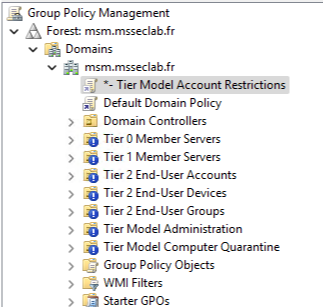
Wow! Any AD audit regular, when seeing all those exclamation marks, would immediately jump to conclusions, suspecting a bad practice... But here, we’re talking about a Microsoft security consultant - someone who knows what they’re doing. So I’ll be extremely blunt: for me, without further explanation (and I found none in the documentation), that’s an immediate no-go. Why? Let’s dig into it...
First of all, let’s recall a basic principle of any integration: you must follow the vendor’s guidance as closely as possible.
And, for as long as anyone can remember, Microsoft has advised against using GPO inheritance blocking:
- Set-GPInheritance - current doc, Windows Server 2025 - is the freshest reference I can cite, and it is explicit: the doc says the cmdlet should be used sparingly, and careless use can make troubleshooting harder. It also reminds us that blocking inheritance prevents settings from higher-level linked GPOs (site, domain, parent OUs) from being inherited automatically, unless the GPO link is enforced (see this page).
- We even find this notion in the Windows Server 2003 Best Practices archive: “Use Block Policy inheritance and No Override sparingly” - routine use of these features makes troubleshooting policy difficult (see this page).
Using blocking by default in the model clearly goes against the vendor’s intended behavior. In addition, from experience, it’s a mechanism that quickly guarantees gaps in coverage: an uncontrolled GPO unlink, a newly created OU that is not properly secured, a policy application issue... Especially since, when you look at the content of the GPOs, they are not set as “enforced” (applied, if your AD is in French), which means the closest GPO to the object wins and can rewrite a setting with different values. So there is no security gain in “blocking” inheritance.
Another point to watch: if you apply the model to an existing AD, the GPO added at the root will automatically apply to your domain... And that may get uncomfortable (Deny (...) configuration, meaning guaranteed surprises with applications).
On the hardenAD side, we opted for a gentler strategy: security GPOs are applied with the “enforced” status (“applied” in the French version - thanks MS, but no, bad translation: “imposed” would have been better), with no inheritance blocking. This method ensures that a higher-level OU imposing a setting cannot see it “canceled” by a lower GPO. And guess what? The vendor actually designed it for that 😉
Bottom line? For me, it’s a blocker, because I know from experience that this approach will introduce major risks very quickly. But in the context of the work accomplished, it’s not a risk - just be careful with your choice...
Oh Legacy, my seated bequest...
In analyzing the model, I find no trace anywhere of legacy management. Yet today, you could deploy the smartest Tier Model in the world: if your tier contains obsolete systems or applications with known unpatched vulnerabilities, you’ll still get torn apart without a fight...
Rereading the documentation, it is clearly stated that the script’s use case is a fresh, modern AD - so, in itself, no legacy... Which drastically reduces its usefulness today if you were planning to use it in an existing domain.
In our case, with hardenAD, we took technical debt into account as the number one attack angle after a foothold in the information system: persistence, often poorly monitored, and ease of exploitation. As a result, we created two additional tiers (Tier 1 Legacy and Tier 2 Legacy) that will be useful to you sooner or later...
Peace is so.... PSO?
Another interesting point: no PSO is defined by the model (same on the hardenAD side, they only exist if you use Hello-my-DIR! to build your directory). That choice surprised me, because by contrast I found Group Policies that define these settings for each tier. If you move an object out of its tier, you lose the strategy and fall back to the default policy, which, in this case, has not been changed:
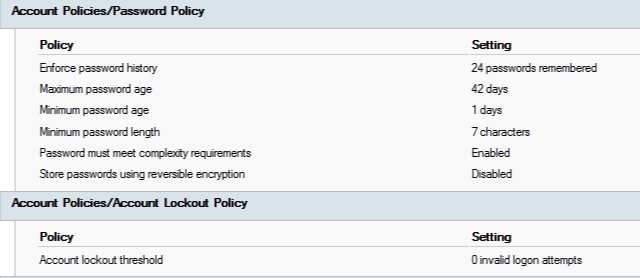
I’ll admit it: that’s a pretty big mistake. In theory, in this wonderful world where everything goes well, this should not happen... Except that:
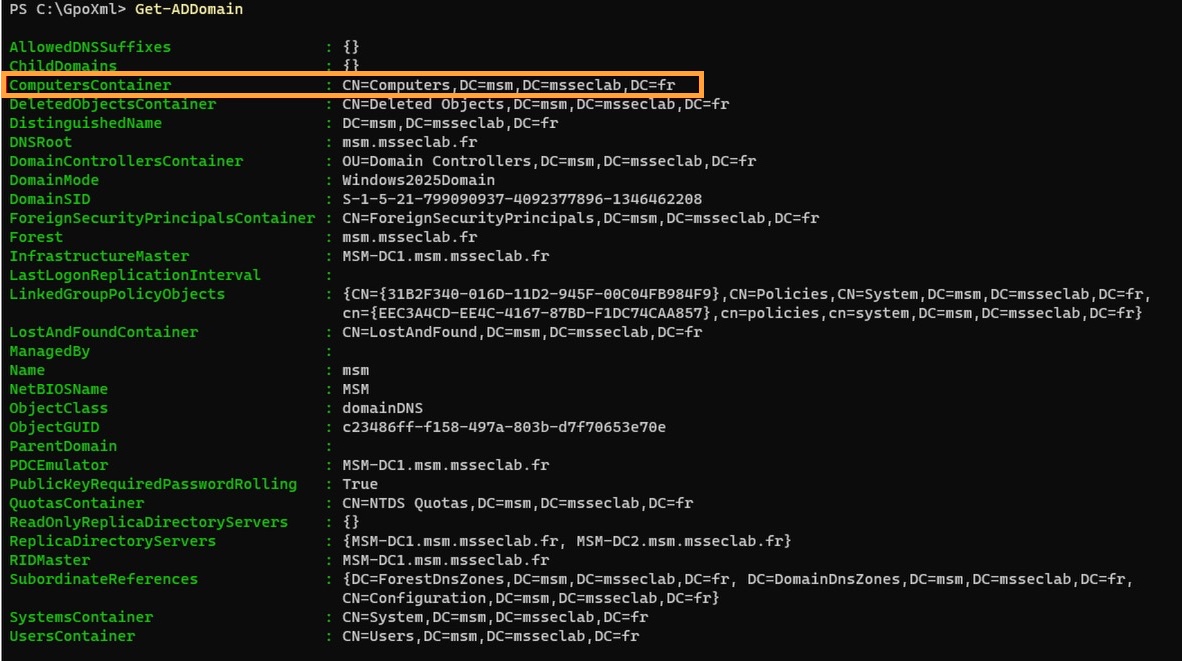
Ah. So, when a new computer joins the domain, it inherits by default the policy we don’t want to see... And guess what? A lot of the audits I perform find objects in this container, left there by mistake, bad practice or all the usual invalid excuses (I’ll do it tomorrow, the CEO won’t allow it, I’ve got tennis, ...). In addition, the machine is outside the tier model, and therefore does not receive any of the policies specific to its tier! And to make it even worse, the root policy will literally prevent you from logging on to it with a privileged account (which is not a bad thing), but if you needed a domain account with local rights... It’s dead, unless you manually intervene on the SAM database (and even then, all tier groups are blocked).
Here too, on the hardenAD side, we got ahead of the problem by creating a provisioning OU and changing the default container for objects. That way, we can push a policy better suited to system provisioning, with no risk of forgetting something (once joined to the domain, it gets the security policies for its tier). It’s an anti-lockout rule!
The Protected Users group: what is it?
I’m not going to waste time: the group is empty. Period. For me, that’s absurd - at the very least, the Domain Admins group should have been a member... In terms of model design, I think this is a major miss.
Audit: what does PingCastle say?
What would a Tier Model tool be without a PingCastle evaluation (or Purple Knight)? In a vanilla Windows Server 2025 context, with a single-domain forest environment at the highest functional levels (with two DCs for the record), the post-directory-creation assessment is 40 out of 100 with a maturity level of 2 out of 5 (simulated ANSSI score):
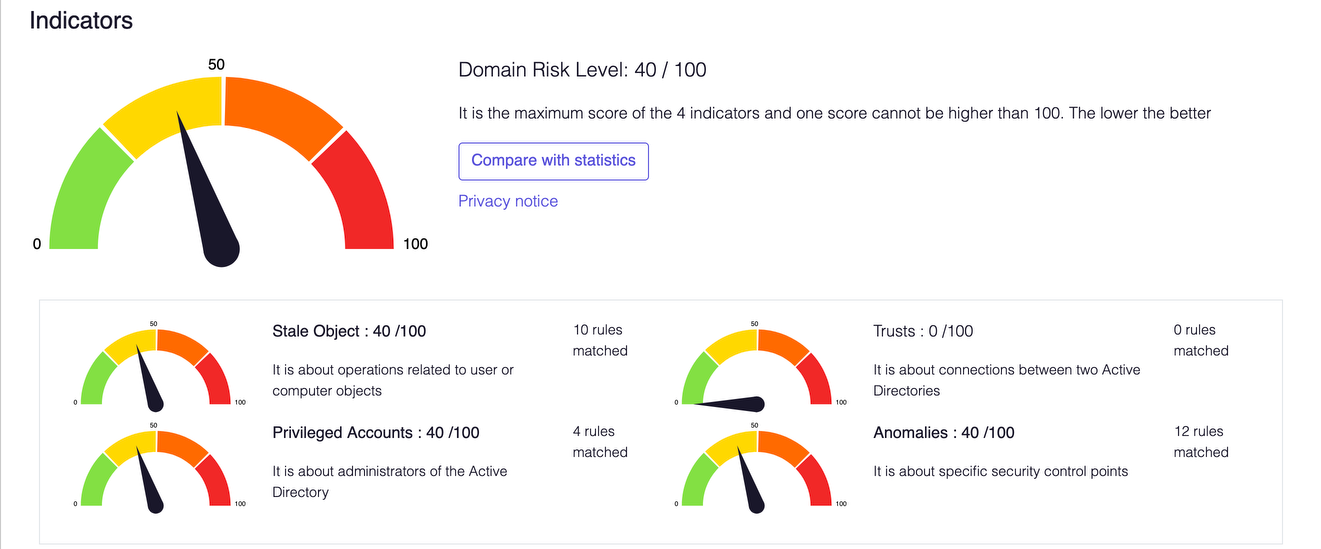
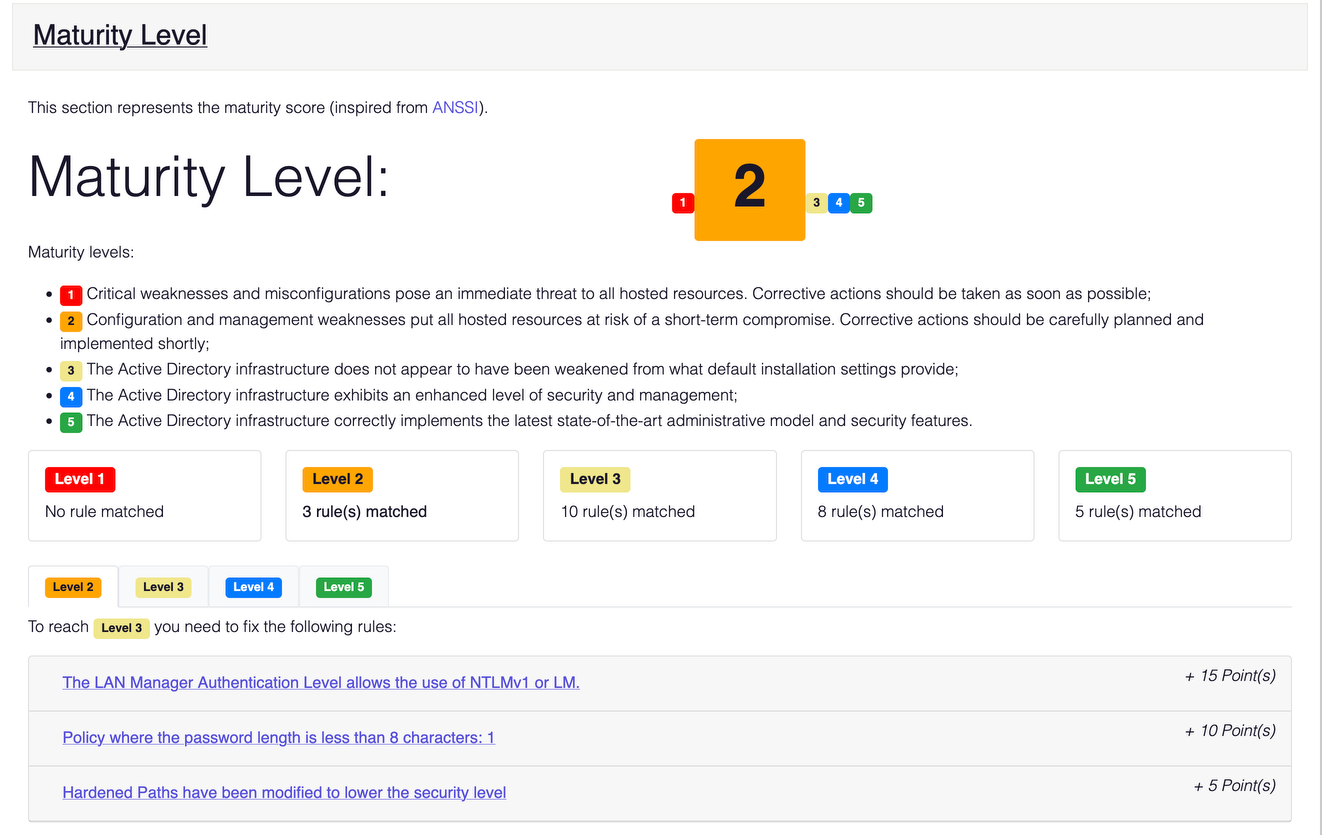
That’s already not bad, but what happens once the models are deployed and enabled? hardenAD drops to 30 out of 100, Microsoft doesn’t move. That does not mean the risk has not decreased: it just means the overall level has stayed roughly the same.
And in detail? The answer in picture form:
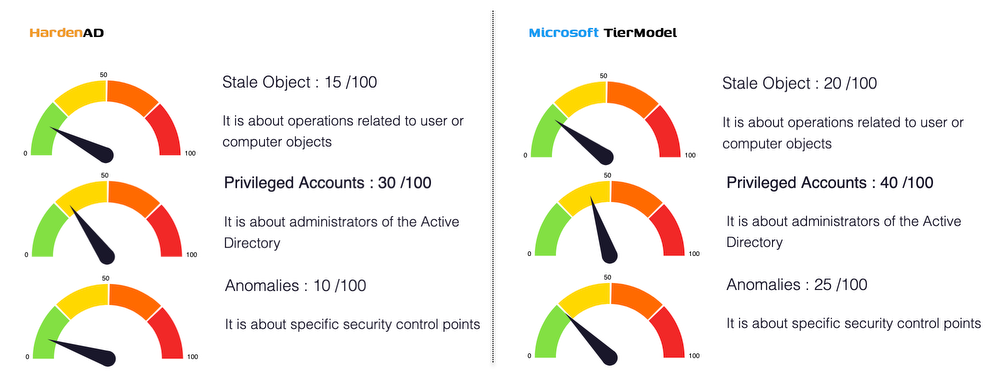
This is where honesty in the analysis matters most: Microsoft’s model was never intended to strengthen the overall security posture of your domain, only to provide a tiering model. HardenAD, on the other hand, was always designed to strengthen your global posture - if we don’t get a lower score, it is simply because the actions required are not just a matter of configuration, but of addressing debt and risk specific to each environment.
One improvement worth noting for both models: by changing the password policy in the Default Domain Policy, we could have reached a maturity score of 3 out of 5! Trust me, I’m going to add that ASAP, dad 🙂
You can even do better still, if you look more closely:

This list is common to both environments, with one exception: Recycle Bin is enabled on hardenAD, which also explains the score difference. If I correct both environments (enabling account sensitivity on Administrator and cleaning up Schema Admins), the hardenAD score will drop to 15 out of 100, versus 25 out of 100 for Microsoft...
I think it is fair to conclude that Microsoft’s script is not enough: you will need to integrate it into a broader project that goes beyond account protection.
Delegation, gifts for whom?
Delegations are pushed to the OUs for the Tier{0/1/2}Admins groups: they are scoped by object type with fine-grained delegation, which is very good. Yet, when you push the analysis a little further, you realize that the separation between system management and object management is not pushed far enough. Take Tier 1, for example: by default, the script deploys no authentication silo, and no silo policy. Result? You can’t use silos as-is; it’s an empty shell you need to fill... In that case, your tiering relies on policies:

Two groups have been defined:
- Tier 1 Admins (group A), to manage tier objects
- Tier 1 Operators (group B), to administer systems
We have the same logic in HardenAD, with an additional group (managers, to manage the tier’s privileged accounts and groups). Since we have no silo, let’s see how privileges were separated on the GPO side: given that we have inheritance blocking and no enforcement from the root, only one GPO defines the logon policy on systems:
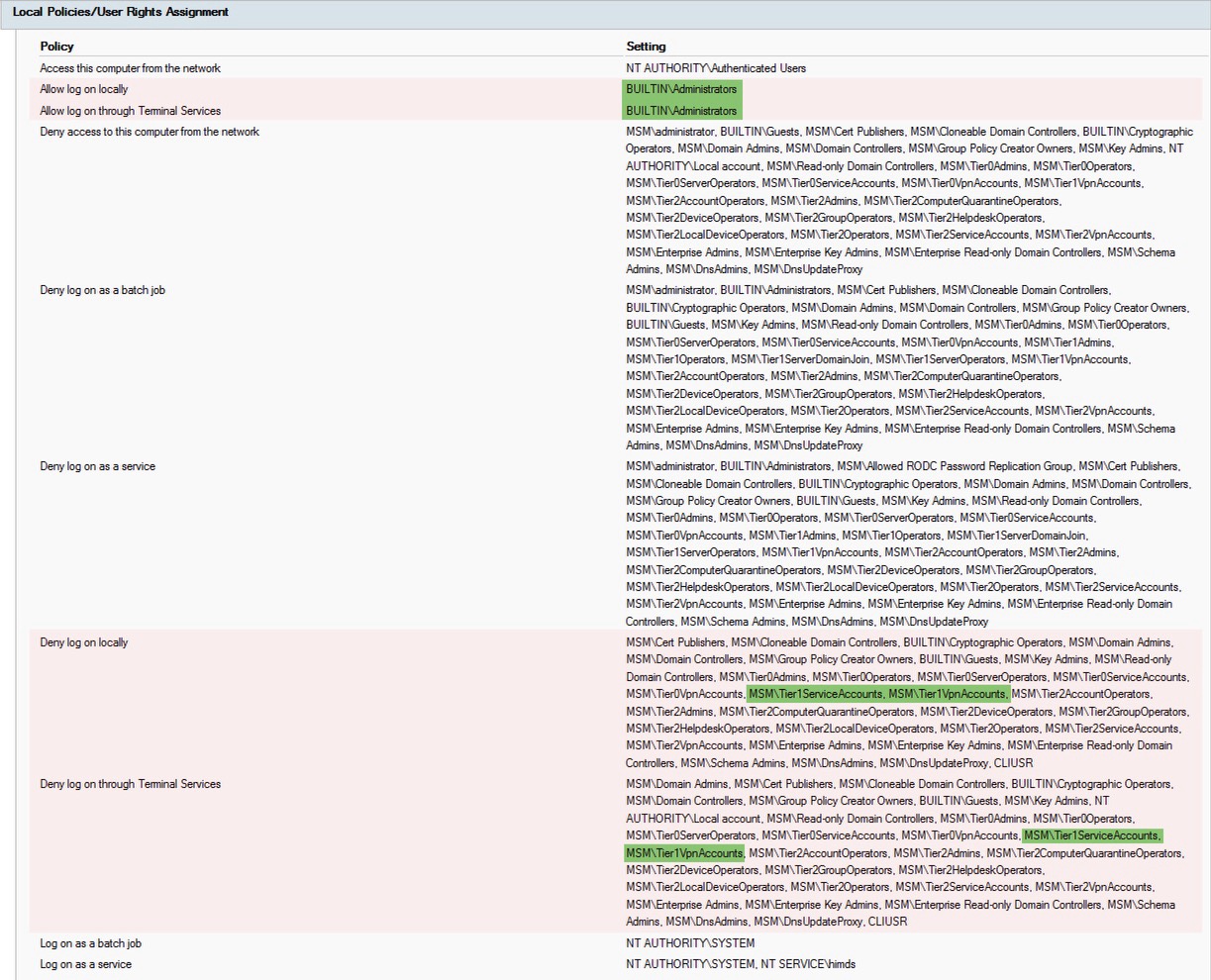
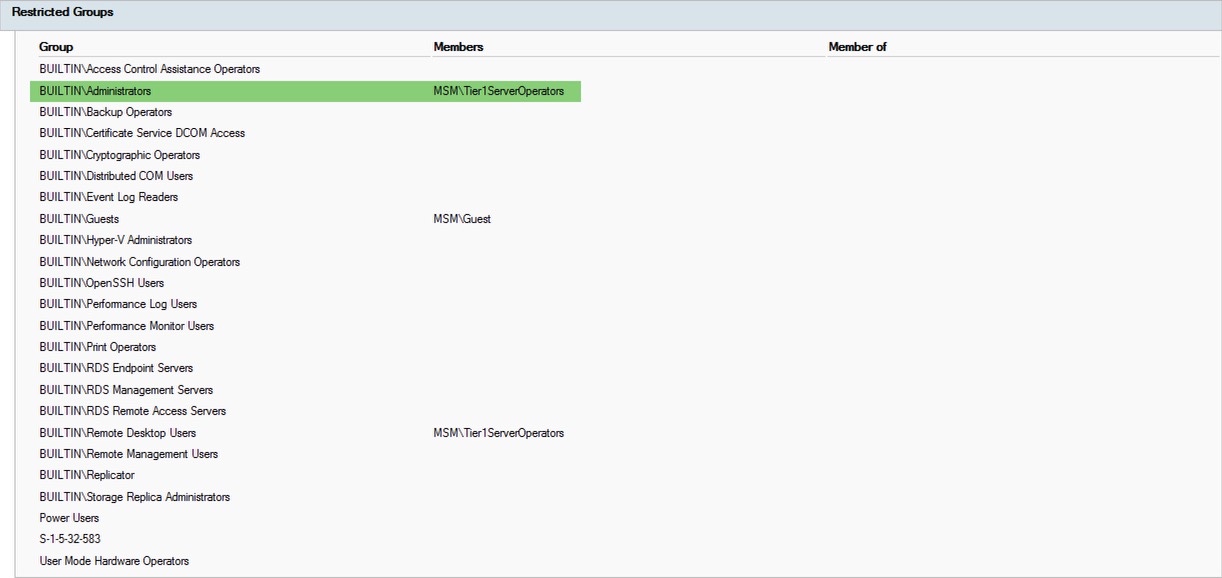
The policy only allows members of the Tier1ServerOperators group to log on – very good. So I did the most common thing I see admins do: I tried to log on with my favorite account (Test1), which is a member of group A (Tier1Admins) - the connection was logically denied (Allow Logon ... policy only authorizing members of the built-in Administrators group by default). And as I often see people do, I thought, “hey, I’ll add myself to group B (Tier1ServerOperators)” - boom, login succeeded.
What does this imply? First, that the “Deny logon ...” policy should have included group A (which it does not). Then, that you have here a misused account, as is often the case in production, exposing all of your tier administration (including OU administration...). Ouch. Some will say “oh, but who does that? ” and I’d answer that quite a lot of people do it without even realizing the risk they’re taking.
But there is, in my opinion, something more serious: the most common attack surface after successful access to a system is to steal the credentials it has. So I put myself in the attacker’s shoes and tried to see whether I could recover the Test1 account after it was no longer connected to the server... Surprise! Session caching is enabled!
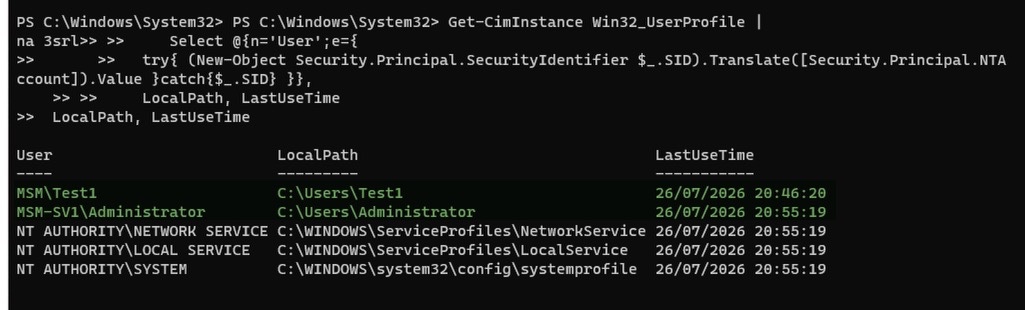
What can we conclude? The Tier Model is indeed there, but the protection measures are insufficient and you will need to complement them to really “close” the doors.
HardenAD remains a reference
After analysis, I see several reasons to say that Microsoft’s script is not yet a reference for deploying a complete Tier Model:
- Microsoft’s script was not designed to be deployed in an existing, complex environment.
- Both scripts are idempotent, although Microsoft’s is better able to measure potential drift - however, Microsoft’s script does not make it easy to customize OUs, delegations, names, GPOs, etc. There are JSON files to customize the environment, but they are poorly documented or not documented at all. Where HardenAD is easy to adapt through a single file (on Microsoft’s side, the documentation provides information but no guidance on implementation, which means testing different scenarios... A huge time cost on the project).
- HardenAD allows gradual deployment, with full control over actions - that’s been its mantra from the start. Running Microsoft’s script applies things in production, brutally if you will.
- HardenAD natively handles hybridization with Entra ID (creating “DoNotSync” OUs to keep objects out of synchronization). That work still needs to be done on Microsoft’s side.
- Microsoft’s Tier Model groups are not as granular as HardenAD’s: by definition, a tier administrator can act on the tier itself and on its tier OU under “Tier Model Administration ”, which means that in the event of compromise, access impacts both admin accounts and objects alike...
- HardenAD integrates legacy hardening by design, which Microsoft does not offer.
Conclusion
Neither of the two solutions is “better” in absolute terms - they address different layers. HardenAD is more useful for the directory/protocol/legacy layer, while Microsoft’s Tier Model is for the newer OS/EDR/M365 layer (but be careful, it is truly incomplete and cannot stand on its own). If you adopt Microsoft’s model, you will need to fix the identified watch points upstream (GPO inheritance, preserved native accounts, missing UPNs) before any production rollout.
Seeing Microsoft reinvest in AD is good news for the ecosystem, provided the tool matures (versioning, dependency management, documentation of design choices). I’m eager to see whether future improvements will land on my directory of choice.