www.it-connect.fr


VS Code Zero-Day Lets Attackers Steal GitHub Tokens in One Click
A security researcher has disclosed a zero-day vulnerability affecting Visual Studio Code. By exploiting this flaw, an attacker can steal the victim’s GitHub authentication tokens with a single click on a malicious link. The problem: there is no security patch. Here’s what you need to know.
One-click GitHub token theft via github.dev
Although this is about Visual Studio Code, it is important to note right away that this security flaw affects github.dev, the browser-based version of Visual Studio Code. It lets users work on GitHub repositories directly from a web browser, with a single click on the button available on GitHub (see the image below).
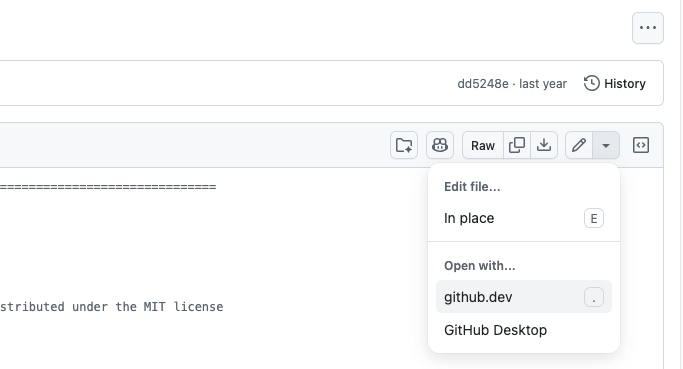
The vulnerability disclosed by the researcher lies in the message-passing mechanism of VS Code’s sandboxed webview. In fact, github.dev uses a sandbox system to protect the user and limit the risk of remote code execution.
However, by tricking a user into clicking a link, an attacker can execute malicious JavaScript code within this webview. That script can then install a malicious extension in the main editor, and its goal will be to extract the OAuth authentication token passed to github.dev.
"Once the payload is executed, the newly installed extension will retrieve your GitHub API token, then query https://api.github.com/user/repos to obtain the list of private repositories you can access. It will then display that list as well as your token in a small information window.", explains Ammar Askar, the researcher behind this discovery.
This authentication mechanism in github.dev therefore provides full access to all of your repositories, not just the one you are currently working on.
Another researcher angry at Microsoft
At the moment, no CVE identifier has been assigned to this vulnerability, and no official patch is available! But why did the researcher disclose the flaw? It was a deliberate choice, driven by bad past experiences with the Microsoft Security Response Center (MSRC). This is reminiscent of another researcher nicknamed Nightmare Eclipse, who was behind the disclosure of several Windows zero-days (including BlueHammer and YellowKey).
In practical terms, he reported the security flaw to GitHub and, within an hour, he published his report and proof-of-concept exploit code for the issue.
"In the past, when I reported bugs in github.dev to them, they told me it was out of scope and that I should report it to the MSRC. And as I pointed out in the article, I really do not want to deal with the MSRC for VSCode bugs.", he adds.
He also says he had a "horrible experience" with the MSRC, including the fact that his vulnerability was quietly fixed without ever giving him credit. Once again, this looks like a personal vendetta against Microsoft.
How to stay protected without a patch
No patch, publicly available exploit code, one-click attack... Not very reassuring. So how can you protect yourself when no security fix exists?
For his part, Ammar Askar had the good idea of providing a workaround. The method he mentions is to delete the cookies and local data stored by the browser for the github.dev site. If you have never used this feature, you will have no data.
The goal is to bring back the warnings that appear during a first attempt to access github.dev. This protects you in a certain way, even if you can still choose to proceed, but it will no longer be a one-click action.
Here are the steps to follow:
- Go to github.dev.
- Click the settings icon in your browser’s address bar.
- Go to the Cookies and site data section, then Manage data on device.
- Delete all cookies and local data for github.dev.