www.it-connect.fr

Secure Boot Bypass: 11 Microsoft-Signed Shims Left Exposed for Years
Eleven Microsoft-signed UEFI bootloaders that have been available for years could bypass Secure Boot on nearly any UEFI machine. Windows, Linux... It did not matter. All it took was copying an old binary to the EFI partition to exploit this flaw. Here is what we know about this security issue.
Eleven forgotten shims, a signature never revoked
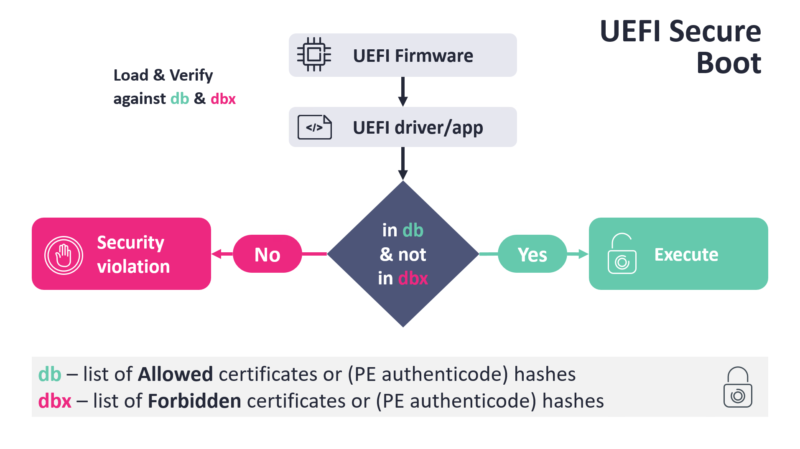
With Secure Boot enabled on a PC, the UEFI firmware checks each boot application against two databases: db, which lists what is allowed, and dbx, which lists what is forbidden. Most manufacturers ship the Microsoft Corporation UEFI CA 2011 certificate in db from the factory. It is this certificate that signs third-party boot components. The problem with this design is that it requires Microsoft to validate every new version of GRUB 2 or the kernel. That is not sustainable, hence shim.
This bootloader is signed once by Microsoft, bundles the publisher certificate, and then takes over: it verifies the next component, usually GRUB 2, which then loads the kernel. A Linux distribution can therefore ship updates without having to go back through Microsoft. Firmware trust stops at shim, and everything else flows from there.
The issue identified by Martin Smolár, a researcher at ESET, is the following: these old signed shims were never revoked. That means 11 binaries in version 0.9 or earlier are affected, and they can be exploited on any machine that trusts the 2011 certificate, regardless of the operating system installed. The affected products include:
- Red Hat Enterprise Linux 7.2, CentOS 7.2, Oracle Linux 7.2 and ROSA Linux R9/R10 distributions (shim 0.9)
- Two OpenSUSE binaries, including shim 2.1 (shim 0.9)
- PC-Doctor Service Center 15 and 16 (shim 0.9)
- The baramundi Management Suite software, up to version 2024R1 included (shim 0.8)
- Abitti 1.0 software, signed for the Finnish Matriculation Examination Board (shim 0.8)
- WhiteCanyon/Blancco WipeDrive 8.0.0 to 8.1.3, and the Spyrus WTGCreator tool (shim 0.7 or earlier)
ESET reported its discovery to CERT/CC on February 16, 2026. Revocation, initially scheduled for the May Patch Tuesday, was released on June 9, 2026, giving vendors time to distribute replacement shims. Two vulnerabilities are tied to this security issue: CVE-2026-8863 and CVE-2026-10797.
No new exploit needed, a simple copy and paste is enough
The vulnerable software does not need to be installed on the target: the attacker brings their own copy of the shim and binary, then drops them on the EFI system partition. The trust chain will accept them, which is a problem. It is a bit like BYOVD (Bring Your Own Vulnerable Driver), but applied in a different context with shim. Be careful, though: even if a simple copy and paste is enough, the attacker still needs the necessary privileges on the machine to perform the operation (but for persistence, this is interesting from an attacker’s point of view).
According to ESET’s report, a single shim can validate several binaries, and the signature and compilation timestamps of those binaries range from 2013 to 2025. "The number of binary files considered trustworthy by a given shim varies: from fewer than ten in the case of dedicated, specialized software to nearly a hundred in the case of well-known Linux distributions," the report states.
ESET provides three examples of the exposed attack surface:
- The Oracle Linux 7.2 shim trusts a GRUB 2 included in the Oracle Linux 7.1 ISO, affected by CVE-2015-5281. The
multibootandmultiboot2commands there allow unverified code to be loaded. No memory corruption, no ROP chain: compiling a multiboot2-compliant kernel image is enough. - Abitti's shim 0.8 ignores the
MokListXrevocation list, which was only enforced starting with version 0.9. It therefore allows binaries to be loaded again even though an organization believed they had been revoked. - The Red Hat Enterprise Linux 7.2 shim 0.9 predates version 15.3, the release that introduced SBAT. It never checks the
SbatLevelpolicy and happily loads a GRUB 2 binary that has already been revoked.
Added to this is CVE-2026-10797, which was patched upstream nearly ten years ago but had remained without an identifier until this ESET disclosure. The affected shims read the signature size in two different places in the PE binary, allowing revocation checks to be applied to fake data.
And no, certificate expiration does not fix anything. You may have noticed this at the start of the article, when I mentioned the Microsoft Corporation UEFI CA 2011 certificate. Indeed, it expired on June 27, 2026, but that date has no impact on verification: as long as the certificate remains in db without being revoked in dbx, the binaries it signed remain trusted. This is a good opportunity to point you back to my article about anticipating Secure Boot certificate expiration in 2026.
"What makes these old shims dangerous is not a new vulnerability, it is that no new vulnerability is needed to bypass UEFI Secure Boot," the article published on WeLiveSecurity explains. As ESET notes, this security issue could be attractive to threats, including bootkits such as BlackLotus, Bootkitty and the HybridPetya ransomware, whose code runs before the operating system loads.
How can you protect yourself?
Now that you have read all this, you are probably wondering how to protect your machine. The main protection measure is the following: apply Microsoft’s latest UEFI revocations (distributed since June 2026).
On Windows, the dbx update is delivered through Windows Update. To check whether you already have the correct lists installed on your system, run the following PowerShell code provided by ESET (it performs a specific search for hashes in the dbx database):
$hashes =
'AE75F0D82BA3DF824FBFC69340CC3B4D66C598373B1AB54CDB6C8BFD83A6B961',
'7B2A3F5C96F95BD8086CE54B0825E300F9C8F11FE3401BB631B3215C8DE9EB10',
'EB86FA1386FE6E4533B8B938DCC1250616D2F1C14C15E2FCF80834A161018A0A',
'FD23D6E57DE6F4E1F9D7118DA1C5F31A8AF6BE5E5D9E8170F9493447268D50C5',
'A0DE9333442C1BF9349A460141AE5E80F911955C6506040FA3D021BF6C1AE3E4',
'95B6D71FC0C0F8C5E1533A37AEF92CF6B0C961E2CC612A97117FA6759CE5FC06',
'236A9CB0D71951C36398A32EB660CE2CD4A52CCFA7CF751CC6A35D9DE549E19B',
'5E594C448760A3135B1A3A83E07A4F2E6FBE49414EF2C7CAB1CBA77F284FA63B',
'8A964D5F8373948D20A1D4296FB92E545DAD4617A0C810F3B934B53D98AE8963',
'410260B1B6F5AF5FBEEB9EA3220658435E876CB3247126EE907A437F312DB373',
'96275DFD6282A522B011177EE049296952AC794832091F937FBBF92869028629'
$dbx = [BitConverter]::ToString((Get-SecureBootUEFI dbx).Bytes) -replace '-'
$notRevoked = $hashes | Where-Object { $dbx -notmatch $_ }
if ($notRevoked) {
    $notRevoked | ForEach-Object { "Hash not revoked: $_" }
} else {
    "All hashes revoked in dbx!"
}
On Linux, the update is delivered through the Linux Vendor Firmware Service and can be verified with the uefi-dbx-audit script. You can find it on this page. On its site, CERT/CC recommends updating db before deploying dbx revocations.
Find the ESET report on this page.