www.it-connect.fr

What Is a WAF? How It Works and How to Deploy One
Every day, millions of websites and APIs are probed by malicious bots looking for the slightest weakness: the WAF, or Web Application Firewall, is precisely the security layer responsible for filtering this hostile traffic before it reaches your applications.
Whether you host a WordPress site for your business, a REST API consumed by a mobile app, or an intranet exposed to employees working remotely, a WAF belongs in your architecture. It acts as an application-layer filter positioned between users and your web server, with the goal of blocking attacks such as SQL injections or Cross-Site Scripting (XSS).
In this article, we will discover what a WAF is, understand how it works, place it in relation to other security devices (network firewall, IPS), review its role against the most common cyberattacks, and then present the main open source solutions on the market. Finally, we will end with a deliberately very simple hands-on lab: deploying a WAF based on the ModSecurity engine and OWASP Core Rule Set rules, using a Docker container.
This article is intended for beginners: no particular prerequisites are required, other than a few notions about how the HTTP protocol and web servers work.
What Is a WAF?
A WAF, for Web Application Firewall (pare-feu applicatif web in French), is a security solution whose role is to analyze HTTP and HTTPS traffic exchanged between clients (browsers, mobile apps, scripts, bots...) and a web application, in order to detect and block malicious requests. In other words, it is a firewall specialized in protecting web applications.
Unlike a classic network firewall that reasons in terms of IP addresses, ports, and protocols, the WAF operates at the application layer, that is, layer 7 of the OSI model (which you all know by heart). As a result, it can "understand" the content of an HTTP request: the requested URL, headers, cookies, parameters passed in the URL or in the request body, and so on. Thanks to this in-depth analysis, it can spot an SQL injection attempt hidden in a form field, where a network firewall would only see a standard packet destined for port 443.
A WAF can take several forms:
- A physical appliance: installed in the datacenter, inline in front of the web servers. This is the historical approach, found at vendors such as F5 or Fortinet.
- A virtual appliance or a software solution: deployed on a hypervisor or directly on the web server, either as a module (ModSecurity for Apache, for example) or integrated as a module in a reverse proxy.
- A cloud service (WAF as a Service): offered by companies such as Cloudflare, AWS (AWS WAF), Azure (Azure WAF), or Akamai. Site traffic passes through the service provider's infrastructure, which filters requests before forwarding them to the origin server. Filtering is performed upstream.
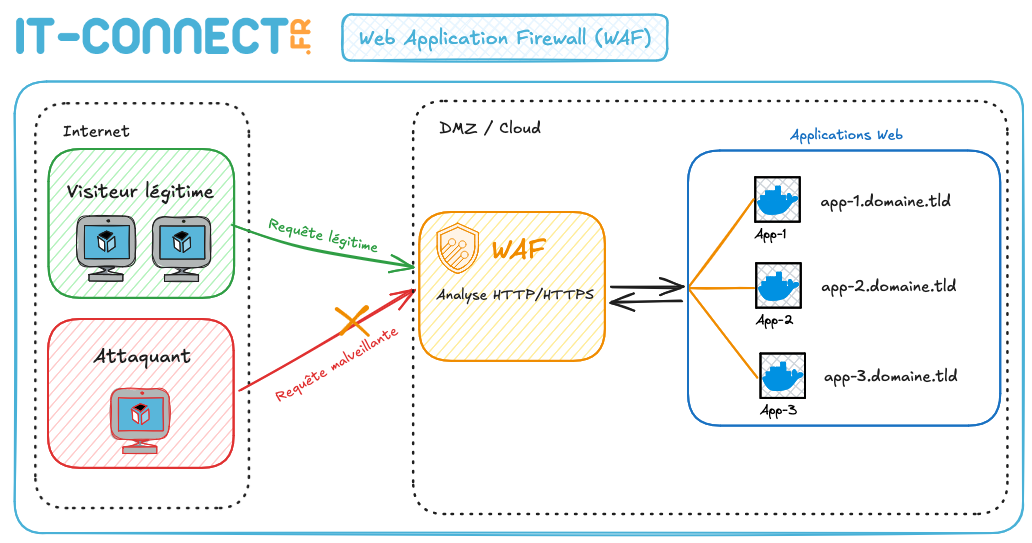
Whatever format is chosen, the principle remains the same: the WAF sits on the path of HTTP/HTTPS requests and acts as a filter.
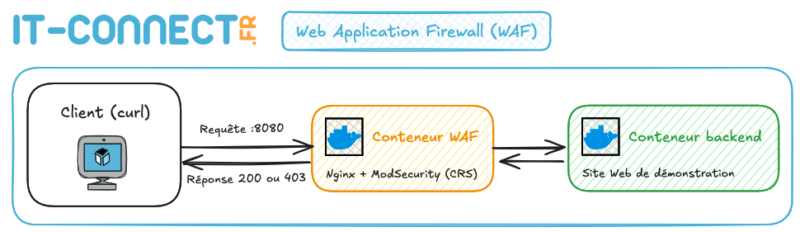
Here is a diagram showing the position of a WAF in a web architecture:
What Is a WAF Used For?
The main mission of a WAF is to protect web applications against application-layer attacks, meaning attacks that exploit flaws in the application's code itself or in its components (CMS, plugins, frameworks, libraries...).
In practical terms, a WAF addresses several needs:
- Blocking known attacks: SQL injections, XSS, file inclusion (LFI/RFI), path traversal, command injection, and more. The WAF relies on detection rules, comparable to antivirus signatures.
- Protecting vulnerable applications while waiting for a fix: this is called virtual patching. When a vulnerability is discovered in an application (for example, a flaw in a WordPress plugin), it is not always possible to patch it immediately. A specific WAF rule can then block exploitation attempts until the official fix is deployed.
- Filtering malicious bots: vulnerability scanners, brute-force bots targeting login pages, aggressive scrapers... A significant portion of global web traffic is generated by bots, and not all of them are friendly.
- Limiting request rates (rate limiting): to slow down brute-force attacks or mitigate certain application-layer denial-of-service attacks (layer 7 DoS).
- Providing visibility: WAF logs are a valuable source of information for understanding who is attacking what, how often, and with which techniques. These logs can feed a SIEM.
- Meeting compliance requirements: some standards explicitly mention the WAF as a protection measure for exposed web applications.
One point should be stressed right away: the WAF is a complementary safety net, not a substitute for secure development. An application riddled with vulnerabilities behind a WAF remains vulnerable: the WAF reduces exposure, but it does not fix the code.
WAF, Network Firewall, and IPS: What Are the Differences?
For a beginner, it is easy to confuse the WAF with other security devices. Here is how to distinguish them:
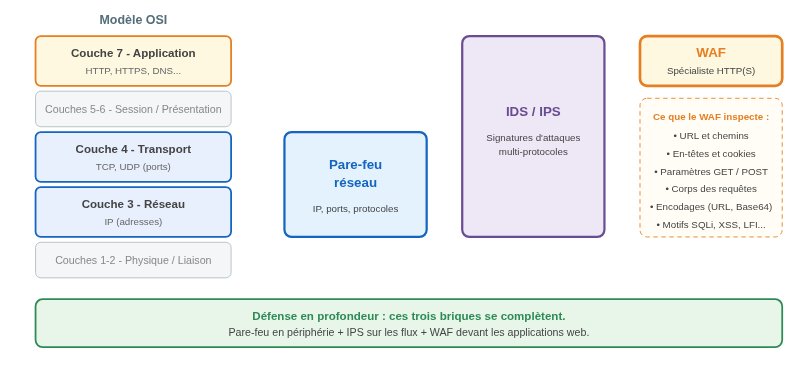
- The network firewall mainly works at layers 3 and 4 of the OSI model. It allows or blocks traffic based on source/destination IP addresses, ports, and protocols. It answers the question: "Is this machine allowed to talk to this server on this port?". However, it is unable to analyze the content of an HTTP request: if port 443 is open, an SQL injection will pass just like any other request.
- IDS/IPS (Intrusion Detection/Prevention System) analyzes network traffic for attack signatures, across all protocols (SMB, DNS, HTTP...). It provides broad but generic coverage: it does not have the fine-grained knowledge of the HTTP protocol and application context that a WAF has.
- The WAF is a specialist: it only handles HTTP/HTTPS traffic, but it does so in depth. It decodes requests, normalizes encodings (URL encoding, Base64, etc.), inspects each parameter, and applies rules specific to web attacks.
Sometimes, the line between a network firewall and a WAF seems very thin. That is normal: the same device can perform all these functions through independent modules (especially on network appliances). The fact that they are grouped together and can be enabled at the same time clearly shows that these security solutions complement each other.
Indeed, these three building blocks are not opposed to one another: they complement each other in a defense-in-depth strategy. The network firewall filters traffic at the perimeter, the IPS monitors internal flows, and the WAF specifically protects web applications.
How Does a WAF Work?
Deployment Mode: Reverse Proxy
In most cases, the WAF operates in reverse proxy mode: it receives client requests instead of the web server, analyzes them, and then forwards them (or not) to the origin server, called the "backend". The client never communicates directly with the application: the WAF terminates the TLS connection, which allows it to inspect encrypted traffic in cleartext. This operating mode is very commonly used.
Other modes exist, such as "bridge" mode (transparent, without address changes) or deployment as a module directly integrated into the web server (as is the case with ModSecurity on Apache), but reverse proxy remains the most widespread model, especially for cloud WAFs.
Security Models: Blacklist and Whitelist
A WAF can apply two filtering logics, often combined:
- Negative security model (blacklist): the WAF allows all traffic except what matches known attack patterns. This is how rule sets such as OWASP Core Rule Set work: hundreds of rules describe characteristic patterns of SQL injections, XSS, and more. Advantage: quick to deploy. Drawback: unknown or cleverly obfuscated attacks may slip through.
- Positive security model (whitelist): the WAF blocks everything except what is explicitly described as legitimate (for example: "the
idparameter of the/productpage can only contain an integer from 1 to 6 digits"). This is the most robust model, but also the most expensive to build and maintain, because it requires an exact understanding of the application. Blacklist-based operation is more commonly used.
Modern WAFs complement these approaches with machine learning and scoring mechanisms: instead of blocking as soon as the first rule is triggered, each anomaly adds points to a score, and the request is blocked only if the score exceeds a threshold. This is the principle behind the "anomaly scoring" mode of the Core Rule Set, which helps reduce false positives.
Possible Actions
When a request triggers a rule, the WAF can react in several ways: log the event without blocking it (detection mode, ideal during testing), block the request with an HTTP 403 code, redirect the client, present a challenge (CAPTCHA, JavaScript challenge), or temporarily ban the source IP address.
The distinction between detection mode and blocking mode is important in practice: a WAF is usually deployed in detection mode for a few days or weeks, logs are analyzed to identify false positives, rules are adjusted, and then the system is switched to blocking mode.
The Role of the WAF Against Cyberattacks
The WAF is on the front line against web attacks targeting applications, the most common of which are listed in the OWASP Top 10 (Open Worldwide Application Security Project), a benchmark in web application security.
Let's look at the main threats a WAF can help counter.
SQL Injection (SQLi)
The attacker inserts SQL code into a form field or URL parameter, hoping that the application will pass it directly to the database. A classic example: the ?id=1' OR '1'='1 parameter added to a URL. The idea here is to inject a condition that is always true (like 1 being equal to 1).
If the application is vulnerable, the attacker can read, modify, or delete data, or even take control of the web application server. The WAF detects characteristic SQL language patterns (UNION SELECT, OR 1=1, comments --, etc.) in request parameters, including when they are encoded.
Cross-Site Scripting (XSS)
Here, the attacker injects malicious JavaScript code that will be executed in other visitors' browsers, for example through an unfiltered blog comment. The consequences range from stealing session cookies to defacing the page. The WAF spots suspicious tags and functions (<script>, onerror=, javascript:, etc.) in submitted data.
File Inclusion and Path Traversal
LFI (Local File Inclusion) or path traversal attacks consist of manipulating parameters to access sensitive server files, such as /etc/passwd, via sequences like ../../../. The WAF blocks these patterns after normalizing the various possible encodings. It is also possible to restrict this type of sequence at the web server parameter level.
Command Injection
When an application runs system commands based on user input, an attacker may try to inject their own commands (; cat /etc/passwd, | whoami...). Here again, the WAF detects characteristic keywords and characters.
Brute-Force Attacks and Credential Stuffing
The WAF can limit the number of login attempts per IP address over a given period (rate limiting), thereby significantly slowing attacks aimed at guessing passwords or replaying stolen credentials. In this case, the application itself must also detect the number of failed attempts and block malicious IP addresses. If we take WordPress as an example, there are plugins that can perform this task.
Exploitation of Known Vulnerabilities (CVE)
When a major vulnerability is disclosed, WAF rule vendors quickly publish detection signatures. Organizations protected by an up-to-date WAF thus benefit from protection even before they have patched their applications. This is one of the strongest arguments in favor of a WAF: it buys time for technical teams.
Recently, I remember that there were Virtual Patching rules for the React2Shell security flaw.
WAF Limitations
You also need to know the limitations of a WAF, which, I remind you, does not eliminate the need for secure development and for keeping your applications up to date.
- False positives: legitimate requests can be blocked, for example a blog article that talks about... SQL injection (I have already seen blocks of this type when the URL of an article contains sensitive keywords). A poorly tuned WAF can disrupt application operation, which is why the burn-in phase in detection mode is important.
- Bypass techniques: attackers compete in ingenuity to obfuscate their payloads (multiple encodings, fragmentation, syntax variations) and slip past the rules.
- Logical flaws: a WAF cannot detect a business logic flaw, such as a broken access control that would allow one user to view another customer's invoices. The request is syntactically perfectly legitimate.
- Maintenance: a WAF requires regular follow-up: rule updates, log analysis, and exclusion tuning.
A WAF must therefore be part of a broader approach: secure development, patch management, regular penetration testing, and monitoring. It is important to keep in mind that there are techniques to identify the WAF used to protect an application (notably through analysis of returned HTTP headers). On that topic, you can find additional information in this GitHub repository.
Open Source WAF Solutions
The open source world offers several quality solutions for deploying a WAF. Here are a few examples.
ModSecurity and OWASP Core Rule Set
ModSecurity is the historic open source WAF engine, created in 2002. It works as a module for Apache, and connectors exist for Nginx and IIS. ModSecurity "only" executes rules: its value comes from the ruleset that accompanies it, and the best known is the OWASP Core Rule Set (CRS), a community-maintained set of generic rules covering the major attack families (SQLi, XSS, LFI, RCE...).
Configuring ModSecurity is no small task, but it is a reference project.
Coraza
OWASP Coraza is a modern WAF engine written in Go, fully compatible with the ModSecurity rule syntax and 100% compatible with Core Rule Set v4. It integrates notably with the Caddy web server, with proxies based on Envoy, and can be embedded in Go applications. There is also a Coraza plugin for Traefik and for HAProxy.
BunkerWeb
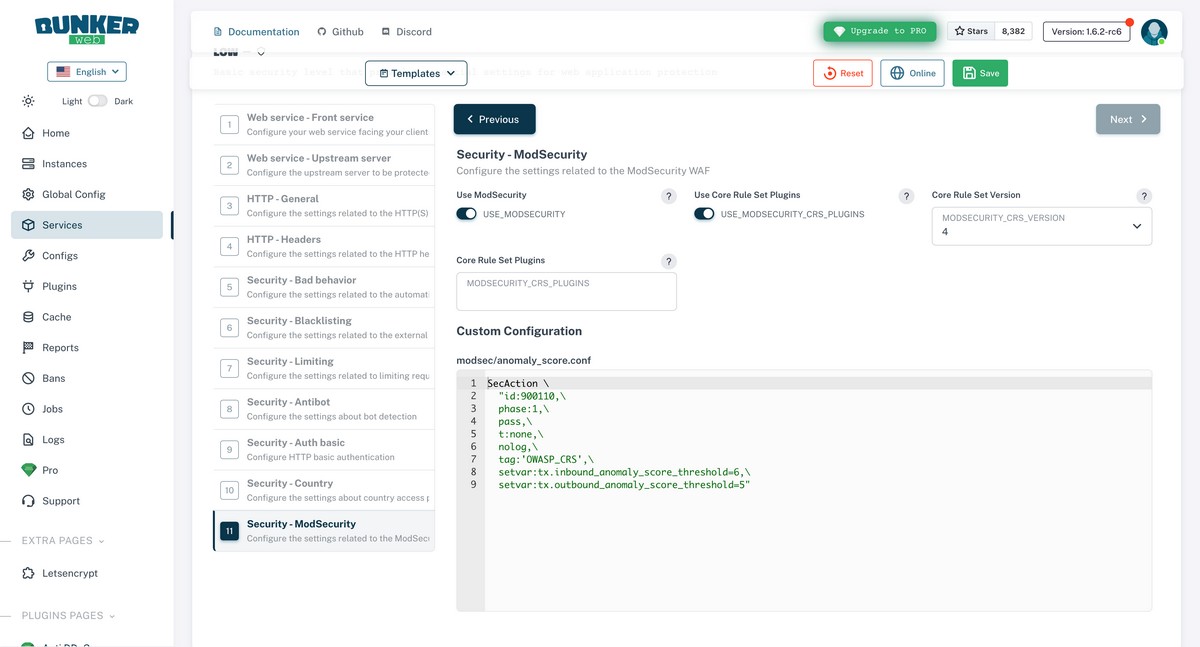
BunkerWeb is a French open source solution based on Nginx and enhanced with many ready-to-use protections: ModSecurity integration (a much more digestible way to use it) and the Core Rule Set, IP blacklists, rate limiting, anti-bot protection, automatic Let's Encrypt certificate management... All of this with a web administration interface. It is an interesting option for quickly obtaining a hardened reverse proxy.
A full tutorial has already been published on IT-Connect:
open-appsec
open-appsec is an open source WAF based on machine learning, developed by Check Point. It stands out for its signatureless approach: it learns the application's legitimate traffic and detects anomalies, making it capable of blocking novel attacks (zero-day). It integrates with Nginx, Kubernetes (ingress), and other environments such as Nginx Proxy Manager and Envoy-based tools.
SafeLine
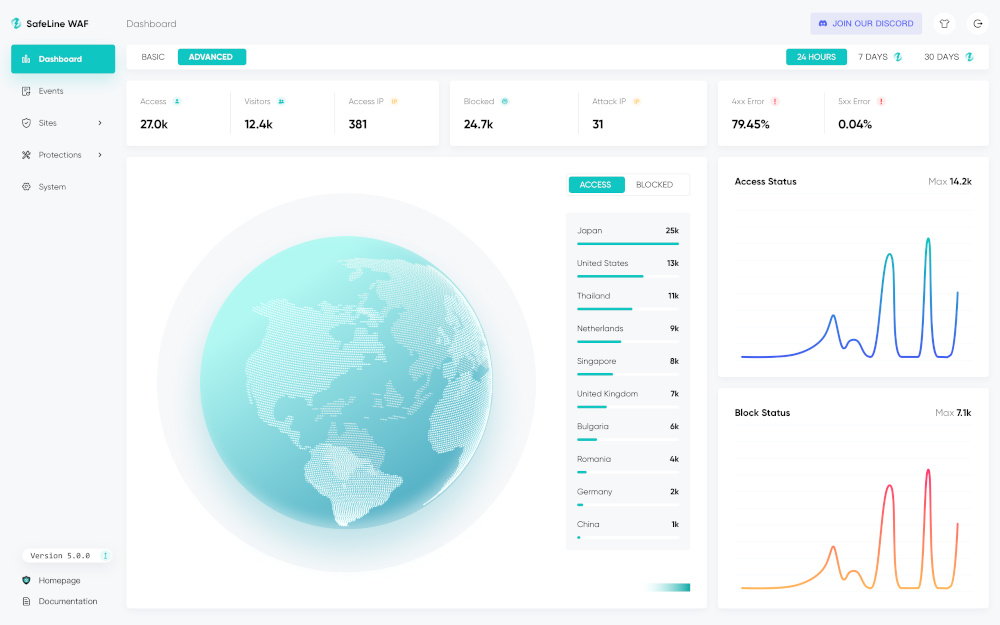
SafeLine is an open source WAF that has gained popularity in recent years. It relies on semantic analysis of requests rather than traditional signatures. It is an open source project that appears to have originated in China.
Hands-On Lab: Deploy a WAF with Docker in a Few Minutes
Time for practice! The goal is to build the simplest possible lab: a ModSecurity + OWASP Core Rule Set WAF, deployed as a reverse proxy in front of a small demo website, all with Docker. This lab will help you discover how a WAF behaves.
Step 1: Create the Docker Compose Project
On a machine with Docker and Docker Compose installed, create a directory for this project and a docker-compose.yml file. I usually work under /opt/docker-compose.
mkdir /opt/docker-compose/lab-waf && cd /opt/docker-compose/lab-waf
nano docker-compose.yml
Add the following content to the YAML file:
services:
  backend:
    image: nginxdemos/hello:plain-text
    container_name: site-backend

  waf:
    image: owasp/modsecurity-crs:nginx
    container_name: waf-modsecurity
    ports:
      - "8080:8080"
    environment:
      # Address of the server to protect (our backend)
      BACKEND: "http://backend"
      # Engine mode: DetectionOnly or On (blocking)
      MODSEC_RULE_ENGINE: "On"
      # CRS paranoia level (1 = the fewest false positives)
      PARANOIA: "1"
    depends_on:
      - backend
Here, we use the official owasp/modsecurity-crs:nginx image, which bundles Nginx, the ModSecurity engine, and the preconfigured Core Rule Set. The BACKEND variable indicates which server legitimate requests should be relayed to, so we specify the container name where our web site is running. The MODSEC_RULE_ENGINE variable set to On enables blocking (use DetectionOnly for a passive mode that only logs events).
Step 2: Start the Lab
Run the following command from the project directory.
docker compose up -dCheck that both containers are up and running:
docker compose psYou should get this result:

Step 3: Test a Legitimate Request
From the host machine, query the demo site through the WAF (you will notice that the web site container is not exposed anyway). Here, I target 192.168.10.200 because that is the address of my Docker server.
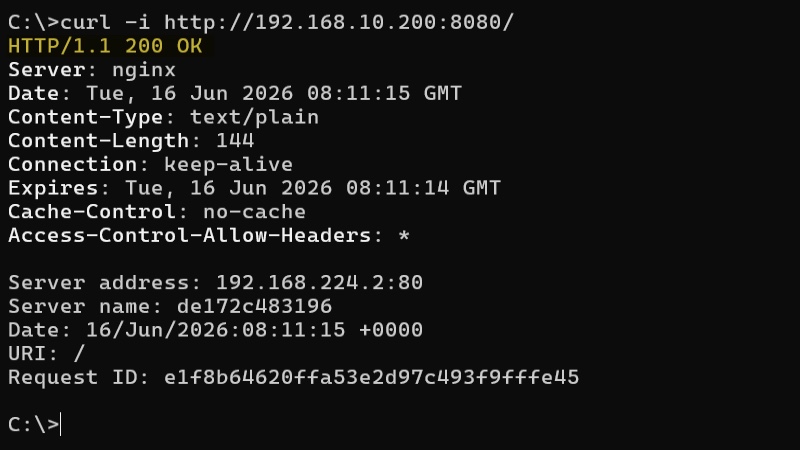
curl -i http://192.168.10.200:8080/The backend server responds with a HTTP/1.1 200 OK code: the request is legitimate, the WAF let it through and relayed the response.
Step 4: Simulate Attacks
Let's now simulate an SQL injection attempt in a URL parameter:
curl -i "http://192.168.10.200:8080/?id=1%27%20OR%20%271%27=%271"

# More readable:
curl -i "http://192.168.10.200:8080/?id=1' OR '1'='1"
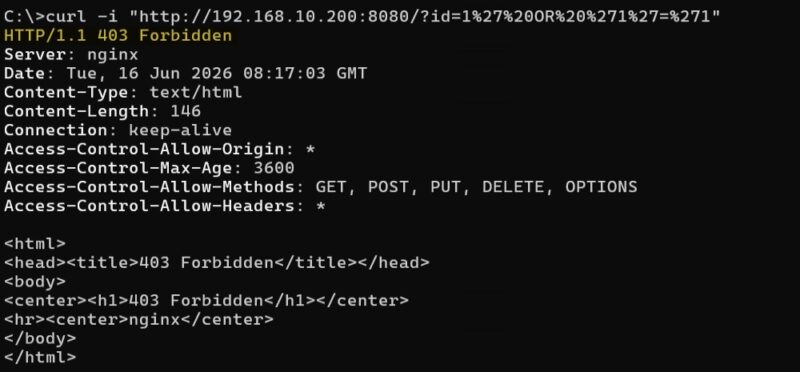
This time, the response is unequivocal: HTTP/1.1 403 Forbidden. The request never reached the backend; it was blocked by the WAF. It denied access to this malicious client.
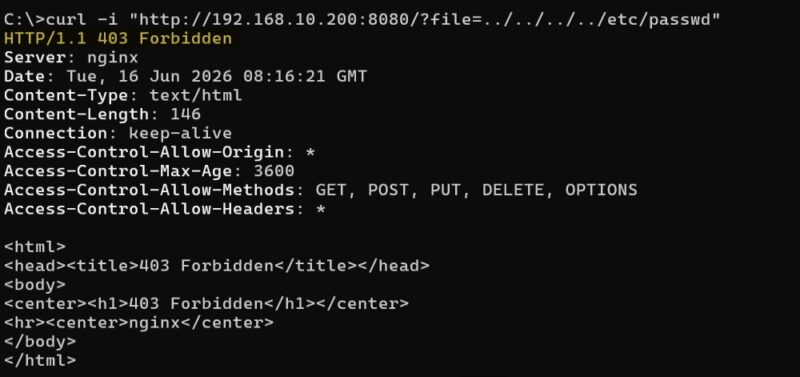
Let's try a path traversal attempt by attempting to read a system file:
curl -i "http://192.168.10.200:8080/?file=../../../../etc/passwd"In both cases, the verdict is the same: 403 Forbidden. See for yourself:
Step 5: Check the WAF Logs
To understand why a request was blocked, consult the container logs:
docker compose logs waf | grep ModSecurityThere you will find, for each block, the rule or rules triggered (identified by their ID, for example 942100 for SQL injection detection via the libinjection library), the anomaly score reached, and the details of the detected payload. This is exactly the kind of information you will use every day to tune your configuration and handle false positives.
Here is an example (truncated for clarity):
{
  "transaction": {
    "client_ip": "192.168.10.199",
    "time_stamp": "Tue Jun 16 08:17:03 2026",
    "is_interrupted": true,
    "request": {
      "method": "GET",
      "uri": "/?id=1%27%20OR%20%271%27=%271"
    },
    "response": {
      "http_code": 403
    },
    "producer": {
      "modsecurity": "ModSecurity v3.0.15 (Linux)",
      "components": ["OWASP_CRS/4.25.0"]
    },
    "messages": [
      {
        "message": "Host header is a numeric IP address",
        "details": {
          "ruleId": "920350",
          "data": "192.168.10.200:8080",
          "severity": "4"
        }
      },
      {
        "message": "SQL Injection Attack Detected via libinjection",
        "details": {
          "ruleId": "942100",
          "data": "Matched Data: s&sos found within ARGS:id: 1' OR '1'='1",
          "severity": "2"
        }
      },
      {
        "message": "Inbound Anomaly Score Exceeded (Total Score: 8)",
        "details": {
          "ruleId": "949110",
          "match": "Operator `Ge' with parameter `5' against TX:BLOCKING_INBOUND_ANOMALY_SCORE (Value: `8')"
        }
      }
    ]
  }
}
Three rules were triggered, and it is their combined score that results in the 403. We can see:
- Rule 942100 –
SQL Injection Attack Detected via libinjection(severity 2 = CRITICAL). This is the core detection: it identified the SQL injection in theidparameter. ItsseverityCRITICAL is worth 5 points in the CRS scoring system. - Rule 920350 –
Host header is a numeric IP address(severity 4 = WARNING). It complains that theHostheader is an IP address (192.168.10.200:8080) rather than a domain name. WARNING is worth 3 points. - Rule 949110 –
Inbound Anomaly Score Exceeded (Total Score: 8). This one does not detect anything: it compares the cumulative score (8) to the blocking threshold. TheMatched "Operator Ge with parameter 5"indicates that the threshold is 5. Since 8 > 5, the request is interrupted. This example also shows that the SQL injection alone would be enough to block the request since 5 > 4.
On the client side, we got an HTTP response with a 403 code, which is consistent with this line visible in the logs: "is_interrupted": true and "http_code": 403.
Going Further
This lab is intentionally contained in a single file, but it illustrates the essential concepts: reverse proxying, rule sets, blocking mode, and logging. For real-world use, you would need to do things like enable HTTPS on the WAF, adjust the CRS paranoia level, set up exclusions for false positives specific to your application, centralize logs, and monitor everything.
The owasp/modsecurity-crs image provides many environment variables for this purpose, documented in the project's official GitHub repository.
Conclusion
The WAF is a full-fledged component of web application security: positioned inline between clients and servers, it deeply analyzes HTTP/HTTPS traffic and blocks the most common application-layer attacks, from SQL injection to XSS, including the exploitation of freshly disclosed vulnerabilities through virtual patching.
We have seen that it does not replace the network firewall, secure development practices, or patch management: it complements them as part of a defense-in-depth strategy. We also reviewed the main open source solutions (ModSecurity, Coraza, NAXSI, open-appsec, BunkerWeb, SafeLine), which let you deploy without a licensing budget, and demonstrated with a Docker lab that a first functional WAF can be deployed in just a few minutes.
If you are just getting started, the best approach is to reproduce this lab, observe the logs, and then experiment with detection mode, Core Rule Set paranoia levels, and false positive handling. You will then be ready to consider a real-world deployment with confidence.
FAQ - Frequently Asked Questions About WAFs
What Is a WAF in Cybersecurity?
A WAF (Web Application Firewall) is an application firewall that analyzes HTTP/HTTPS traffic between clients and a web application in order to detect and block malicious requests, such as SQL injections or XSS attacks.
What Is the Difference Between a WAF and a Traditional Firewall?
The network firewall filters traffic according to IP addresses, ports, and protocols (layers 3 and 4 of the OSI model), while the WAF inspects the content of HTTP requests at the application layer (layer 7): URLs, headers, cookies, and parameters.
Does a WAF Protect Against All Cyberattacks?
Does it protect against cyberattacks: Yes. Against all cyberattacks? No. The WAF blocks web attacks targeting your applications. It does not protect against phishing, malware on endpoints, business logic flaws, or attacks targeting other protocols. It is part of a defense-in-depth strategy.
What Is OWASP Core Rule Set (CRS)?
It is an open source detection ruleset maintained by the OWASP community, compatible with several WAFs including ModSecurity and Coraza. It covers the main web attack families: SQL injection, XSS, file inclusion, command injection, and more.
What Is Virtual Patching?
Virtual patching consists of deploying a WAF rule that blocks exploitation of a known vulnerability while waiting for the official patch to be applied to the application. This reduces the exposure window without changing the code.
What Is a False Positive on a WAF?
It is a legitimate request that is blocked by mistake because it resembles an attack. For example, a form where the user enters SQL code in an educational context. False positives are handled with targeted exclusion rules.
Can a WAF Protect a REST API?
Yes. APIs use the HTTP protocol and therefore benefit from WAF filtering. Some solutions also provide OpenAPI schema validation, so that only requests conforming to the API are accepted.