www.it-connect.fr

PHP2Shell and Docker: How to Check and Update Your PHP Containers
Are you running WordPress, Nextcloud, or another PHP-based application in a Docker container? Then updating the host will not protect you from PHP2Shell: PHP is bundled inside the Docker image. Here’s how to check your containers and update them.
A quick reminder for context: on Wednesday, October 21, the PHP team released versions 8.5.12, 8.4.27, 8.3.36, and 8.2.35, which fix the two critical flaws grouped under the PHP2Shell name. I detailed the impact of these vulnerabilities in an article. Since then, several actors, including watchTowr have reported observing attempted exploitation of these flaws.
Some of you may have patched your server in just a few minutes when PHP is installed directly on the host operating system. But what about containerized applications? The simple answer: you need a new image, then you need to recreate the container. A running container keeps the image it was started from, even if a patched version is available on Docker Hub.
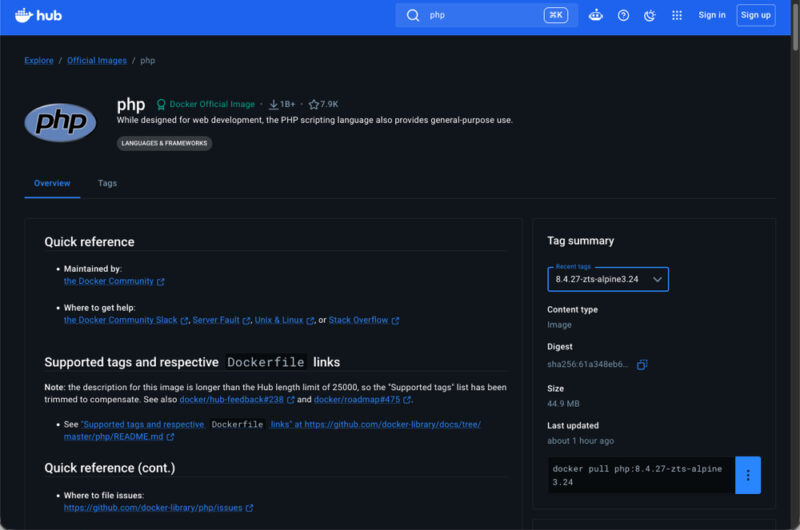
The update of the official images was merged into the docker-library/php repository on Wednesday afternoon. But the rollout hit a snag: around 5:40 PM (Paris time), tags 8.5.12, 8.4.27, 8.3.36, and 8.2.35 appeared on Docker Hub with no image behind them. There was a small deployment issue, so a docker pull returned the error “no match for platform in manifest”. "Sorry, we had a deployment issue, the updated tags are being published", a maintainer acknowledged.
The situation is now back to normal. Indeed, the real images were published around midnight for the Debian variants, then overnight for the newer Alpine variants, for many generic tags (php:8.4-fpm, php:8.3-apache, etc.). If you tried to update Wednesday evening without success, try again: this time it should work.
The images built on top of those followed. FrankenPHP 1.13.2 ships the four fixed versions in its Docker images, and the official Drupal and Joomla images were rebuilt overnight. The WordPress image was also updated (an hour before this article was written), so it now includes the correct PHP version as well.
As you can see, once the PHP image has been pushed, it must also be integrated into all application images that use PHP, and that still depends on the responsiveness of the application maintainers.
How to check the PHP version inside a container
Before updating anything, take inventory of your containers. The docker ps command lists the running containers, with the image used by each one in the IMAGE column. Do not stop at php images: many self-hosted applications bundle PHP without showing it in their name.
- Query PHP inside the container to get the real information
To do this, run the php -v command inside the container with docker compose exec followed by the service name. For example, for a service named wordpress:
docker compose exec wordpress php -vHere is an example output:
PHP 8.3.36 (cli) (built: Oct 21 2026 16:38:20) (NTS)
Copyright (c) The PHP Group
Zend Engine v4.3.36, Copyright (c) Zend Technologies
    with Zend OPcache v8.3.36, Copyright (c), by Zend Technologies
Outside Docker Compose, the equivalent is docker exec followed by the container name, then php -v. If the command cannot find PHP, the embedded binary name may include the branch number, such as php84 on images built with Alpine packages.
- Read the version without running PHP
Official images store the version in the PHP_VERSION environment variable. The command docker inspect mon-conteneur | grep PHP_VERSION displays it, even for a stopped container, which lets you retrieve the information.
- Check the distribution package
If PHP was installed with apt or apk, check the package version instead, because that is sometimes the only clue that the fix is present: docker exec mon-conteneur dpkg -l | grep php on Debian and Ubuntu, or docker exec mon-conteneur apk info -v | grep php on Alpine.
With the official images, you should see 8.5.12, 8.4.27, 8.3.36, or 8.2.35. Be careful with tags 8.5.12RC1 or 8.4.27RC1: these are release candidates that came before the official release.
Updating your Docker containers
It all depends on how your container pulls its image. With a generic tag such as php:8.4-fpm or wordpress:latest, run docker compose pull, then docker compose up -d to recreate the container, and check the version again. If it has not changed, the fixed image has not been published yet.
Here is an example of the full sequence with the PHPIPAM application:
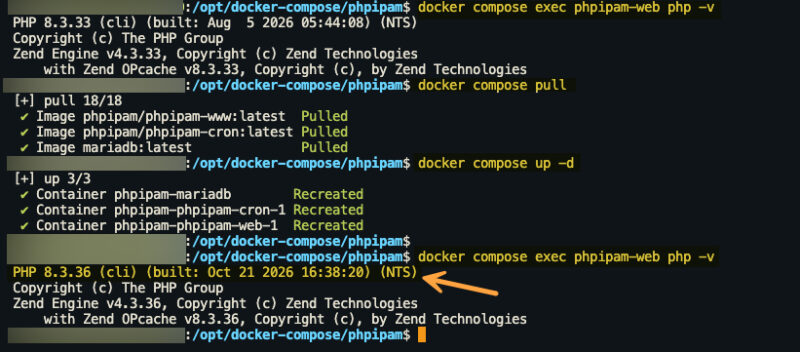
Note: you do not have to do it manually... If you use a solution such as Arcane or Dockhand, you can easily detect image updates and apply them across a set of Docker containers.
If you build your own image from a Dockerfile, use docker compose build --pull, otherwise Docker may reuse the base image already in cache. By contrast, a pinned reference such as php:8.4.24-fpm or a sha256 digest will never change: you must update it yourself. You therefore need a line like this in your Dockerfile:
FROM php:8.4.27-fpmThere is still the case where your Dockerfile installs PHP with apt or apk: it then depends on the distribution packages. Debian has rolled out PHP packages for Debian 12 (php8.2 at 8.2.35-1~deb12u1) and Debian 13 (php8.4 at 8.4.27-1~deb13u1). On Alpine’s side, the php84 package in edge was still at 8.4.26 when I checked. Images built on those packages, such as those from LinuxServer.io, remain exposed until they are rebuilt.
And what about PHP 8.1 or older images? Official tags are no longer rebuilt: php:8.1-apache has not changed since December 31, 2025. The only real solution is to move to a supported branch, ideally 8.3 or 8.4, since PHP 8.2 will no longer receive fixes after December 31, 2026.