www.it-connect.fr

Microsoft Defender for Endpoint Can Now Automatically Isolate Compromised Devices
Microsoft has decided to enhance the capabilities of its Microsoft Defender for Endpoint solution by adding a feature that can automatically isolate compromised devices. Currently available in preview, its goal is to block attackers' attempts at lateral movement within a computer network.
Containing cyberattacks with Defender for Endpoint
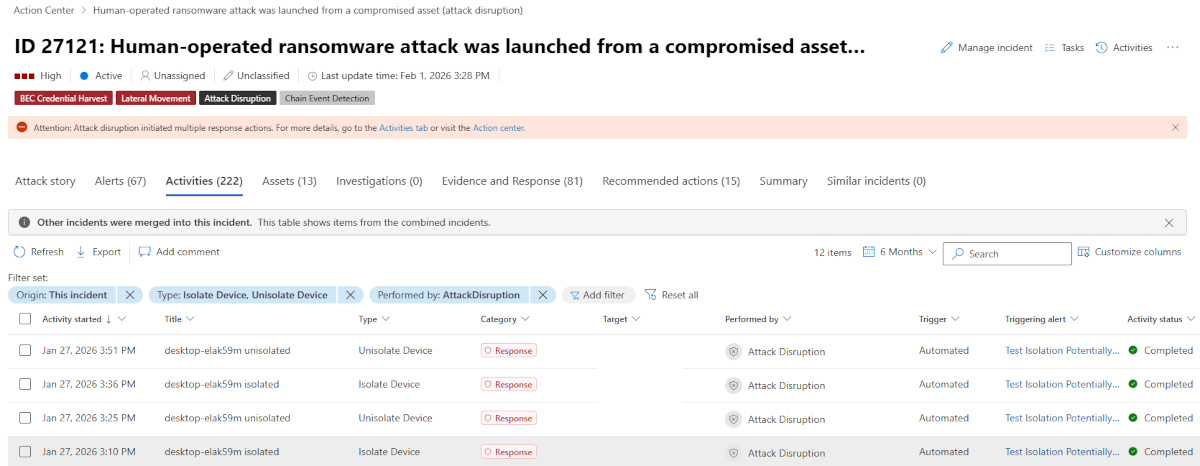
This new feature announced by Microsoft integrates directly into the automatic attack disruption mechanism. When a device is automatically isolated by the security system, it is disconnected from the network in order to limit the attacker's options. The goal is to contain the threat on that machine without allowing lateral movement to other devices on the network.
Even though the isolated machine is disconnected from the network during this isolation process, it retains connectivity with the Microsoft Defender for Endpoint service, which continues to monitor the device in real time.
Microsoft states the following: "When a device in your organization is suspected to be compromised, Microsoft Defender for Endpoint can automatically isolate the device as part of automatic attack disruption."
The Redmond company also says this security mechanism helps reduce the risk of data exfiltration and ransomware spread. More importantly, when an attack is contained, security teams should use that time to investigate and implement remediation actions. In theory, Microsoft Defender for Endpoint gives them that precious time.
Requirements and isolation management
Automatic isolation through this feature is subject to one condition: it applies only to user workstations managed by Microsoft Defender for Endpoint.
At any time, devices can be released from "confinement" by an administrator with the required permissions. Everything is handled directly from the Microsoft 365 portal via the device inventory, where a dedicated option is available to release the machine ("Release from isolation").
Note that Microsoft has been working for several years on device and user isolation mechanisms. It was already possible to manually isolate a machine from the Microsoft portal, regardless of whether it was running Windows or Linux.
Finally, in May 2026, Microsoft also introduced in preview a feature that allows you to schedule antivirus scans on Linux machines (quick scan, full scan, etc.).