www.it-connect.fr


YellowKey Zero-Day Lets Attackers Bypass Windows BitLocker Protection
YellowKey is the name of the new Windows zero-day flaw disclosed in recent hours. It makes it possible to bypass Windows BitLocker protection in a simple way, while another flaw dubbed GreenPlasma has also been revealed. Here’s what you need to know.
Do you remember Chaotic Eclipse (Nightmare Eclipse), the researcher unhappy with the treatment he received from Microsoft? Well, it turns out he is behind the disclosure of these two new security flaws: YellowKey and GreenPlasma. As a reminder, he has already disclosed several exploits in Microsoft Defender: BlueHammer (CVE-2026-33825), RedSun (no CVE identifier at this time) and UnDefend. So, he has done it again.
Bypassing BitLocker with YellowKey
YellowKey is probably the most concerning vulnerability disclosed by this researcher. In fact, this security flaw acts as a real backdoor inside the Windows Recovery Environment (WinRE), normally used to repair boot-related issues.
The researcher behind the disclosure documented the steps needed to reproduce the YellowKey exploit. Here is how the attack works:
- Preparing the payload: copy a folder named
FsTxexactly as is to the path<VotreCleUSB>:\System Volume Information\FsTx. The media must use a file system compatible with Windows (NTFS is preferred, although FAT32 or exFAT should also work). - Connecting to the system: plug the prepared USB drive into the target Windows computer with BitLocker protection enabled.
- Launching WinRE: reboot the machine into the Windows Recovery Environment. As a reminder, you can do this by holding down the SHIFT key while clicking the restart button with the mouse.
- Boot-time manipulation: as soon as you have clicked the restart button, release SHIFT and immediately hold down the CTRL key. You must not release this key during the process.
- The magic happens: if all steps have been performed correctly, a terminal (shell) will open.
Once the shell is open, the attacker gains unrestricted access to the volume that is normally encrypted and protected by BitLocker. In other words, this exploit does bypass BitLocker encryption.
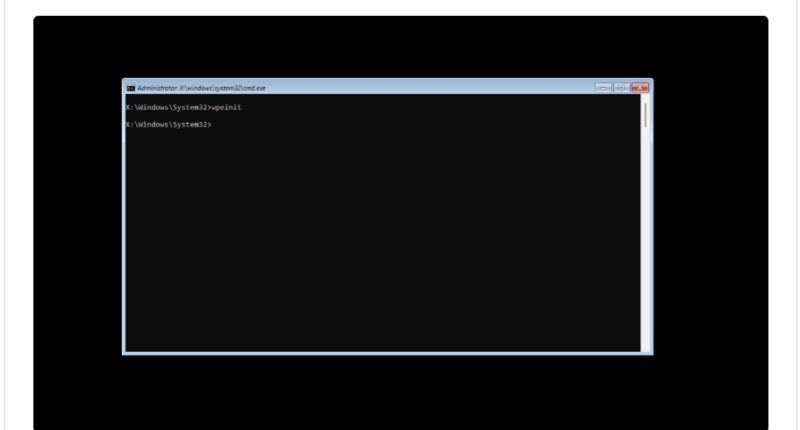
Security researcher Kevin Beaumont confirmed that the YellowKey exploit works. He also rightly suggests two ways to protect yourself: add a BitLocker startup PIN and set a BIOS password. The second point is important because if you block booting from USB, you block this exploit.
However, here is what Nightmare-Eclipse says: "What’s funny is that this flaw is extremely practical: there’s no need to plug in an external storage device, you just remove the disk, copy the files from the EFI partition, put it back in place, and everything still works. That shows how serious this is."
At this time, the public PoC only works on the original machine (where the TPM stores the keys) and on configurations based solely on the TPM component, which automatically unlock the disk at startup without requiring any user interaction. This explains Kevin Beaumont’s recommendation to use a BitLocker PIN.
Nevertheless, in his blog post, Nightmare-Eclipse says the PIN would not be enough: "Second, no, the TPM + PIN combination does not solve the problem: the flaw remains exploitable no matter what. I asked myself the following question: does it still work in a TPM + PIN environment? Yes, it does, but I’m not publishing the PoC; I think what is already circulating is serious enough."
Finally, note that this vulnerability affects Windows 11 and Windows Server 2022/2025. Windows 10 is not affected.
Privilege escalation via GreenPlasma
The second flaw, named GreenPlasma, is a privilege escalation tied to the creation of arbitrary sections in Windows CTFMON. A user with no special privileges can thus create memory section objects directly in directories writable by the SYSTEM account.
Although the PoC disclosed by Nightmare-Eclipse is intentionally incomplete to obtain SYSTEM access, the researcher cheekily adds: "If you’re smart enough, you can turn this into a full privilege escalation."
He also notes that this exploit works on Windows 11 and Windows Server 2022/2025, while saying he is not sure whether it is operational on Windows 10.
To wrap up this article, let’s recall the security researcher’s motivations: deep dissatisfaction with how Microsoft’s security bug reports are handled by the company’s teams. For example, he complains that Microsoft silently fixed the RedSun vulnerability without ever assigning it an identifier, unlike BlueHammer.
The problem is that by disclosing vulnerabilities this way, he risks causing harm to many people. In fact, if Microsoft does not take the necessary steps, we may end up in trouble when cybercriminals start exploiting these flaws.... This is already the case with the ones disclosed in Defender.
I’m afraid this is not over yet — Nightmare-Eclipse has promised a big surprise for next month’s Patch Tuesday...