www.it-connect.fr

April Windows Update Breaks Backups: Affected Software List
Backup applications that rely on the psmounterex.sys driver may no longer work correctly on Windows and Windows Server after installing the April 2026 patches. Many applications are affected: UrBackup, Acronis, Macrium Reflect, and more. Here is what we know.
A new change introduced by the April 2026 updates affects certain backup applications on Windows 10, Windows 11, and Windows Server. This is especially true for applications that use the VSS service and the kernel driver named psmounterex.sys.
Administrators like you may encounter error messages such as "The backup failed because Microsoft VSS timed out during snapshot creation.", or even the "VSS_E_BAD_STATE" error. In Event Viewer, you may see errors related to a code integrity issue involving the previously mentioned driver name.
In practice, not every operation will necessarily fail. You may still be able to run backups, but restore operations may not work, depending on tasks that involve mounting an image on the machine. In other words, mounting a backup image as a virtual drive will not work with the affected applications.
Several backup solutions are directly impacted, including:
- Acronis Cyber Protect Cloud (the vendor documented this issue on this page),
- Macrium Reflect,
- NinjaOne Backup,
- UrBackup Server
This list is not exhaustive, but it clearly shows that various third-party solutions (that is, non-Microsoft products) are affected, especially those used to back up devices such as workstations and servers.
The cause: Microsoft blocks the driver
A few hours ago, Microsoft updated the KB5083769 update page for Windows 11. A link to a new support document was added, and it helps explain the origin of this issue.
Here is Microsoft’s explanation: "This intentional behavior change is designed to protect devices from known vulnerabilities in the psmounterex.sys kernel driver. After installing Windows updates released on or after April 14, 2026, Windows code integrity enforcement prevents vulnerable versions of this driver from loading when the Microsoft vulnerable driver blocklist is enabled."
Microsoft has therefore made the decision to add this driver to its list of vulnerable drivers (and therefore blocked). A note was also added to the changelog associated with the April 2026 update (showing that Microsoft does not always disclose everything about the changes it makes).
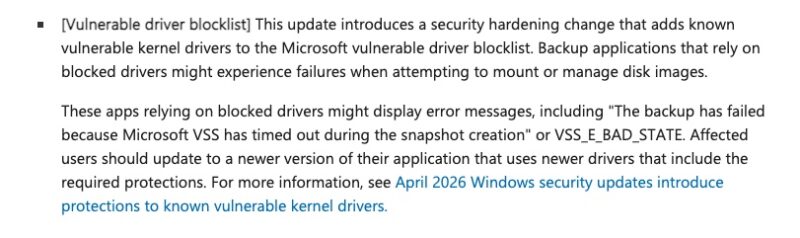
Microsoft explains that if a driver is blocked by this security mechanism, you should see events with ID 3077 on the local machine. Specifically in this log: Application and Services Logs \ Microsoft \ Windows \ CodeIntegrity \ Operational.
If so many people are affected by this block, it is because for several years now this vulnerable driver blocking feature has been enabled by default on Windows. You can check its status in the Windows Security app on your machine.
Have you encountered this issue? Feel free to share your feedback in the comments.